

惯性聚合 高效追踪和阅读你感兴趣的博客、新闻、科技资讯
阅读原文 在惯性聚合中打开

推荐订阅源

N
Netflix TechBlog - Medium
V
Vulnerabilities – Threatpost
Google Online Security Blog
Hugging Face - Blog
Hugging Face - Blog
L
LINUX DO - 热门话题
云风的 BLOG
云风的 BLOG
P
Proofpoint News Feed
D
Docker
C
Cyber Attacks, Cyber Crime and Cyber Security
MyScale Blog
MyScale Blog
P
Palo Alto Networks Blog
T
Tenable Blog
P
Privacy International News Feed
Google DeepMind News
小众软件
小众软件
Cisco Talos Blog
Cisco Talos Blog
aimingoo的专栏
aimingoo的专栏
Cyber Security Advisories - MS-ISAC
A
Arctic Wolf
C
Cybersecurity and Infrastructure Security Agency CISA
C
Cisco Blogs
T
Threat Research - Cisco Blogs
NISL@THU
NISL@THU
The Hacker News
The Hacker News
Project Zero
Project Zero
AWS News Blog
AWS News Blog
Simon Willison's Weblog
cs.CL updates on arXiv.org
T
Threatpost
V
Visual Studio Blog
The GitHub Blog
The GitHub Blog
The Cloudflare Blog
Last Week in AI
Last Week in AI
Jina AI
Jina AI
Cyberwarzone
Cyberwarzone
The Register - Security
C
CXSECURITY Database RSS Feed - CXSecurity.com
Vercel News
Vercel News
D
Darknet – Hacking Tools, Hacker News & Cyber Security
MongoDB | Blog
MongoDB | Blog
U
Unit 42
Scott Helme
Scott Helme
A
About on SuperTechFans
WordPress大学
WordPress大学
F
Fortinet All Blogs
大猫的无限游戏
大猫的无限游戏
G
GRAHAM CLULEY
Latest news
Latest news
让小产品的独立变现更简单 - ezindie.com
S
Schneier on Security

博客园 - le.li

python: 安装python 依赖pip install xxx报错,'pip' 不是内部或外部命令,也不是可运行的程序 nginx:普通用户使用80端口启动nginx报错,nginx: [emerg] bind() to 0.0.0.0:80 failed (13: Permission denied) redis:linux安装redis nginx:linux系统安装nginx linux:su切换用户后ll报错 JDK:Linux下载安装jdk1.8 Redis:访问redis报错(error) NOAUTH Authentication required idea:打开黑屏 android: onClick与onTouch冲突,onclick事件没有触发 [Mysql]快速执行sql文件 JAVA: Mybatis添加xml执行多行更新语句时报错 Android: 添加默认菜单 Android:android studio使用本地路径依赖 [idea]mvn install没有问题,idea build报错:java: Compilation failed: internal java compiler error Android:adb devices返回设备状态offline Wireshark:记一次抓包过程 Android:adb查看手机启动端口 Android:androidx.appcompat.app.AppCompatActivity添加返回按钮 Android:查看依赖
[JAVA]JDK多版本设置
le.li · 2025-10-12 · via 博客园 - le.li

windows环境

背景:

经常会遇到不同项目,需要不同版本的jdk版本,每次都需要手工修改环境变量

我这里遇到需要分别使用jdk1.8和jdk17

解决:

通过bat设置好版本,通过脚本实现反复快速修改。 

@echo off
@chcp 65001
@echo off
:choseSettings
set base_path=D:\xxxx
REM cls echo 请选择一个Java版本1.8/17: set /p choice= if "%choice%"=="1.8" goto option1.8 if "%choice%"=="17" goto option17 echo 无效的输入版本,请重新输入。 goto choseSettings :option1.8 echo 你选择了: %choice% setx JAVA_HOME "%base_path%\jdk1.8.0_202" setx PATH "%%JAVA_HOME%%\bin;%PATH%" setx CLASSPATH ".;%%JAVA_HOME%%\lib\dt.jar;%%JAVA_HOME%%\lib\tools.jar;" pause goto end :option17 echo 你选择了: %choice% setx JAVA_HOME "%base_path%\jdk-17" setx PATH "%%JAVA_HOME%%\bin;%PATH%" pause goto end :end pause

将base_path修改为实际路径,修改内部的jdk实际版本路径
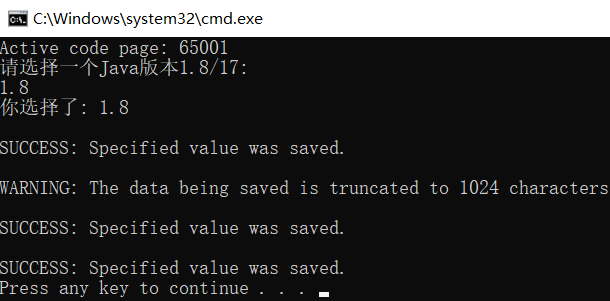
image

 打开新的cmd窗口,输入java -version查看是否修改成功。

或者查看用户环境变量里的值是否正确

备注:如果需要修改系统环境变量,需要使用 

setx JAVA_HOME "%base_path%\jdk1.8.0_202" /M