惯性聚合 高效追踪和阅读你感兴趣的博客、新闻、科技资讯
阅读原文 在惯性聚合中打开

推荐订阅源

Exploit-DB.com RSS Feed
S
SegmentFault 最新的问题
Recent Commits to openclaw:main
Attack and Defense Labs
F
Full Disclosure
Vercel News
Vercel News
N
News | PayPal Newsroom
The GitHub Blog
The GitHub Blog
H
Hacker News: Front Page
H
Heimdal Security Blog
P
Privacy International News Feed
博客园 - 司徒正美
Google DeepMind News
N
Netflix TechBlog - Medium
Threat Intelligence Blog | Flashpoint
C
Cisco Blogs
L
Lohrmann on Cybersecurity
D
Docker
Recent Announcements
Security Archives - TechRepublic
人人都是产品经理
人人都是产品经理
C
CXSECURITY Database RSS Feed - CXSecurity.com
P
Proofpoint News Feed
T
Tailwind CSS Blog
C
Check Point Blog
博客园 - 叶小钗
Google Online Security Blog
Martin Fowler
Martin Fowler
Stack Overflow Blog
Stack Overflow Blog
博客园 - 聂微东
S
Secure Thoughts
博客园 - Franky
博客园_首页
阮一峰的网络日志
阮一峰的网络日志
P
Palo Alto Networks Blog
Latest news
Latest news
量子位
让小产品的独立变现更简单 - ezindie.com
博客园 - 三生石上(FineUI控件)
The Cloudflare Blog
Last Week in AI
Last Week in AI
K
KPMG report finds enterprise disconnect between AI and its ROI | CIO
Cyberwarzone
Cyberwarzone
小众软件
小众软件
Cisco Talos Blog
Cisco Talos Blog
Hacker News: Ask HN
Hacker News: Ask HN
T
Threatpost
T
Tenable Blog
P
Privacy & Cybersecurity Law Blog
WordPress大学
WordPress大学

博客园 - le.li

python: 安装python 依赖pip install xxx报错,'pip' 不是内部或外部命令,也不是可运行的程序 nginx:普通用户使用80端口启动nginx报错,nginx: [emerg] bind() to 0.0.0.0:80 failed (13: Permission denied) redis:linux安装redis nginx:linux系统安装nginx linux:su切换用户后ll报错 JDK:Linux下载安装jdk1.8 Redis:访问redis报错(error) NOAUTH Authentication required idea:打开黑屏 android: onClick与onTouch冲突,onclick事件没有触发 [Mysql]快速执行sql文件 [JAVA]JDK多版本设置 JAVA: Mybatis添加xml执行多行更新语句时报错 Android: 添加默认菜单 Android:android studio使用本地路径依赖 [idea]mvn install没有问题,idea build报错:java: Compilation failed: internal java compiler error Android:adb devices返回设备状态offline Android:adb查看手机启动端口 Android:androidx.appcompat.app.AppCompatActivity添加返回按钮 Android:查看依赖
Wireshark:记一次抓包过程
le.li · 2025-04-19 · via 博客园 - le.li

访问官网点击下载:

https://www.wireshark.org/download.html

或者直接点击如下路径下载:

https://2.na.dl.wireshark.org/win64/Wireshark-4.4.6-x64.exe
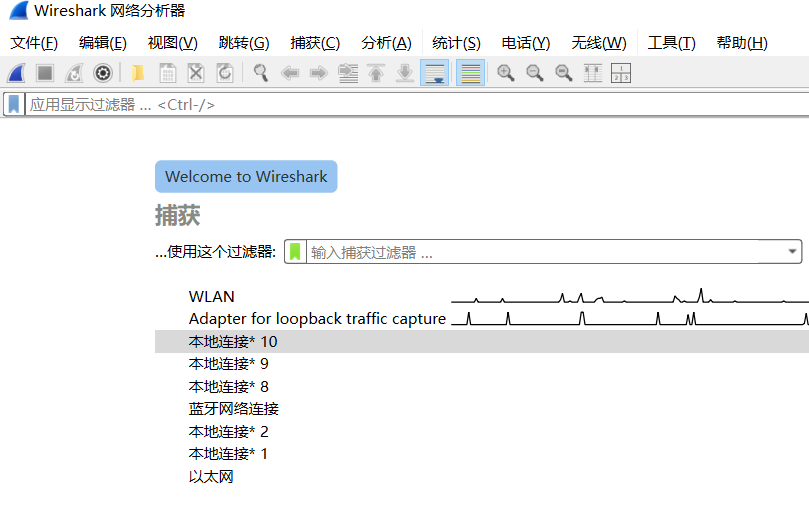
双击下载的exe,安装完成后,点击Wireshark打开程序

如果不确定网卡,打开cmd窗口,输入

查看网卡信息,包含IP,掩码、网关等
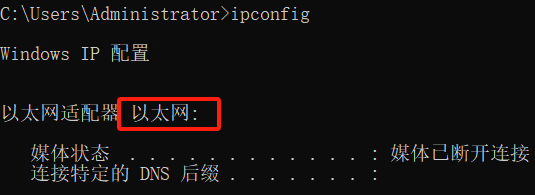
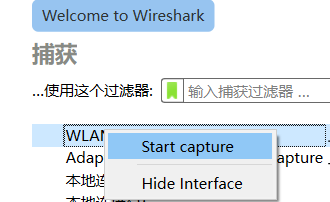
双击或右键网卡,点击Start capture,开始抓包

以本地网卡作为测试点

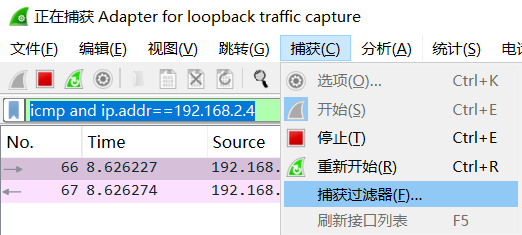
在抓包工具中添加过滤条件icmp 添加IP地址192.168.2.4

icmp and ip.addr==192.168.2.4

抓包后,可以看到源IP,目的IP,协议,报文长度等信息
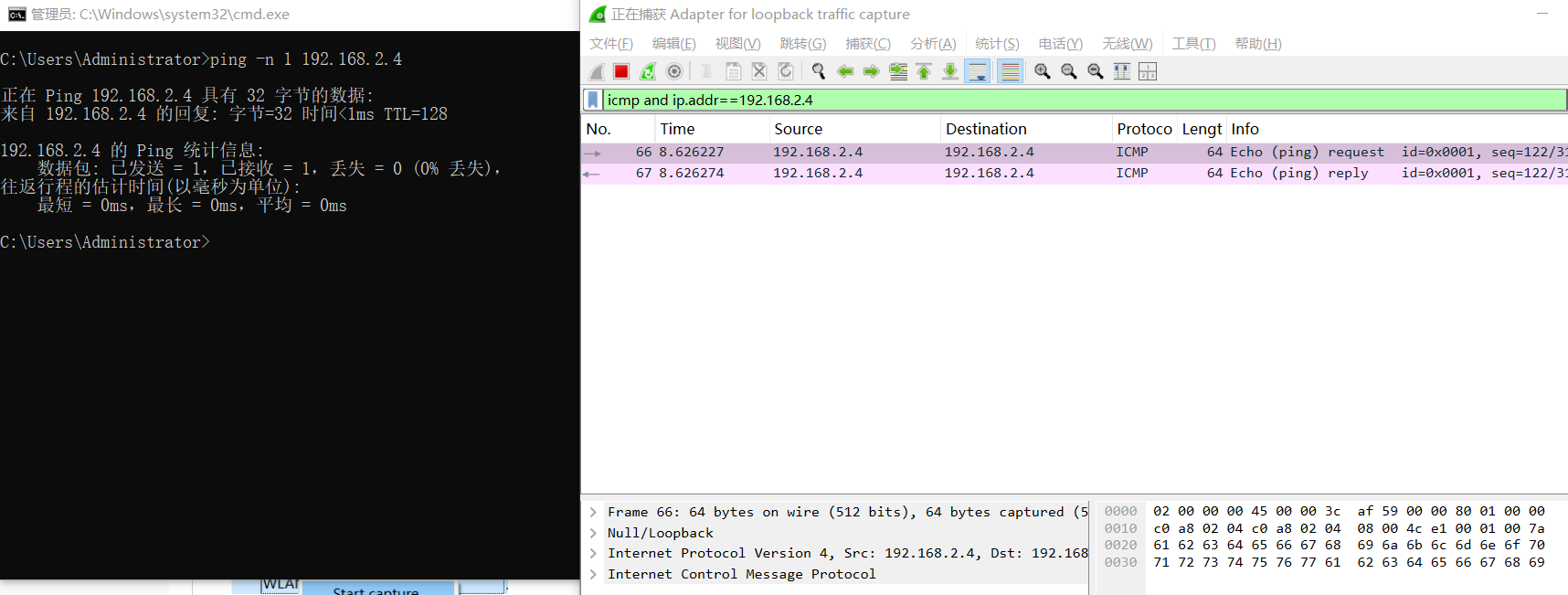
(1)Frame: 物理层的数据帧概况

(2)Ethernet II: 数据链路层以太网帧头部信息

(3)Internet Protocol Version 4: 互联网层IP包头部信息

(4)Transmission Control Protocol: 传输层T的数据段头部信息,此处是TCP

(5)Hypertext Transfer Protocol: 应用层的信息,这里指HTTP协议

抓包过滤器类型Type(host、net、port)、方向Dir(src、dst)、协议Proto(ether、ip、tcp、udp、http、icmp、ftp等)、逻辑运算符(&& 与、|| 或、!非)

http.request.method=="GET", 只显示HTTP GET方法的

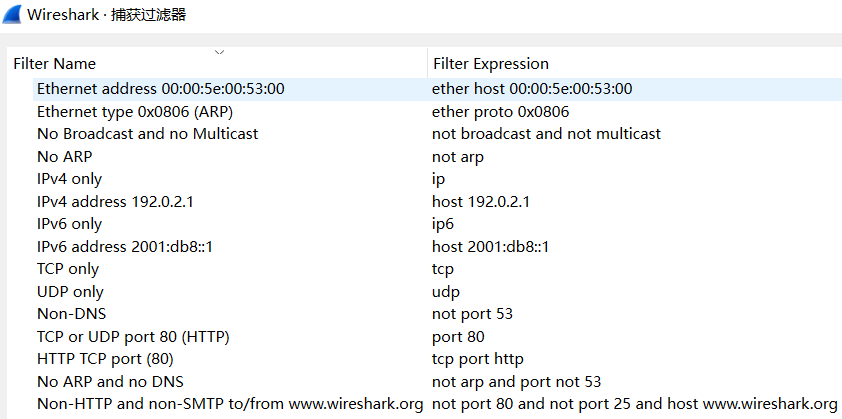
查看过滤条件,工具自带的介绍

点击菜单”捕获“->获取过滤器