惯性聚合 高效追踪和阅读你感兴趣的博客、新闻、科技资讯
阅读原文 在惯性聚合中打开

推荐订阅源

S
Secure Thoughts
Security Latest
Security Latest
Simon Willison's Weblog
O
OpenAI News
GbyAI
GbyAI
L
LINUX DO - 最新话题
A
Arctic Wolf
T
Tor Project blog
G
GRAHAM CLULEY
I
InfoQ
博客园_首页
IT之家
IT之家
The Register - Security
Exploit-DB.com RSS Feed
P
Proofpoint News Feed
The GitHub Blog
The GitHub Blog
Blog — PlanetScale
Blog — PlanetScale
N
Netflix TechBlog - Medium
K
Kaspersky official blog
博客园 - 三生石上(FineUI控件)
S
SegmentFault 最新的问题
U
Unit 42
PCI Perspectives
PCI Perspectives
量子位
P
Palo Alto Networks Blog
S
Securelist
T
Troy Hunt's Blog
博客园 - 【当耐特】
Recorded Future
Recorded Future
K
KPMG report finds enterprise disconnect between AI and its ROI | CIO
S
Security Affairs
Engineering at Meta
Engineering at Meta
T
The Blog of Author Tim Ferriss
博客园 - 聂微东
罗磊的独立博客
N
News and Events Feed by Topic
人人都是产品经理
人人都是产品经理
B
Blog RSS Feed
NISL@THU
NISL@THU
C
Cisco Blogs
T
Threatpost
有赞技术团队
有赞技术团队
Forbes - Security
Forbes - Security
Hugging Face - Blog
Hugging Face - Blog
Last Week in AI
Last Week in AI
T
The Exploit Database - CXSecurity.com
Cloudbric
Cloudbric
Cyberwarzone
Cyberwarzone
Google DeepMind News
C
Cyber Attacks, Cyber Crime and Cyber Security

博客园 - smile轉角

【js】ES5,ES6继承是如何实现的 【js】setTimeout、Promise、Async/Await 的区别 【面试题】思维逻辑方面 【js】js内置对象Error(错误机制) 【TS】学习笔记 【js】CommonJS、AMD、CMD三种规范 【vue3】父子组件通信之 vue3 defineProps,defineEmits ,defineExpose 【js】JS严格模式有什么特点 【css】使用弹性盒子布局时,省略号问题 【vue】 Failed to load resource: the server responded with a status of 404 (Not Found) 【第三方】富文本调研 【js】元素是否在可视区范围内 【js】json的相关操作 【vue3】资料 【css】展示背景图片的底部部分 【html】 svg 【html5】html5中input 标签 type值为range时,修改其默认css 【js】forEach,for...in,for...of 区别 【js】map,reduce,filter的区别
【其他】查看Animate.css官网动画没有效果
smile轉角 · 2023-02-10 · via 博客园 - smile轉角

Hey! It seems that you have animations disabled on your OS, turning Animate.css off.
Animate.css supports the prefers-reduced-motion CSS media feature. You can read more about it here.

原因:系统关闭动画效果的方法(本人为电脑win10)

开启:

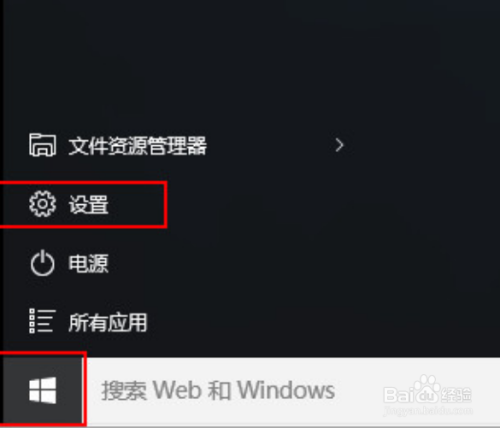
  1. 打开开始菜单,最后点击设置进入。

    电脑win10系统关闭动画效果的方法

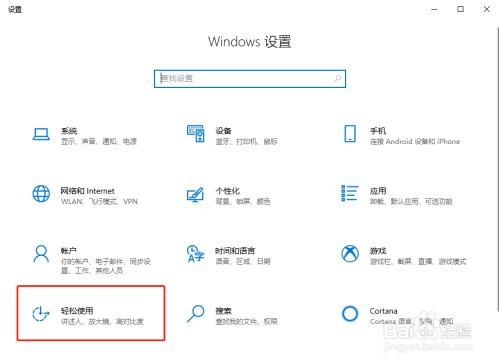
  2. 电脑会打开windows设置界面,或者可以直接按下win+I调出windows设置界面,最后点击轻松应用进入。
    电脑win10系统关闭动画效果的方法

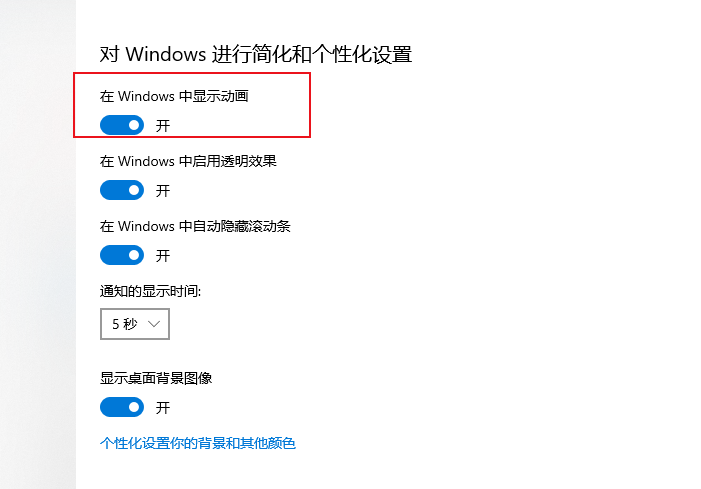
  3. 最后在弹出的界面中将鼠标切换到其他选项,最后直接开启动画效果即可。

本文版权归作者和博客园共有,欢迎转载,但未经作者同意必须保留此段声明,且在文章页面明显位置给出原文连接,否则保留追究法律责任的权利.

欢迎关注我,一起进步!扫描下方二维码即可加我QQ

posted on 2023-02-10 09:53  smile轉角  阅读(373)  评论(0)    收藏  举报