惯性聚合 高效追踪和阅读你感兴趣的博客、新闻、科技资讯
阅读原文 在惯性聚合中打开

推荐订阅源

酷 壳 – CoolShell
酷 壳 – CoolShell
H
Hacker News: Front Page
P
Palo Alto Networks Blog
T
ThreatConnect
Apple Machine Learning Research
博客园_首页
T
True Tiger Recordings
P
Privacy & Cybersecurity Law Blog
B
Blog
IT之家
IT之家
Last Week in AI
Last Week in AI
F
Full Disclosure
Hacker News: Ask HN
Hacker News: Ask HN
C
Comments on: Blog
Microsoft Azure Blog
C
Cybersecurity and Infrastructure Security Agency CISA
Microsoft Security Blog
博客园 - 【当耐特】
N
News and Events Feed by Topic
NISL@THU
NISL@THU
腾讯CDC
雷峰网
雷峰网
Security Latest
Security Latest
李成银的技术随笔
M
Microsoft Research Blog - Microsoft Research
L
LangChain Blog
L
Lohrmann on Cybersecurity
cs.CL updates on arXiv.org
C
Check Point Blog
Y
Y Combinator Blog
Recent Announcements
博客园 - Franky
N
News | PayPal Newsroom
V
V2EX
A
About on SuperTechFans
The Register - Security
月光博客
月光博客
奇客Solidot–传递最新科技情报
奇客Solidot–传递最新科技情报
Google Online Security Blog
MyScale Blog
MyScale Blog
Cisco Talos Blog
Cisco Talos Blog
Vercel News
Vercel News
WordPress大学
WordPress大学
C
Cyber Attacks, Cyber Crime and Cyber Security
The Hacker News
The Hacker News
IntelliJ IDEA : IntelliJ IDEA – the Leading IDE for Professional Development in Java and Kotlin | The JetBrains Blog
爱范儿
爱范儿
A
Arctic Wolf
L
LINUX DO - 最新话题
freeCodeCamp Programming Tutorials: Python, JavaScript, Git & More

博客园 - 幽冥狂_七

vue2 中把页面导出pdf Nuxt 文档 gird 布局合并了行和列 原位置不动 SemanticKernel Stable diffusion语法 Cosyvoice本地部署指令文档 CSS实现点击翻转效果 记录.net8支付宝手机网页应用的过程 读取.net core配置文件appsetting.json内容 chromedriver版本 Sql Server触发器调用exe控制台程序 秒杀的简单例子 Vue3 Slot—插槽全家桶使用详解 转载一篇文章:专升本这场荒唐的闹剧终于结束了 单行文本过多、多文本过多出现省略号或小点点 .NET 程序员的调试神器-Dumpify vue3中使用swiper的完整版教程 highchart x轴第一个日期有省略号 - 幽冥狂_七 highchart柱状图添加最小高度 Windows11专业版KMS命令激活(不需要激活工具)
微信小程序配置自动更新,微信小程序自动升级
幽冥狂_七 · 2023-07-04 · via 博客园 - 幽冥狂_七

我们开发完小程序,发布新版本之后,用户如果想体验新版本,需要把小程序从使用列表删除,在重新搜索之后,再次打开,新的版本才会生效。但是, 随着我们更新次数的增加,这种方式就很不友好,用户体验下降,所以在开发中,我们就要考虑配置小程序自动更新。

首先,我们需要了解下小程序的运行机制,小程序启动可以分为两种情况,一种是冷启动,一种是热启动

  • 冷启动:如果用户首次打开,或小程序销毁后被用户再次打开,此时小程序需要重新加载启动,即冷启动。

  • 热启动:如果用户已经打开过某小程序,然后在一定时间内再次打开该小程序,此时小程序并未被销毁,只是从后台状态进入前台状态,这个过程就是热启动。

在了解下更新机制

  • 未启动时更新:就是说用户本地已经存在小程序历史版本,此时打开不是最新版本,最坏的情况是24小时内下发推送给用户。

  • 启动时更新:就是冷启动,用户从未体验小程序,或者小程序销毁后再打开。异步下载新版本,并同时用本地的包进行启动,新版本需要等下一次冷启动才会应用上。

上面简单介绍了小程序的运行机制和更新机制,接下来就是配置小程序自动更新。我们在app.js中,新增如下代码

// 小程序自动更新
if (wx.canIUse('getUpdateManager')) {
  const updateManager = wx.getUpdateManager()
  updateManager.onCheckForUpdate(function (res) {
    // 请求完新版本信息的回调
    if (res.hasUpdate) {
      updateManager.onUpdateReady(function () {
        wx.showModal({
          title: '更新提示',
          content: '新版本已经准备好,是否重启应用?',
          success: function (res) {
            if (res.confirm) {
              // 新的版本已经下载好,调用 applyUpdate 应用新版本并重启
              updateManager.applyUpdate()
            }
          }
        })
      })
      updateManager.onUpdateFailed(function () {
        // 新的版本下载失败
        wx.showModal({
          title: '已经有新版本了哟~',
          content: '新版本已经上线啦~,请您删除当前小程序,重新搜索打开哟~'
        })
      })
    }
  })
}

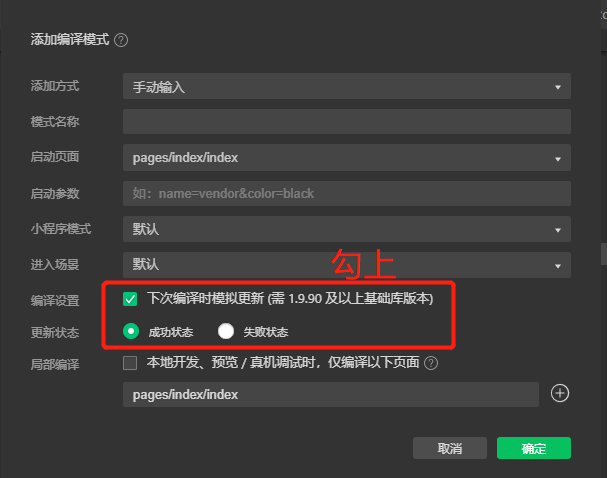
添加编译模式
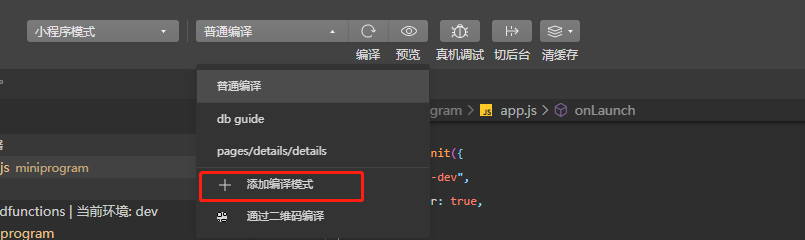
abf7bf85542d7f5160d3bec2a459f6fc.png

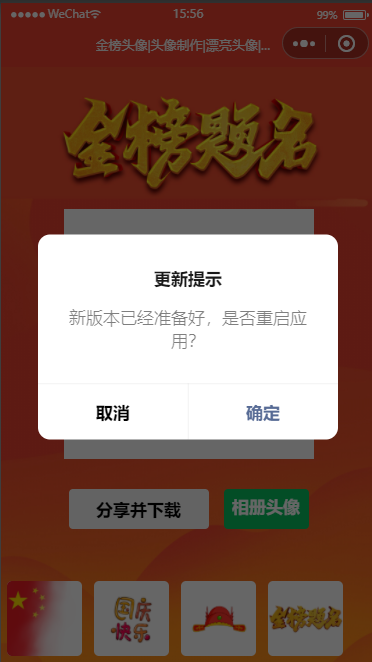
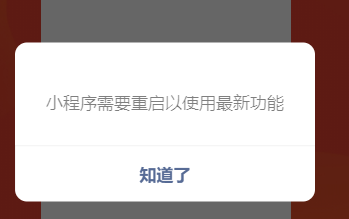
小程序会重新编译,版本更新已提示

更新完会重启,小程序自动更新已配置完成。

参考:https://www.cnblogs.com/nmgwap/p/16331632.html