


惯性聚合 高效追踪和阅读你感兴趣的博客、新闻、科技资讯
阅读原文 在惯性聚合中打开

推荐订阅源

The Last Watchdog
The Last Watchdog
S
Securelist
T
Threat Research - Cisco Blogs
Forbes - Security
Forbes - Security
AI
AI
cs.AI updates on arXiv.org
Attack and Defense Labs
cs.CV updates on arXiv.org
cs.CL updates on arXiv.org
Threat Intelligence Blog | Flashpoint
Know Your Adversary
Know Your Adversary
P
Privacy International News Feed
W
WeLiveSecurity
P
Palo Alto Networks Blog
O
OpenAI News
V2EX - 技术
V2EX - 技术
H
Heimdal Security Blog
L
Lohrmann on Cybersecurity
NISL@THU
NISL@THU
T
Tor Project blog
T
Threatpost
G
GRAHAM CLULEY
T
The Exploit Database - CXSecurity.com
云风的 BLOG
云风的 BLOG
人人都是产品经理
人人都是产品经理
A
Arctic Wolf
www.infosecurity-magazine.com
Latest news
Latest news
Application and Cybersecurity Blog
T
Tenable Blog
量子位
L
LINUX DO - 最新话题
Webroot Blog
Webroot Blog
F
Fortinet All Blogs
C
CERT Recently Published Vulnerability Notes
Hacker News: Ask HN
Hacker News: Ask HN
U
Unit 42
T
Tailwind CSS Blog
WordPress大学
WordPress大学
N
News | PayPal Newsroom
C
CXSECURITY Database RSS Feed - CXSecurity.com
N
Netflix TechBlog - Medium
freeCodeCamp Programming Tutorials: Python, JavaScript, Git & More
Stack Overflow Blog
Stack Overflow Blog
Cloudbric
Cloudbric
C
Check Point Blog
V
Visual Studio Blog
The GitHub Blog
The GitHub Blog
The Hacker News
The Hacker News
B
Blog

博客园 - centosboy

Thinkpad T490卡顿排查 xinference初探 diff的安装与使用 ubuntu docker运行大模型 vllm部署 zabbix监控mongodb /root/.dbshell无权限解决办法 开机启动后应用limit没有生效 关于运维工作的一点感悟 Autossh打洞 hive分区表实践 hashlib模块 rm 防误删脚本 linux 通过inode删除文件 那些年踩过的坑 htpdate代替ntpdate同步时间 Openfire搭建聊天系统 zookeeper运维 centos ping添加丢包记录 Linux tee命令输出显示在屏幕和保存到日志文件中
将CDLINUX装入U盘
centosboy · 2020-12-21 · via 博客园 - centosboy

所需资源:

cdlinux.iso

unetbootin-windows-585

grub4dos.

bootice_0.9

制作方法:

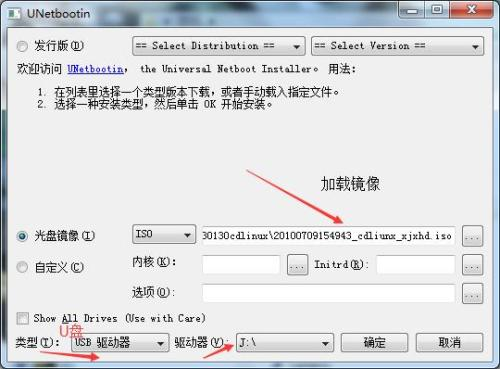
1.打开unetbootin-windows-585,,选择第二项光盘镜像,载入你刚下载的CDlinux-0.9.7.iso文件路径,选择你的U盘,确定
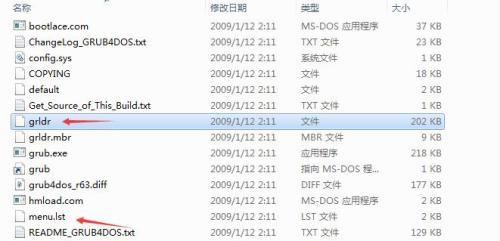
2.打开下载grub4dos,选择grldr和menu 文件,复制到U盘的根目录,复制之后u盘里面是这样
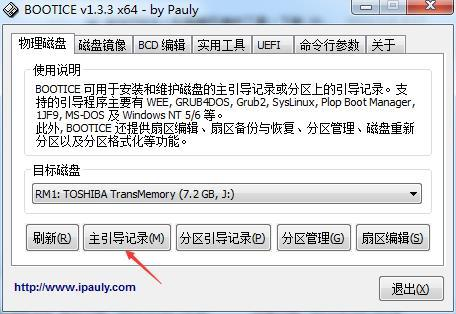
3.打开bootice,选择U盘.点(主引导记录)
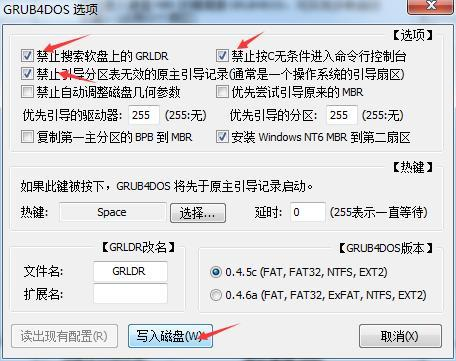
之后按下图选择选项,写入磁盘
4.进入U盘,编辑编辑menu.lst,在其内加入如下内容,并保存
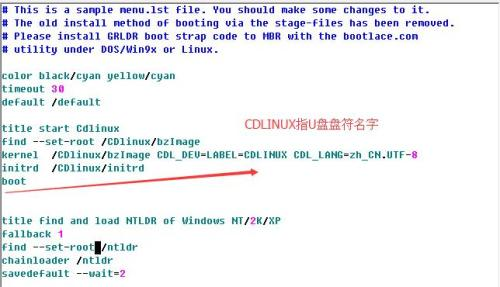
title start Cdlinux

find --set-root /CDlinux/bzImage

kernel /CDlinux/bzImage CDL_DEV=LABEL=CDLINUX CDL_LANG=zh_CN.UTF-8

initrd /CDlinux/initrd

boot

在上面的menu.lst内的CDL_DEV=LABEL=CDLINUX 中的CDLINUX是指U盘的标签名

5.重启选择U盘启动