





树莓派 4B / 5B 养龙虾🦞
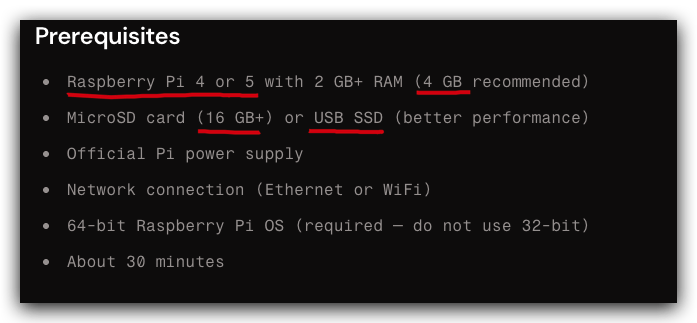
https://docs.openclaw.ai/install/raspberry-pi#prerequisites
Raspberry Pi 5 / Raspberry Pi 4B
https://www.raspberrypi.com/products/raspberry-pi-5/
https://www.raspberrypi.com/products/raspberry-pi-5-model-b/
https://www.raspberrypi.com/products/raspberry-pi-4-model-b/
Raspberry Pi 5 compute module
https://www.raspberrypi.com/products/compute-module-5/?variant=cm5-104032
使用 Raspberry Pi OS Lite (64-bit) 制作 headless 服务器系统,设置必要启动配置项目
$ sudo apt install rpi-imager
https://www.raspberrypi.com/software/
https://www.raspberrypi.com/software/operating-systems/
# ssh username@hostname
$ ssh pi@192.168.1.7
# 更新
$ sudo apt update && sudo apt upgrade -y

# 安装必要的 OpenClaw 依赖软件包 (git, curl, build-essential)
$ sudo apt install -y git curl build-essential

# 设置 timezone (用于准确触发 cron & reminders)
$ sudo timedatectl set-timezone Asia/Shanghai
# 安装 nvm
$ curl -o- https://raw.githubusercontent.com/nvm-sh/nvm/v0.40.4/install.sh | bash
$ nvm -h

$ nvm ls-remote | grep "Latest LTS"
# 安装 node.js 24+
$ nvm install 24.14.0
$ nvm use 24.14.0
$ nvm alias default 24.14.0

$ node --version
$ npm -v
$ npx -v
https://github.com/nvm-sh/nvm?tab=readme-ov-file#install--update-script
$ sudo fallocate -l 2G /swapfile

$ sudo chmod 600 /swapfile
$ sudo mkswap /swapfile
$ sudo swapon /swapfile
$ echo '/swapfile none swap sw 0 0' | sudo tee -a /etc/fstab

# Reduce swappiness for low-RAM devices
$ echo 'vm.swappiness=10' | sudo tee -a /etc/sysctl.conf
$ sudo sysctl -p
$ curl -fsSL https://openclaw.ai/install.sh | bash
$ openclaw onboard --install-daemon

$ openclaw status

$ sudo systemctl status openclaw

$ journalctl -u openclaw -f
# 获取 dashboard URL (username@hostname)
$ ssh pi@192.168.1.7  'openclaw dashboard --no-open'
# 在新 Terminal 开启 SSH tunnel (username@hostname)
$ ssh -N -L 18789:127.0.0.1:18789 pi@192.168.1.7
一直可以远程访问,需要使用Tailscale integration (内网穿透 VPN)
# Tailnet-only (Serve)

{
  gateway: {
    bind: "loopback",
    tailscale: { mode: "serve" },
  },
}
#Tailnet-only (bind to Tailnet IP)

{
  gateway: {
    bind: "tailnet",
    auth: { mode: "token", token: "your-token" },
  },
}
https://docs.openclaw.ai/gateway/tailscale
The best secure connectivity platform for devs, IT, and security
A Zero Trust identity-based connectivity platform that replaces your legacy VPN, SASE, and PAM and connects remote teams, multi-cloud environments, CI/CD pipelines, Edge & IoT devices, and AI workloads.
https://www.raspberrypi.com/documentation/computers/raspberry-pi.html#usb-mass-storage-boot
$ grep -q 'NODE_COMPILE_CACHE=/var/tmp/openclaw-compile-cache' ~/.bashrc || cat >> ~/.bashrc <<'EOF' # pragma: allowlist secret
export NODE_COMPILE_CACHE=/var/tmp/openclaw-compile-cache
mkdir -p /var/tmp/openclaw-compile-cache
export OPENCLAW_NO_RESPAWN=1
EOF

$ source ~/.bashrc
$ echo 'gpu_mem=16' | sudo tee -a /boot/config.txt

# 禁用蓝牙 💩
$ sudo systemctl disable bluetooth
https://docs.openclaw.ai/install/raspberry-pi#performance-tips
$ cat ~/.openclaw/openclaw.json
# 🚀 直接修改配置文件
$ sudo vim ~/.openclaw/openclaw.json
# ⚠️ 直接 CLI 命令行修改
$ openclaw config get agents.defaults.workspace
$ openclaw config set agents.defaults.heartbeat.every "2h"
$ openclaw config unset plugins.entries.brave.config.webSearch.apiKey
# 💩 命令行交互式修改
# full onboarding flow
$ openclaw onboard

# config wizard
$ openclaw configure
https://docs.openclaw.ai/gateway/configuration
https://docs.openclaw.ai/gateway/configuration
$ openclaw plugins install @openclaw/feishu
https://docs.openclaw.ai/channels/feishu
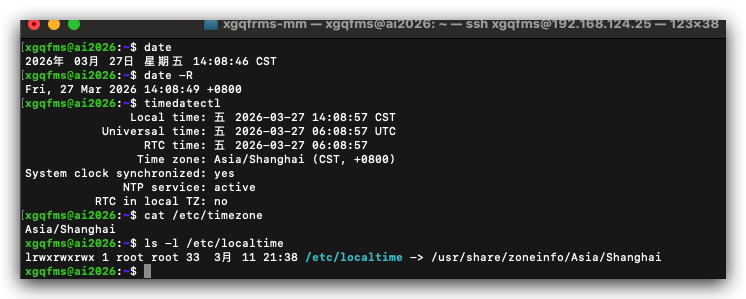
Ubuntu Linux 通过命令查看时区 timezone
xgqfms@ai2026:~$ timedatectl
               Local time: 五 2026-03-27 14:08:57 CST
           Universal time: 五 2026-03-27 06:08:57 UTC
                 RTC time: 五 2026-03-27 06:08:57
                Time zone: Asia/Shanghai (CST, +0800)
System clock synchronized: yes
              NTP service: active
          RTC in local TZ: no
xgqfms@ai2026:~$ cat /etc/timezone
Asia/Shanghai
xgqfms@ai2026:~$ ls -l /etc/localtime
lrwxrwxrwx 1 root root 33  3月 11 21:38 /etc/localtime -> /usr/share/zoneinfo/Asia/Shanghai

xgqfms@ai2026:~$ date
2026年 03月 27日 星期五 14:08:46 CST
xgqfms@ai2026:~$ date -R
Fri, 27 Mar 2026 14:08:49 +0800
©xgqfrms 2012-2021
www.cnblogs.com/xgqfrms 发布文章使用:只允许注册用户才可以访问!
原创文章,版权所有©️xgqfrms, 禁止转载 🈲️,侵权必究⚠️!
此内容由惯性聚合(RSS阅读器)自动聚合整理,仅供阅读参考。 原文来自 — 版权归原作者所有。