



惯性聚合 高效追踪和阅读你感兴趣的博客、新闻、科技资讯
阅读原文 在惯性聚合中打开

推荐订阅源

酷 壳 – CoolShell
酷 壳 – CoolShell
H
Hacker News: Front Page
P
Palo Alto Networks Blog
T
ThreatConnect
Apple Machine Learning Research
博客园_首页
T
True Tiger Recordings
P
Privacy & Cybersecurity Law Blog
B
Blog
IT之家
IT之家
Last Week in AI
Last Week in AI
F
Full Disclosure
Hacker News: Ask HN
Hacker News: Ask HN
C
Comments on: Blog
Microsoft Azure Blog
C
Cybersecurity and Infrastructure Security Agency CISA
Microsoft Security Blog
博客园 - 【当耐特】
N
News and Events Feed by Topic
NISL@THU
NISL@THU
腾讯CDC
雷峰网
雷峰网
Security Latest
Security Latest
李成银的技术随笔
M
Microsoft Research Blog - Microsoft Research
L
LangChain Blog
L
Lohrmann on Cybersecurity
cs.CL updates on arXiv.org
C
Check Point Blog
Y
Y Combinator Blog
Recent Announcements
博客园 - Franky
N
News | PayPal Newsroom
V
V2EX
A
About on SuperTechFans
The Register - Security
月光博客
月光博客
奇客Solidot–传递最新科技情报
奇客Solidot–传递最新科技情报
Google Online Security Blog
MyScale Blog
MyScale Blog
Cisco Talos Blog
Cisco Talos Blog
Vercel News
Vercel News
WordPress大学
WordPress大学
C
Cyber Attacks, Cyber Crime and Cyber Security
The Hacker News
The Hacker News
IntelliJ IDEA : IntelliJ IDEA – the Leading IDE for Professional Development in Java and Kotlin | The JetBrains Blog
爱范儿
爱范儿
A
Arctic Wolf
L
LINUX DO - 最新话题
freeCodeCamp Programming Tutorials: Python, JavaScript, Git & More

博客园 - 野生西瓜

[Unity 杂货铺] SpriteAtlas 和 SBP 打包 [Unity 杂货铺] 游戏字体选择 - 野生西瓜 [Unity 杂货铺] 游戏项目的结构规划与初始化 [Unity 杂货铺] Git 配置与实践 [Unity 杂货铺] 引擎版本的选择 [Unity] 基础寻路算法 - 环境搭建 [Unity] 引擎脚本相关的字符串优化 [Unity] 基础寻路算法 - 代码实践 [Unity] 资源工作流程 - AssetPostprocessor [Unity] 资源工作流程 - 辅助工具 [Lua游戏AI开发指南] 笔记零 - 框架搭建 [GAME] [Civilization] 文明6字体及字体大小修改 [Unity] 编辑器运行中动态编译执行C#代码 [Unity] 在软件标题栏显示工作路径 [GAMEDEV] 个人开发如何找到合适的图片素材? [施工中] 博客导航 2021 的书 [BACKUP] Visual Studio Code 配置 [theHunterCOTW] 猎人荒野的召唤-一点资料
[Unity] 资源工作流程 - ScriptedImporter
野生西瓜 · 2022-04-01 · via 博客园 - 野生西瓜

一、参考资料

  1. UnityDoc - 脚本化导入器 (Scripted Importer)
  2. Unity插件开发:使用ScriptedImporter优化Lua文件导入

二、说明

资源工作流程可分为:导入、创建、构建、分发、加载,五个步骤。Scripted Importer 属于“导入”部分的内容。

Unity 本身提供了大量的内置导入器,比如在添加图片文件到 Assets 目录时,会交由 TextureImporter 进行处理,Unity 弹出 Importing.. 提示,进行图片压缩等工作,生成 Library 缓存...

内置的导入器相当复杂,大部分的核心代码也是引擎不开源的 C/C++ 部分。而 Unity 提供了另一种可自定义的导入器:Scripted Importer,使用 C# 为 Unity 本身不支持的文件格式编写自定义资源导入器。

Scripted Importer 无法处理已由 Unity 本身处理的文件扩展名

三、ScriptedImporter

Unity 本身不识别 .lua 后缀的文件,如果直接移入 Asset 目录,则会由 DefaultImporter 赋予最基本的属性(旧版本也可能直接忽略不识别的文件)

所以 Lua 文件通常会加上 .txt 或者 .bytes 后缀,交由内置的 TextScriptImporter 进行导入。

或者也可以自行添加处理 .lua 后缀格式的导入器:

using UnityEngine;
using UnityEditor.AssetImporters;
using System.IO;

[ScriptedImporter(1, ".lua")]
public class LuaImporter : ScriptedImporter
{
    public string luaPath;
    public override void OnImportAsset(AssetImportContext ctx)
    {
        //Debug.Log("OnImportAsset");
        luaPath = ctx.assetPath;
        string luaTxt = File.ReadAllText(ctx.assetPath);
        var assetText = new TextAsset(luaTxt);
        ctx.AddObjectToAsset("main obj", assetText);
        ctx.SetMainObject(assetText);
    }
}

三、ScriptedImporterEditor

单击资源可在 Inspector 窗口中查看其设置,通过创建继承自 ScriptedImporterEditor 的类,可在对应 Importer 的资源编辑器面板中显示自定义内容:

using UnityEditor;
using UnityEditor.AssetImporters;

[CustomEditor(typeof(LuaImporter))]
public class LuaImporterEditor : ScriptedImporterEditor
{
    public override void OnInspectorGUI()
    {
        LuaImporter importer = target as LuaImporter;
        if (importer)
        {
            EditorGUILayout.LabelField(importer.luaPath);
            EditorGUILayout.LabelField(importer.GetInstanceID()+"");
        }
        ApplyRevertGUI(); //默认的 Revert/Apply 显示
    }
}
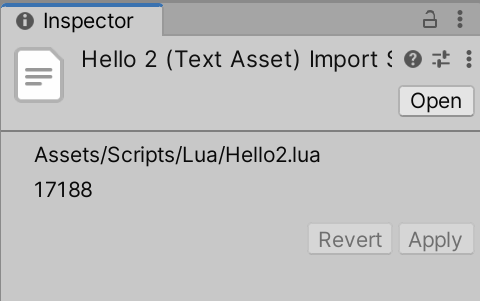
图片1