

惯性聚合 高效追踪和阅读你感兴趣的博客、新闻、科技资讯
阅读原文 在惯性聚合中打开

推荐订阅源

腾讯CDC
Schneier on Security
B
Blog RSS Feed
aimingoo的专栏
aimingoo的专栏
P
Proofpoint News Feed
A
About on SuperTechFans
Recorded Future
Recorded Future
Recent Announcements
Microsoft Security Blog
L
LangChain Blog
Hugging Face - Blog
Hugging Face - Blog
The GitHub Blog
The GitHub Blog
Google DeepMind News
T
Tailwind CSS Blog
Vercel News
Vercel News
H
Hackread – Cybersecurity News, Data Breaches, AI and More
MyScale Blog
MyScale Blog
V2EX - 技术
V2EX - 技术
N
Netflix TechBlog - Medium
F
Fortinet All Blogs
V
Visual Studio Blog
Martin Fowler
Martin Fowler
K
KPMG report finds enterprise disconnect between AI and its ROI | CIO
博客园 - Franky
freeCodeCamp Programming Tutorials: Python, JavaScript, Git & More
T
The Exploit Database - CXSecurity.com
F
Full Disclosure
Scott Helme
Scott Helme
H
Heimdal Security Blog
博客园 - 叶小钗
Google DeepMind News
Cyberwarzone
Cyberwarzone
Application and Cybersecurity Blog
V
Vulnerabilities – Threatpost
Blog — PlanetScale
Blog — PlanetScale
Security Latest
Security Latest
WordPress大学
WordPress大学
Cyber Security Advisories - MS-ISAC
T
Troy Hunt's Blog
S
SegmentFault 最新的问题
Forbes - Security
Forbes - Security
Jina AI
Jina AI
S
Securelist
小众软件
小众软件
Simon Willison's Weblog
J
Java Code Geeks
AWS News Blog
AWS News Blog
N
News and Events Feed by Topic
博客园 - 三生石上(FineUI控件)
量子位

博客园 - gavin_l

我们为什么需要另一个“桌面助手”? Hyper-v 中 CentOS 连接外网之有线网卡 VMware下 CentOS 连接外网问题(笔记) Mongo.exe 无法定位程序输入点terminate于动态链接库 *.dll的解决办法 你可能不知道的 10 条 SQL 技巧,涨知识了! MySql5.7.* 多实例安装部署 词组查询以及多值映射等SolrNet使用中的细节问题 (转)前端不为人知的一面--前端冷知识集锦 (转)jQuery插件开发精品教程,让你的jQuery提升一个台阶 在ASP.NET MVC中,使用Bundle来打包压缩js和css(转) 设计模式 ASP.NET应用程序与页面生命周期 .Net内存泄露原因及解决办法 C#反射Assembly 详细说明 (转)面向程序员的数据库访问性能优化法则 ab 压测工具使用 svn使用教程及常见问题解决方案 日期格式转换 (原)使用 memcache 使用过程中可能遇到的问题
MongoDB 多实例安装成服务
gavin_l · 2019-02-20 · via 博客园 - gavin_l

转发自:https://www.cnblogs.com/GainLoss/p/6906937.html

1.在mongodb的官网上下载安装包

https://www.mongodb.com/download-center
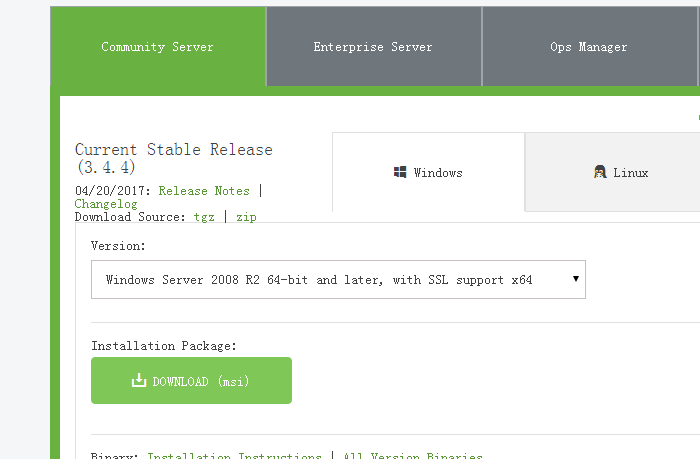
选择对应你的系统的安装包下载

如果下载不了 可以使用这个链接下载http://dl.mongodb.org/dl/win32/x86_64

2.解压安装包在d盘中,为了之后方便,对文件夹命名的时候尽量简单

3.在你的mongoDB中创建一个D://mongoDB/data/db

4.打开cmd命令行,进入到D:\mongoDB/bin文件中在cmd中输入以下命令,启动monggoDb

D:/mongoDB\bin>mongod --dbpath D:/mongoDB\data\db

5.mongodb默认,链接端口是27017,如果能正确打开localhost:27017的话,就说明是对的

6.为了之后方便,我们可以设置mongodb为windows服务,这个操作是实现每次开机的时候mongodb可以自动启动

在mongoDB中data下新建一个文件夹log,然后再log中添加一个文件mongodb.log的文件

在d:/mongoDB文件夹中添加一个mongo.config,把mongo.config文件用记事本打开在里面填写
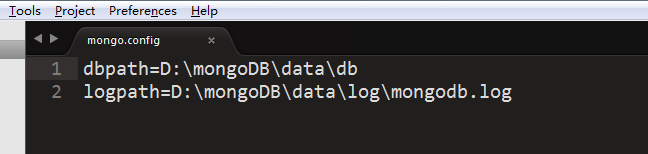
然后再cmd中用管理员身份打开,进入D:/mongoDB/bin目录中

输入以下命令mongod --config D:\mongoDB\mongo.config --install --serviceName "MongoDB27017" --serviceDisplayName "MongoDB27017"

注意:在安装多实例并将设为服务时, --serviceDisplayName <name> 是指服务列表中的服务名称,默认值是 MongoDB ,如果该值重复,则创建服务失败!
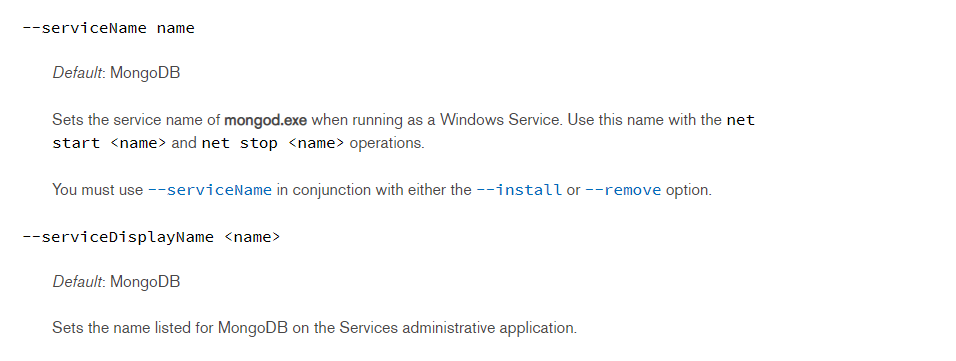
7.打开cmd输入services.msc可以查看mongoDB服务,点击启动就可以了。或者直接在cmd中直接运行: net start 服务名称

或者可以在运行中输入services.msc,也可以查看mongoDB服务

注意:在这个流程中,每次都用管理员身份打开cmd比较保险