惯性聚合 高效追踪和阅读你感兴趣的博客、新闻、科技资讯
阅读原文 在惯性聚合中打开

推荐订阅源

Forbes - Security
Forbes - Security
GbyAI
GbyAI
OSCHINA 社区最新新闻
OSCHINA 社区最新新闻
S
SegmentFault 最新的问题
Y
Y Combinator Blog
Recorded Future
Recorded Future
博客园 - Franky
I
InfoQ
T
The Blog of Author Tim Ferriss
Recent Announcements
Cyber Security Advisories - MS-ISAC
博客园_首页
阮一峰的网络日志
阮一峰的网络日志
T
Tailwind CSS Blog
Cyberwarzone
Cyberwarzone
The Register - Security
H
Hackread – Cybersecurity News, Data Breaches, AI and More
Threat Intelligence Blog | Flashpoint
雷峰网
雷峰网
P
Palo Alto Networks Blog
G
GRAHAM CLULEY
Cloudbric
Cloudbric
CTFtime.org: upcoming CTF events
MongoDB | Blog
MongoDB | Blog
F
Full Disclosure
Google DeepMind News
Recent Commits to openclaw:main
C
Check Point Blog
爱范儿
爱范儿
The GitHub Blog
The GitHub Blog
cs.AI updates on arXiv.org
W
WeLiveSecurity
T
Threat Research - Cisco Blogs
U
Unit 42
N
Netflix TechBlog - Medium
The Cloudflare Blog
Spread Privacy
Spread Privacy
Microsoft Azure Blog
美团技术团队
T
Troy Hunt's Blog
Engineering at Meta
Engineering at Meta
H
Heimdal Security Blog
TaoSecurity Blog
TaoSecurity Blog
C
Cybersecurity and Infrastructure Security Agency CISA
T
Tenable Blog
B
Blog
S
Securelist
H
Hacker News: Front Page
Google Online Security Blog
G
Google Developers Blog

博客园 - zhengyan_web

rn 适配 鸿蒙 极光推送集成记录 xcode 打包 报错 main.jsbundle does not exist. react-native-background-job 加载依赖报错处理 解决gradle与gradle plugin匹配关系以及gradle下载缓慢的问题 ‌华为手机记录密码后页面显示的用户名可以通过修改设置来隐藏 极狐gitlab 搭建 rn node 版本问题 xcode 15打包报错 网络代理 mac jdk切换 js编码、解码方法(escape,encodeURI,encodeURIComponent区别及用法) grep命令 苹果审核Guideline 2.3.1 - Performance XCode报错Thread 1: EXC_BAD_ACCESS (code=2, address=0x....) mac m1 运行老项目 docker 安装homebrew报错error: Not a valid ref: refs/remotes/origin/master 的解决方法 React Native 新版 pod install 依赖时报错
mac 电脑查看已安装的谷歌插件
zhengyan_web · 2024-07-01 · via 博客园 - zhengyan_web

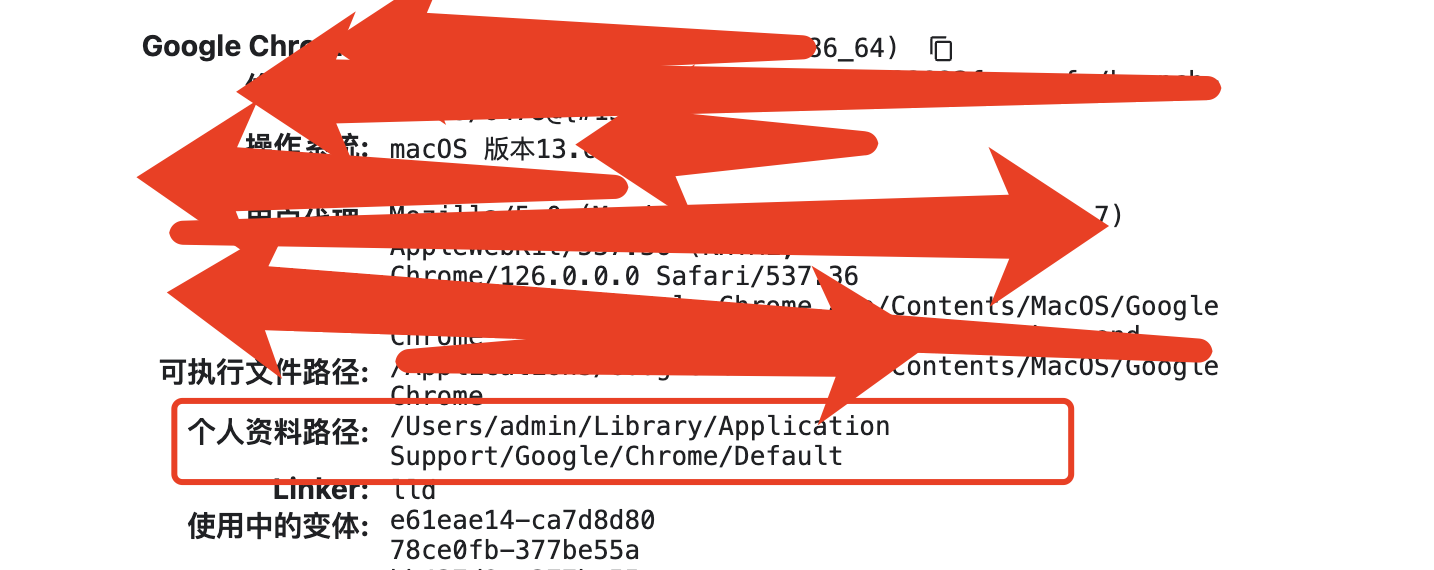
1、打开谷歌浏览器  地址栏上面输入
   chrome://version/

2、找到 个人资料路径: /Users/admin/Library/Application Support/Google/Chrome/Default

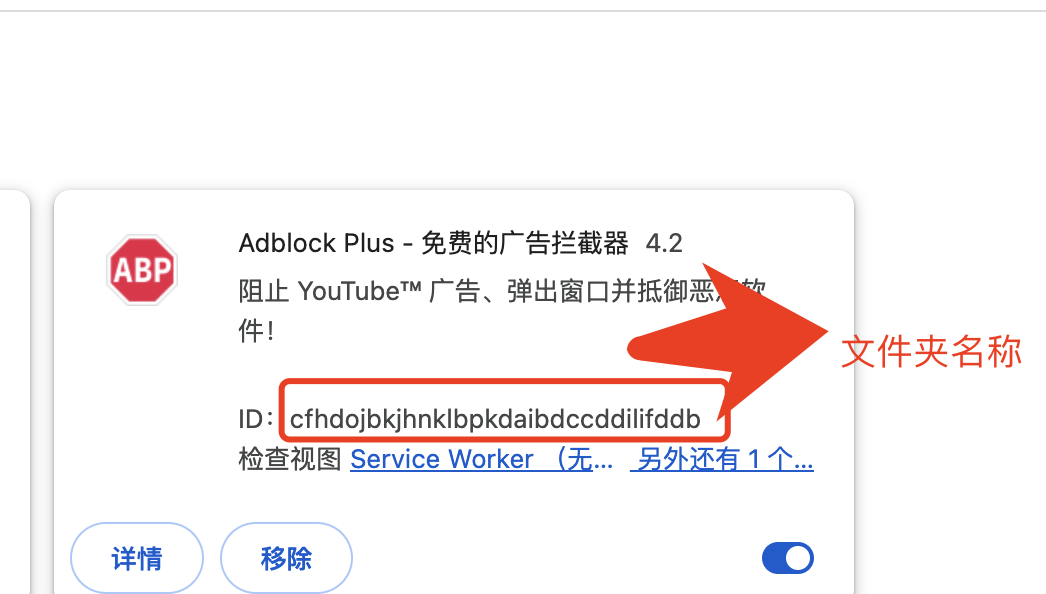
3、打开个新窗口  地址了上输入:个人资料路径  ,并找到 Extensions/ 文件夹

4、里面都是已安装的谷歌插件, 想要哪个插件 就在扩展程序插件上查看 文件夹目录