




由于Apache官网改变策略(2015年1月左右),官网不再提供Apache-http-server的windows的编译版本,但是提供了几个第三方的版本
http://httpd.apache.org/docs/current/platform/windows.html#down
分别是ApacheHaus、Apache Lounge、BitNami WAMP Stack、WampServer、XAMPP
笔者进的是ApacheHaus下载Apache 2.4.x VC9 64位版本
建议下载httpd-2.4.12-x64-r2.zip、httpd-2.4.12-x86-r2.zip
然后下载对应的VC9(VC2008)运行库
32位
http://www.microsoft.com/downloads/en/details.aspx?FamilyID=A5C84275-3B97-4AB7-A40D-3802B2AF5FC2
64位
http://www.microsoft.com/downloads/en/details.aspx?FamilyID=BA9257CA-337F-4B40-8C14-157CFDFFEE4E
安装好VC9运行库之后,将httpd-2.4.12-x64-r2.zip里面的Apache24文件夹放到D盘根目录(注意:必须放到根目录,其他目录启动和加载模块会出错)
然后打开命令行,切换到bin目录,运行httpd.exe
C:\Users\test>D:

D:\>cd Apache24

D:\Apache24>cd bin

D:\Apache24\bin>httpd.exe
(OS 10048)通常每个套接字地址(协议/网络地址/端口)只允许使用一次。  : AH00072: mak
e_sock: could not bind to address [::]:443
(OS 10048)通常每个套接字地址(协议/网络地址/端口)只允许使用一次。  : AH00072: mak
e_sock: could not bind to address 0.0.0.0:443
AH00451: no listening sockets available, shutting down
AH00015: Unable to open logs

D:\Apache24\bin>
这里443端口被占用,我们可以通过netstat -ano查询那个进程在使用这个端口
参数解释:
  -a            显示所有连接和侦听端口。
  -n            以数字形式显示地址和端口号。
  -o            显示拥有的与每个连接关联的进程 ID。
结果如下:
D:\Apache24\bin>netstat -ano

活动连接

  协议  本地地址          外部地址        状态           PID
  TCP    0.0.0.0:135            0.0.0.0:0              LISTENING       704
  TCP    0.0.0.0:443            0.0.0.0:0              LISTENING       2472
  TCP    0.0.0.0:445            0.0.0.0:0              LISTENING       4
  TCP    0.0.0.0:902            0.0.0.0:0              LISTENING       1664
  TCP    0.0.0.0:912            0.0.0.0:0              LISTENING       1664
  TCP    0.0.0.0:5938           0.0.0.0:0              LISTENING       2028
  TCP    0.0.0.0:49152          0.0.0.0:0              LISTENING       496
  TCP    0.0.0.0:49154          0.0.0.0:0              LISTENING       856
  TCP    0.0.0.0:49156          0.0.0.0:0              LISTENING       1044
  TCP    0.0.0.0:49157          0.0.0.0:0              LISTENING       1452
  TCP    0.0.0.0:49158          0.0.0.0:0              LISTENING       600
  TCP    0.0.0.0:49163          0.0.0.0:0              LISTENING       592
  TCP    127.0.0.1:4300         0.0.0.0:0              LISTENING       3816
  TCP    127.0.0.1:4301         0.0.0.0:0              LISTENING       3816
  TCP    127.0.0.1:5939         0.0.0.0:0              LISTENING       2028
  TCP    127.0.0.1:5939         127.0.0.1:58762        ESTABLISHED     2028
  TCP    127.0.0.1:8307         0.0.0.0:0              LISTENING       2472
  TCP    127.0.0.1:58762        127.0.0.1:5939         ESTABLISHED     4840
  TCP    127.0.0.1:58972        127.0.0.1:58973        ESTABLISHED     5792
  TCP    127.0.0.1:58973        127.0.0.1:58972        ESTABLISHED     5792
  TCP    127.0.0.1:59811        127.0.0.1:2559         SYN_SENT        3172
  TCP    172.18.62.201:139      0.0.0.0:0              LISTENING       4
  TCP    172.18.62.201:59212    111.161.81.209:80      CLOSE_WAIT      3816
  TCP    172.18.62.201:59274    111.161.81.209:80      CLOSE_WAIT      3816
  TCP    172.18.62.201:59373    111.161.81.209:80      CLOSE_WAIT      3816
  TCP    172.18.62.201:59427    111.161.81.209:80      CLOSE_WAIT      3816
  TCP    172.18.62.201:59475    112.64.237.239:8080    TIME_WAIT       0
  TCP    172.18.62.201:59555    92.51.156.100:5938     ESTABLISHED     2028
  TCP    172.18.62.201:59607    111.161.81.209:80      CLOSE_WAIT      3816
  TCP    172.18.62.201:59623    112.90.86.25:443       TIME_WAIT       0
  TCP    172.18.62.201:59624    183.60.16.21:8080      TIME_WAIT       0
  TCP    172.18.62.201:59626    183.60.16.21:8080      TIME_WAIT       0
  TCP    172.18.62.201:59629    112.90.86.25:443       TIME_WAIT       0
  TCP    172.18.62.201:59693    61.137.188.200:80      TIME_WAIT       0
  TCP    172.18.62.201:59694    61.135.169.125:443     ESTABLISHED     5792
  TCP    172.18.62.201:59699    111.206.76.33:443      ESTABLISHED     5792
  TCP    172.18.62.201:59700    111.206.76.33:443      ESTABLISHED     5792
  TCP    172.18.62.201:59701    111.206.76.33:443      ESTABLISHED     5792
  TCP    172.18.62.201:59702    111.206.76.32:443      ESTABLISHED     5792
  TCP    172.18.62.201:59703    111.206.76.32:443      TIME_WAIT       0
  TCP    172.18.62.201:59704    61.135.169.121:443     ESTABLISHED     5792
  TCP    172.18.62.201:59705    61.135.169.121:443     TIME_WAIT       0
  TCP    172.18.62.201:59706    61.135.169.121:443     ESTABLISHED     5792
  TCP    172.18.62.201:59707    61.135.169.121:443     TIME_WAIT       0
  TCP    172.18.62.201:59708    23.59.139.27:80        TIME_WAIT       0
  TCP    172.18.62.201:59709    23.59.139.27:80        TIME_WAIT       0
  TCP    172.18.62.201:59714    61.135.169.125:443     ESTABLISHED     5792
  TCP    172.18.62.201:59715    61.135.169.121:443     ESTABLISHED     5792
  TCP    172.18.62.201:59719    61.135.169.125:80      ESTABLISHED     5792
  TCP    172.18.62.201:59734    223.202.6.26:80        ESTABLISHED     5792
  TCP    172.18.62.201:59736    223.202.6.26:80        TIME_WAIT       0
  TCP    172.18.62.201:59745    202.106.182.252:80     TIME_WAIT       0
  TCP    172.18.62.201:59746    123.125.29.224:80      ESTABLISHED     5792
  TCP    172.18.62.201:59747    123.125.29.224:80      TIME_WAIT       0
  TCP    172.18.62.201:59748    124.95.163.253:80      TIME_WAIT       0
  TCP    172.18.62.201:59749    124.95.163.253:80      TIME_WAIT       0
  TCP    172.18.62.201:59750    124.95.163.253:80      TIME_WAIT       0
  TCP    172.18.62.201:59751    124.95.163.253:80      FIN_WAIT_1      5792
  TCP    172.18.62.201:59754    124.95.163.253:80      TIME_WAIT       0
  TCP    172.18.62.201:59759    124.95.163.253:80      TIME_WAIT       0
  TCP    172.18.62.201:59760    218.30.115.254:80      TIME_WAIT       0
  TCP    172.18.62.201:59762    124.95.163.253:80      TIME_WAIT       0
  TCP    172.18.62.201:59766    124.40.53.35:80        ESTABLISHED     4380
  TCP    172.18.62.201:59767    218.60.106.89:80       ESTABLISHED     4380
  TCP    172.18.62.201:59768    218.60.106.89:80       ESTABLISHED     4380
  TCP    172.18.62.201:59769    218.60.106.89:80       ESTABLISHED     4380
  TCP    172.18.62.201:59770    23.42.177.49:80        ESTABLISHED     4380
  TCP    172.18.62.201:59778    124.40.53.35:80        ESTABLISHED     4380
  TCP    172.18.62.201:59779    124.95.163.253:80      TIME_WAIT       0
  TCP    172.18.62.201:59780    124.95.163.253:80      TIME_WAIT       0
  TCP    172.18.62.201:59802    1.1.1.1:80             SYN_SENT        3816
  TCP    172.18.62.201:59807    123.125.125.85:80      TIME_WAIT       0
  TCP    172.18.62.201:59809    125.39.120.82:443      SYN_SENT        5016
  TCP    192.168.116.1:139      0.0.0.0:0              LISTENING       4
  TCP    192.168.253.1:139      0.0.0.0:0              LISTENING       4
  TCP    [::]:135               [::]:0                 LISTENING       704
  TCP    [::]:443               [::]:0                 LISTENING       2472
  TCP    [::]:445               [::]:0                 LISTENING       4
  TCP    [::]:49152             [::]:0                 LISTENING       496
  TCP    [::]:49154             [::]:0                 LISTENING       856
  TCP    [::]:49156             [::]:0                 LISTENING       1044
  TCP    [::]:49157             [::]:0                 LISTENING       1452
  TCP    [::]:49158             [::]:0                 LISTENING       600
  TCP    [::]:49163             [::]:0                 LISTENING       592
  TCP    [::1]:8307             [::]:0                 LISTENING       2472
  UDP    0.0.0.0:4000           *:*                                    3816
  UDP    0.0.0.0:4001           *:*                                    3816
  UDP    0.0.0.0:5355           *:*                                    1232
  UDP    0.0.0.0:49152          *:*                                    968
  UDP    0.0.0.0:51101          *:*                                    3816
  UDP    0.0.0.0:52030          *:*                                    3816
  UDP    0.0.0.0:52031          *:*                                    3816
  UDP    0.0.0.0:52032          *:*                                    3816
  UDP    0.0.0.0:54781          *:*                                    3164
  UDP    0.0.0.0:57498          *:*                                    2028
  UDP    0.0.0.0:61524          *:*                                    3816
  UDP    0.0.0.0:61676          *:*                                    2772
  UDP    0.0.0.0:62217          *:*                                    5016
  UDP    0.0.0.0:62629          *:*                                    2772
  UDP    0.0.0.0:63659          *:*                                    3816
  UDP    127.0.0.1:1900         *:*                                    3356
  UDP    127.0.0.1:50173        *:*                                    3356
  UDP    172.18.62.201:137      *:*                                    4
  UDP    172.18.62.201:138      *:*                                    4
  UDP    172.18.62.201:1900     *:*                                    3356
  UDP    172.18.62.201:5353     *:*                                    2028
  UDP    192.168.116.1:137      *:*                                    4
  UDP    192.168.116.1:138      *:*                                    4
  UDP    192.168.116.1:1900     *:*                                    3356
  UDP    192.168.116.1:5353     *:*                                    2028
  UDP    192.168.253.1:137      *:*                                    4
  UDP    192.168.253.1:138      *:*                                    4
  UDP    192.168.253.1:1900     *:*                                    3356
  UDP    192.168.253.1:5353     *:*                                    2028
  UDP    [::]:5355              *:*                                    1232
  UDP    [::]:57499             *:*                                    2028
  UDP    [::1]:1900             *:*                                    3356
  UDP    [::1]:5353             *:*                                    2028
  UDP    [::1]:50172            *:*                                    3356
  UDP    [fe80::481a:1efd:d5d4:a87b%23]:546  *:*
    856
  UDP    [fe80::481a:1efd:d5d4:a87b%23]:546  *:*
    856
  UDP    [fe80::481a:1efd:d5d4:a87b%23]:1900  *:*
     3356
  UDP    [fe80::5919:851f:5249:17f1%21]:546  *:*
    856
  UDP    [fe80::5919:851f:5249:17f1%21]:1900  *:*
     3356
  UDP    [fe80::7495:5b85:a10c:3cb7%3]:546  *:*
   856
  UDP    [fe80::7495:5b85:a10c:3cb7%3]:546  *:*
   856
  UDP    [fe80::7495:5b85:a10c:3cb7%3]:1900  *:*
    3356

D:\Apache24\bin>
这个结果太多了,加个findstr命令查一下
D:\Apache24\bin>netstat -ano|findstr :443
  TCP    0.0.0.0:443            0.0.0.0:0              LISTENING       2472
  TCP    [::]:443               [::]:0                 LISTENING       2472

D:\Apache24\bin>
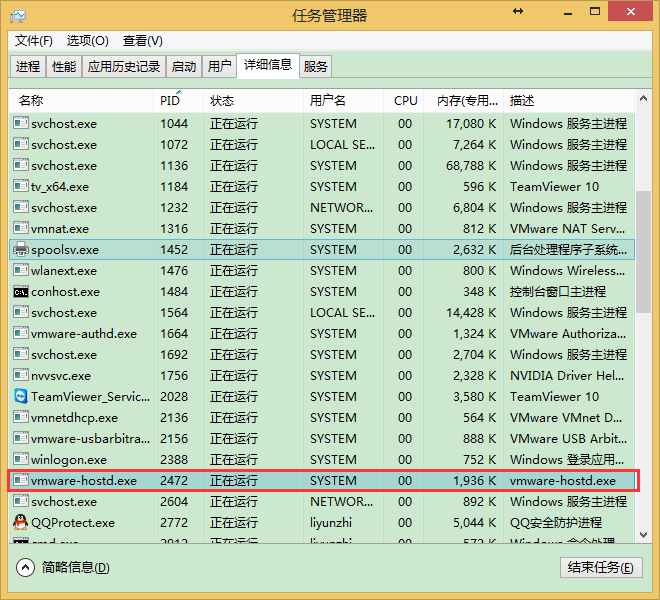
可以看到PID为2472的进程占用了这个端口。
这是可以用进程管理器查看是那个进程占用,也可以用tasklist命令查看
D:\Apache24\bin>tasklist

映像名称                       PID 会话名              会话#       内存使用
========================= ======== ================ =========== ============
System Idle Process              0 Services                   0          4 K
System                           4 Services                   0        336 K
smss.exe                       304 Services                   0      1,028 K
csrss.exe                      396 Services                   0      4,972 K
wininit.exe                    496 Services                   0      5,000 K
services.exe                   592 Services                   0      6,648 K
lsass.exe                      600 Services                   0     12,448 K
svchost.exe                    660 Services                   0     10,908 K
svchost.exe                    704 Services                   0      8,196 K
nvvsvc.exe                     872 Services                   0      7,152 K
QQPCRTP.exe                    968 Services                   0     17,028 K
suservice.exe                  640 Services                   0        780 K
svchost.exe                    856 Services                   0     21,956 K
svchost.exe                   1044 Services                   0     40,112 K
svchost.exe                   1072 Services                   0     23,148 K
svchost.exe                   1136 Services                   0     85,796 K
svchost.exe                   1232 Services                   0     17,028 K
spoolsv.exe                   1452 Services                   0     12,920 K
wlanext.exe                   1476 Services                   0      5,892 K
conhost.exe                   1484 Services                   0      3,092 K
svchost.exe                   1564 Services                   0     26,960 K
svchost.exe                   1692 Services                   0     13,124 K
TeamViewer_Service.exe        2028 Services                   0     11,572 K
vmnat.exe                     1316 Services                   0      4,988 K
vmware-authd.exe              1664 Services                   0      3,120 K
vmnetdhcp.exe                 2136 Services                   0     10,352 K
vmware-usbarbitrator64.ex     2156 Services                   0      2,788 K
vmware-hostd.exe              2472 Services                   0      4,684 K
svchost.exe                   2604 Services                   0      4,944 K
svchost.exe                   3356 Services                   0      8,472 K
SearchIndexer.exe             3828 Services                   0     59,352 K
audiodg.exe                   3512 Services                   0      9,668 K
csrss.exe                     6076 Console                    4     39,188 K
winlogon.exe                  2388 Console                    4      6,088 K
dwm.exe                       4452 Console                    4     50,392 K
nvxdsync.exe                  3692 Console                    4     17,764 K
nvvsvc.exe                    1756 Console                    4     15,076 K
TeamViewer.exe                4840 Console                    4     37,488 K
taskhostex.exe                3444 Console                    4     13,120 K
explorer.exe                  4380 Console                    4    158,964 K
ChsIME.exe                    5096 Console                    4      6,064 K
tv_w32.exe                    4044 Console                    4      5,240 K
tv_x64.exe                    1184 Console                    4      4,940 K
nvtray.exe                    3172 Console                    4     18,512 K
SogouImeBroker.exe            5612 Console                    4     57,096 K
SogouImeLoader.exe            3516 Console                    4     19,388 K
SogouCloud.exe                4888 Console                    4     14,436 K
vmware-tray.exe               4956 Console                    4      6,164 K
QQPCTray.exe                  5016 Console                    4     86,072 K
QQPCNetFlow.exe               4696 Console                    4      2,756 K
QQPCRealTimeSpeedup.exe       3164 Console                    4     27,864 K
8021x.exe                     5620 Console                    4     57,760 K
dllhost.exe                   5144 Console                    4      6,388 K
firefox.exe                   5792 Console                    4    553,612 K
plugin-container.exe          4116 Console                    4     15,024 K
FlashPlayerPlugin_17_0_0_     4164 Console                    4     11,996 K
FlashPlayerPlugin_17_0_0_     3140 Console                    4     84,252 K
QQProtect.exe                 2772 Console                    4     20,328 K
QQ.exe                        3816 Console                    4    134,360 K
TXPlatform.exe                3348 Console                    4      2,116 K
360AP.exe                     4632 Console                    4     65,592 K
360AP.exe                     5616 Console                    4     11,272 K
360AP.exe                     5220 Console                    4     12,576 K
cmd.exe                       2912 Console                    4      3,528 K
conhost.exe                   4404 Console                    4     24,732 K
notepad.exe                   4396 Console                    4     27,032 K
SogouSmartInfo.exe            3496 Console                    4      7,044 K
tasklist.exe                  4076 Console                    4      6,676 K
WmiPrvSE.exe                  4244 Services                   0      6,088 K

D:\Apache24\bin>
加findstr的命令结果
D:\Apache24\bin>tasklist |findstr 2472
vmware-hostd.exe              2472 Services                   0      4,684 K

D:\Apache24\bin>
笔者这里是虚拟机占用,解决方法要么关闭服务器进程/服务,要么换端口号,笔者这里换端口号
打开conf目录下的httpd.conf,搜索ssl
找到如下文字
# Secure (SSL/TLS) connections
# Note: The following must must be present to support
#       starting without SSL on platforms with no /dev/random equivalent
#       but a statically compiled-in mod_ssl.
#
<IfModule ssl_module>
#Include conf/extra/httpd-ssl.conf
Include conf/extra/httpd-ahssl.conf
SSLRandomSeed startup builtin
SSLRandomSeed connect builtin
</IfModule>
从上面的文字可以看出ssl的配置文件在conf/extra/httpd-ahssl.conf目录下(注意:并不在conf/extra/httpd-ssl.conf目录,这一句被注释掉了)
将其中的443改成其他端口,如1443
第一处(Line 18)
改成
第二处(Line 134,136)
<VirtualHost _default_:443>
  SSLEngine on
  ServerName localhost:443
  SSLCertificateFile "${SRVROOT}/conf/ssl/server.crt"
  SSLCertificateKeyFile "${SRVROOT}/conf/ssl/server.key"
  DocumentRoot "${SRVROOT}/htdocs"
# DocumentRoot access handled globally in httpd.conf
    CustomLog "${SRVROOT}/logs/ssl_request.log" \
          "%t %h %{SSL_PROTOCOL}x %{SSL_CIPHER}x \"%r\" %b"
    <Directory "${SRVROOT}/htdocs">
        Options Indexes Includes FollowSymLinks
        AllowOverride AuthConfig Limit FileInfo
    Require all granted
    </Directory>
</virtualhost>
改成
<VirtualHost _default_:1443>
  SSLEngine on
  ServerName localhost:1443
  SSLCertificateFile "${SRVROOT}/conf/ssl/server.crt"
  SSLCertificateKeyFile "${SRVROOT}/conf/ssl/server.key"
  DocumentRoot "${SRVROOT}/htdocs"
# DocumentRoot access handled globally in httpd.conf
    CustomLog "${SRVROOT}/logs/ssl_request.log" \
          "%t %h %{SSL_PROTOCOL}x %{SSL_CIPHER}x \"%r\" %b"
    <Directory "${SRVROOT}/htdocs">
        Options Indexes Includes FollowSymLinks
        AllowOverride AuthConfig Limit FileInfo
    Require all granted
    </Directory>
</virtualhost>
第三处(Line 150,152)
<VirtualHost *:443>
  SSLEngine on
  ServerName serverone.tld:443
  SSLCertificateFile "${SRVROOT}/conf/ssl/serverone.crt"
  SSLCertificateKeyFile "${SRVROOT}/conf/ssl/serverone.key"
  DocumentRoot "${SRVROOT}/htdocs"
    CustomLog "${SRVROOT}/logs/ssl_request.log" \
          "%t %h %{SSL_PROTOCOL}x %{SSL_CIPHER}x \"%r\" %b"
    <Directory "${SRVROOT}/htdocs">
        Options Indexes Includes FollowSymLinks
        AllowOverride AuthConfig Limit FileInfo
    Require all granted
    </Directory>
</virtualhost>
改成
<VirtualHost *:1443>
  SSLEngine on
  ServerName serverone.tld:1443
  SSLCertificateFile "${SRVROOT}/conf/ssl/serverone.crt"
  SSLCertificateKeyFile "${SRVROOT}/conf/ssl/serverone.key"
  DocumentRoot "${SRVROOT}/htdocs"
    CustomLog "${SRVROOT}/logs/ssl_request.log" \
          "%t %h %{SSL_PROTOCOL}x %{SSL_CIPHER}x \"%r\" %b"
    <Directory "${SRVROOT}/htdocs">
        Options Indexes Includes FollowSymLinks
        AllowOverride AuthConfig Limit FileInfo
    Require all granted
    </Directory>
</virtualhost>
第四处(Line 165,167)
<VirtualHost *:443>
  SSLEngine on
  ServerName servertwo.tld:443
  SSLCertificateFile "${SRVROOT}/conf/ssl/servertwo.crt"
  SSLCertificateKeyFile "${SRVROOT}/conf/ssl/servertwo.key"
  DocumentRoot "${SRVROOT}/htdocs"
    CustomLog "${SRVROOT}/logs/ssl_request.log" \
          "%t %h %{SSL_PROTOCOL}x %{SSL_CIPHER}x \"%r\" %b"
    <Directory "${SRVROOT}/htdocs">
        Options Indexes Includes FollowSymLinks
        AllowOverride AuthConfig Limit FileInfo
    Require all granted
    </Directory>
</virtualhost>
改成
<VirtualHost *:1443>
  SSLEngine on
  ServerName servertwo.tld:1443
  SSLCertificateFile "${SRVROOT}/conf/ssl/servertwo.crt"
  SSLCertificateKeyFile "${SRVROOT}/conf/ssl/servertwo.key"
  DocumentRoot "${SRVROOT}/htdocs"
    CustomLog "${SRVROOT}/logs/ssl_request.log" \
          "%t %h %{SSL_PROTOCOL}x %{SSL_CIPHER}x \"%r\" %b"
    <Directory "${SRVROOT}/htdocs">
        Options Indexes Includes FollowSymLinks
        AllowOverride AuthConfig Limit FileInfo
    Require all granted
    </Directory>
</virtualhost>
如果提示80端口占用,一般是IIS服务启动占用,解决方法也是两种,关闭IIS服务或者改端口,80端口在httpd.conf配置文件里面改
这时再用命令行输入
不报错说明启动成功
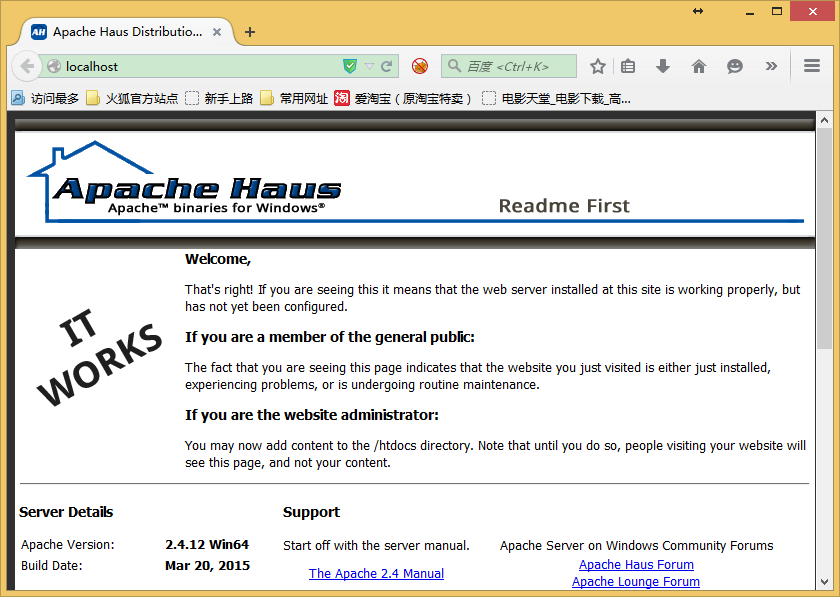
浏览器打开http://localhost
看到Apache Haus的图标和It Works界面说明配置成功
将apache注册为系统服务
在管理员模式下启动命令行,输入httpd -k install
D:\Apache24\bin>httpd -k install
Installing the 'Apache2.4' service
The 'Apache2.4' service is successfully installed.
Testing httpd.conf....
Errors reported here must be corrected before the service can be started.

D:\Apache24\bin>
这是可以通过ApacheMonitor.exe界面控制apache服务器启动关闭重启

也可以执行以下命令来控制
httpd -k start
httpd -k stop
httpd -k restart
此内容由惯性聚合(RSS阅读器)自动聚合整理,仅供阅读参考。 原文来自 — 版权归原作者所有。