
惯性聚合 高效追踪和阅读你感兴趣的博客、新闻、科技资讯
阅读原文 在惯性聚合中打开

推荐订阅源

P
Proofpoint News Feed
罗磊的独立博客
Martin Fowler
Martin Fowler
B
Blog RSS Feed
U
Unit 42
V
V2EX
H
Help Net Security
V
Vulnerabilities – Threatpost
The Register - Security
IT之家
IT之家
Cloudbric
Cloudbric
K
Kaspersky official blog
C
CXSECURITY Database RSS Feed - CXSecurity.com
Jina AI
Jina AI
Microsoft Azure Blog
大猫的无限游戏
大猫的无限游戏
P
Palo Alto Networks Blog
钛媒体:引领未来商业与生活新知
钛媒体:引领未来商业与生活新知
S
SegmentFault 最新的问题
Cisco Talos Blog
Cisco Talos Blog
博客园 - 司徒正美
Cyberwarzone
Cyberwarzone
Spread Privacy
Spread Privacy
P
Proofpoint News Feed
Apple Machine Learning Research
T
Tenable Blog
奇客Solidot–传递最新科技情报
奇客Solidot–传递最新科技情报
I
Intezer
G
GRAHAM CLULEY
T
Threatpost
C
Check Point Blog
C
Cyber Attacks, Cyber Crime and Cyber Security
H
Hackread – Cybersecurity News, Data Breaches, AI and More
D
Darknet – Hacking Tools, Hacker News & Cyber Security
T
Tor Project blog
L
Lohrmann on Cybersecurity
WordPress大学
WordPress大学
N
Netflix TechBlog - Medium
The GitHub Blog
The GitHub Blog
C
CERT Recently Published Vulnerability Notes
Microsoft Security Blog
Hugging Face - Blog
Hugging Face - Blog
The Hacker News
The Hacker News
Schneier on Security
爱范儿
爱范儿
云风的 BLOG
云风的 BLOG
Security Archives - TechRepublic
T
The Blog of Author Tim Ferriss
K
KPMG report finds enterprise disconnect between AI and its ROI | CIO
P
Privacy & Cybersecurity Law Blog

博客园 - 高山流水200808

ubuntu安装HermesAgent接入Nous平台小米大模型和微信通道配置 沈阳2025中考各区各校人数估算 沈阳2025公办普高率分析 思科Cisco ASA5506-x防火墙内部用户无法使用PPTP连接到VPN - 高山流水200808 专利事务所信息Python爬取 对CSDN的理性吐槽 CSDN博客已经打不开了 大连交大教务一键教学评价 apache2.4+tomcat8+jk1.2.40集群配置 使用Fiddle监听HTTPS网页 证书吊销 window下Apache-http-server(httpd-2.4.12)安装与配置 CentOS6.6升级openssl到1.0.2a openssl生成证书链多级证书 tomcat7.0.55配置单向和双向HTTPS连接(二) KeyStore和TrustStore Widows下利用OpenSSL生成证书 tomcat7.0.55配置单向和双向HTTPS连接 HTTP/1.1标准请求方法和状态码
tomcat7.0.55配置HTTP强制跳转到HTTPS
高山流水200808 · 2015-05-14 · via 博客园 - 高山流水200808

首先需要配置好HTTPS单向或双向链接

参考:

tomcat7.0.55配置单向和双向HTTPS连接(二)

然后编辑tomcat的conf目录下的web.xml

在<welcome-file-list>结束标签之后添加

    <login-config>
        <!-- Authorization setting for SSL -->
        <auth-method>CLIENT-CERT</auth-method>
        <realm-name>Client Cert Users-only Area</realm-name>
    </login-config>
    <security-constraint>
        <!-- Authorization setting for SSL -->
        <web-resource-collection >
            <web-resource-name >SSL</web-resource-name>
            <url-pattern>/*</url-pattern>
        </web-resource-collection>
        <user-data-constraint>
            <transport-guarantee>CONFIDENTIAL</transport-guarantee>
        </user-data-constraint>
    </security-constraint>

如下图所示
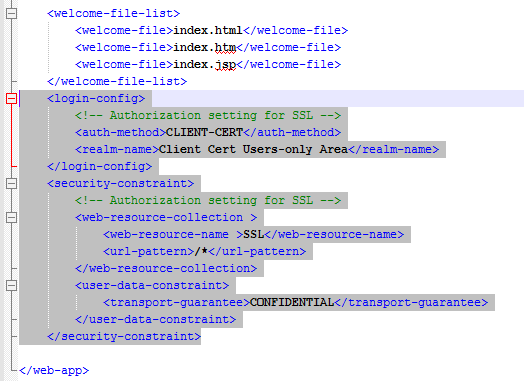
然后重启tomcat,用浏览器打开

http://localhost:8080

地址栏能看到https://localhost:8443/说明配置成功