

惯性聚合 高效追踪和阅读你感兴趣的博客、新闻、科技资讯
阅读原文 在惯性聚合中打开

推荐订阅源

N
News | PayPal Newsroom
Security Archives - TechRepublic
Hacker News: Ask HN
Hacker News: Ask HN
H
Hacker News: Front Page
Apple Machine Learning Research
TaoSecurity Blog
TaoSecurity Blog
Help Net Security
Help Net Security
Threat Intelligence Blog | Flashpoint
V
V2EX
Hugging Face - Blog
Hugging Face - Blog
cs.CV updates on arXiv.org
cs.CL updates on arXiv.org
人人都是产品经理
人人都是产品经理
博客园 - 三生石上(FineUI控件)
Security Latest
Security Latest
Cloudbric
Cloudbric
WordPress大学
WordPress大学
S
SegmentFault 最新的问题
cs.AI updates on arXiv.org
www.infosecurity-magazine.com
Know Your Adversary
Know Your Adversary
A
Arctic Wolf
L
LangChain Blog
Application and Cybersecurity Blog
The GitHub Blog
The GitHub Blog
P
Proofpoint News Feed
W
WeLiveSecurity
freeCodeCamp Programming Tutorials: Python, JavaScript, Git & More
M
MIT News - Artificial intelligence
Google DeepMind News
奇客Solidot–传递最新科技情报
奇客Solidot–传递最新科技情报
The Cloudflare Blog
小众软件
小众软件
NISL@THU
NISL@THU
云风的 BLOG
云风的 BLOG
P
Privacy & Cybersecurity Law Blog
S
Security @ Cisco Blogs
博客园 - 【当耐特】
I
InfoQ
Vercel News
Vercel News
CTFtime.org: upcoming CTF events
P
Proofpoint News Feed
O
OpenAI News
Google DeepMind News
N
News and Events Feed by Topic
K
KPMG report finds enterprise disconnect between AI and its ROI | CIO
K
Kaspersky official blog
T
Threat Research - Cisco Blogs
量子位
宝玉的分享
宝玉的分享

博客园 - MSTK

Android Studio提高Build速度 Android创建LiteOrmManager类(4) DecoView的使用 Android创建LiteOrmManager类(3) Android创建LiteOrmManager类(2) Android创建LiteOrmManager类(1) Android使用Snackbar Unable to add window -- token null is not valid; is your activity running? Android Studio集成通义灵码 MonoDETR(2) MonoDETR(1) The color "XXX" in values has no declaration in the base values folder; this can lead to crashes when the resource is queried in a configuration that does not match this qualifier LiteORM的使用(2) LiteORM的使用(1) 使用AlarmManager实现APP保活(2) 使用AlarmManager实现APP保活(1) CEC2017的30个函数 使用双进程实现Android APP保活 Process finished with exit code 137 (interrupted by signal 9: SIGKILL) GIT RE-BASIN: MERGING MODELS MODULO PERMUTATION SYMMETRIES (1) MMpretrain使用Tiny ImageNet数据集 PyCharm debug collecting data...
Ubuntu使用dd命令实现硬盘级复制
MSTK · 2024-09-09 · via 博客园 - MSTK

以前的Ubuntu系统用的机械硬盘,因为读写次数太多,已经出现问题了,速度很慢,开机提示坏道,于是买了一个固态硬盘,准备重装系统,但是重装系统,各种驱动、环境都要重装,太麻烦了,于是准备把以前的硬盘完整的复制到新硬盘,这样就不用重装各种驱动、环境了.

把新硬盘接上主板后,输入以下dd命令:

sudo dd if=/dev/sda of=/dev/sdb bs=4M status=preogress

其中,/dev/sda是老硬盘,/dev/sdb是新硬盘,使用这个命令实现了两个硬盘之间的硬盘级复制,即把老硬盘上的所有文件都复制到新硬盘.有人说使用dd命令实现硬盘级复制要用启动U盘,在启动U盘的系统里面输入这个命令,据我亲测没必要这么做,直接在老系统里面输入这个命令一样的可以实现.

输入命令之后,就开始等待,新老硬盘都是1T,复制了几个小时,终于完成了.
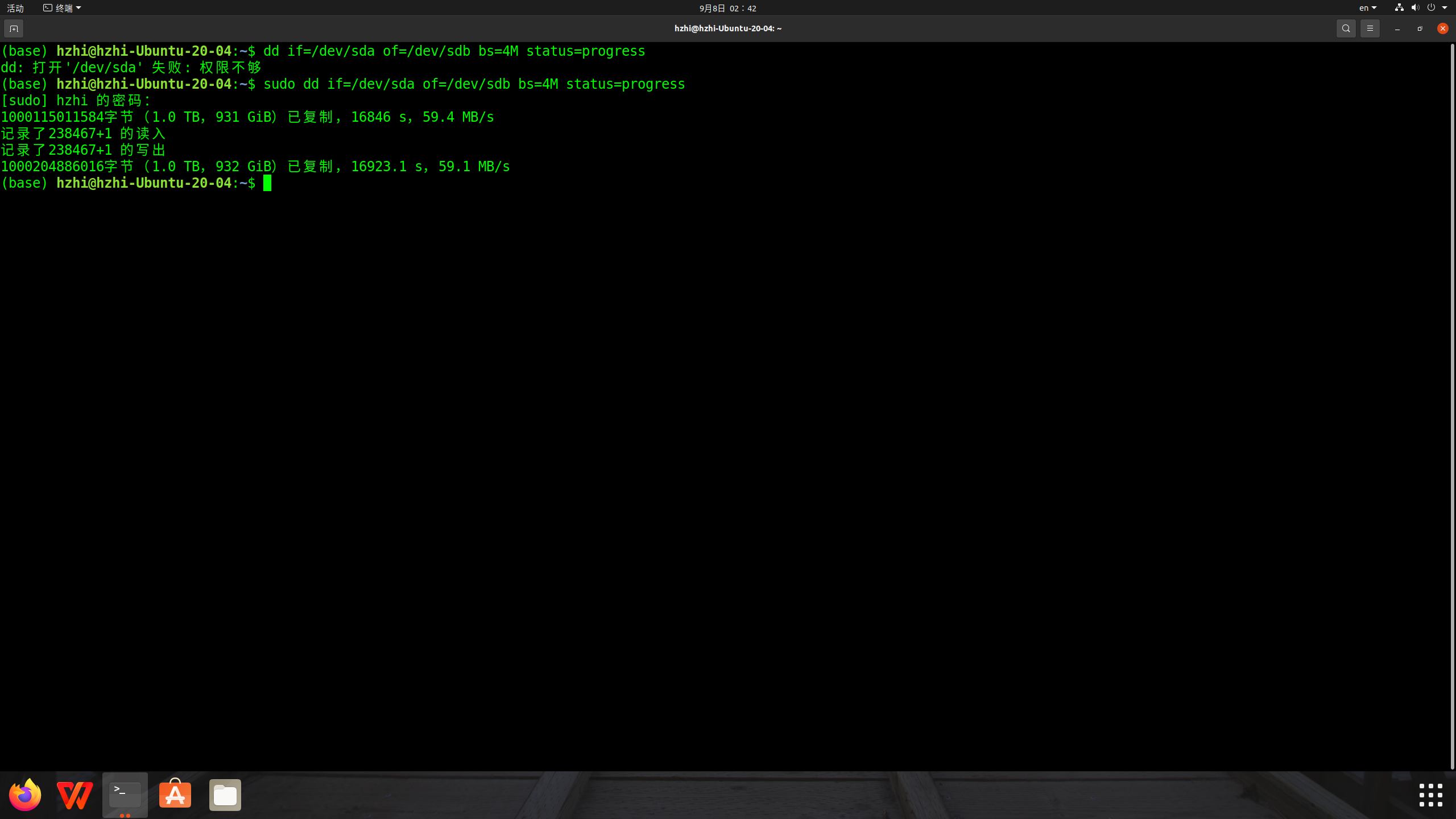
然后关机,取下老硬盘,把以前插老硬盘的线插在新硬盘上面,重启,第一次重启卡在login界面长时间没动,按了一下重启键,这次顺利进入了系统.这个系统和以前的系统完全一样,包括用户名、密码、桌面、各种文件夹、文件这些都完全一样.打开PyCharm运行了一下机器学习程序,完美运行,git记录也还在,省去了安装工各种驱动、环境的时间,真是太方便了.据说这样复制连硬盘的UUID也复制过来了,可以改,不过我害怕出错,没有改,暂时先这样吧.