






Mybatis-Generator可以帮助我们自动生成很多结构化的代码,比如每张表对应的Entity、Mapper接口和Xml文件,可以省去很多繁琐的工作。
1、在pom文件中添加插件依赖:
<!-- mybatis generator 自动生成代码插件 -->
<plugin>
    <groupId>org.mybatis.generator</groupId>
    <artifactId>mybatis-generator-maven-plugin</artifactId>
    <version>1.3.2</version>
    <configuration>
        <configurationFile>${basedir}/src/main/resources/generator/generatorConfig.xml</configurationFile>
        <overwrite>true</overwrite>
        <verbose>true</verbose>
    </configuration>
</plugin>
2、将mybatis-generator配置文件放入resource/generator目录下,文件名为generatorConfig.xml,内容如下:
<?xml version="1.0" encoding="UTF-8"?>
<!DOCTYPE generatorConfiguration
        PUBLIC "-//mybatis.org//DTD MyBatis Generator Configuration 1.0//EN"
        "http://mybatis.org/dtd/mybatis-generator-config_1_0.dtd">
<generatorConfiguration>
    <!-- 数据库驱动:选择你的本地硬盘上面的数据库驱动包-->
    <classPathEntry  location="D:\maven-repository\mysql\mysql-connector-java\8.0.11\mysql-connector-java-8.0.11.jar"/>
    <context id="DB2Tables"  targetRuntime="MyBatis3">
        <commentGenerator>
            <property name="suppressDate" value="true"/>
            <!-- 是否去除自动生成的注释 true:是 : false:否 -->
            <property name="suppressAllComments" value="true"/>
        </commentGenerator>
        <!--数据库链接URL,用户名、密码 -->
        <jdbcConnection driverClass="com.mysql.jdbc.Driver" connectionURL="jdbc:mysql://127.0.0.1/lan?serverTimezone=UTC" userId="root" password="111111">
        </jdbcConnection>
        <javaTypeResolver>
            <property name="forceBigDecimals" value="false"/>
        </javaTypeResolver>
        <!-- 生成模型的包名和位置-->
        <javaModelGenerator targetPackage="com.ideasfly.dao.entity" targetProject="src/main/java">
            <property name="enableSubPackages" value="true"/>
            <property name="trimStrings" value="true"/>
        </javaModelGenerator>
        <!-- 生成映射文件的包名和位置-->
        <sqlMapGenerator targetPackage="com.ideasfly.dao.mapper" targetProject="src/main/java">
            <property name="enableSubPackages" value="true"/>
        </sqlMapGenerator>
        <!-- 生成DAO的包名和位置-->
        <javaClientGenerator type="XMLMAPPER" targetPackage="com.ideasfly.dao.mapper" targetProject="src/main/java">
            <property name="enableSubPackages" value="true"/>
        </javaClientGenerator>
        <!-- 要生成的表 tableName是数据库中的表名或视图名 domainObjectName是实体类名-->
        <table tableName="dicom_file" domainObjectName="DicomFile" enableCountByExample="false" enableUpdateByExample="false" enableDeleteByExample="false" enableSelectByExample="false" selectByExampleQueryId="false"/>
    </context>
</generatorConfiguration>
需要修改的部分为:
a、数据库驱动架包文件位置,即mysql-connector-java-x.jar架包位置,可以在maven仓库中查找,或者自己单独下载都可以。
b、数据库的url以及用户名密码等。
c、生成模型的包名和位置。
d、生成映射文件的包名和位置。
e、生成DAO的包名和位置。
f、添加要生成的表。
3、运行插件,生成代码,其中插件位置在MavenProject中的Plugins下,如图所示,运行即可。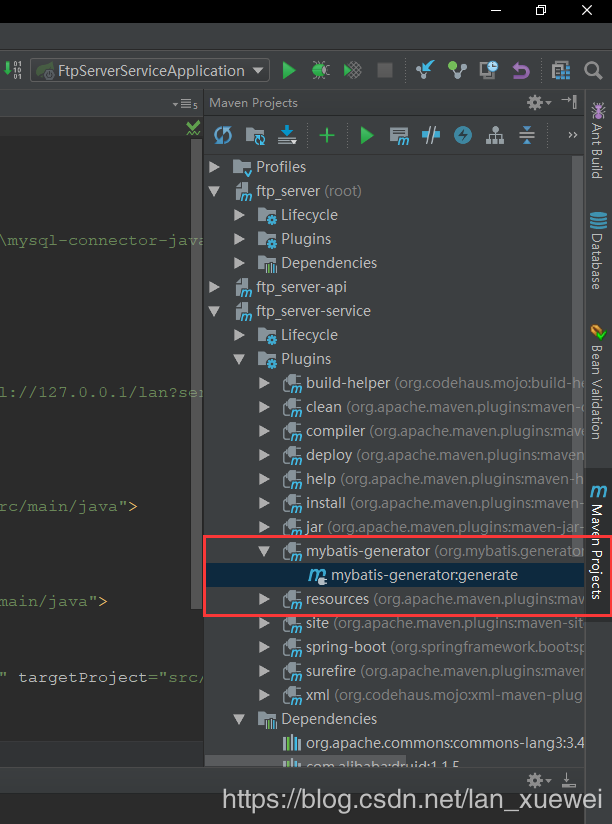
4、查看entity以及mapper,大功告成
此内容由惯性聚合(RSS阅读器)自动聚合整理,仅供阅读参考。 原文来自 — 版权归原作者所有。