

惯性聚合 高效追踪和阅读你感兴趣的博客、新闻、科技资讯
阅读原文 在惯性聚合中打开

推荐订阅源

Project Zero
Project Zero
Martin Fowler
Martin Fowler
人人都是产品经理
人人都是产品经理
C
Check Point Blog
S
SegmentFault 最新的问题
腾讯CDC
IT之家
IT之家
Jina AI
Jina AI
OSCHINA 社区最新新闻
OSCHINA 社区最新新闻
B
Blog RSS Feed
博客园 - Franky
V
Visual Studio Blog
The Register - Security
GbyAI
GbyAI
博客园 - 【当耐特】
Hugging Face - Blog
Hugging Face - Blog
U
Unit 42
Google DeepMind News
Microsoft Security Blog
Y
Y Combinator Blog
云风的 BLOG
云风的 BLOG
博客园 - 三生石上(FineUI控件)
Schneier on Security
N
News and Events Feed by Topic
T
Troy Hunt's Blog
小众软件
小众软件
Scott Helme
Scott Helme
Threat Intelligence Blog | Flashpoint
TaoSecurity Blog
TaoSecurity Blog
Security Archives - TechRepublic
C
CERT Recently Published Vulnerability Notes
aimingoo的专栏
aimingoo的专栏
T
The Exploit Database - CXSecurity.com
Know Your Adversary
Know Your Adversary
G
GRAHAM CLULEY
T
Tenable Blog
P
Palo Alto Networks Blog
cs.CV updates on arXiv.org
S
Schneier on Security
Simon Willison's Weblog
H
Help Net Security
WordPress大学
WordPress大学
The Cloudflare Blog
cs.AI updates on arXiv.org
MongoDB | Blog
MongoDB | Blog
Forbes - Security
Forbes - Security
H
Hackread – Cybersecurity News, Data Breaches, AI and More
W
WeLiveSecurity
I
InfoQ
P
Privacy International News Feed

博客园 - 陈大欠

andrej karpathy skills 从 Harness Engineering 到 superpowers 从 Harness Engineering 到 OpenSpec 从 Harness Engineering 到 Trellis Harness Engineering Claude Code Hooks 配置说明 Scoop Claude-LED MagicCenterHub Windows Terminal & PowerShell 玩转 Visual Studio 外部工具 WCF API 语义搜索工具 Step Builder:让对象构建有顺序、有边界、有校验 基于 Attribute 的 AOP 字段校验 浅析 .NET 响应式编程 IObservable与ReactiveX Cron表达式简明教程 正则表达式拾遗 快速批量升级 NugetPackage 版本 C# IEquatable和IEqualityComparer 最佳实践 使用XDT提高开发效率 如何保证XML正确性 分析 Dump 入门简明教程 Git commit emoji 对照表 ELK Stack 笔记 HTML5/CSS3(PrefixFree.js) 3D文字特效 Jquery实现图片上下一张 js css 构建滚动边框 使用jquery构建Metro style 返回顶部 使用js实现移动设备访问跳转到指定目录 从一幅图中了解开源世界 Jquery ajax 学习笔记 工欲善其事必先利其器系列之:在VS里面折叠js代码
copilot-api:让 ClaudeCode 接入 Github Copilot
陈大欠 · 2026-07-18 · via 博客园 - 陈大欠

copilot-api

Claude Code 只接受 Anthropic API 格式,而 GitHub Copilot 提供的是 OpenAI 格式

目前已经有很多工具实现了这个转换,比如:
Aider:原生支持 GitHub Copilot
Cline:VS Code 插件,通过 VSCode 内置功能同样支持。

copilot-api 这个工具的厉害之处在于:
双格式支持:同时提供 OpenAIAnthropic 兼容的 API 端点
Claude Code 专用优化:专门为 Claude Code 做了适配
https://github.com/ericc-ch/copilot-api

hiwor  ~  18:14:38  1.228s  0   hiwor  ~  18:46:51  0s  0 
❯  copilot-api start
[18:49:50] ℹ Using VSCode version: 1.115.0
[18:49:51] ℹ Logged in as muxiang
[18:49:53] ℹ Available models:
- claude-opus-4.7
- claude-sonnet-4.6
- gemini-3.1-pro-preview
- gpt-5.2-codex
- gpt-5.3-codex
- gpt-5.4-mini
- gpt-5.4

- gpt-4-o-preview
- text-embedding-ada-002

 ╭────────────────────────────────────────────────────────────────────────────────────────────────╮
 │                                                                                                │
│   Usage Viewer: https://ericc-ch.github.io/copilot-api?endpoint=http://localhost:4141/usage  │
 │                                                                                                │
 ╰────────────────────────────────────────────────────────────────────────────────────────────────╯

➜ Listening on: http://localhost:4141/ (all interfaces)
<-- POST /v1/messages?beta=true
--> POST /v1/messages?beta=true 200 3s
--> POST /v1/messages?beta=true 200 4s

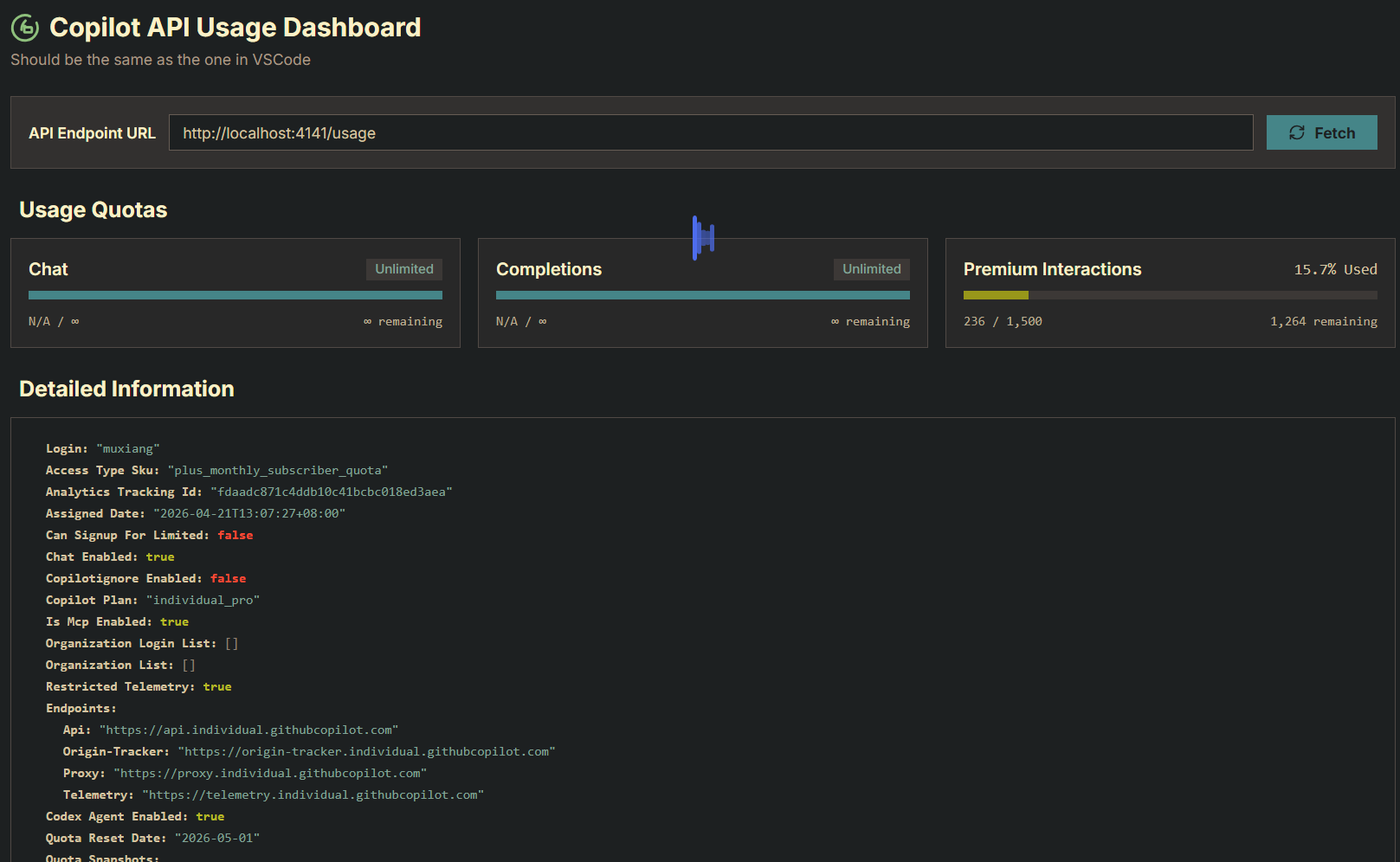
通过 localhost:4141/usage 可以查看服务状态
peROaGT.png

Claude 配置


{
    "env": {
        "ANTHROPIC_AUTH_TOKEN": "dummy",
        "ANTHROPIC_BASE_URL": "http://localhost:4141",
        "ANTHROPIC_DEFAULT_HAIKU_MODEL": "claude-haiku-4.5",
        "ANTHROPIC_DEFAULT_OPUS_MODEL": "claude-opus-4.7",
        "ANTHROPIC_DEFAULT_SONNET_MODEL": "claude-sonnet-4.6",
        "ANTHROPIC_MODEL": "claude-opus-4.7",
        "ANTHROPIC_REASONING_MODEL": "claude-opus-4.7",
        "CLAUDE_CODE_DISABLE_NONESSENTIAL_TRAFFIC": "1",
        "DISABLE_NON_ESSENTIAL_MODEL_CALLS": "1"
    }
} 

enjoy using (*´・ω・`)⊃