惯性聚合 高效追踪和阅读你感兴趣的博客、新闻、科技资讯
阅读原文 在惯性聚合中打开

推荐订阅源

美团技术团队
W
WeLiveSecurity
Stack Overflow Blog
Stack Overflow Blog
L
LangChain Blog
S
SegmentFault 最新的问题
Apple Machine Learning Research
Google DeepMind News
F
Full Disclosure
奇客Solidot–传递最新科技情报
奇客Solidot–传递最新科技情报
The Register - Security
G
Google Developers Blog
C
Check Point Blog
GbyAI
GbyAI
A
About on SuperTechFans
V
Vulnerabilities – Threatpost
T
The Blog of Author Tim Ferriss
T
Tor Project blog
AWS News Blog
AWS News Blog
Cyberwarzone
Cyberwarzone
C
CERT Recently Published Vulnerability Notes
MongoDB | Blog
MongoDB | Blog
Latest news
Latest news
aimingoo的专栏
aimingoo的专栏
U
Unit 42
Y
Y Combinator Blog
P
Privacy International News Feed
Cisco Talos Blog
Cisco Talos Blog
S
Securelist
S
Schneier on Security
雷峰网
雷峰网
cs.CV updates on arXiv.org
Attack and Defense Labs
P
Proofpoint News Feed
C
Cisco Blogs
Webroot Blog
Webroot Blog
T
Troy Hunt's Blog
Google Online Security Blog
月光博客
月光博客
P
Privacy & Cybersecurity Law Blog
Security Archives - TechRepublic
罗磊的独立博客
Cloudbric
Cloudbric
钛媒体:引领未来商业与生活新知
钛媒体:引领未来商业与生活新知
Recent Commits to openclaw:main
Application and Cybersecurity Blog
Hacker News: Ask HN
Hacker News: Ask HN
H
Hackread – Cybersecurity News, Data Breaches, AI and More
博客园 - 司徒正美
freeCodeCamp Programming Tutorials: Python, JavaScript, Git & More
Microsoft Security Blog

博客园 - 琴声清幽

花胶冻奶 重装win10,带ufi启动,并且配置java的开发环境,配置gitee,配置mvn,配置jdk11 “木香槟榔”经典药对的配伍与应用 炖汤 汽车站--行车图 汽锅鸡--原味 汽锅鸡 宽带汤 散滞气汤的用法和主要对症 空服力,食物的属性 胡萝卜苹果汁,生姜红茶 通达信配色 vivo手机查找 windows聚焦的照片位置 足穴位 笔记大全 股票情绪炒股参考 趋势抄底的劲头,看RGBAND 衣服的尺码 追击反转,华宝pc的特色指标。 巴菲特的2025大会语录
安装mkcert的ip证书
琴声清幽 · 2025-08-12 · via 博客园 - 琴声清幽

安装,过程有些慢,需要等待,开始显示0速率。好长时间一直显示0速率。

$ curl -JLO "https://dl.filippo.io/mkcert/latest?for=linux/amd64"
$ chmod +x mkcert-v*-linux-amd64
$ sudo cp mkcert-v*-linux-amd64 /usr/local/bin/mkcert

将 CA 证书加入本地可信 CA

创建证书

mkcert localhost 127.0.0.1 ::1 192.168.7.40

Created a new certificate valid for the following names 📜
- "localhost"
- "127.0.0.1"
- "::1"
- "192.168.7.40"

The certificate is at "./localhost+3.pem" and the key at "./localhost+3-key.pem" ✅

查看证书的颁发机构

mkcert -CAROOT

/root/.local/share/mkcert

客户机导入证书

可以看到 CA 路径下有两个文件rootCA-key.pemrootCA.pem两个文件,用户需要信任rootCA.pem这个文件。将rootCA.pem拷贝一个副本,并命名为rootCA.crt(因为 windows 并不识别pem扩展名,并且 Ubuntu 也不会将pem扩展名作为 CA 证书文件对待),将rootCA.crt文件分发给其他用户,手工导入。

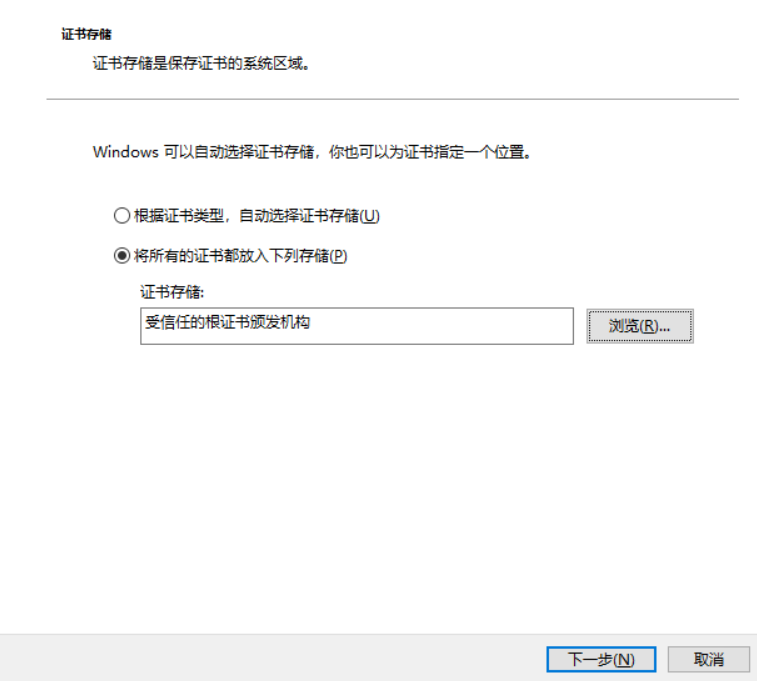
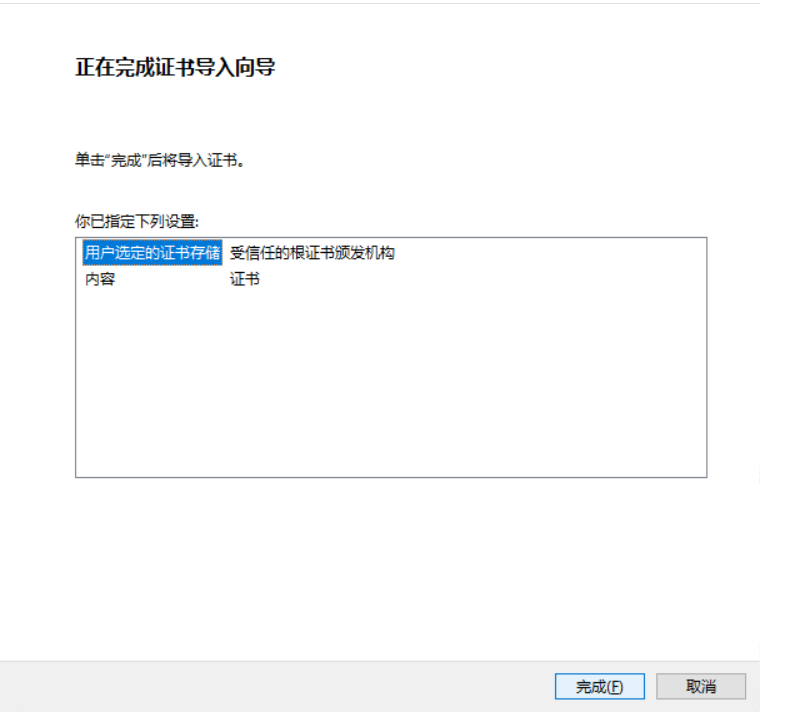
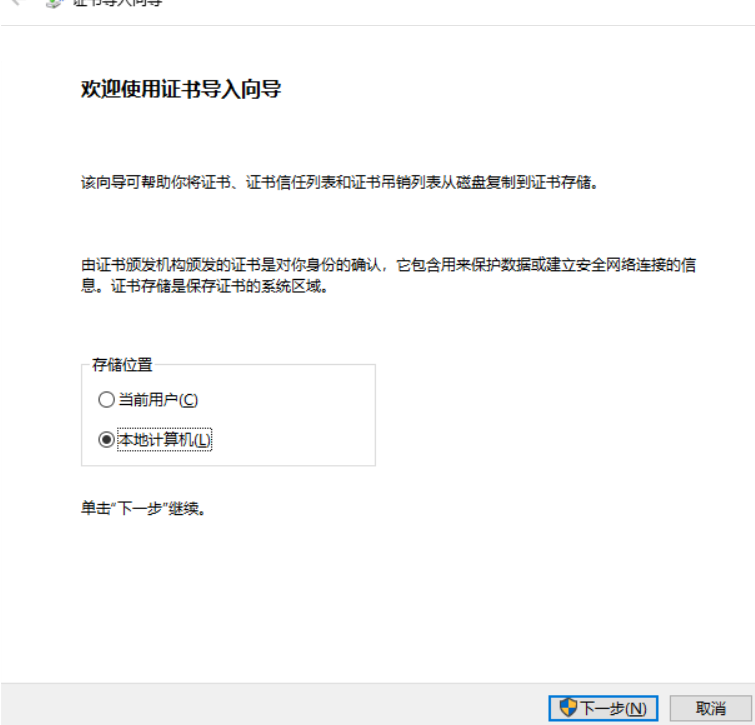
windows 导入证书的方法是双击这个文件,在证书导入向导中将证书导入“受信任的根证书颁发机构”:
image

image

image

导入后验证:

curl -I https://192.168.7.40
HTTP/1.0 200 OK
Server: SimpleHTTP/0.6 Python/3.6.8
Date: Tue, 09 Apr 2019 05:22:12 GMT
Content-type: text/html; charset=utf-8
Content-Length: 1794

windows验证

需要在windows客户机删除旧的证书。用户证书管理 里面

需要手动输入https的网址试一次,否则按老的来算的。依旧显示没证书或者非法证书。需要手动输入https的完整网址

如果遇到证书不匹配,检查nginx的配置文件,需要将新的pem加到conf文件中,并且更换。切记!!   

浏览器中提示的ssl为新日期的,为准