



多态反序列化是处理继承结构对象序列化的常见需求,但不同 JSON 序列化库的实现机制差异会带来显著的安全风险。微软 CA2326 规则明确警示:避免使用非安全的 JsonSerializerSettings 配置(如 Newtonsoft.Json 的 TypeNameHandling 非 None 值),否则可能引发类型注入攻击。本文将对比 Newtonsoft.Json 与 System.Text.Json 在多态反序列化中的实现差异,重点分析安全性问题,并通过代码实例验证两者的安全表现。
Newtonsoft.Json 通过 TypeNameHandling 配置项控制是否在 JSON 中嵌入类型元数据。当设置 TypeNameHandling 支持多态时,JSON 会携带 $type 字段(包含类型的完全限定名和程序集信息),反序列化时直接根据该字段实例化对应类型。这种设计虽然灵活支持多态,但缺乏默认的类型校验机制,攻击者可构造包含恶意类型的 JSON,触发敏感类型实例化。
System.Text.Json 默认不支持多态反序列化,需通过 [JsonDerivedType] 特性或 DerivedTypes 显式声明允许的派生类型。反序列化时仅处理配置过的类型,拒绝未授权的类型注入,从机制上规避了安全风险。
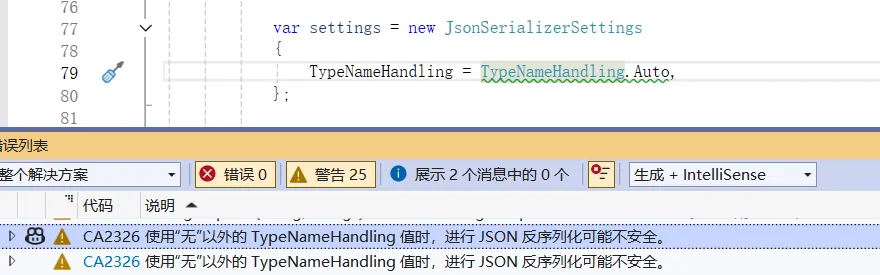
CA2326 规则的核心是禁止使用 TypeNameHandling 非 None 值的配置 —— 攻击者可利用 $type 字段构造恶意 JSON,实例化如 ProcessStartInfo(执行系统命令)、FileStream(读写文件)等敏感类型,引发远程代码执行或数据泄露。
using Newtonsoft.Json;
using Newtonsoft.Json.Serialization;
using System.Diagnostics;
using System.Text.Json;
using System.Text.Json.Serialization;
using System.Text.Json.Serialization.Metadata;

namespace NewtonsoftSecurityDemo
{
    [JsonPolymorphic(TypeDiscriminatorPropertyName = "CustomerType")]
    [JsonDerivedType(typeof(PaymentCompletedEvent), "PaymentCompletedEvent")]
    [JsonDerivedType(typeof(OrderCreatedEvent), "OrderCreatedEvent")]
    public class TransactionEvent
    {
        public string EventId { get; set; } = Guid.NewGuid().ToString();

        public DateTime EventTime { get; set; } = DateTime.Now;

        public string OrderId { get; set; }

        // 业务扩展字段(攻击者利用的入口)
        public object ExtData { get; set; }
    }

    public class PaymentCompletedEvent : TransactionEvent
    {
        public decimal Amount { get; set; }
        public string PaymentMethod { get; set; }
    }

    public class OrderCreatedEvent : TransactionEvent
    {
        public string UserId { get; set; }
        public int ItemCount { get; set; }
    }


    // Newtonsoft.Json 安全绑定器(演示白名单校验)
    public class EventSerializationBinder : ISerializationBinder
    {
        // 仅允许的安全类型白名单
        private readonly HashSet<string> _allowedTypes = new()
        {
            "NewtonsoftSecurityDemo.PaymentCompletedEvent",
            "NewtonsoftSecurityDemo.OrderCreatedEvent",
            //"System.Diagnostics.ProcessStartInfo"
        };

        public Type BindToType(string assemblyName, string typeName)
        {
            // 仅允许白名单内的类型
            if (!_allowedTypes.Contains(typeName))
            {
                throw new NotSupportedException($"禁止反序列化未授权类型:{typeName}");
            }
            return Type.GetType($"{typeName}, {assemblyName}") ?? typeof(TransactionEvent);
        }

        public void BindToName(Type serializedType, out string? assemblyName, out string? typeName)
        {
            assemblyName = serializedType.Assembly.FullName;
            typeName = serializedType.FullName;
        }
    }

    class Program
    {
        static void Main(string[] args)
        {
            Console.WriteLine("=== Newtonsoft.Json 命令执行攻击演示 ===");
            Newtonsoft_Attack_ProcessStartInfo();

            Console.WriteLine("\n=== Newtonsoft.Json 文件读取攻击演示 ===");
            Newtonsoft_Attack_FileStream();

            Console.WriteLine("\n=== Newtonsoft.Json 启用 SerializationBinder:安全防护演示 ===");
            Newtonsoft_Secure_WithBinder();

            Console.WriteLine("\n=== System.Text.Json 安全防护演示 ===");
            SystemTextJson_Defense();

            Console.ReadKey();
        }

        /// <summary>
        /// 模拟:注入ProcessStartInfo执行系统命令
        /// </summary>
        static void Newtonsoft_Attack_ProcessStartInfo()
        {
            string maliciousCallbackJson = @$"
                {{
                    ""$type"": ""NewtonsoftSecurityDemo.PaymentCompletedEvent, NewtonsoftSecurityDemo"",
                    ""EventId"": ""{Guid.NewGuid()}"",
                    ""OrderId"": ""ORD_{new Random().Next(1000, 9999)}"",
                    ""Amount"": 999.00,
                    ""PaymentMethod"": ""Alipay"",
                    ""ExtData"": {{
                        ""$type"": ""System.Diagnostics.ProcessStartInfo,System.Diagnostics.Process"",
                        ""FileName"": ""cmd.exe"",
                        ""Arguments"": ""/c echo 'some scripts' > C:\\temp\\attack_log.txt && echo 'doing' >> C:\\temp\\attack_log.txt"",
                        ""UseShellExecute"": true
                    }}
                }}";

            var settings = new JsonSerializerSettings
            {
                TypeNameHandling = TypeNameHandling.Auto,
            };

            var eventData = Newtonsoft.Json.JsonConvert.DeserializeObject<TransactionEvent>(maliciousCallbackJson, settings);
            Console.WriteLine($"处理订单事件:{eventData.OrderId}");

            if (eventData.ExtData is ProcessStartInfo psi)
            {
                Directory.CreateDirectory("C:\\temp");
                Process.Start(psi);
                Console.WriteLine($"  [攻击成功] 执行命令:{psi.Arguments}");
                Console.WriteLine($"  [攻击结果] 生成文件:C:\\temp\\attack_log.txt 文件内容:");
                if (File.Exists("C:\\temp\\attack_log.txt"))
                {
                    string content = File.ReadAllText("C:\\temp\\attack_log.txt");
                    Console.WriteLine($"{content}");
                }
            }
        }

        /// <summary>
        /// 模拟:注入FileInfo读取敏感文件
        /// </summary>
        static void Newtonsoft_Attack_FileStream()
        {
            string targetFile = Path.Combine(Environment.GetFolderPath(Environment.SpecialFolder.Desktop), "appsettings.json");
            if (!File.Exists(targetFile))
            {
                File.WriteAllText(targetFile, "ConnectionString: 123456");
            }

            string maliciousExportJson = @$"
                {{
                    ""$type"": ""NewtonsoftSecurityDemo.OrderCreatedEvent, NewtonsoftSecurityDemo"",
                    ""OrderId"": ""ORD_{new Random().Next(1000, 9999)}"",
                    ""UserId"": ""user_{new Random().Next(100, 999)}"",
                    ""ExtData"": {{
                        ""$type"": ""System.IO.FileInfo"",
                        ""FileName"": ""{targetFile.Replace("\\", "\\\\")}""
                    }}
                }}";

            var settings = new JsonSerializerSettings
            {
                TypeNameHandling = TypeNameHandling.Auto
            };

            var eventData = Newtonsoft.Json.JsonConvert.DeserializeObject<TransactionEvent>(maliciousExportJson, settings);
            Console.WriteLine($"处理订单导出:{eventData.OrderId}");

            // 通过FileInfo读取文件内容(模拟攻击逻辑)
            if (eventData.ExtData is FileInfo fileInfo)
            {
                using (var sr = new StreamReader(fileInfo.OpenRead()))
                {
                    string sensitiveContent = sr.ReadToEnd();
                    Console.WriteLine($"  [攻击成功] 读取敏感文件内容:\n{sensitiveContent}");
                }
            }
        }

        /// <summary>
        /// Newtonsoft.Json 启用SerializationBinder:拦截恶意类型
        /// </summary>
        static void Newtonsoft_Secure_WithBinder()
        {
            string maliciousCallbackJson = @$"
                {{
                    ""$type"": ""NewtonsoftSecurityDemo.PaymentCompletedEvent, NewtonsoftSecurityDemo"",
                    ""EventId"": ""{Guid.NewGuid()}"",
                    ""OrderId"": ""ORD_{new Random().Next(1000, 9999)}"",
                    ""Amount"": 999.00,
                    ""PaymentMethod"": ""Alipay"",
                    ""ExtData"": {{
                        ""$type"": ""System.Diagnostics.ProcessStartInfo,System.Diagnostics.Process"",
                        ""FileName"": ""cmd.exe"",
                        ""Arguments"": ""/c echo 'some scripts' > C:\\temp\\attack_log.txt && echo 'doing' >> C:\\temp\\attack_log.txt"",
                        ""UseShellExecute"": true
                    }}
                }}";

            var settings = new JsonSerializerSettings
            {
                TypeNameHandling = TypeNameHandling.Auto,
                SerializationBinder = new EventSerializationBinder() // 启用白名单校验
            };

            try
            {
                var eventData = Newtonsoft.Json.JsonConvert.DeserializeObject<TransactionEvent>(maliciousCallbackJson, settings);
                if (eventData.ExtData is ProcessStartInfo)
                {
                    Console.WriteLine("  [防护失效] 恶意类型未被拦截(异常)");
                }
            }
            catch (Exception ex)
            {
                Console.WriteLine($"  [防护成功] 拦截未授权类型:{ex.Message}");
            }
        }

        /// <summary>
        /// System.Text.Json 安全防护验证
        /// </summary>
        static void SystemTextJson_Defense()
        {
            string maliciousCallbackJson = @$"
                {{
                    ""CustomerType"": ""PaymentCompletedEvent"",
                    ""EventId"": ""{Guid.NewGuid()}"",
                    ""OrderId"": ""ORD_{new Random().Next(1000, 9999)}"",
                    ""Amount"": 999.00,
                    ""PaymentMethod"": ""Alipay"",
                    ""ExtData"": {{
                        ""$type"": ""System.Diagnostics.ProcessStartInfo,System.Diagnostics.Process"",
                        ""FileName"": ""cmd.exe"",
                        ""Arguments"": ""/c echo 'some scripts' > C:\\temp\\attack_log.txt && echo 'doing' >> C:\\temp\\attack_log.txt"",
                        ""UseShellExecute"": true
                    }}
                }}";

            var eventData = System.Text.Json.JsonSerializer.Deserialize<TransactionEvent>(maliciousCallbackJson);

            Console.WriteLine($"  主对象类型:{eventData.GetType().FullName}");
            Console.WriteLine($"  ExtData 实际类型:{eventData.ExtData.GetType().FullName}");

            if (eventData.ExtData is JsonElement)
            {
                Console.WriteLine("  [防护成功] 恶意类型ProcessStartInfo被拦截,ExtData仅保留原始JSON结构,未反序列化为恶意对象");
            }
            else if (eventData.ExtData is ProcessStartInfo)
            {
                Console.WriteLine("  [防护失效] 恶意类型解析成功");
            }
            else
            {
                Console.WriteLine($"  [正常业务] 解析到合法类型:{eventData.ExtData.GetType().FullName}");
            }

            Console.WriteLine("\n尝试转换ExtData为ProcessStartInfo:");
            try
            {
                var psi = (ProcessStartInfo)eventData.ExtData;
                Console.WriteLine("  [防护失效] 恶意类型解析成功");
            }
            catch (InvalidCastException ex)
            {
                Console.WriteLine($"  [防护成功] 强制转换失败,原因:{ex.Message}");
            }
        }
    }
}
运行结果为:
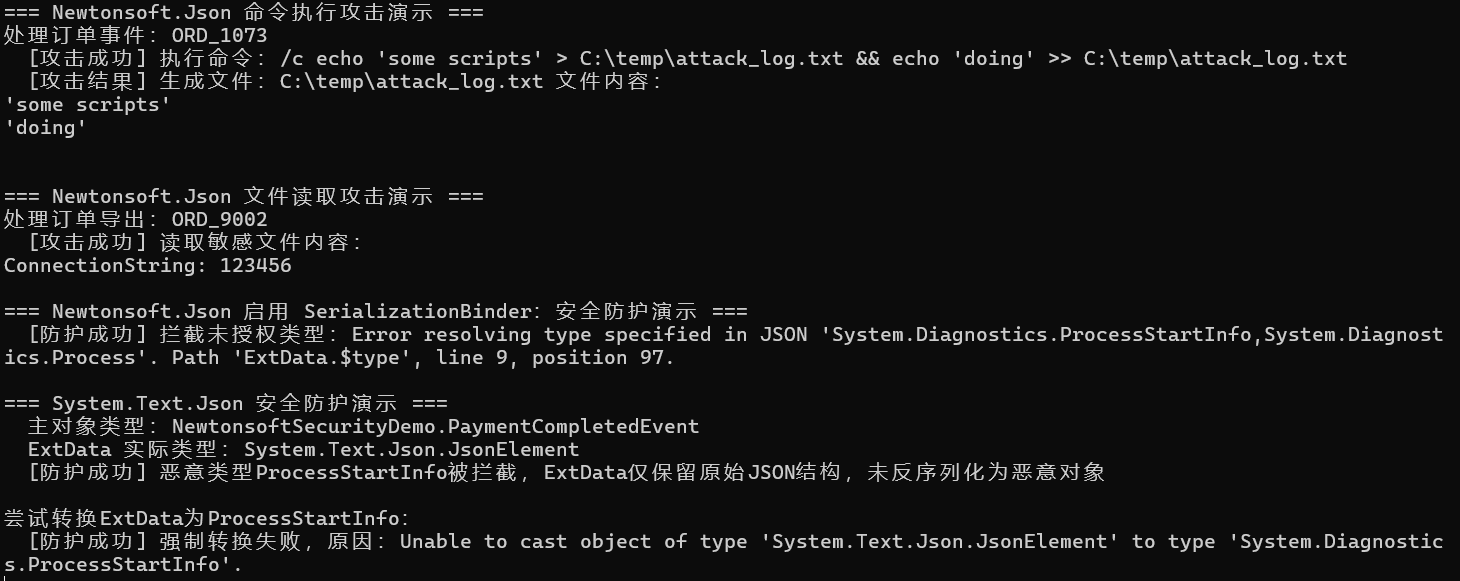
通过 Demo 可以发现:
- Newtonsoft 无防护时攻击成功;
- Newtonsoft 启用 SerializationBinder 后拦截了恶意类型;
- System.Text.Json 始终拦截恶意类型,ExtData 为 JsonElement,无法转换为 ProcessStartInfo。
先看代码:
public class EventSerializationBinder : ISerializationBinder
{
    // 仅允许的安全类型白名单
    private readonly HashSet<string> _allowedTypes = new()
    {
        "NewtonsoftSecurityDemo.PaymentCompletedEvent",
        "NewtonsoftSecurityDemo.OrderCreatedEvent",
        //"System.Diagnostics.ProcessStartInfo"
    };

    public Type BindToType(string assemblyName, string typeName)
    {
        // 仅允许白名单内的类型
        if (!_allowedTypes.Contains(typeName))
        {
            throw new NotSupportedException($"禁止反序列化未授权类型:{typeName}");
        }
        return Type.GetType($"{typeName}, {assemblyName}") ?? typeof(TransactionEvent);
    }

    public void BindToName(Type serializedType, out string? assemblyName, out string? typeName)
    {
        assemblyName = serializedType.Assembly.FullName;
        typeName = serializedType.FullName;
    }
}
SerializationBinder 的核心作用是:接管从 JSON 中的 $type 字符串 到实际 Type 类型的映射过程,强制校验类型合法性。简单说:
- 无 SerializationBinder:反序列化器会无条件反射创建 $type 指定的任意类型,包括危险类型;
- 有 SerializationBinder:反序列化器必须经过你的自定义校验逻辑,仅允许白名单内的类型被实例化,直接阻断恶意类型的创建。
Newtonsoft.Json 的 TypeNameHandling 机制虽灵活,但易被利用触发安全漏洞;System.Text.Json 通过显式多态配置白名单的设计,规避了类型注入风险。
在实际开发中,针对多态场景,建议优先使用 System.Text.Json。若必须使用 Newtonsoft.Json,需遵循以下安全实践:
- 避免使用 TypeNameHandling 非 None 值。
- 若必须启用,需严格校验 $type 字段类型的合法性,仅允许安全类型。
我希望您喜欢这篇文章,并一如既往地感谢您阅读并与朋友和同事分享我的文章。

此内容由惯性聚合(RSS阅读器)自动聚合整理,仅供阅读参考。 原文来自 — 版权归原作者所有。