





1
I’d like to know if it’s possible to game in wayland without having to add “PROTON_ENABLE_WAYLAND=1 %command%” to every single game.
I’m aware it’s not feature complete yet, but I want to do this anyway.
Well add that to your environment, startup shell profiles or /etc/environment.
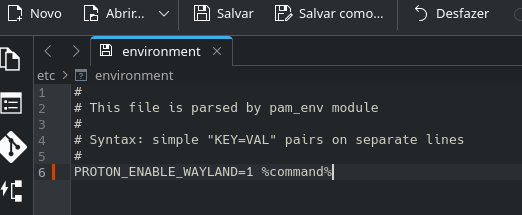
Like this?
cscs 4
No.
See the 4th line; the file only accepts KEY=VAL pairs.
Get rid of the %command% part.
Ok. thanks!
Dirge 6
The %command% part is just how you form the launch of a Steam game with your environment variables preceding it. So what you’re doing now is declaring the environment variable globally so that it doesn’t need to be used at the launch of the game.
There’s lots of different places that you can declare environment variables depending on how much you want them to encompass.
Your old method was very specific since it only covered the game that was being launched.
/etc/environment is fully global and will work for anything and everything that runs on the computer.
And for future reference there are also ways to set them per user or per desktop environment(which may just be global if you’re running a single user and/or single DE setup).
Useful stuff to look into!
Do not have a lot to add, good answers to your initial query. Here is an example of my config.
My enviroment variables look like this.
GTK_USE_PORTAL=1
GTK_THEME=Breeze-Gently
VDPAU_DRIVER=radeonsi
ELECTRON_OZONE_PLATFORM_HINT=wayland
MESA_SHADER_CACHE_MAX_SIZE=12G
PROTON_ENABLE_WAYLAND=1
I put game specific options in steam such as
mangohud game-performance %command"% or whatever else you want that is game specific. Make sure %command:% is your last option as per the cachyos-gaming wiki.
Good Luck.
if you want to set it explicit to specific proton (because some of my games outside steam, kinda weird with wayland env, so i use this instead, and use different proton for that specific games)
this is the way
for example of proton-cachy-os
/usr/share/steam/compatibilitytools.d/proton-cachyos/
just copy the user_settings_sample.py into user_settings.py, and modify accordingly
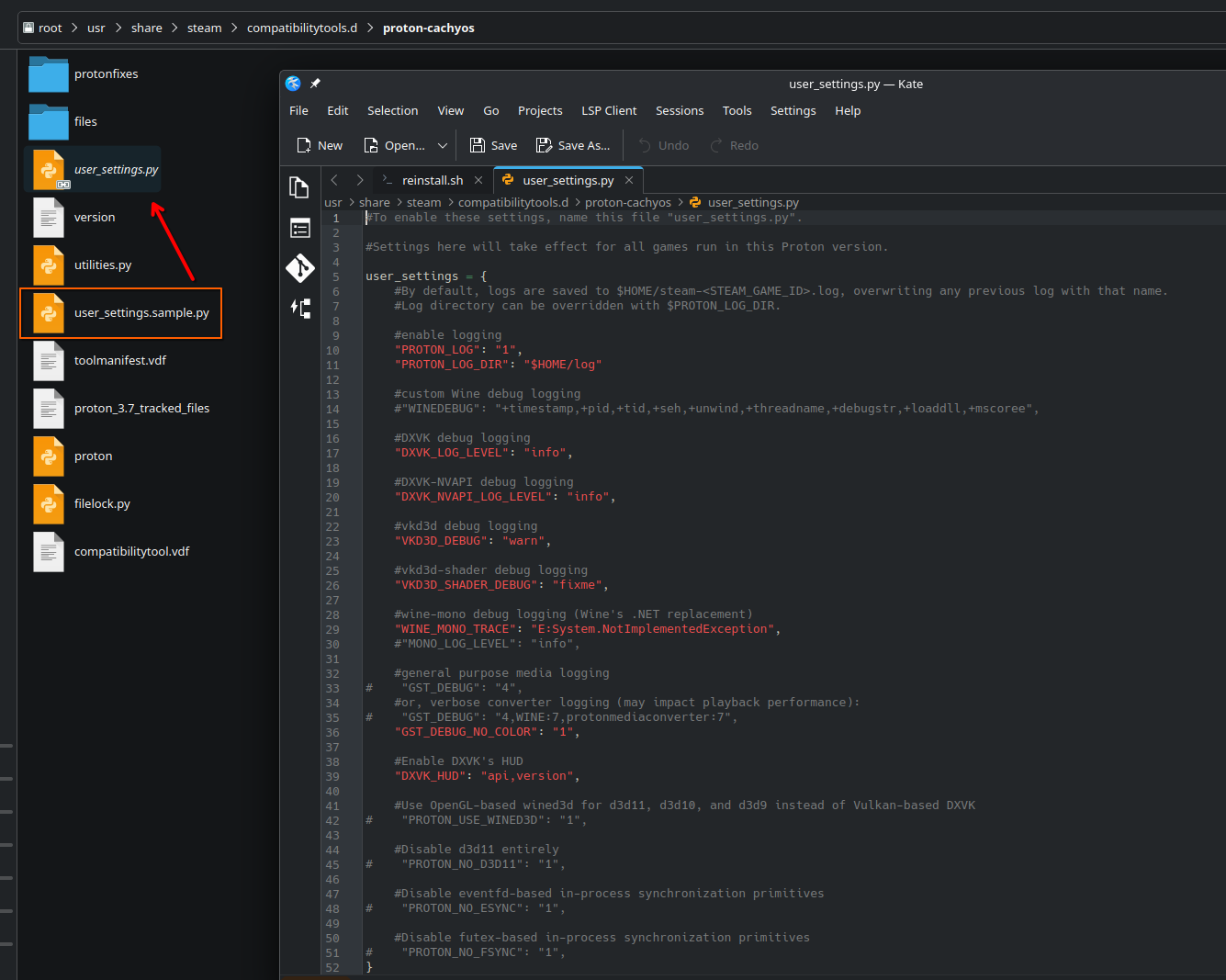
Weird, I tried to go to this path but there’s nothing.
if you want more globally, there is this way
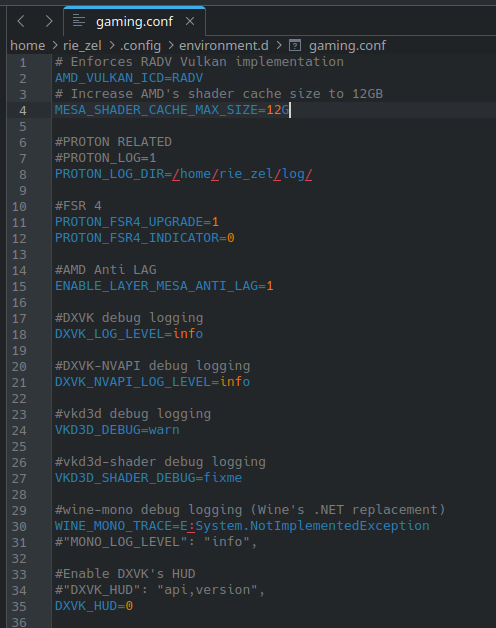
instead using systemwide (in etc)
use
.config/environment.d/[pickaname].conf
keep it clean, add them to your .profile. It should be the only place you have exports.
keep .bash_profile clean too, only use it to source the .profile and .bashrc
well you don’t have too but good housekeeping and so you know where everything is. 
And this is any good? I just tried that for Noita, and it was a disaster: it opened on the wrong screen and was semi-transparent. I managed to move it to the correct monitor, but the framerate was a joke (like 15FPS). So I disabled this variable immediately.
What good should it bring?
that’s why it’s not default yet. Still testing.
Wayland & Display

    PROTON_ENABLE_WAYLAND=1: Enable native Wayland support.
        Benefits: Allows HDR without Gamescope; improves latency/frame pacing
        Caveats: Breaks Steam Overlay, currently experimental
What does happen if the user doesn’t remove the %command% part?
That part ignored because it has a space, or the whole KEY=VAL pair doesn’t work?
cscs 15
It would at least break that one line, if not more.
mercster 16
You don’t want to set this globally. PROTON_ENABLE_WAYLAND is still experimental, and will break some games. Set it per-game by using the PROTON_ENABLE_WAYLAND=1 %command% line in preferences.
mercster 17
Also, as far as removing ‘%command%’ that wouldn’t work. You’re telling Steam what Proton command line to use. It supposes %command% at the beginning of the command line, so if you are just adding command line switches, i.e. -dx11 or -fullscreen or whatever some game might support, it is not required. But when setting environment variables BEFORE the binary name that will affect the behavior of the command, %command% must be given so Proton knows where to call the game.
i.e. if you wanted to set an environment variable AND give command line arguments, how would Steam know what’s what? You would need PROTON_ENABLE_WAYLAND=1 %command% -args-go-here. If you do not understand the difference between environment variables and command line arguments, I’m sure googling for some documentation would be useful.
I personally just switch to Valve’s Proton if the WineWayland command breaks it, like it does with Duke Nukem 3D.
Then I get to keep WineWayland for the most games that work while just needing to restart the Steam client for the few games that don’t.
I personally find this a lot better than adding the command (along with other commands) game-by-game.
cscs 19
It was necessary for the /etc/environment file or any other one defining environment variables where KEY=VAL is the only acceptable syntax.
Yes, %command% is important when changing game launch options in steam.
But it is more than superfluous in the /etc/environment file - it breaks it.