1
New to CachyOS and linux in general. I’ll list my specs and describe the issue below:
- CPU: 7800x3d
- GPU: 7900xtx
- OS: cachyOS using Wayland and installed with Lemine
- Monitors:
-
- main monitor: 1440p 240hz
- second monitor: 1080p 60hz
The issue is basically that my GPU’s vram get locked at max clock speed (2500mhz) at idle. This can be solved by either disabling the second monitor - then lowering the main monitors hz to 200 downclockes the vram to 912mhz - or by lowering the main monitor to 120hz, the vram will then also downclock to 912mhz. Note that the values are always locked to 2500mhz or 912mhz, they don’t move at all.
This issue was fixable in windows, using CRU software. By increasing the main monitors verticals blanking value, this essentially tricked the GPU and it was able to downclock the vram to a low (at idle as low as 50mhz) dynamic state. Using CRU in cachyos using WINE has had no succes.
I’ve tried googling this issue extensively. It seems like changing the blanking value in cachyos is near impossible and i’ve not found a way. I tried using chatgpt for hours and tried to load a custom EDID. I tried editing (with chatgpt instructions, this is a new installation so was okay if things went wrong)
- /etc/default/limine
- admin:///boot/limine.conf
- /etc/limine-snapper-sync.conf
- /etc/limine-entry-tool.conf
I also made a new resolution in /sys/class/drm/card1-DP-1/edid
I also edited mkinitcpio (FILES=(/lib/firmware/edid/ag276qzd.bin)
None of this worked and I’m at the end of my rope. Really liking cachy but having max vram clocks 24/7 just isn’t acceptable.
Any help would be greatly appreciated 
EDID Override (the proper Linux way to mimic CRU)
-
Dump the current EDID: cat /sys/class/drm/card1-DP-1/edid > monitor.edid (adjust card/output name; check with ls /sys/class/drm/)
-
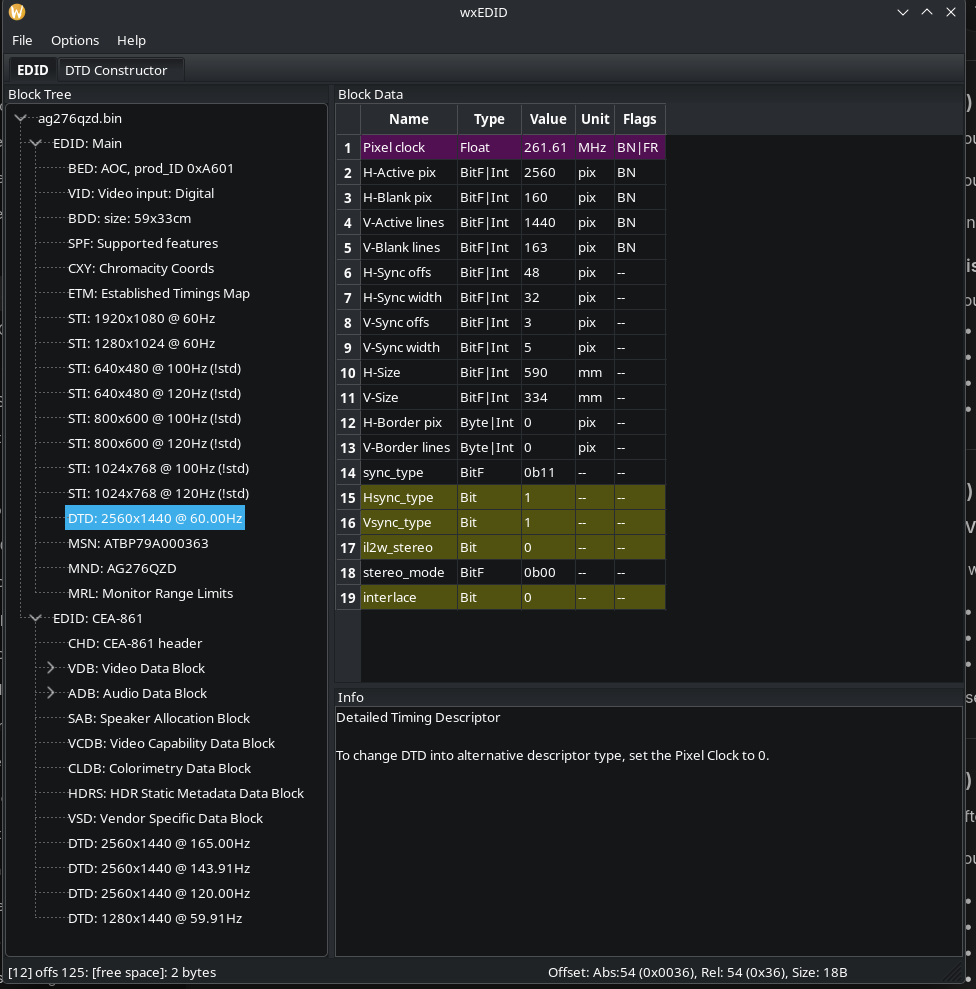
Edit it with a tool like wxEDID (or edid-decode + manual hex edit) to increase vertical blanking/porch values on the 2560x1440@240 mode (similar to what you did in Windows CRU).
-
Load the modified EDID at boot via kernel parameter: drm.edid_firmware=card1-DP-1:edid/monitor.bin (place the .bin in /lib/firmware/edid/ and update initramfs with mkinitcpio -P).
reboot and test
Also try exact timings that worked in Windows CRU (from CRU’s “detailed resolution” editor)
Gooser 3
(post deleted by author)
4
So close! I sadly don’t see the 240hz mode in wxEDID. Here a screenshot