



惯性聚合 高效追踪和阅读你感兴趣的博客、新闻、科技资讯
阅读原文 在惯性聚合中打开

推荐订阅源

L
LINUX DO - 最新话题
C
Cyber Attacks, Cyber Crime and Cyber Security
G
GRAHAM CLULEY
T
Tenable Blog
T
Threatpost
C
CXSECURITY Database RSS Feed - CXSecurity.com
I
Intezer
cs.CL updates on arXiv.org
D
Darknet – Hacking Tools, Hacker News & Cyber Security
K
Kaspersky official blog
Security Latest
Security Latest
P
Privacy & Cybersecurity Law Blog
Google Online Security Blog
SecWiki News
SecWiki News
P
Palo Alto Networks Blog
TaoSecurity Blog
TaoSecurity Blog
Webroot Blog
Webroot Blog
Spread Privacy
Spread Privacy
O
OpenAI News
The Last Watchdog
The Last Watchdog
P
Proofpoint News Feed
C
Check Point Blog
cs.CV updates on arXiv.org
人人都是产品经理
人人都是产品经理
S
Security @ Cisco Blogs
Scott Helme
Scott Helme
OSCHINA 社区最新新闻
OSCHINA 社区最新新闻
cs.AI updates on arXiv.org
月光博客
月光博客
S
Securelist
酷 壳 – CoolShell
酷 壳 – CoolShell
V
V2EX
T
Troy Hunt's Blog
W
WeLiveSecurity
GbyAI
GbyAI
N
News | PayPal Newsroom
Y
Y Combinator Blog
C
Cisco Blogs
H
Help Net Security
The GitHub Blog
The GitHub Blog
Threat Intelligence Blog | Flashpoint
博客园 - 【当耐特】
Jina AI
Jina AI
MongoDB | Blog
MongoDB | Blog
P
Proofpoint News Feed
让小产品的独立变现更简单 - ezindie.com
CTFtime.org: upcoming CTF events
云风的 BLOG
云风的 BLOG
小众软件
小众软件
N
News and Events Feed by Topic

Ubuntu blog

Tracing a memory leak bug in PID 1 and contributing an upstream fix: a Linux support story | Ubuntu MAAS installation: bare metal provisioning is easier than ever | Ubuntu Januscape vulnerability CVE-2026-53359 mitigations available | Ubuntu Managing Ubuntu on bare metal at scale Ubuntu Server: a platform made for enterprise scale | Ubuntu Building an open source chain of trust: new research uncovers key blockers and ways forward | Ubuntu Beyond safety and security: Why automotive open source demands dependability  | Ubuntu DirtyClone Linux kernel local privilege escalation vulnerability fixes available | Ubuntu pedit COW kernel local privilege escalation vulnerability mitigations | Ubuntu Canonical becomes Gold Sponsor of Trifecta Tech Foundation | Ubuntu Challenges designers face in open source (and how to fix them) | Ubuntu Hunting a 16-year-old SQLite bug with TLA+: is dqlite affected? | Ubuntu Anbox Cloud on C4A metal: Android, at scale, without friction | Ubuntu Canonical announces live kernel patching for Arm64 | Ubuntu How to use RISC-V custom instructions with Ubuntu | Ubuntu Ubuntu Summit 26.04: connected by open source | Ubuntu So you need to add microcontrollers to your fleet: now what? | Ubuntu Validating real-world skills through Canonical Academy | Ubuntu Virtualized Android comes to Anbox Cloud | Ubuntu Template: Streamlining open source design contributions | Ubuntu Beyond Mythos: responding to a new threat landscape | Ubuntu A look into Ubuntu Core 26: Building a local AI inference appliance in a virtual machine | Ubuntu A decade of Ubuntu on IBM Z and IBM LinuxONE | Ubuntu AI at the edge: simplifying infrastructure with Cisco and Canonical | Ubuntu The next era of telco clouds: get open infrastructure choice with Sylva and Canonical Kubernetes | Ubuntu What is RDMA over Converged Ethernet (RoCE)? | Ubuntu Beyond tokens per watt – using Ubuntu 26.04 LTS for AI | Ubuntu A look into Ubuntu Core 26: Deploying AI models on Renesas RZ/V series for production | Ubuntu RISC-V profiles – why is RVA23 significant? | Ubuntu AI with AMD ROCm on Ubuntu: your questions answered | Ubuntu Ubuntu and Ubuntu Pro on Azure Cobalt 200 VMs | Ubuntu What is InfiniBand? | Ubuntu How Canonical Support solves hard Linux performance bugs  – even in 12-year old code | Ubuntu Securing AI agent workflows on Ubuntu with the new NVIDIA OpenShell snap | Ubuntu Canonical announces optimized Ubuntu images for TPU virtual machines by Google Cloud | Ubuntu VMware hypervisor deployment using MAAS | Ubuntu Migrating from Apache Spark 3 to Spark 4 | Ubuntu Introducing Workshop: launch sandboxed development environments on Ubuntu with a single command | Ubuntu Run agentic workloads on Arm and Ubuntu | Ubuntu Decoding design: How design and engineering thrive together in open source | Ubuntu PinTheft Linux kernel vulnerability mitigation | Ubuntu Canonical announces fully Managed Kubeflow AI operations platform on the Microsoft Azure Marketplace | Ubuntu A look into Ubuntu Core 26: Cloud-powered edge computing with AWS IoT Greengrass and Azure IoT Edge | Ubuntu CVE-2026-46333 (ssh-keysign-pwn) Linux kernel vulnerability mitigations | Ubuntu Finding the blind spot: How Canonical hunts logic flaws with AI | Ubuntu Fragnesia Linux kernel local privilege escalation vulnerability mitigations | Ubuntu Rethinking BYOD security: protecting data without trusting devices | Ubuntu Dirty Frag Linux kernel local privilege escalation vulnerability mitigations | Ubuntu Three weeks to go: A sneak peek of the Ubuntu Summit 26.04 experience | Ubuntu How to use Ubuntu on Windows | Ubuntu Fixes available for CVE-2026-31431 (Copy Fail) Linux Kernel Local Privilege Escalation Vulnerability | Ubuntu Run NVIDIA Nemotron 3 Nano Omni locally in a single command | Ubuntu Why Web Engineering is great | Ubuntu Ubuntu 16.04 LTS has reached the end of standard Expanded Security Maintenance with Ubuntu Pro. Here are your options. | Ubuntu Understanding disaggregated GenAI model serving with llm-d | Ubuntu From Jammy to Resolute: how Ubuntu’s toolchains have evolved | Ubuntu Hybrid search and reranking: a deeper look at RAG | Ubuntu Canonical expands Ubuntu support to next-generation MediaTek Genio 520 and 720 platforms | Ubuntu Intentional leadership at Canonical | Ubuntu Ubuntu Pro comes to Nutanix bare-metal Kubernetes | Ubuntu RISC-V 101 – what is it and what does it mean for Canonical? | Ubuntu Ubuntu Summit 26.04 is coming: Save the date and share your story! | Ubuntu How to manage Ubuntu fleets using on-premises Active Directory and ADSys | Ubuntu Simplify bare metal operations for sovereign clouds | Ubuntu How to Harden Ubuntu SSH: From static keys to cloud identity | Ubuntu The “scanner report has to be green” trap | Ubuntu Modern Linux identity management: from local auth to the cloud with Ubuntu | Ubuntu Canonical welcomes NVIDIA’s donation of the GPU DRA driver to CNCF | Ubuntu Hot code burns: the supply chain case for letting your containers cool before you ship | Ubuntu
Developing web apps with local LLM inference | Ubuntu
Abdelrahman · 2026-05-21 · via Ubuntu blog

I’ve yet to meet a developer that enjoys working with metered AI APIs. The need to pay for every API call in development works in direct opposition to the ethos of rapid iteration, and it’s easy for the costs to get out of hand. That’s why Canonical has created a different approach to building AI-powered applications; one where the model lives inside your app, not behind a pay-per-token HTTP call. This post walks through the ideas behind Embedded AI – integrating local LLM inference directly into your app – and demonstrates those ideas in practice on the NVIDIA DGX Spark.

The problem with remote AI services

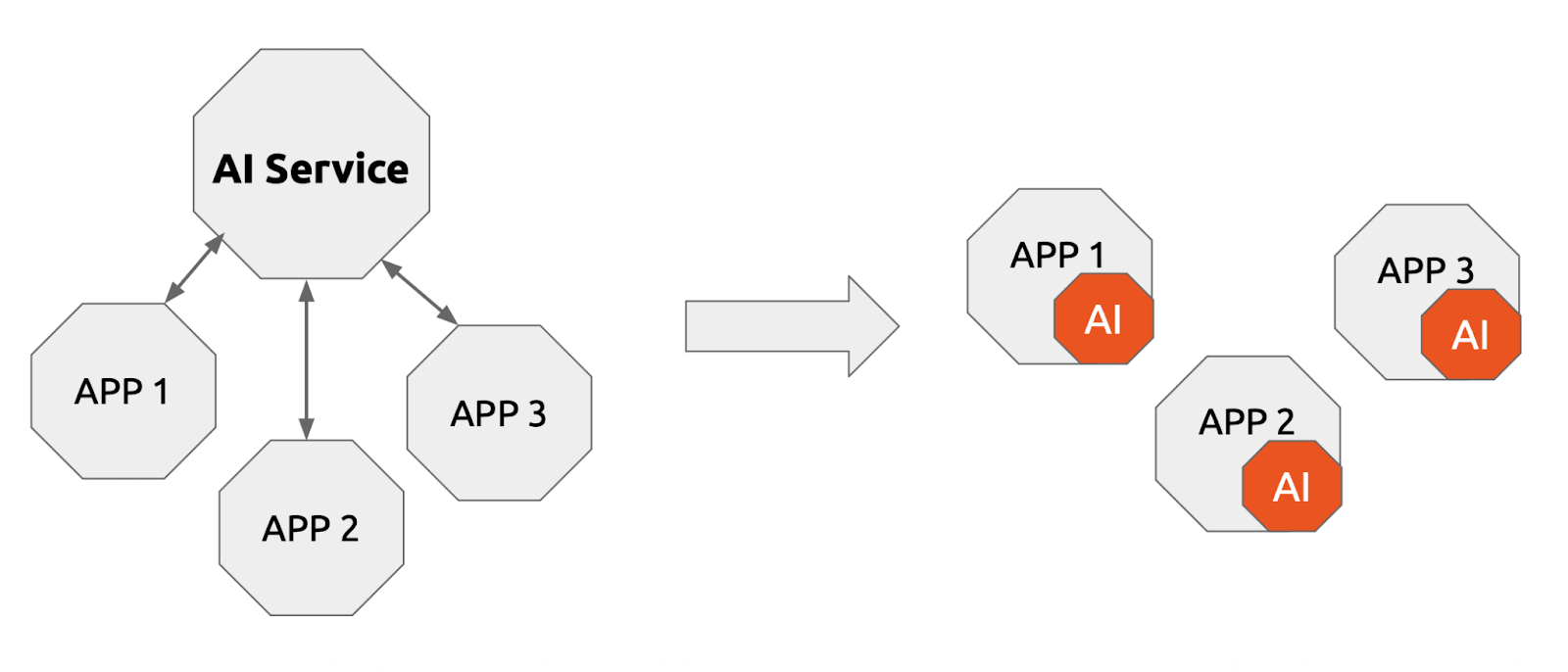
Today’s default architecture for AI-powered applications is a hub-and-spoke model: multiple applications each call out to a shared AI service (OpenAI, Anthropic, Google Gemini, etc.). That service is responsible for running inference, metering usage, enforcing rate limits, and billing you by the token.

This model solves one real problem: you do not have to manage GPU infrastructure yourself. But it introduces several others:
  1. Cost unpredictability. Every call has a marginal cost. In development, where you iterate fast and make many exploratory requests, those costs compound quickly and often surprise teams mid-sprint.
  2. Network latency. A round-trip to a remote API adds tens to hundreds of milliseconds per request. For applications that chain multiple model calls (agents, RAG pipelines, multi-step reasoning), the latency accumulates and degrades user experience.
  3. Data privacy. Sending sensitive data to a third-party service requires trust in that service’s data policies, creates compliance complexity, and may simply be prohibited in regulated industries.
  4. Dev-to-production friction. Development environments stub the API or use different credentials than production. Configuration drift, mock/real mismatches, and environment-specific behavior all stem from the fact that the “AI” in development is not the same thing as the “AI” in production.
  5. Operational complexity. Rotating API keys, managing quotas across teams, handling upstream outages, and understanding why a model behaves differently today versus last week are all problems that come bundled with remote AI services.

From AI services to local LLM inference

The idea behind Embedded AI is straightforward: treat the model and its inference runtime the way you already treat a software package as a local dependency of your application, not as a remote third-party service.

Instead of three apps all calling a shared external endpoint:

  • APP 1 ──┐
  • APP 2 ──┤──► AI Service (remote, metered, shared)
  • APP 3 ──┘

Each app packages and runs its own inference engine:

  • APP 1 + AI  (local, free at runtime, isolated)
  • APP 2 + AI  (local, free at runtime, isolated)
  • APP 3 + AI  (local, free at runtime, isolated)

This idea mirrors how organizations moved from server-side database instances to local SQLite, or from shared Redis clusters to in-process caches for appropriate workloads. The question is whether the hardware and the packaging tooling have caught up enough to make it practical.

In 2026, the answer is increasingly yes.

Inference snaps: installing AI like a package

The friction in running local LLM inference has historically been setup complexity: installing NVIDIA CUDA drivers, choosing the right quantization for your GPU’s VRAM, configuring the inference server, managing updates. Canonical’s inference snaps solve this.

An inference snap packages together:

  • The model weights in a format optimized for local hardware
  • The inference runtime (llama.cpp, vLLM, or others, selected automatically)
  • Hardware-specific optimizations (quantization level, batching strategy, inference engine selection)
  • A standard OpenAI-compatible HTTP API exposed locally
  • Dependency management and automatic updates via the Snap store

The snap’s engine manager detects your hardware at install time and selects the engine that makes best use of your CPU, GPU, or NPU. You do not choose quantization manually. You do not install CUDA toolkit by hand. You run one command:

sudo snap install gemma3

With that, you have a locally running Gemma 3 inference server exposing an OpenAI-compatible endpoint, hardware-optimized, with automatic updates. The model is immediately usable from any application that knows how to make an HTTP call.

Snaps expose a content interface mechanism that lets other snaps (your application) read the endpoint URL from a shared status.json file:

sudo snap connect demo-app:inference-snap-status gemma3:status

After this connection, your application can read exactly where the inference endpoint is listening without any configuration file or environment variable management. The snap system handles the plumbing.

The reference implementations

The embedded-ai repository contains two concrete examples, both built as snaps themselves, so they integrate cleanly with the inference snap ecosystem.

App 1: simple chat

The first example (_01_simple_chat) is deliberately minimal. It demonstrates the core pattern: a snap-packaged Python application that reads the inference endpoint from the Gemma 3 snap’s status interface and streams a chat completion to stdout.

Building and running:

# Build the snap
cd _01_simple_chat && snapcraft pack   # or: make build

# Install it
sudo snap install demo-app_*.snap --dangerous --devmode

# Connect it to the inference snap
sudo snap connect demo-app:inference-snap-status gemma3:status

# Run it
demo-app

The app streams a single chat completion using the model exposed by the inference snap. Because the inference snap exposes an OpenAI-compatible API, the Python code looks identical to code that calls api.openai.com; except the base URL points to localhost and there is no API key. The model runs on your machine. The cost of that call is electricity.

This pattern has an important architectural implication: your application code is decoupled from the specific model. Swap gemma3 for a different inference snap (say, qwen-vl or nemotron-3-nano), re-run the snap connect, and your app works against the new model with zero code changes.

App 2: PDF summarizer

The second example (_02_pdf_summarizer) shows a more realistic use case: processing a document and generating a summary using the local model.

Building and running:

# Build the snap
cd _02_pdf_summarizer && snapcraft pack   # or: make build

# Install it
sudo snap install pdf-summarizer_*.snap --dangerous --devmode

# Connect to the inference snap
sudo snap connect pdf-summarizer:inference-snap-status gemma3:status

# Summarize a PDF
pdf-summarizer /path/to/document.pdf

The app reads the PDF from disk, sends its content to the local LLM inference endpoint, and streams a concise summary to stdout. Notice what is not happening here: the PDF contents are not leaving your machine. They are not being sent to a third-party API. There is no data processing agreement to worry about, no risk of training data contamination, no latency from a WAN round-trip. The model reads your document locally and gives you an answer.

For enterprise use cases involving legal documents, medical records, financial reports, or any other sensitive material, this distinction is often the deciding factor in whether AI-powered features can be built at all.

Why package your app as a snap too?

You might wonder: why package the demo apps themselves as snaps? You could just run a Python script that calls localhost:PORT.

The answer is about distribution and dependency management. When your application is a snap:

  1. Dependencies are bundled. Your Python version, pip packages, and any native libraries are frozen in the snap. No virtualenv setup, no pip install -r requirements.txt on the target machine.
  2. The content interface works cleanly. The snap system’s connection mechanism lets your app and the inference snap share a secure, well-defined channel for discovering the endpoint URL. This is cleaner than environment variables or config files and works correctly across snap updates.
  3. Your app updates like software. Snap updates are atomic and rollback-safe. If an update breaks something, you revert with one command.
  4. You ship once, run anywhere Ubuntu runs. The same snap package that runs on your DGX Spark runs on an Ubuntu server in a data centre, on edge devices with a supported GPU, or on any Ubuntu Certified hardware.

This is the realization of the dev-to-production parity promise: you develop, test, and ship the same artifact.

When does local LLM inference make sense?

Local AI is not the right answer for every situation. It makes the most sense when:

Privacy is a hard requirement. Legal, medical, financial, or government workloads where data cannot leave the premises are natural fits.

Latency matters. Applications that call the model in a tight loop (agents, real-time assistants, streaming pipelines) benefit enormously from eliminating network round-trips.

Costs would otherwise scale with usage. Internal tools used heavily by a team, e.g. code review assistants, document summarizers, knowledge base Q&A, accumulate token costs fast. A one-time hardware investment can amortize quickly against ongoing API bills.

Dev-to-production parity is important. Teams that are tired of “works against the API in dev, behaves differently in prod” issues benefit from having the exact same model and runtime in every environment.

Offline or air-gapped environments. Manufacturing floors, research labs, field deployments, and any environment without reliable internet connectivity need local inference by necessity.

It is less suitable for workloads that genuinely need frontier model scale (where a 70B local model is not competitive with a 200B+ remote one), or for sporadic, low-volume AI use where the hardware investment does not justify itself.

Getting started

Everything described in this post is open source and documented:

Inference snaps documentation and tutorials

Inference snaps source

Reference implementations

The fastest path to running your first locally-inferred completion:

# 1. Install the model snap
sudo snap install gemma3

# 2. Clone the reference repo
git clone https://github.com/abdelrahmanhosny/embedded-ai.git
cd embedded-ai/_01_simple_chat

# 3. Build and install the demo app snap
snapcraft pack        # or: make build
sudo snap install demo-app_*.snap --dangerous --devmode

# 4. Connect the app to the inference snap
sudo snap connect demo-app:inference-snap-status gemma3:status

# 5. Run it
demo-app

That is all it takes to go from zero to a locally-running, hardware-optimized, OpenAI-compatible LLM serving your application; no API key, no monthly bill, no data leaving your machine.


The code examples in this post reference the embedded-ai repository at commit main as of May 2026. The Inference Snaps project is maintained by Canonical under an open source license.