




惯性聚合 高效追踪和阅读你感兴趣的博客、新闻、科技资讯
阅读原文 在惯性聚合中打开

推荐订阅源

Apple Machine Learning Research
Help Net Security
Help Net Security
A
About on SuperTechFans
博客园_首页
M
MIT News - Artificial intelligence
Cyber Security Advisories - MS-ISAC
量子位
F
Fortinet All Blogs
OSCHINA 社区最新新闻
OSCHINA 社区最新新闻
爱范儿
爱范儿
L
LINUX DO - 最新话题
The GitHub Blog
The GitHub Blog
Hacker News - Newest:
Hacker News - Newest: "LLM"
C
Cybersecurity and Infrastructure Security Agency CISA
N
News and Events Feed by Topic
S
Security @ Cisco Blogs
A
Arctic Wolf
V
Vulnerabilities – Threatpost
Exploit-DB.com RSS Feed
T
Tailwind CSS Blog
The Last Watchdog
The Last Watchdog
钛媒体:引领未来商业与生活新知
钛媒体:引领未来商业与生活新知
Security Latest
Security Latest
cs.CL updates on arXiv.org
H
Heimdal Security Blog
H
Hacker News: Front Page
Simon Willison's Weblog
Threat Intelligence Blog | Flashpoint
Recent Announcements
N
Netflix TechBlog - Medium
SecWiki News
SecWiki News
酷 壳 – CoolShell
酷 壳 – CoolShell
I
InfoQ
MyScale Blog
MyScale Blog
C
Cyber Attacks, Cyber Crime and Cyber Security
L
LangChain Blog
Stack Overflow Blog
Stack Overflow Blog
Vercel News
Vercel News
AI
AI
L
LINUX DO - 热门话题
G
Google Developers Blog
P
Proofpoint News Feed
腾讯CDC
Schneier on Security
美团技术团队
V
V2EX
PCI Perspectives
PCI Perspectives
L
Lohrmann on Cybersecurity
Jina AI
Jina AI
博客园 - 司徒正美

Ubuntu blog

Canonical announces the Enterprise Store as part of Ubuntu Pro | Ubuntu Tracing a memory leak bug in PID 1 and contributing an upstream fix: a Linux support story | Ubuntu MAAS installation: bare metal provisioning is easier than ever | Ubuntu Januscape vulnerability CVE-2026-53359 mitigations available | Ubuntu Managing Ubuntu on bare metal at scale Ubuntu Server: a platform made for enterprise scale | Ubuntu Building an open source chain of trust: new research uncovers key blockers and ways forward | Ubuntu Beyond safety and security: Why automotive open source demands dependability  | Ubuntu DirtyClone Linux kernel local privilege escalation vulnerability fixes available | Ubuntu pedit COW kernel local privilege escalation vulnerability mitigations | Ubuntu Canonical becomes Gold Sponsor of Trifecta Tech Foundation | Ubuntu Challenges designers face in open source (and how to fix them) | Ubuntu Hunting a 16-year-old SQLite bug with TLA+: is dqlite affected? | Ubuntu Anbox Cloud on C4A metal: Android, at scale, without friction | Ubuntu Canonical announces live kernel patching for Arm64 | Ubuntu How to use RISC-V custom instructions with Ubuntu | Ubuntu Ubuntu Summit 26.04: connected by open source | Ubuntu So you need to add microcontrollers to your fleet: now what? | Ubuntu Validating real-world skills through Canonical Academy | Ubuntu Virtualized Android comes to Anbox Cloud | Ubuntu Template: Streamlining open source design contributions | Ubuntu Beyond Mythos: responding to a new threat landscape | Ubuntu A look into Ubuntu Core 26: Building a local AI inference appliance in a virtual machine | Ubuntu A decade of Ubuntu on IBM Z and IBM LinuxONE | Ubuntu AI at the edge: simplifying infrastructure with Cisco and Canonical | Ubuntu The next era of telco clouds: get open infrastructure choice with Sylva and Canonical Kubernetes | Ubuntu What is RDMA over Converged Ethernet (RoCE)? | Ubuntu Beyond tokens per watt – using Ubuntu 26.04 LTS for AI | Ubuntu RISC-V profiles – why is RVA23 significant? | Ubuntu AI with AMD ROCm on Ubuntu: your questions answered | Ubuntu Ubuntu and Ubuntu Pro on Azure Cobalt 200 VMs | Ubuntu What is InfiniBand? | Ubuntu How Canonical Support solves hard Linux performance bugs  – even in 12-year old code | Ubuntu Securing AI agent workflows on Ubuntu with the new NVIDIA OpenShell snap | Ubuntu Canonical announces optimized Ubuntu images for TPU virtual machines by Google Cloud | Ubuntu VMware hypervisor deployment using MAAS | Ubuntu Migrating from Apache Spark 3 to Spark 4 | Ubuntu Introducing Workshop: launch sandboxed development environments on Ubuntu with a single command | Ubuntu Run agentic workloads on Arm and Ubuntu | Ubuntu Decoding design: How design and engineering thrive together in open source | Ubuntu Developing web apps with local LLM inference | Ubuntu PinTheft Linux kernel vulnerability mitigation | Ubuntu Canonical announces fully Managed Kubeflow AI operations platform on the Microsoft Azure Marketplace | Ubuntu A look into Ubuntu Core 26: Cloud-powered edge computing with AWS IoT Greengrass and Azure IoT Edge | Ubuntu CVE-2026-46333 (ssh-keysign-pwn) Linux kernel vulnerability mitigations | Ubuntu Finding the blind spot: How Canonical hunts logic flaws with AI | Ubuntu Fragnesia Linux kernel local privilege escalation vulnerability mitigations | Ubuntu Rethinking BYOD security: protecting data without trusting devices | Ubuntu Dirty Frag Linux kernel local privilege escalation vulnerability mitigations | Ubuntu Three weeks to go: A sneak peek of the Ubuntu Summit 26.04 experience | Ubuntu How to use Ubuntu on Windows | Ubuntu Fixes available for CVE-2026-31431 (Copy Fail) Linux Kernel Local Privilege Escalation Vulnerability | Ubuntu Run NVIDIA Nemotron 3 Nano Omni locally in a single command | Ubuntu Why Web Engineering is great | Ubuntu Ubuntu 16.04 LTS has reached the end of standard Expanded Security Maintenance with Ubuntu Pro. Here are your options. | Ubuntu Understanding disaggregated GenAI model serving with llm-d | Ubuntu From Jammy to Resolute: how Ubuntu’s toolchains have evolved | Ubuntu Hybrid search and reranking: a deeper look at RAG | Ubuntu Canonical expands Ubuntu support to next-generation MediaTek Genio 520 and 720 platforms | Ubuntu Intentional leadership at Canonical | Ubuntu Ubuntu Pro comes to Nutanix bare-metal Kubernetes | Ubuntu RISC-V 101 – what is it and what does it mean for Canonical? | Ubuntu Ubuntu Summit 26.04 is coming: Save the date and share your story! | Ubuntu How to manage Ubuntu fleets using on-premises Active Directory and ADSys | Ubuntu Simplify bare metal operations for sovereign clouds | Ubuntu How to Harden Ubuntu SSH: From static keys to cloud identity | Ubuntu The “scanner report has to be green” trap | Ubuntu Modern Linux identity management: from local auth to the cloud with Ubuntu | Ubuntu Canonical welcomes NVIDIA’s donation of the GPU DRA driver to CNCF | Ubuntu Hot code burns: the supply chain case for letting your containers cool before you ship | Ubuntu
A look into Ubuntu Core 26: Deploying AI models on Renesas RZ/V series for production | Ubuntu
Gabriel Agui · 2026-06-04 · via Ubuntu blog

Welcome to this blog series which explores innovative uses of Ubuntu Core. Throughout this series, Canonical’s Engineers will show what you can build with our releases, highlighting the features and tools available to you.

In this blog, Asa Mirzaieva, engineer from the Silicon Alliances team, will show you how to deploy optimised AI models on Renesas RZ/V series hardware using the Dynamically Reconfigurable Processor for AI (DRP-AI). 

Deploying AI models for edge inference on specialized MPUs is particularly useful for developers looking to balance high performance with extremely low power consumption. Coupled with Ubuntu Core’s architecture, developers have an end-to-end infrastructure for managing a secure, modular deployment.

By the end of this blog, you’ll know how to package, load, and run AI inference models on Renesas DRP-AI using snaps.

AI inference on Renesas DRP-AI

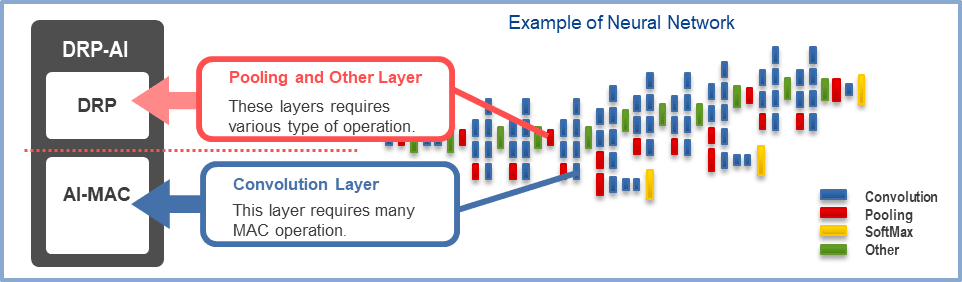
If you aren’t familiar with Renesas’ RZ/V series, the main takeaway is that these microprocessors feature a dedicated AI accelerator called DRP-AI. This dynamically reconfigurable processor accelerates the heavy lifting of neural network inference, such as feature extraction and classification, while maintaining exceptional power efficiency. To fully understand how this acceleration is achieved, we must look at how DRP-AI dynamically reconfigures its internal dataflow to match the network architecture, contrasting sharply with traditional sequential CPU processing.
Packaging and Deploying Edge AI with Ubuntu Core

In a nutshell, running AI workloads at the edge involves preparing the model, integrating it with the runtime and application, and ensuring it can be reliably deployed on target devices, as seen on the diagram below.

The diagram shows this workflow for Renesas RZ/V platforms: development and packaging are done on a host system (such as your laptop or build server running Ubuntu), while deployment targets the RZ/V device running Ubuntu Core.

On this host system, models are compiled with the DRP-AI toolchain and packaged together with the runtime and the application into a snap; this snap is then deployed to the target device as a complete AI solution
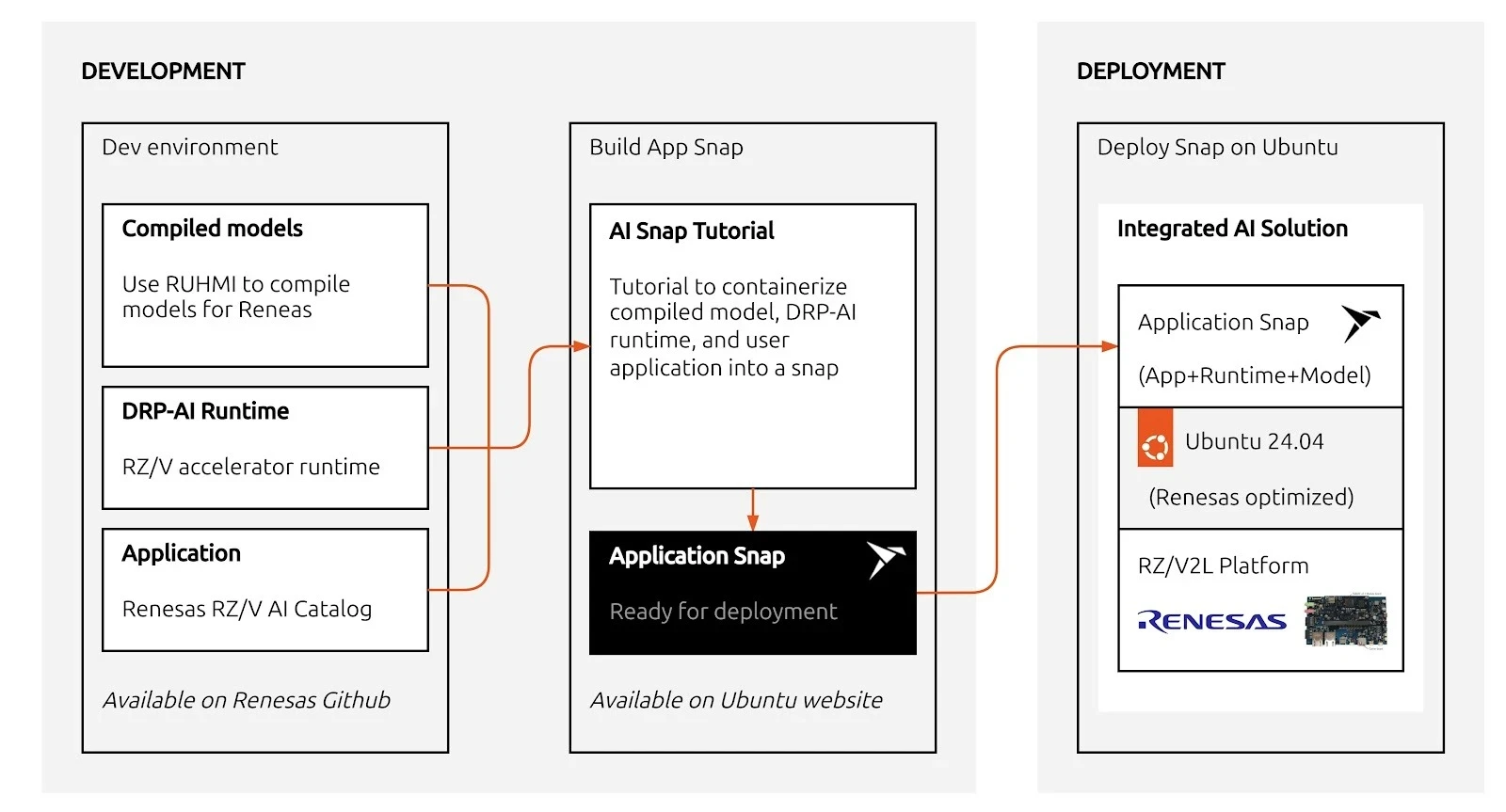
The following sections walk through each step in detail: from model compilation with DRP-AI TVM to packaging and running inference on the device.

Compiling with DRP-AI TVM

Just like other advanced AI pipelines, DRP-AI TVM requires you to compile your model (such as ONNX) to generate Runtime Model Data. The stack leverages the EdgeCortix MERA Compiler Framework to map your AI model into a highly efficient instruction set that the CPU and DRP-AI hardware can process collaboratively.

Because model compilation relies on specific SDKs and the EdgeCortix MERA Compiler Framework, this step is typically performed on a dedicated host machine (or Docker container) and is not handled by our runtime snap.

For step-by-step instructions on how to set up your environment and compile your ONNX models, please refer to the official DRP-AI TVM Compiling Tutorials provided by Renesas.

Once your model has been pruned, optimized, and compiled on your host environment, the next step is getting both the runtime binaries and the compiled model onto your board.

Packaging your AI application in a snap

To run inference securely and reliably, we package the applications into a snap. Canonical has created an example repository, rzv_drp-ai_tvm_snap, which bundles the upstream Renesas example applications so they can be easily installed and managed via snapd.

In the snap, we package three major components:

  • The DRP-AI TVM runtime library (libdrp_tvm_rt.so and its dependencies)
  • The compiled tutorial application (tutorial_app_v2ml)
  • The pre-compiled AI model data (located in the project’s models/ directory)

Thanks to Snapcraft’s advanced tooling, you can cross-compile the entire application for arm64 right from an amd64 host.

Once built, you can transfer your resulting snap to your RZ/V2L board and install it. Currently, accessing hardware interfaces relies on devmode confinement:

sudo snap install --devmode rzv-drp-ai-tvm-examples_*.snap

Under the Hood: The snapcraft.yaml File

The magic behind this secure, cross-compiled package is the snapcraft.yaml file. This single declarative file dictates how the AI application is built and packaged. Here is a simplified snippet of how it orchestrates the three major components:

name: rzv-drp-ai-tvm-examples
base: core24
confinement: devmode

apps:
  tutorial-app:
    command: usr/bin/launch-tutorial.sh

parts:
  tvm-runtime:
    plugin: nil
    source: [https://github.com/renesas-rz/rzv_drp-ai_tvm.git](https://github.com/renesas-rz/rzv_drp-ai_tvm.git)
    override-prime: |
      craftctl default
      # 1. Install runtime library
      cp -a $CRAFT_PART_SRC/obj/build_runtime/v2m/lib/* $CRAFT_PRIME/usr/lib/
      # 2. Install the compiled model
      cp -a ${CRAFT_PROJECT_DIR}/models/ $CRAFT_PRIME/usr/bin/

  tutorial-app:
    after: [tvm-runtime]
    plugin: cmake
    source: ${CRAFT_PROJECT_DIR}/../parts/tvm-runtime/src/apps
    override-prime: |
      craftctl default
      # 3. Install compiled binary
      cp -a $CRAFT_PART_BUILD/tutorial_app_v2ml $CRAFT_PRIME/usr/bin/

This configuration maps directly to the major components we discussed:

  • Component 1: The Runtime Library: Handled by the tvm-runtime part. It fetches the upstream Renesas DRP-AI TVM source code and copies the pre-built TVM runtime libraries into the snap’s runtime path.
  • Component 2: The Compiled Model: Also handled in the tvm-runtime part. The locally prepared AI model data is pulled directly from the project’s models/ folder into the snap so it’s readily available at runtime.
  • Component 3: The Tutorial Application: Handled by the tutorial-app part. It uses the cmake plugin to cross-compile the C++ tutorial application specifically for the arm64 architecture, placing the final tutorial_app_v2ml binary into the snap.

Installing the snap

Run the following command after the successful build of the snap (XXX stands for the version).

devmode is required to access the DRP-AI devices from within the snap.

sudo snap install rzv-drp-ai-tvm-examplesXXX.snap --devmode

Running the Inference Examples

After the snap is installed, running the pre-packaged application is as simple as calling the snap command.

To run the ResNet18/ResNet50 image-classification inference (assuming you’ve provided the compiled model data and input files to the board):

rzv-drp-ai-tvm-examples.tutorial-app

Make sure to use 640×480 bmp images with the default ONNX model.

That’s it! You can completely separate your AI models from your application logic and firmware, providing a modular approach to updates. When you improve your model, Ubuntu Core and the Snap Store will help you deliver these updates reliably and securely over the air.

Thanks to Ubuntu Core, you can just focus on your development and not worry about the infrastructure on how to update devices in the field or maintain system security.

What’s next?

The Renesas DRP-AI accelerator offers a tremendous advantage for edge AI devices, delivering high-speed inference without severe power penalties. Their value for deploying embedded AI devices is indisputable.

Now is your turn. Why don’t you try packaging your optimized DRP-AI models using snaps? Through this, you will see the benefits for yourself of the infrastructure to manage and deploy software at the edge. With Ubuntu Core, you can build your production image with your targeted snaps and hardware. This will empower you to easily flash devices in production lines. Plus, in your image, you can define what user experience you want to bring, keeping your model and intellectual property secure in its sandbox.