




With our latest 1.30.0 Anbox Cloud release, available today, we are introducing one of the most significant evolutions of the platform to date: support for virtualized Android.
For the first time, Anbox Cloud can launch complete Android system images inside lightweight virtual machines, managed and orchestrated through the same Anbox APIs our users already rely on.
This new capability does not replace what Anbox Cloud already does well; it expands it. Containerized Android remains a first-class citizen, and virtualized Android adds a powerful new option when full system fidelity is required.
We initially designed Anbox Cloud with containerized Android in mind because we consider that containers are an excellent fit for most cloud workloads that require fast and easy scaling. Indeed, containers are quick to start, they require fewer resources, and they work seamlessly with most orchestration systems. Today, containerized Android is still the ideal approach for large-scale Android application deployments for multiple use cases such as streaming, testing, automation, etc.
However, we’ve been seeing an increase in demand for workloads that go beyond applications and that would require full control over the Android system. Custom kernels, modified system services, vendor-specific components, or close alignment with physical devices all fall into this category. These are precisely the cases where containerization alone becomes restrictive and virtualized Android solutions, like Cuttlefish, become a better fit.
Virtualized Android fills this gap by allowing Android to run as a full system within a virtual machine (VM), while still allowing users to benefit from Anbox Cloud’s existing features like instance management, automation, and scalability.
“With virtualized Android in Anbox Cloud, developers can now run complete Android system images on cloud and bare-metal infrastructure such as Google Cloud C4A-metal.” says Cedric Gegout, Canonical VP of Products. “This gives engineering teams a new way to industrialize Android: consistent environments, repeatable pipelines, higher density, and infrastructure that can be managed like any other cloud-native workload.”
Teams using highly customized Android images can easily transition them to the cloud without sacrificing quality.
Developers using Cuttlefish-based images can now enjoy a scalable environment that fits perfectly into their CI and automation workflows. Automotive OEMs, who usually deeply modify their Android Automotive OS (AAOS) images, can test entire Android systems in a consistent, cloud-native environment.
All of this takes place within the same Anbox Cloud experience that our users enjoy: the APIs, tooling, and workflows remain consistent, regardless of how Android is executed.
This release represents a significant architectural shift.
Historically, Android in Anbox Cloud always ran as a containerized Android system. Typically, that container was hosted as an Android container running inside another container.
While this gave us flexibility at the infrastructure level, Android itself was still constrained to a container environment. With this new release, that changes.
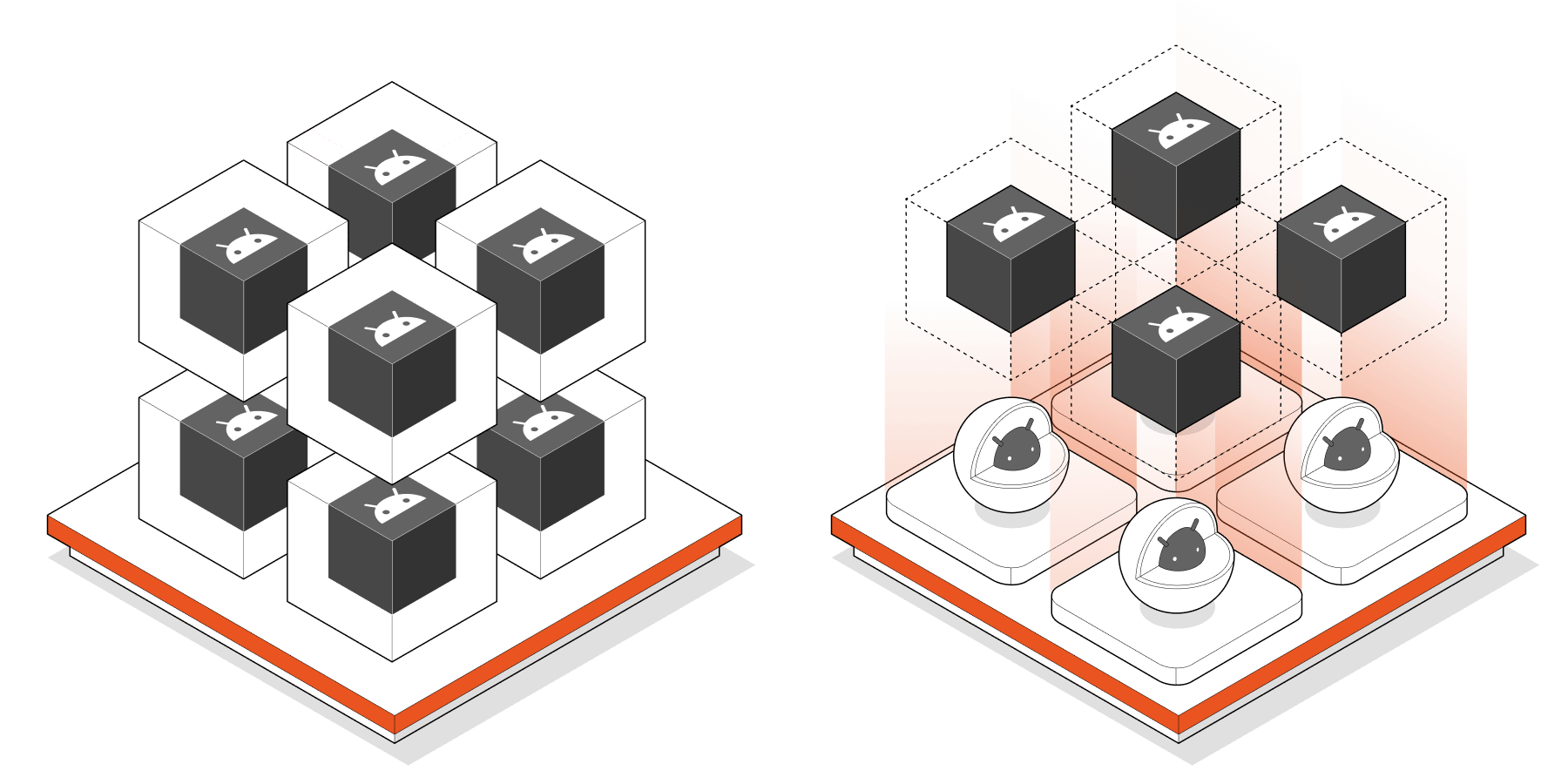
Anbox Cloud now supports two distinct Android execution models:
Representation of a key difference between virtualized Android and containerized Android
In other words, Android is no longer always containerized. When using the virtualized option, Android runs as a complete VM, with its own kernel and system environment, enabling significantly broader compatibility with custom and modified system images.
More importantly, LXD remains the foundation of everything. Whether Android is running in a container or a virtual machine, Anbox Cloud still relies on LXD for strong isolation, simple resource management, and orchestration, preserving our users’ familiar operating model.
The addition of virtualized Android is about choosing the right tool for the job.
When you require complete control over the Android system image, virtualized Android is the best choice. This includes custom Android Open Source Project (AOSP) or AAOS builds, OEM-specific images, and modified Google reference images such as Cuttlefish.
It’s ideal for system validation, device-level testing, platform development, and any workload that relies on low-level Android behavior.
When it comes to applications rather than the operating system, containerized Android is still the best option. Indeed, for Android apps, containers continue to provide superior scaling efficiency and simplicity for high-density deployments and fast startup times.
Both approaches have clear advantages, and Anbox Cloud now supports both rather than forcing users to choose between them.
This release is a major step toward our long-term vision: making Anbox Cloud the most powerful platform for running Android in the cloud, whether at the application level or at the full system level.
Containerized Android continues to deliver speed and scale, whereas virtualized Android provides compatibility and control. With both options, Anbox Cloud gives our users the freedom to select what works best for their workloads now and in the future.
If you are looking for architectural and technical details, download our latest whitepaper “From containerized Android™ to full system virtualization”.
Try it now and stay tuned for further developments in our upcoming releases. For detailed instructions on how to upgrade your existing deployment, please refer to the Anbox Cloud documentation.
Learn everything about virtualized Android with Anbox Cloud in our latest whitepaper.
If you need details to get started, go through our Anbox Cloud documentation
Learn more about Anbox Cloud or contact our team to discuss your use case
Android is a trademark of Google LLC. Anbox Cloud uses assets available through the Android Open Source Project.I’m testing testing and I don’t see the first chunk and I’m pausingFirst chunk not appearing
The Android robot is reproduced or modified from work created and shared by Google and used according to terms described in the Creative Commons 3.0 Attribution License.
此内容由惯性聚合(RSS阅读器)自动聚合整理,仅供阅读参考。 原文来自 — 版权归原作者所有。