

惯性聚合 高效追踪和阅读你感兴趣的博客、新闻、科技资讯
阅读原文 在惯性聚合中打开

推荐订阅源

小众软件
小众软件
IT之家
IT之家
钛媒体:引领未来商业与生活新知
钛媒体:引领未来商业与生活新知
Security Archives - TechRepublic
P
Proofpoint News Feed
C
CERT Recently Published Vulnerability Notes
阮一峰的网络日志
阮一峰的网络日志
OSCHINA 社区最新新闻
OSCHINA 社区最新新闻
The Cloudflare Blog
P
Palo Alto Networks Blog
Know Your Adversary
Know Your Adversary
D
Darknet – Hacking Tools, Hacker News & Cyber Security
Cisco Talos Blog
Cisco Talos Blog
L
Lohrmann on Cybersecurity
AWS News Blog
AWS News Blog
J
Java Code Geeks
博客园_首页
Scott Helme
Scott Helme
WordPress大学
WordPress大学
有赞技术团队
有赞技术团队
T
The Exploit Database - CXSecurity.com
Security Latest
Security Latest
V
Visual Studio Blog
Cloudbric
Cloudbric
Jina AI
Jina AI
K
KPMG report finds enterprise disconnect between AI and its ROI | CIO
博客园 - 叶小钗
Apple Machine Learning Research
博客园 - 聂微东
人人都是产品经理
人人都是产品经理
A
Arctic Wolf
C
Cybersecurity and Infrastructure Security Agency CISA
S
SegmentFault 最新的问题
The Last Watchdog
The Last Watchdog
SecWiki News
SecWiki News
cs.CV updates on arXiv.org
W
WeLiveSecurity
K
Kaspersky official blog
让小产品的独立变现更简单 - ezindie.com
Hacker News: Ask HN
Hacker News: Ask HN
cs.CL updates on arXiv.org
freeCodeCamp Programming Tutorials: Python, JavaScript, Git & More
宝玉的分享
宝玉的分享
Hugging Face - Blog
Hugging Face - Blog
量子位
Google Online Security Blog
博客园 - Franky
Simon Willison's Weblog
博客园 - 三生石上(FineUI控件)
Recent Commits to openclaw:main

Ubuntu blog

Tracing a memory leak bug in PID 1 and contributing an upstream fix: a Linux support story | Ubuntu MAAS installation: bare metal provisioning is easier than ever | Ubuntu Januscape vulnerability CVE-2026-53359 mitigations available | Ubuntu Managing Ubuntu on bare metal at scale Ubuntu Server: a platform made for enterprise scale | Ubuntu Building an open source chain of trust: new research uncovers key blockers and ways forward | Ubuntu Beyond safety and security: Why automotive open source demands dependability  | Ubuntu DirtyClone Linux kernel local privilege escalation vulnerability fixes available | Ubuntu pedit COW kernel local privilege escalation vulnerability mitigations | Ubuntu Canonical becomes Gold Sponsor of Trifecta Tech Foundation | Ubuntu Challenges designers face in open source (and how to fix them) | Ubuntu Hunting a 16-year-old SQLite bug with TLA+: is dqlite affected? | Ubuntu Anbox Cloud on C4A metal: Android, at scale, without friction | Ubuntu Canonical announces live kernel patching for Arm64 | Ubuntu How to use RISC-V custom instructions with Ubuntu | Ubuntu Ubuntu Summit 26.04: connected by open source | Ubuntu So you need to add microcontrollers to your fleet: now what? | Ubuntu Validating real-world skills through Canonical Academy | Ubuntu Virtualized Android comes to Anbox Cloud | Ubuntu Template: Streamlining open source design contributions | Ubuntu Beyond Mythos: responding to a new threat landscape | Ubuntu A look into Ubuntu Core 26: Building a local AI inference appliance in a virtual machine | Ubuntu A decade of Ubuntu on IBM Z and IBM LinuxONE | Ubuntu AI at the edge: simplifying infrastructure with Cisco and Canonical | Ubuntu The next era of telco clouds: get open infrastructure choice with Sylva and Canonical Kubernetes | Ubuntu What is RDMA over Converged Ethernet (RoCE)? | Ubuntu Beyond tokens per watt – using Ubuntu 26.04 LTS for AI | Ubuntu A look into Ubuntu Core 26: Deploying AI models on Renesas RZ/V series for production | Ubuntu RISC-V profiles – why is RVA23 significant? | Ubuntu AI with AMD ROCm on Ubuntu: your questions answered | Ubuntu Ubuntu and Ubuntu Pro on Azure Cobalt 200 VMs | Ubuntu What is InfiniBand? | Ubuntu How Canonical Support solves hard Linux performance bugs  – even in 12-year old code | Ubuntu Securing AI agent workflows on Ubuntu with the new NVIDIA OpenShell snap | Ubuntu Canonical announces optimized Ubuntu images for TPU virtual machines by Google Cloud | Ubuntu VMware hypervisor deployment using MAAS | Ubuntu Migrating from Apache Spark 3 to Spark 4 | Ubuntu Introducing Workshop: launch sandboxed development environments on Ubuntu with a single command | Ubuntu Run agentic workloads on Arm and Ubuntu | Ubuntu Decoding design: How design and engineering thrive together in open source | Ubuntu Developing web apps with local LLM inference | Ubuntu PinTheft Linux kernel vulnerability mitigation | Ubuntu Canonical announces fully Managed Kubeflow AI operations platform on the Microsoft Azure Marketplace | Ubuntu A look into Ubuntu Core 26: Cloud-powered edge computing with AWS IoT Greengrass and Azure IoT Edge | Ubuntu CVE-2026-46333 (ssh-keysign-pwn) Linux kernel vulnerability mitigations | Ubuntu Finding the blind spot: How Canonical hunts logic flaws with AI | Ubuntu Fragnesia Linux kernel local privilege escalation vulnerability mitigations | Ubuntu Rethinking BYOD security: protecting data without trusting devices | Ubuntu Dirty Frag Linux kernel local privilege escalation vulnerability mitigations | Ubuntu Three weeks to go: A sneak peek of the Ubuntu Summit 26.04 experience | Ubuntu How to use Ubuntu on Windows | Ubuntu Fixes available for CVE-2026-31431 (Copy Fail) Linux Kernel Local Privilege Escalation Vulnerability | Ubuntu Run NVIDIA Nemotron 3 Nano Omni locally in a single command | Ubuntu Why Web Engineering is great | Ubuntu Ubuntu 16.04 LTS has reached the end of standard Expanded Security Maintenance with Ubuntu Pro. Here are your options. | Ubuntu From Jammy to Resolute: how Ubuntu’s toolchains have evolved | Ubuntu Hybrid search and reranking: a deeper look at RAG | Ubuntu Canonical expands Ubuntu support to next-generation MediaTek Genio 520 and 720 platforms | Ubuntu Intentional leadership at Canonical | Ubuntu Ubuntu Pro comes to Nutanix bare-metal Kubernetes | Ubuntu RISC-V 101 – what is it and what does it mean for Canonical? | Ubuntu Ubuntu Summit 26.04 is coming: Save the date and share your story! | Ubuntu How to manage Ubuntu fleets using on-premises Active Directory and ADSys | Ubuntu Simplify bare metal operations for sovereign clouds | Ubuntu How to Harden Ubuntu SSH: From static keys to cloud identity | Ubuntu The “scanner report has to be green” trap | Ubuntu Modern Linux identity management: from local auth to the cloud with Ubuntu | Ubuntu Canonical welcomes NVIDIA’s donation of the GPU DRA driver to CNCF | Ubuntu Hot code burns: the supply chain case for letting your containers cool before you ship | Ubuntu
Understanding disaggregated GenAI model serving with llm-d | Ubuntu
Rob Gibbon ( · 2026-04-27 · via Ubuntu blog

What is llm-d?

llm-d is an open source solution for managing high-scale, high-performance Large Language Model (LLM) deployments. LLMs are at the heart of generative AI – so when you chat with ChatGPT or Gemini, you’re talking to an LLM.

Simple LLM deployments – where an LLM is deployed to a single server – can suffer from latency issues, even with just one user. This can be because of lack of memory-bandwidth on the server, or because of KV cache pressure on system memory. This means that you’re kept waiting for the LLM to respond to your question or instruction, which can really drag, and nobody likes to be kept waiting. 

Llm-d tries to solve this by splitting up the LLM deployment (disaggregating the deployment) and separating out different components of the architecture onto dedicated hardware. This means that the various parts of the system can be managed and scaled independently. Llm-d is a cloud-native system and uses Kubernetes as an orchestration engine for all of this, so that managing the necessary resources can be done automatically – using Kubernetes’ automation features.

Why run your own LLM service?

For some organizations, sovereignty (that is, keeping things under your own control, governance and oversight) is imperative. That’s true for sensitive data, and also for sensitive data processing, like the things folks do with LLMs, such as building Retrieval Augmented Generative AI (RAG) systems or agentic workflows. So for those organizations, there’s no question that they’re going to want to run an LLM service under their own watch, on their own systems, even in their own data center. With open weight large language models like Kimi-2.5 and GM-5 that can hold their own against Gemini Pro, Claude Sonnet and Grok becoming available, it’s never been a better time to run a sovereign AI Factory. And that’s where llm-d comes into its own.
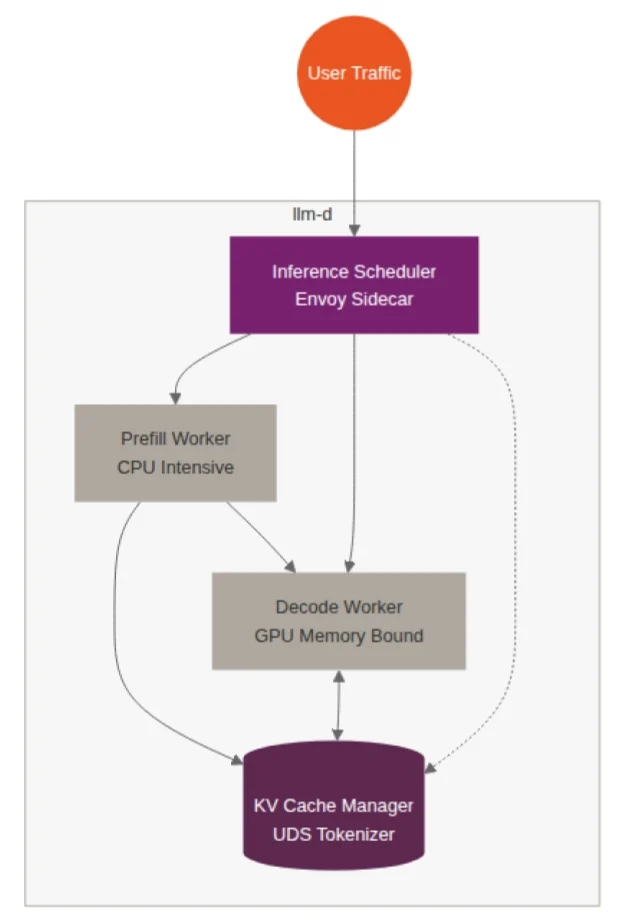
Architecture of llm-d

At a high level, llm-d is composed of four major components, all of which run on a Kubernetes cluster:

  1. Inference scheduler – this part is an adaptive load balancer, responsible for intelligently routing user questions to worker nodes that have already cached relevant context related to the user’s question. It’s using metrics pulled from a Prometheus metrics endpoint to take routing decisions.
  2. Cache manager – this part is responsible for coordinating LLM key-value (KV) caches. Getting caching right is a critical factor in getting the best possible LLM performance.
  3. Prefill worker – llm-d splits the actual LLM workload in two. The prefill component performs the heavy, compute intensive processing of prompts and can be scaled independently.
  4. Decode worker – the decode component performs the memory-bandwidth dependent task of generating tokens (this is the part that is responsible for writing the answer to the user’s question).

Llm-d is designed to work with the very high-performance hardware these setups need, like servers with enterprise-grade GPUs and Infiniband network switching – which is an alternative networking solution to the classic ethernet.

Getting hands-on

I find that the best way to learn about something more deeply is to work with it. So to that end, I put together some Juju charms for Ubuntu, to get a better understanding of how llm-d works for myself. They can enable you to deploy an LLM to an llm-d setup in a clean, straightforward way – without needing to be a Kubernetes guru.

I’ve made the source code available in GitHub, along with some instructions about how to build the code and get things up and running. Note that I’ve just been playing around with Juju charms when building these; there may be bugs and they are not supported by Canonical, so use them at your own risk.

The diagram below illustrates how the various Juju charms that manage the system are integrated.
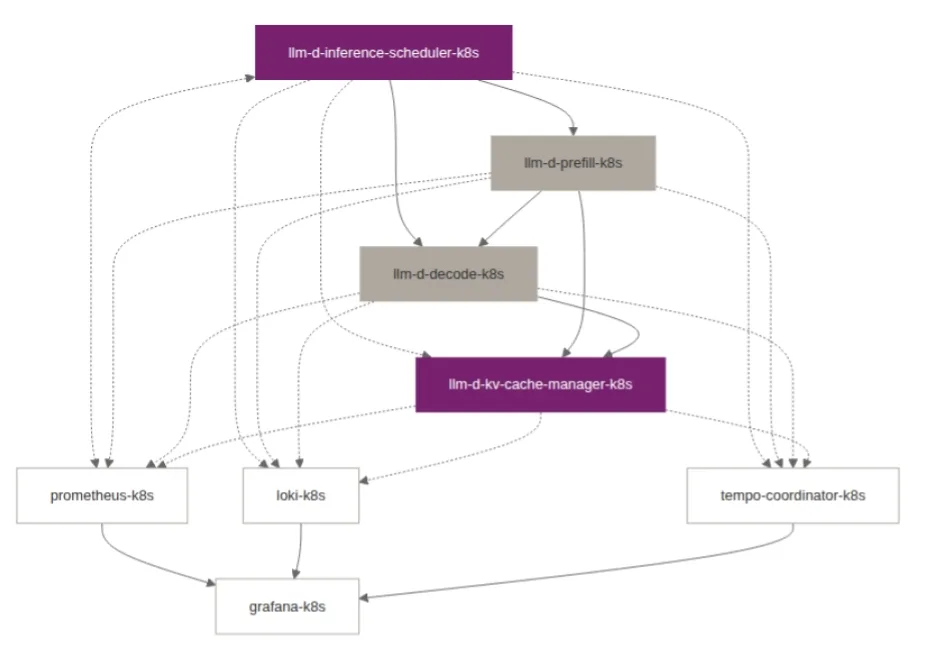
Juju charms offer a clean approach to devops, and the system has primitives for both cloud infrastructure and Kubernetes. If you’d like to dig in and learn more about how to develop or use Juju charms, head over to our Juju page

Further reading