


惯性聚合 高效追踪和阅读你感兴趣的博客、新闻、科技资讯
阅读原文 在惯性聚合中打开

推荐订阅源

Recent Announcements
J
Java Code Geeks
雷峰网
雷峰网
Microsoft Security Blog
博客园 - 【当耐特】
腾讯CDC
博客园 - 司徒正美
B
Blog RSS Feed
博客园 - 三生石上(FineUI控件)
I
InfoQ
N
Netflix TechBlog - Medium
L
LangChain Blog
博客园_首页
Cyber Security Advisories - MS-ISAC
T
Tailwind CSS Blog
MyScale Blog
MyScale Blog
美团技术团队
The Cloudflare Blog
爱范儿
爱范儿
Stack Overflow Blog
Stack Overflow Blog
博客园 - 聂微东
H
Help Net Security
Martin Fowler
Martin Fowler
V
Visual Studio Blog

Blog on 1Password Blog

NIST and AI agents: 1Password’s approach to agent identity | 1Password Go beyond device health with External Checks in 1Password Device Trust | 1Password Natoma and 1Password help enterprises scale AI securely with governed agent access | 1Password New integrations between 1Password SaaS Manager and EPM | 1Password A first step toward post-quantum security | 1Password RSA 2026: Leading the way to secure agentic AI | 1Password How 1Password is Building a Culture of AI Fluency Through AI Champions | 1Password 1Password vs. Keeper Security: A comparison | 1Password 1Password vs. LastPass: Which is right for you? | 1Password Secure MCP credentials with 1Password and Runlayer | 1Password The next layer of AI security | 1Password Building the next chapter of Go-to-Market in EMEA | 1Password Automating SOC workflows with 1Password Enterprise Password Manager | 1Password Automated Provisioning hosted by 1Password: A Simpler, Smarter Way to Manage Access | 1Password Introducing 1Password® Unified Access: Identity Security for Humans and Their AI Agents | 1Password Next-generation automated provisioning, without compromising zero-knowledge security | 1Password Bitwarden vs. 1Password: Which password manager is right for you? | 1Password Password Manager for Families, Enterprise & Business | 1Password | 1Password How to wrangle SaaS contract renewals | 1Password Stop trusting consumer browsers with work credentials | 1Password IAM stops at sign-in. Your credentials do not. | 1Password Your digital pit crew: a 10-minute pre-race security checklist | 1Password 1Password Device Trust is coming to EMEA | 1Password The identity transformation: Analyst and CIO insights | 1Password Why now is the moment to join 1Password Go-To-Market | 1Password Identity and Accountability in the Age of AI Agents | 1Password How 1Password secures agent architectures | 1Password 1Password becomes the first global partner to transact through Express Private Offers in AWS Marketplace | 1Password Start Learning on 1Password Academy | 1Password Expanding Programmatic Access to 1Password | 1Password
New MSP capabilities for simpler client onboarding and st...
info@1passwo · 2026-05-07 · via Blog on 1Password Blog

Introducing new features in 1Password Enterprise Password Manager – MSP Edition to reduce client onboarding effort and give MSPs greater control over policies, access, and usage.

Setting up and managing client environments often involves repetitive, manual work. Each new managed company requires policy setup, access configuration, and ongoing oversight. Repeating this across environments slows onboarding, introduces inconsistencies, and makes it harder to maintain control.

To address this, 1Password is introducing Policy Templates, Seat Limits, and Granular Vault Permissions in 1Password Enterprise Password Manager – MSP Edition to reduce repetitive setup, enforce consistent access controls, and give MSPs greater control over client license usage. 

Apply consistent policies from the start

Setting up policies for each client’s environment individually is time-consuming and increases the risk of inconsistencies. Policy Templates for MSPs allows owners, administrators, and MSP administrators to define and enforce policies once, then apply these policies across all or selected managed companies. With Policy Templates, teams can:

  • Create reusable policy configurations for multiple clients

  • Enforce consistent baseline security and access policies

  • Centrally update templates and apply changes across environments

  • Control which policies clients can or cannot override
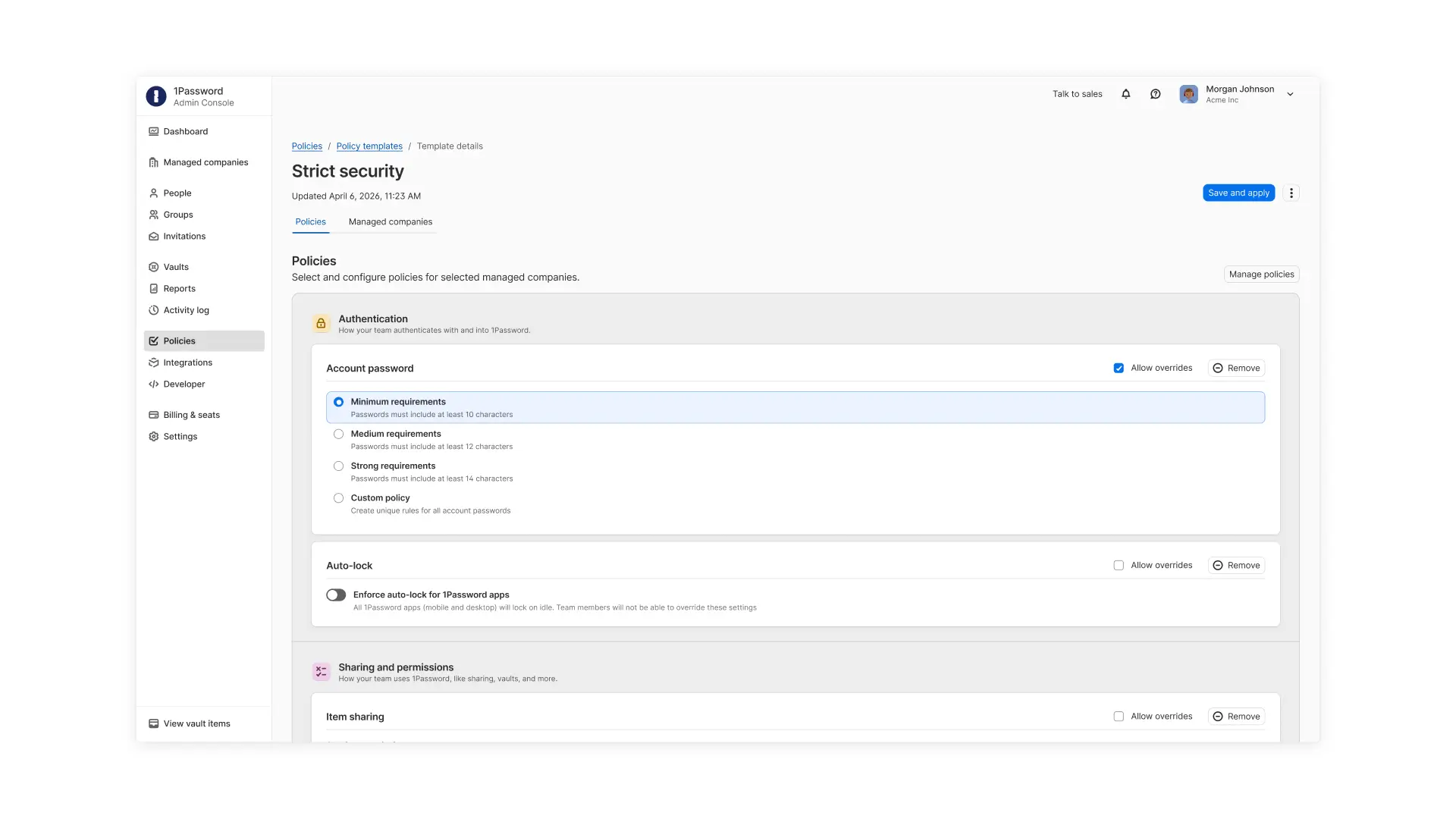
A screenshot of the 1Password admin console showing different options for authentication requirements.

These templates reduce manual setup during client onboarding and ensure each managed company environment starts from a consistent security baseline while still allowing flexibility where needed.

Keep client usage predictable and aligned with contracts

As clients grow, usage can quickly exceed initial expectations or contracted limits. Without clear controls, MSPs may only discover overages after costs have already increased. Seat Limits for managed companies allow MSPs to set and enforce a maximum number of users or guests that can be given licenses. With Seat Limits, MSP teams can:

  • Align client usage with contracted agreements

  • Prevent unplanned overages

  • Maintain predictable margin and cost structures

  • Proactively plan for growth discussions as client usage increases
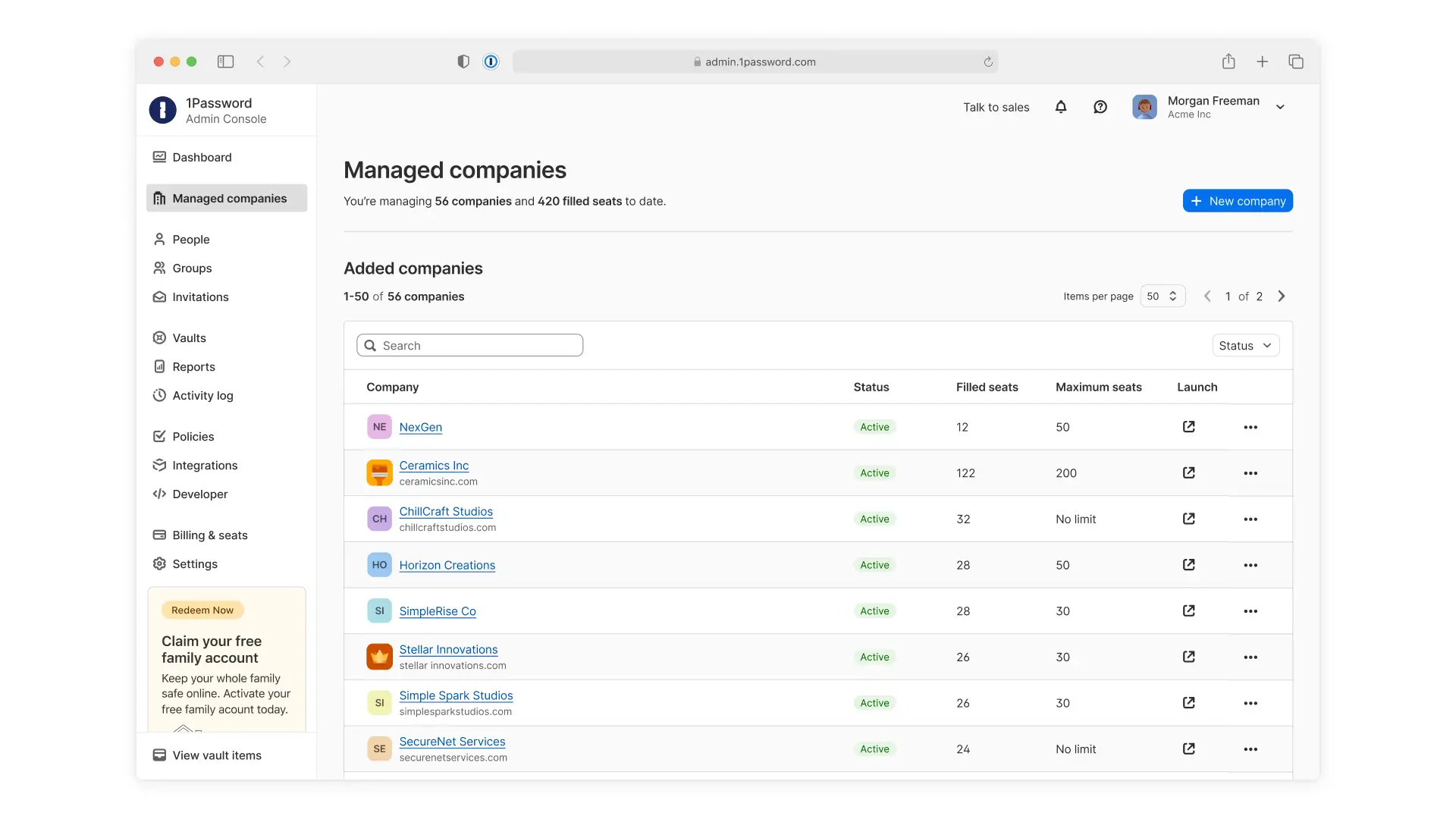
A screenshot of the 1Password MSP dashboard showing a list of managed companies, the number of seats currently filled, and their maximum number of seats.

Control access without slowing down support

Supporting clients requires access to their environments, but that access shouldn’t be broadly granted. Granular Vault Permissions within managed companies give MSPs and their clients precise control over who can access shared vaults. Managed companies can choose to give MSP technicians no default access and only assign access to specific vaults or assign access by role to support least-privilege access. 

With granular, role-based vault permissions, MSPs can work with their managed companies to: 

  • Limit shared vault access to only the technicians who need it

  • Assign access based on roles or specific users

  • Maintain least-privilege access across client environments
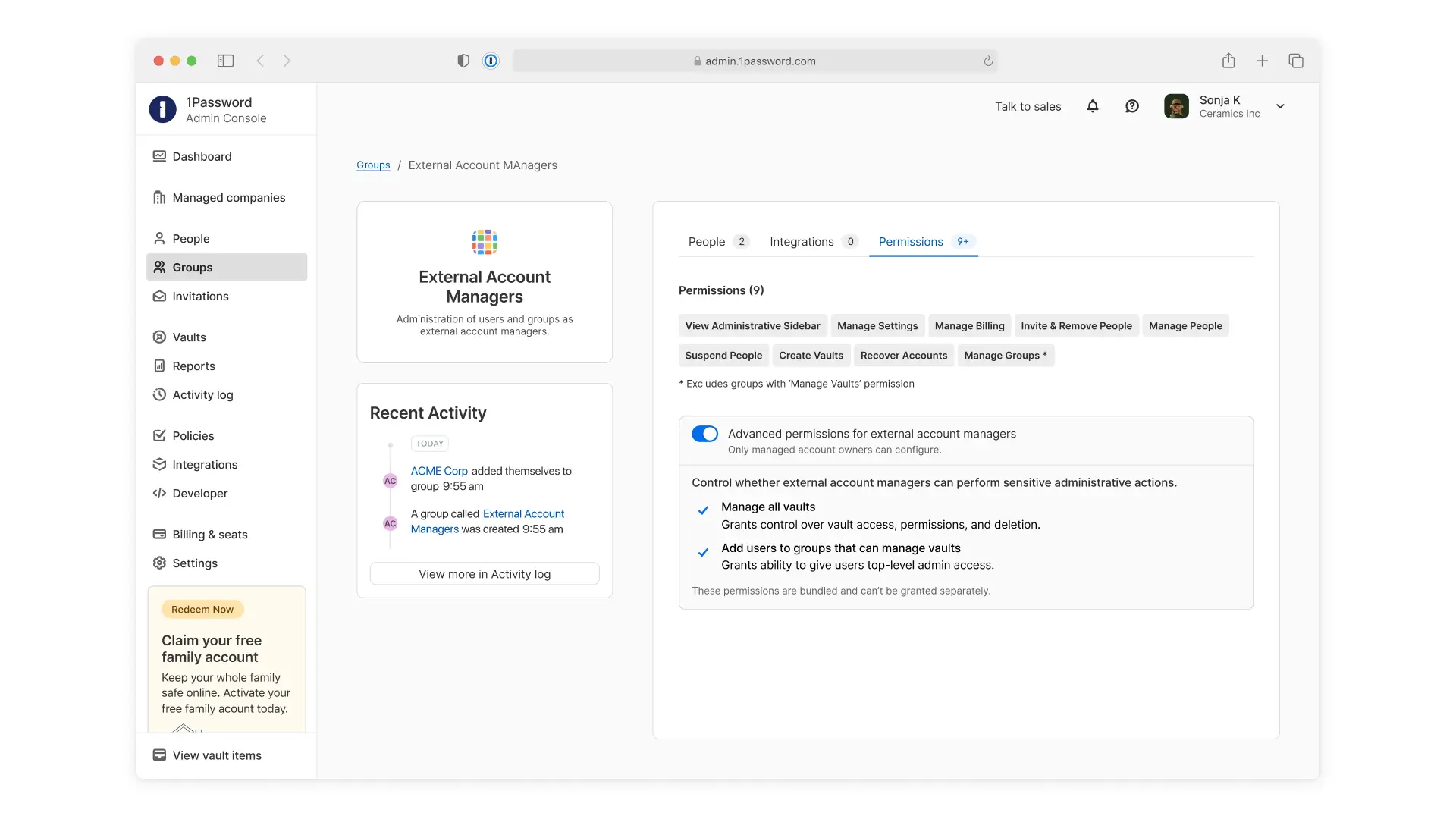
A screenshot of the 1Password MSP dashboard showing how admins can manage permissions for their technicians.

This ensures technicians only access what’s needed to support clients while reducing unnecessary exposure. It also helps MSPs and their clients maintain stronger control over sensitive data sharing.

Built for how MSPs manage client environments

These capabilities are built for how MSPs manage client environments, from onboarding new clients to enforcing policies, managing user growth, and controlling access to client data. By reducing repetitive work and improving control, MSPs can onboard clients more efficiently and maintain consistency across every client environment.

These features are now available in 1Password Enterprise Password Manager – MSP Edition. Existing customers can start using these new capabilities through the MSP console. New MSPs can start a free 14-day trial to explore these capabilities in 1Password today.