




Phishing attacks are everywhere these days. People encounter them while shopping, job hunting, reading work emails, and checking personal texts. Thanks to AI-powered scammers, phishing has become both more common and harder to spot, leading to disastrous consequences. A phishing attack on a business costs an average of $4.8 million, and attacks on individuals can drain bank accounts and wreck credit scores.
The scary thing about phishing is that it only takes one momentary lapse in judgment for a scammer to steal a victim’s information. In one common form of the attack, the scammer will send an email or text containing a link to a fraudulent (but real-looking) website. When the victim enters their information into the site, they’re really handing it to the scammer, who can then cause chaos with the stolen information.
These fake phishing sites look convincing, but they often have some tell-tale signs, such as a misspelled URL. That means a lot of phishing attacks could be prevented by a second pair of eyes to alert you if something seems…well…phishy.
Today, 1Password is beginning the rollout of a phishing prevention feature to act as that second pair of eyes and stop users before they share their passwords with scammers.
Here’s how it currently works: when a 1Password user clicks a link where the URL doesn’t match their saved login, 1Password won’t autofill their credentials. That’s an important first step. However, in those situations, users may not understand why their credentials aren’t being autofilled and try to manually copy and paste them to the fake website.
Our new phishing feature adds an extra layer of protection. When a user attempts to paste their credentials, the 1Password browser extension displays a pop-up warning, prompting them to pause and exercise caution before proceeding.
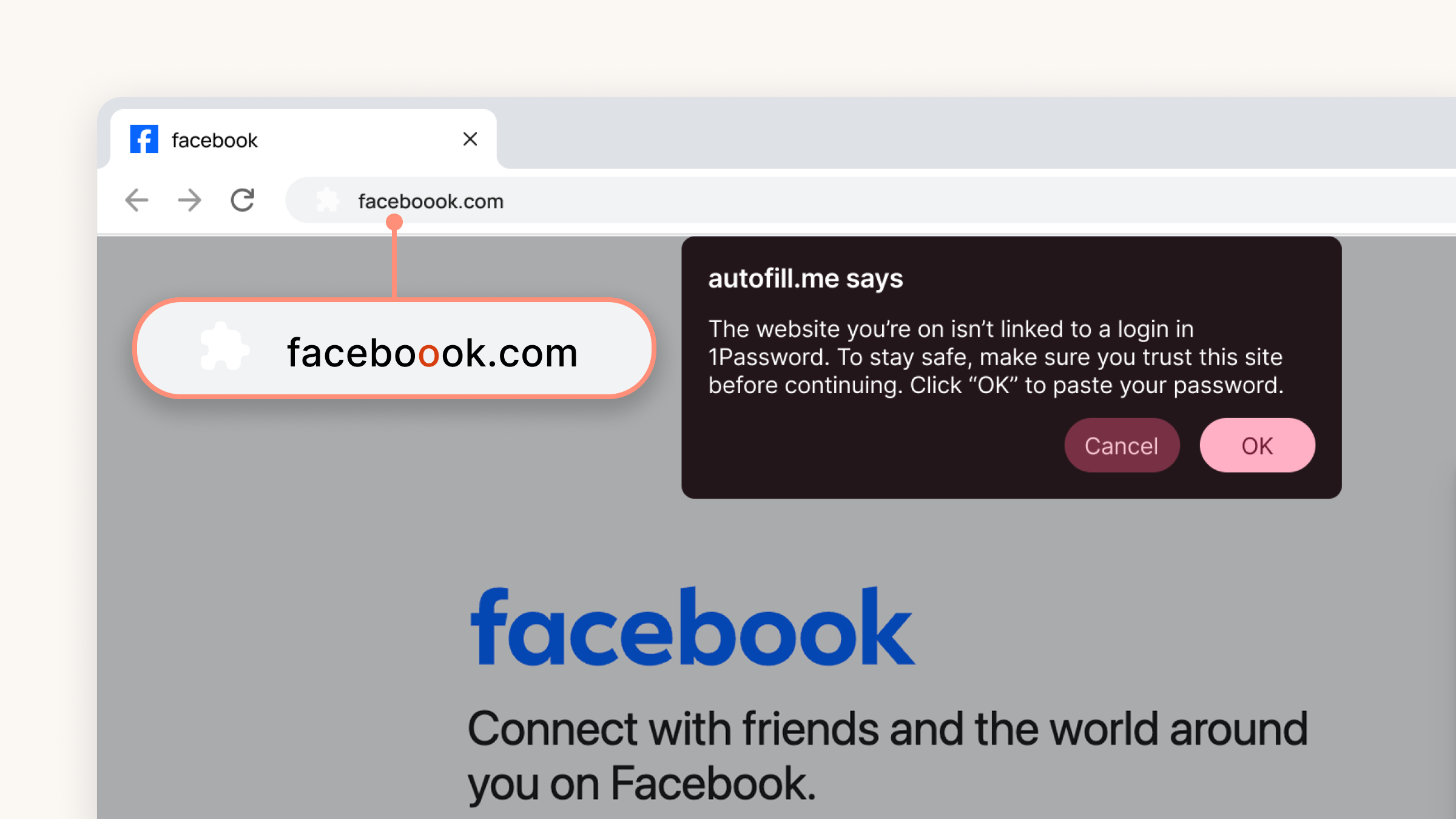
In the example above, it's easy for a user to miss that extra "o" in the URL, especially if the rest of the page looks convincing. But the pop-up reminds them to slow down and look more closely before proceeding.
For our individual and family plan users, this feature will be enabled by default once it is rolled out. 1Password Admins can enable this for their employees in Authentication Policies in the 1Password admin console.
This feature is just one of the ways 1Password protects our users from phishing attacks. Another part of that effort is understanding how people are getting phished. To get more insight about that, 1Password surveyed 2,000 American adults to learn how people are falling victim to and protecting themselves from phishing scams – both at work and in their personal lives.
We learned that the problem is nearly universal; 89% of Americans have encountered a phishing scam, and 61% have actually been phished. Clearly, people need help defending themselves.
We’ll spend the rest of this blog digging deeper into the results and offering practical advice for preventing phishing attacks at home and at work.
Phishing has been around for decades, but AI is helping attackers run more believable scams at higher volumes. People used to spot phishing attempts by their typos and shoddy graphic design, but with AI, it takes only minutes for a scammer to create a highly polished phishing email or website.
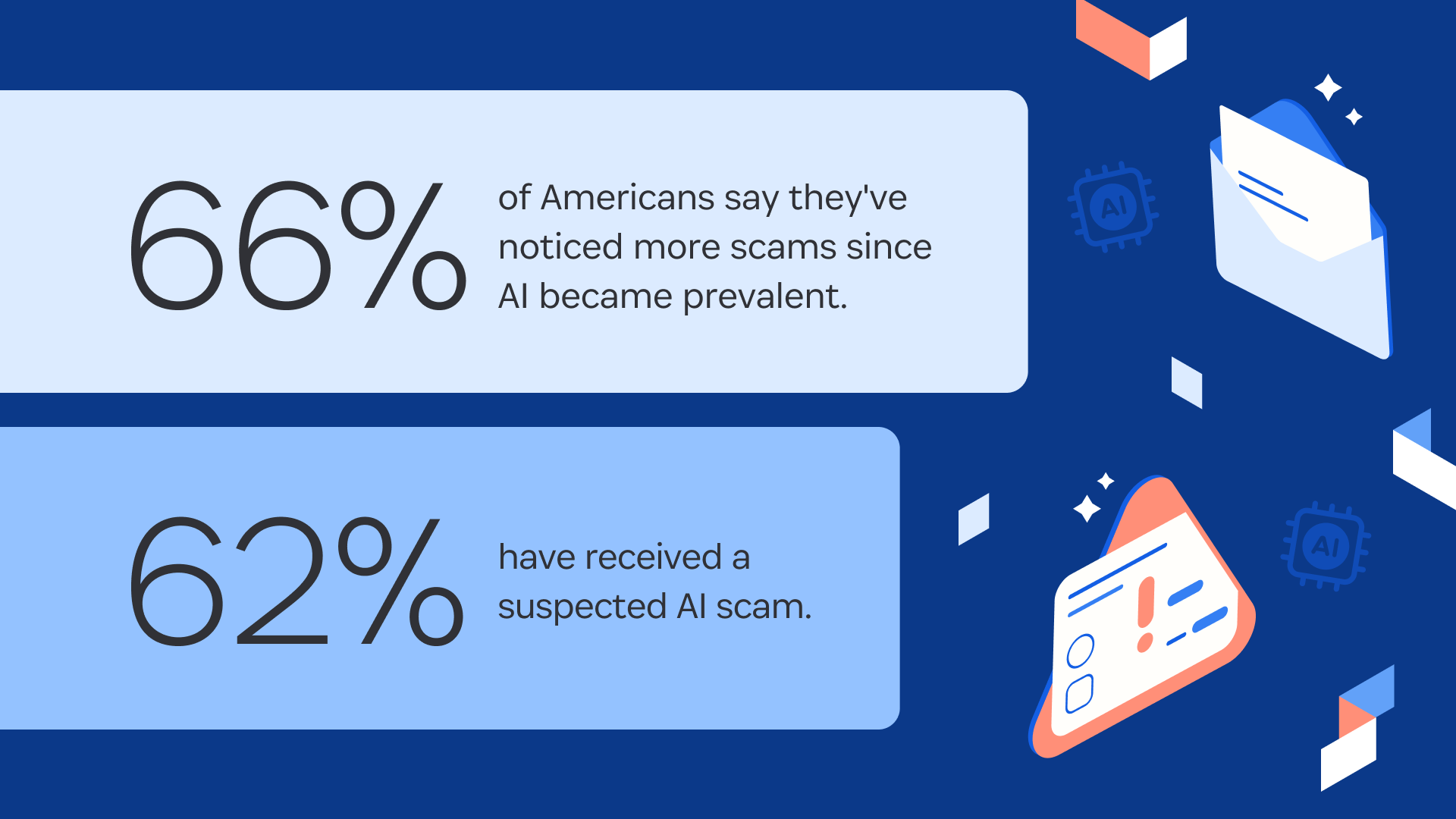
As we mentioned, the best way to spot a phishing site in the age of AI is to check the URL, but only 25% of Americans in our survey said they hover over URLs before clicking them.
Take-home lesson #1
Don’t rely on obvious mistakes to spot a scam. Always make sure that a website URL matches the official company domain before clicking.
Dave Lewis, Global Advisory CISO 1Password
When we look at where Americans are getting phished, it’s a mix of the usual suspects and some unexpected entries.
Where Americans have been phished
Personal email: 45%
Text message 41%
Social media: 38%
Phone call 28%
Online ads or search results: 26%
There's a surprising disconnect between where people report encountering suspected phishing attempts and where they have been successfully phished. For instance, there’s a big gap between the number of people who have gotten a suspected phishing phone call (49%) and the number who have fallen for it (only 28%). That indicates that people, on the whole, are still fairly capable of spotting a scam phone call (at least until AI voice scams become more widespread). On the other hand, only 37% of people report seeing a social media phishing attempt, but 38% of phishing victims have been tricked there.
Take-home lesson #2
Any place where you can share your personal data is a place you can be phished. Even online search results can be planted by bad actors.
Dave Lewis, Global Advisory CISO 1Password
Next, we asked phishing victims what they were trying to do when they were phished.
Most successful phishing bait
Get a special deal, price, or sale: 41%
Track a delivery or package: 31%
Apply for a job: 25%
Conduct personal business (banking, wire transfers, etc.): 23%
Respond to a legal issue (tax error, speeding ticket, etc.): 17%
Donate to a charity or cause: 13%
The common thread between all these ruses is that they create emotional and financial urgency.
We rush to take advantage of a good deal, to resolve a potential legal dispute, to protect our money and purchases, to support the causes we believe in, and (especially in a crowded job market) to secure a new role.
Take-home lesson #3
If your heart rate increases, your caution should too. If a situation is urgent, contact the sender through a trusted channel, NOT the website, email, or phone number you see in the message.
Dave Lewis, Global Advisory CISO 1Password
Our survey found that working Americans are 16% more likely to have fallen for a phishing scam than non-workers (67% vs 51%). The most likely explanation is that workers spend more time on their devices, which increases their exposure to phishing attempts.
Indeed, 36% of workers we surveyed admitted they had clicked on a suspicious link in a work email. Of those, 26% were responding to HR or their boss – both of which can trigger a sense of emotional and financial urgency.
Here’s one story shared by a survey respondent that illustrates how this works in practice.
About six months ago, a coworker in our office received what appeared to be an urgent email from our IT department requesting her to verify her credentials by clicking a link. The email looked legitimate with our company logo and formatting. She was busy and clicked the link without thinking, entering her username and password on what turned out to be a fake login page. Within hours, someone tried accessing company files using her credentials.
Fortunately, our security system flagged the unusual activity and locked the account before any data was actually stolen. IT immediately reset all passwords and implemented additional two-factor authentication across the organization. She felt embarrassed but reported it right away, which helped prevent a more serious breach. The IT team used it as a training example for the rest of us about recognizing phishing attempts, even when they look convincing.” - Gen Z man in California
This story has it all: an urgent email, a fake login page, and another crucial theme: credentials.
One of the most important differences between phishing scams in private life versus at work is the importance of passwords. To be clear: scammers take advantage of weak and compromised passwords wherever they find them, but when they’re going after an individual target, the ultimate goal is usually short-term financial gain.
Phishing attacks on companies are often far more sophisticated and may be the first stage of a more elaborate scheme. Indeed, phishing attacks are the leading vector in ransomware attacks. In this scenario, an attacker’s goal is to gain deep access to a company’s systems to steal or encrypt data. And their biggest asset is an employee password that will give them the access they want.
The perfect target for a phishing attack is an employee with poor password practices, such as:
Default passwords that were never reset
Duplicate or similar passwords across multiple accounts
Weak and easily guessed passwords
No multifactor authentication (MFA)
Unfortunately, poor password practices are rampant in the workplace.
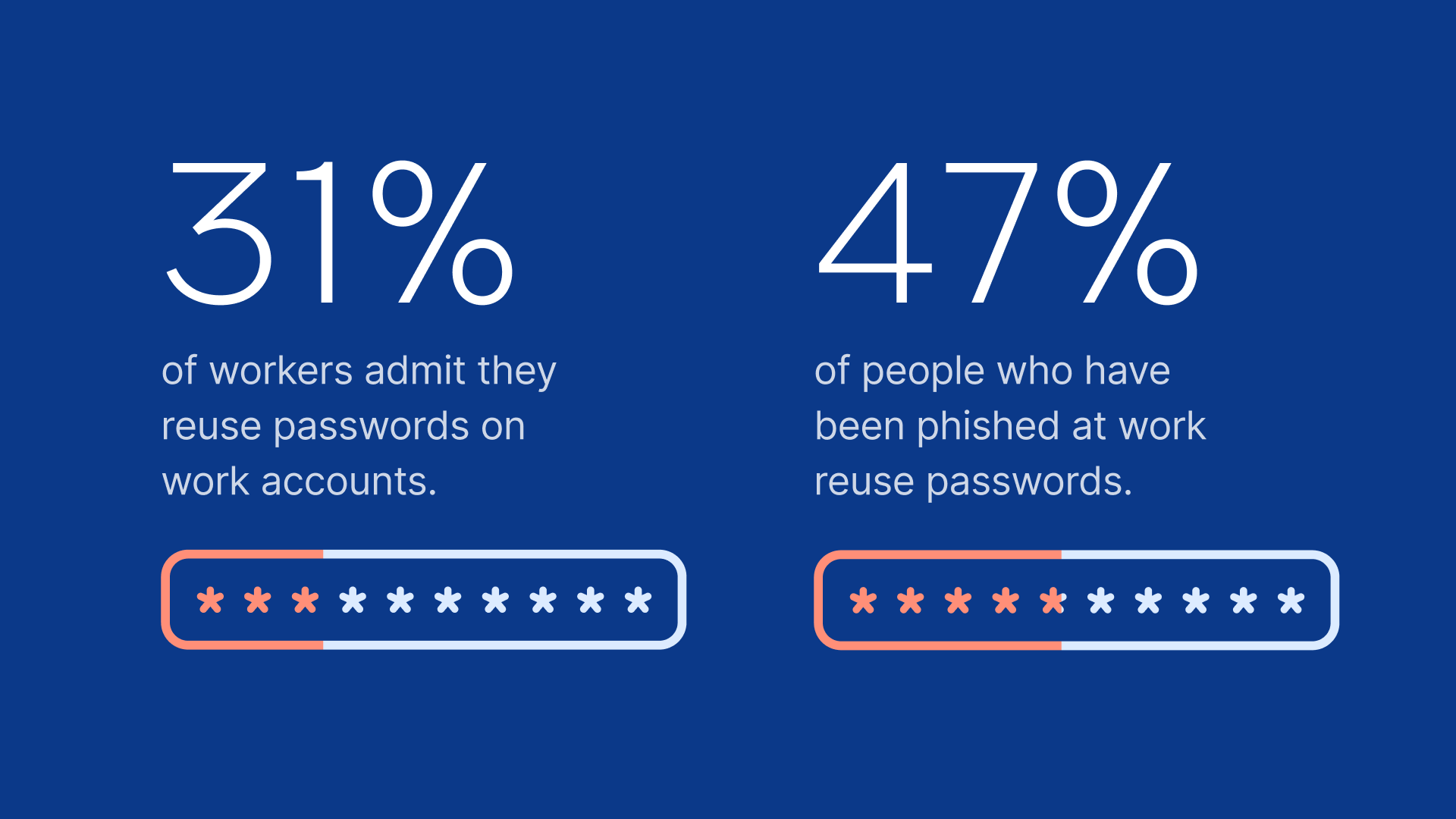
A single reused password can allow an attacker to move from one application to another, setting the stage for a hugely disruptive and expensive attack.
There are various methods IT teams (and companies in general) can employ to help prevent or mitigate the damage of phishing attacks.
Deploying an enterprise credential management solution like 1Password helps ensure they use strong, unique credentials for every login. It also notifies admins if MFA is available but not in use, or if a credential is compromised in another breach.
Many companies require employees to complete regular phishing training and sometimes even conduct simulated attacks to ensure they respond correctly.
Requiring MFA across company-managed apps is another commonsense solution to help minimize the damage that can be caused by stolen credentials.
Likewise, larger organizations may have network monitoring and other detection software that can flag suspicious behavior that signals a bad actor trying to infiltrate a company’s systems.
But even with every possible anti-phishing measure in place, at some point it still comes down to an individual employee with their mouse hovering over a link, deciding whether or not to click.
In those situations, the “x factor” might be an employee’s sense of responsibility for their company’s security. Our survey found that employees who believe it’s IT’s job to stop phishing are much more likely to fall victim to phishing.
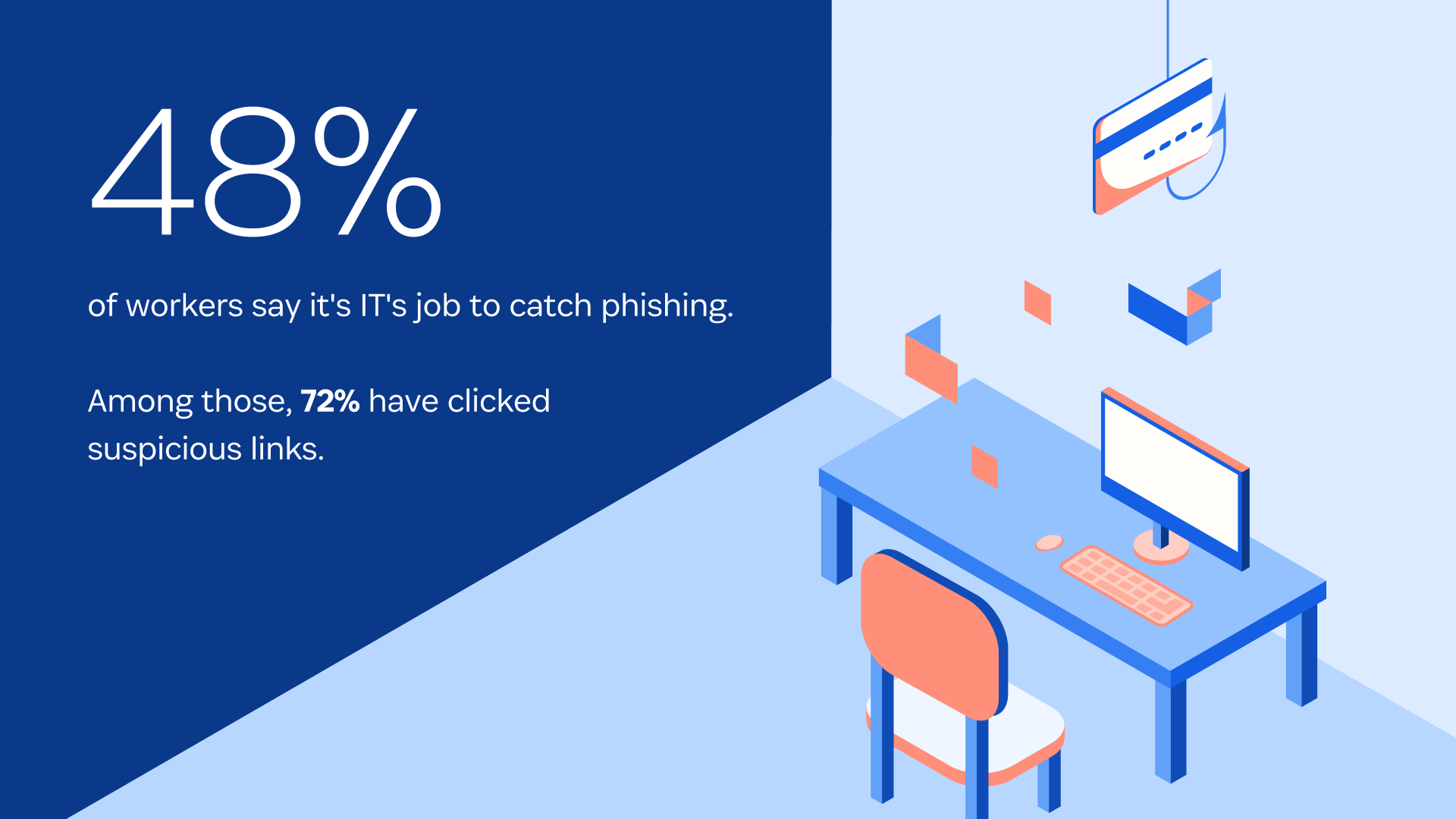
Meanwhile, 78% of employees know they should report phishing to their IT department, but more than half (56%) delete suspicious messages instead.
These numbers highlight the need for better communication between IT and end users, and for company leadership to make it clear that security is everyone’s responsibility.
Getting ahead of phishing attacks is all about communication, that’s what disrupts the scammer’s plan. The most important thing an employee can do if they receive a suspicious message is tell someone. A lot of attacks could be prevented by simply knocking on the cubicle next door and saying ‘hey, does this look right to you?’ If someone believes they’ve already been phished, they should notify IT immediately. Those are the skills you learn with good training, and they need to be constantly reinforced, so people remember them when they get those urgent, scary-looking messages.”
- Dave Lewis, Global Advisory CISO, 1Password
The goal of 1Password’s new anti-phishing feature is to give users – whether at work or home – a subtle reminder that helps their training kick in. We’re excited to continue developing it as part of our overall mission to secure the future of work.
Don't get hooked
If you’d like to learn more about how 1Password can help protect you, your family, and your business, get in touch with our team.
1Password conducted this study using an online survey prepared by KW Research and distributed by PureSpectrum, completed by n=2,000 American adults. Within employees, a range of role types, seniority, and industries are represented. Data was collected from September 29 to October 2, 2025.
此内容由惯性聚合(RSS阅读器)自动聚合整理,仅供阅读参考。 原文来自 — 版权归原作者所有。