


惯性聚合 高效追踪和阅读你感兴趣的博客、新闻、科技资讯
阅读原文 在惯性聚合中打开

推荐订阅源

J
Java Code Geeks
Martin Fowler
Martin Fowler
B
Blog RSS Feed
D
DataBreaches.Net
L
LangChain Blog
月光博客
月光博客
S
SegmentFault 最新的问题
阮一峰的网络日志
阮一峰的网络日志
V
Visual Studio Blog
美团技术团队
Jina AI
Jina AI
博客园 - 司徒正美
雷峰网
雷峰网
Last Week in AI
Last Week in AI
让小产品的独立变现更简单 - ezindie.com
IT之家
IT之家
博客园 - 三生石上(FineUI控件)
WordPress大学
WordPress大学
小众软件
小众软件
罗磊的独立博客
博客园_首页
freeCodeCamp Programming Tutorials: Python, JavaScript, Git & More
A
About on SuperTechFans
Engineering at Meta
Engineering at Meta

Blog on 1Password Blog

Why secure-by-design is an incentives problem, with Bob Lord | 1Password NIST and AI agents: 1Password’s approach to agent identity | 1Password Go beyond device health with External Checks in 1Password Device Trust | 1Password Natoma and 1Password help enterprises scale AI securely with governed agent access | 1Password New integrations between 1Password SaaS Manager and EPM | 1Password A first step toward post-quantum security | 1Password RSA 2026: Leading the way to secure agentic AI | 1Password How 1Password is Building a Culture of AI Fluency Through AI Champions | 1Password 1Password vs. Keeper Security: A comparison | 1Password 1Password vs. LastPass: Which is right for you? | 1Password Secure MCP credentials with 1Password and Runlayer | 1Password The next layer of AI security | 1Password Building the next chapter of Go-to-Market in EMEA | 1Password Automating SOC workflows with 1Password Enterprise Password Manager | 1Password Automated Provisioning hosted by 1Password: A Simpler, Smarter Way to Manage Access | 1Password Introducing 1Password® Unified Access: Identity Security for Humans and Their AI Agents | 1Password Next-generation automated provisioning, without compromising zero-knowledge security | 1Password Bitwarden vs. 1Password: Which password manager is right for you? | 1Password Password Manager for Families, Enterprise & Business | 1Password | 1Password How to wrangle SaaS contract renewals | 1Password Stop trusting consumer browsers with work credentials | 1Password IAM stops at sign-in. Your credentials do not. | 1Password Your digital pit crew: a 10-minute pre-race security checklist | 1Password 1Password Device Trust is coming to EMEA | 1Password The identity transformation: Analyst and CIO insights | 1Password Why now is the moment to join 1Password Go-To-Market | 1Password Identity and Accountability in the Age of AI Agents | 1Password How 1Password secures agent architectures | 1Password 1Password becomes the first global partner to transact through Express Private Offers in AWS Marketplace | 1Password Start Learning on 1Password Academy | 1Password
Clickjacking: What it means for 1Password users | 1Password
info@1password.com (Jacob DePriest) · 2025-08-26 · via Blog on 1Password Blog

Clickjacking is a technique where a malicious or compromised webpage visually disguises or overlays elements of a page or browser extension, like the autofill menu, so that a user unintentionally clicks on them. In practice, this could allow a site to trick users into autofilling card details, identity items, or other information without realizing it.

Clickjacking isn’t new, and it’s not unique to password managers. It’s a long-standing web technique that affects many websites and browser extensions. At its core, it’s a browser-level limitation, not something a single browser extension can fully solve.

How 1Password is responding to clickjacking

We take every security concern seriously. While clickjacking can only be fully resolved at the browser level, we’ve introduced a solution that addresses the risk for our customers by giving them more control and information.

On August 20, 2025, we released version 8.11.7, which gives customers the option to be notified and approve or deny autofill actions before they occur. This extends the confirmation alert that already exists for payment information, an alert that cannot be hidden or overlaid by clickjacking.

With these updates, customers are clearly informed when autofill is happening and remain in control of what is shared, helping them stay protected against clickjacking attacks.

Does clickjacking put my 1Password data at risk?

No. Your data in 1Password remains encrypted and protected. Clickjacking does not expose your vaults, export your data, or give websites direct access to your saved information.

What clickjacking can do is try to trick users into triggering autofill. That’s why we’ve added safeguards, like confirmation alerts, so users have a chance to double-check before their data is filled.
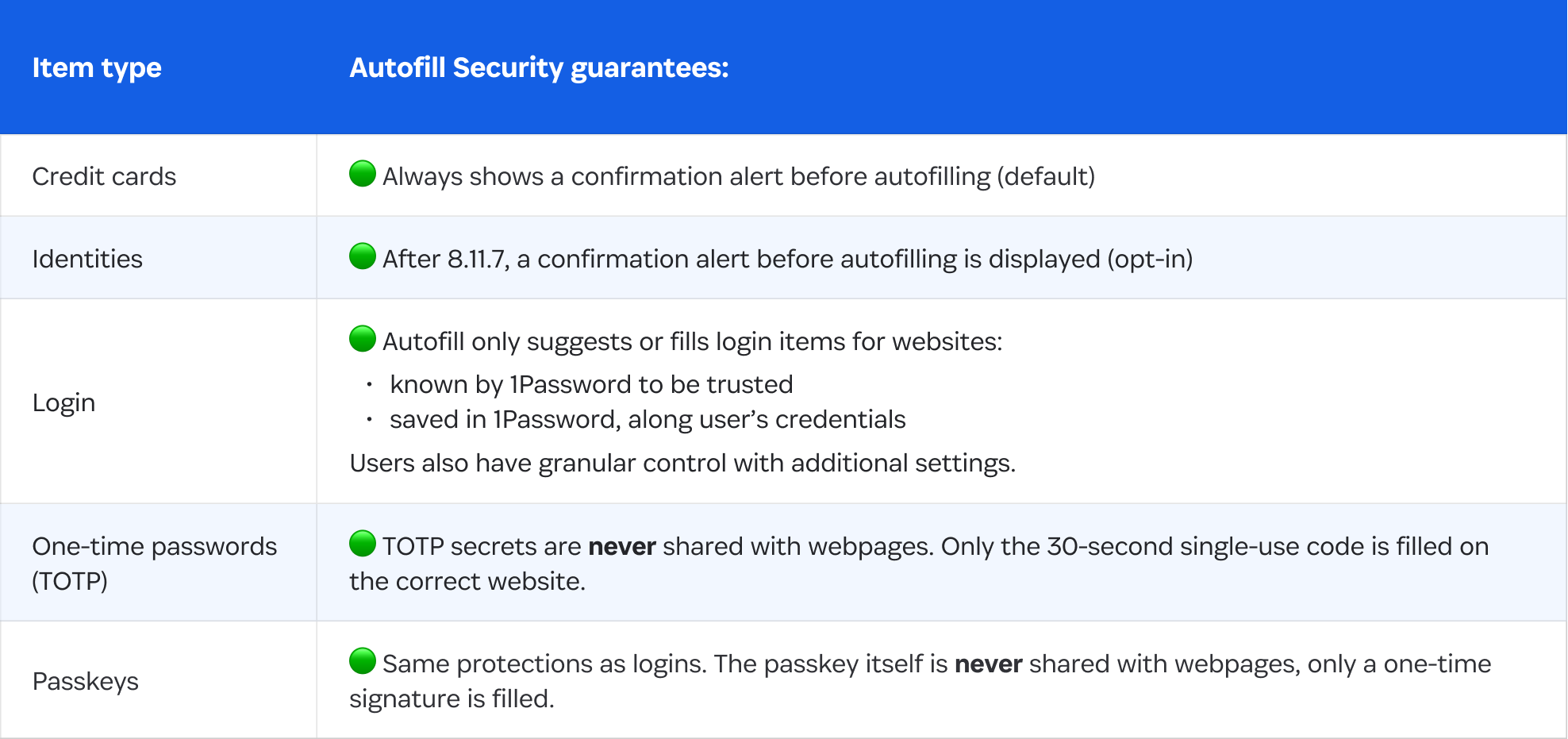
A table that describes what autofill security guarantees.

What you should do

To stay protected, we recommend updating to version 8.11.7.2 (or 8.11.7 on iOS App Store) as soon as it becomes available in your browser’s store. You can check this webpage to download the latest version.

We also recommend keeping autofill enabled. While it may feel safer to turn it off, disabling autofill can actually increase risk. Without autofill, users are more likely to reuse weak passwords or copy and paste credentials into websites, where they can be stolen if the site is malicious.

Autofill also helps protect users from phishing by only filling credentials in on the exact domains they are saved for. In most cases, the protection autofill provides far outweighs the potential risk of clickjacking.

You can read our full security advisory here.