










Enterprise password managers (EPM) like 1Password, LastPass, Dashlane, and Bitwarden help you create, store, and fill strong passwords and credentials across different websites and apps, so you don’t have to remember or write them down. EPMs provide secure sharing, data encryption, and data breach prevention against phishing and malware, helping IT and Security teams protect and enforce policies around credentials.
While there are many EPM options, choosing the best password manager can be a challenge. A side-by-side comparison helps you see which is best for your organization’s cybersecurity strategy.
If you’re comparing 1Password and Keeper, it helps to start with what both products are built around: an Enterprise Password Manager (EPM). EPMs are how both platforms store, share, and enforce policies around credentials. They’re the foundation for each vendor’s broader security strategy. Below is a comparison of core features many organizations consider essential for protecting employees and their credentials.
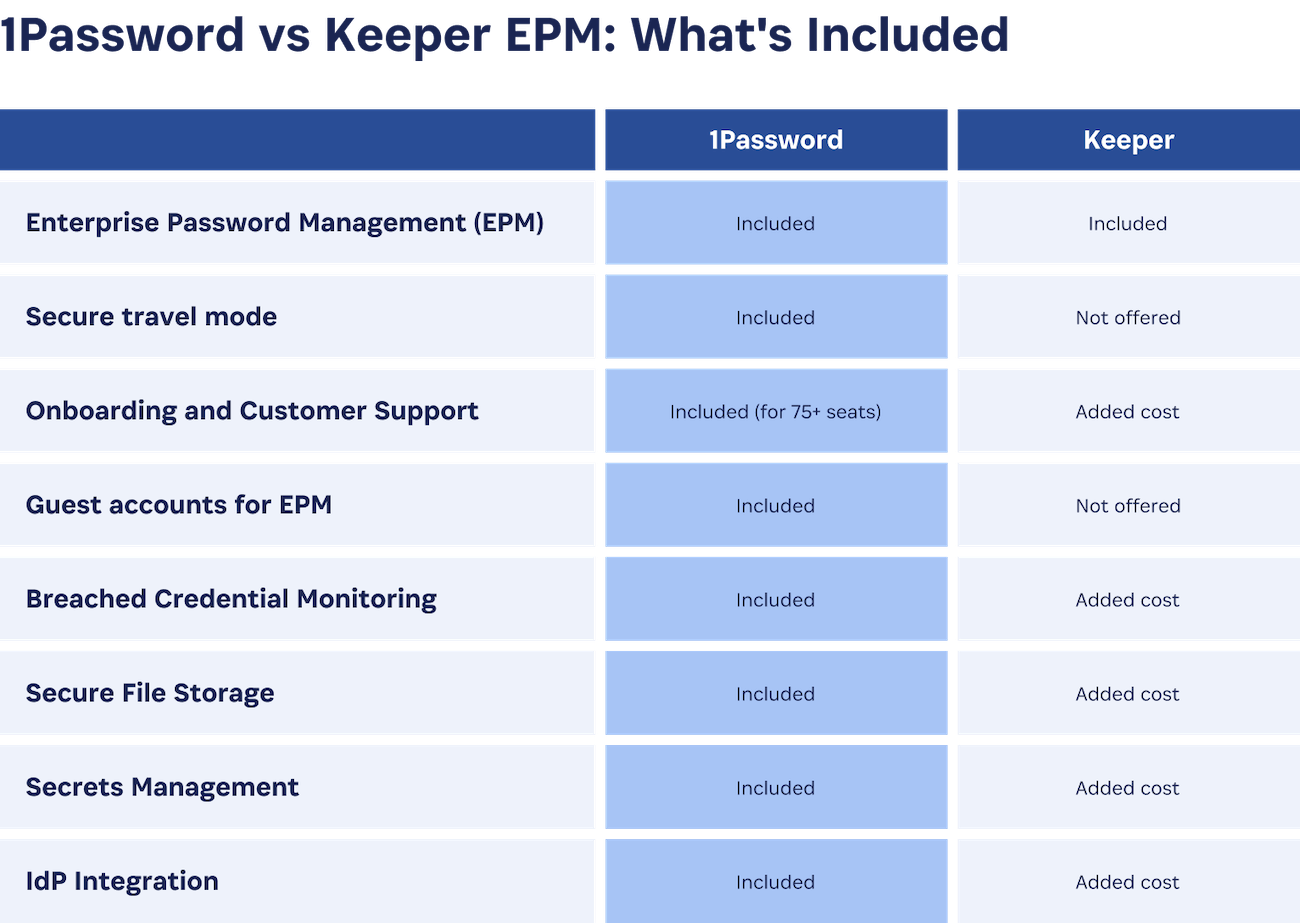
Enterprise password managers store and encrypt users’ login credentials to discourage password reuse and insecure storage (like spreadsheets or sticky notes). They typically include a password generator and enable secure sharing among authenticated employees.
Both 1Password and Keeper cover these basics. The differences tend to show up in what’s included by default versus sold as add-ons. In many deployments, 1Password includes critical capabilities as part of the standard product, while Keeper packages some features as paid add-ons. 1Password also includes 20 guest accounts with every business plan, which can be useful for securely sharing vault access with contractors, auditors, or temporary collaborators. Keeper does not offer equivalent guest access to vaults; sharing is generally limited to users provisioned within the same account.
Both Keeper and 1Password EPM use AES-256 encryption. With either service, vault data is decrypted locally on the user’s device. Both operate using a zero-knowledge architecture, which means neither provider can decrypt your vault data.
1Password adds a 128-bit Secret Key in addition to the account password, creating a stronger model than relying on a single account password alone. 1Password also uses a password-authenticated key exchange (PAKE) protocol to protect the user's password and add an additional layer of security to authentication.
Keeper claims that 1Password doesn’t encrypt at the “record level.” That’s a terminology difference: Keeper calls vault items “records.” Each 1Password vault item is encrypted individually.
Both Keeper and 1Password have the ability to alert users when a password for their account has been compromised and leaked on the dark web. 1Password’s service is called Watchtower, while Keeper’s is BreachWatch.
With 1Password, Watchtower alerts are included in your company plan, whereas Keeper’s BreachWatch costs extra.
Keeper describes their secrets manager as a core element of their PAM solution, but it’s a required add-on, even for enterprise tier customers of their password manager. And while Keeper supports a number of integrations, many are CLI or service-mode driven, requiring teams to deploy tooling, manage configurations, and maintain them over time.
1Password treats secrets management as a first-class workflow. It’s designed to reduce operational overhead, support secure .env workflows, and enable programmatic retrieval and injection of secrets across GitHub Actions, Kubernetes, and more.
Keeper and 1Password both conduct regular third-party security audits. Keeper, however, maxes out their bug bounty at $25,000.
1Password offers a bug bounty of up to $1,000,000.
On the certification front, 1Password holds ISO 27001:2022, ISO 27017:2015, ISO 27018:2019, and ISO 27701:2019, along with SOC 2 Type II attestation and a published security whitepaper. Taken together, these provide a level of externally validated assurance and documentation depth that many buyers look for during security review.
1Password includes a secure Travel Mode, which limits the amount of information stored on an individual device during travel. Only vaults marked “safe to travel” remain on the device.
The Associated Press has publicly described using 1Password to help protect journalists traveling to high-risk countries.
Keeper does not have a comparable travel mode.
When a Keeper user is locked out and can't answer their backup security question, the admin recovery process is lengthy: the locked-out user must be deleted, their vault rights transferred, a new blank vault created, the data manually moved, and the user re-provisioned — a workflow that can take 30 minutes or more.
With 1Password, anyone with recovery permissions can go to the user's profile, click "Begin Recovery," and the user receives an email to reset their account password and Secret Key. The entire process takes under two minutes.
Keeper charges for support, with prices increasing depending on the size or needs of your company.
1Password EPM, however, includes onboarding and customer support for any account over 75 seats; admins get the help of a dedicated team as they roll out the solution.
Keeper offers multi-tenancy via its MSP console and SCIM-based provisioning, but both introduce operational friction. Newly provisioned users enter a "Pending" state until encryption keys are exchanged, requiring a separate Automator service. SCIM can't natively assign Keeper Roles, and deprovisioning only locks a user's vault rather than removing it, leaving manual cleanup for admins. Group management relies on workaround prefixes rather than enforced policies.
1Password takes a different approach: multi-tenancy gives enterprises isolated child accounts under a single parent dashboard with centralized Policy Templates that enforce security baselines across every tenant. Hosted Provisioning runs inside confidential computing enclaves with no customer-hosted servers to maintain, validates every change against the identity provider before applying it, and delivers complete deprovisioning.
1Password is a strong choice for organizations that want to prioritize user experience and privacy. 1Password is designed to work on the devices people actually use, including unmanaged and personal devices, without relying on invasive monitoring. 1Password is transparent about what activity data it collects, which helps organizations improve security while maintaining user trust.
Secure every employee credential
If you want to strengthen credential security across your workforce, please reach out to us.
Start your 14-day free trial
Try 1Password free for 14 days and see how it can help your team secure access without slowing work down.
此内容由惯性聚合(RSS阅读器)自动聚合整理,仅供阅读参考。 原文来自 — 版权归原作者所有。