


惯性聚合 高效追踪和阅读你感兴趣的博客、新闻、科技资讯
阅读原文 在惯性聚合中打开

推荐订阅源

T
Tailwind CSS Blog
大猫的无限游戏
大猫的无限游戏
L
LINUX DO - 热门话题
让小产品的独立变现更简单 - ezindie.com
雷峰网
雷峰网
aimingoo的专栏
aimingoo的专栏
博客园_首页
MongoDB | Blog
MongoDB | Blog
V
V2EX
GbyAI
GbyAI
量子位
Microsoft Azure Blog
有赞技术团队
有赞技术团队
G
Google Developers Blog
云风的 BLOG
云风的 BLOG
B
Blog
Microsoft Security Blog
S
SegmentFault 最新的问题
O
OpenAI News
N
News and Events Feed by Topic
博客园 - Franky
爱范儿
爱范儿
Forbes - Security
Forbes - Security
freeCodeCamp Programming Tutorials: Python, JavaScript, Git & More
V2EX - 技术
V2EX - 技术
Application and Cybersecurity Blog
N
News and Events Feed by Topic
N
News | PayPal Newsroom
Schneier on Security
Cloudbric
Cloudbric
Security Archives - TechRepublic
cs.AI updates on arXiv.org
Recent Commits to openclaw:main
人人都是产品经理
人人都是产品经理
P
Privacy International News Feed
Cyber Security Advisories - MS-ISAC
B
Blog RSS Feed
阮一峰的网络日志
阮一峰的网络日志
D
DataBreaches.Net
Last Week in AI
Last Week in AI
罗磊的独立博客
Spread Privacy
Spread Privacy
Recent Announcements
The Cloudflare Blog
Google DeepMind News
AWS News Blog
AWS News Blog
The Register - Security
Y
Y Combinator Blog
J
Java Code Geeks
I
Intezer

Black Hills Information Security, Inc.

Bad Habits: An ANTISOC Operation Same Problem, Different Angles: When Red Team and Blue Team Actually Talk to Each Other How to Identify and Exploit New Vulnerabilities Swapper – A Pure Regex Match/Replace Burp Extension A Practical Guide to BloodHound Data Collection Network Engineering Basics Signed, Trusted, and Abused: Proxy Execution via WebView2 Getting Started In Pentesting – Advice From The BHIS Pentest Lead Cloud Security: Tips and Resources for Securing the Cloud Lessons From A Chatbot Incident How to Lead Effective Tabletops Understanding GRC: How to Navigate Risks and Compliance Standards The “P” in PAM is for Persistence: Linux Persistence Technique Malware Analysis: How to Analyze and Understand Malware OSINT: How to Find, Use, and Control Open-Source Intelligence What to Do with Your First Home Lab When the SOC Goes to Deadwood: A Night to Remember Social Engineering and Microsoft SSPR: The Road to Pwnage is Paved with Good Intentions Common Cyber Threats Finding the Right Penetration Testing Company Deceptive-Auditing: An Active Directory Honeypots Tool The Curious Case of the Comburglar How to Set Smart Goals (That Actually Work For You) Inside the BHIS SOC: A Conversation with Hayden Covington Abusing Delegation with Impacket (Part 3): Resource-Based Constrained Delegation Why You Got Hacked – 2025 Super Edition Abusing Delegation with Impacket (Part 2): Constrained Delegation Abusing Delegation with Impacket (Part 1): Unconstrained Delegation GoSpoof – Turning Attacks into Intel Model Context Protocol (MCP) Bypassing WAFs Using Oversized Requests Getting Started with AI Hacking Part 2: Prompt Injection Wrangling Windows Event Logs with Hayabusa & SOF-ELK (Part 2) DomCat: A Domain Categorization Tool Wrangling Windows Event Logs with Hayabusa & SOF-ELK (Part 1) Microsoft Store and WinGet: Security Risks for Corporate Environments Default Web Content MailFail Commonly Abused Administrative Utilities: A Hidden Risk to Enterprise Security Stop Spoofing Yourself! Disabling M365 Direct Send Bypassing CSP with JSONP: Introducing JSONPeek and CSP B Gone Offensive Tooling Cheatsheets: An Infosec Survival Guide Resource DNS Triage Cheatsheet GraphRunner Cheatsheet Burp Suite Cheatsheet Impacket Cheatsheet Wireshark Cheatsheet Hashcat Cheatsheet EyeWitness Cheatsheet Nmap Cheatsheet Netcat (nc) Cheatsheet Hunt for Weak Spots in Your Wireless Network with Airodump-ng from the Aircrack-ng Suite Detecting ADCS Privilege Escalation Vulnerability Scanning with Nmap Getting Started with NetExec: Streamlining Network Discovery and Access How to Use Dirsearch Augmenting Penetration Testing Methodology with Artificial Intelligence – Part 3: Arcanum Cyber Security Bot How to Design and Execute Effective Social Engineering Attacks by Phone Abusing S4U2Self for Active Directory Pivoting Why Use a Macro Pad? Espanso: Text Replacement, the Easy Way Caging Copilot: Lessons Learned in LLM Security Augmenting Penetration Testing Methodology with Artificial Intelligence – Part 2: Copilot Augmenting Penetration Testing Methodology with Artificial Intelligence – Part 1: Burpference Intercepting Traffic for Mobile Applications that Bypass the System Proxy How to Root Android Phones Communicating Security to the C-Suite: A Strategic Approach Offline Memory Forensics With Volatility Getting Started with AI Hacking: Part 1 Go-Spoof: A Tool for Cyber Deception How to Test Adversary-in-the-Middle Without Hacking Tools Canary in the Code: Alert()-ing on XSS Exploits How to Hack Wi-Fi with No Wi-Fi Why Your Org Needs a Penetration Test Program Burp Suite Extension: Copy For Light at the End of the Dark Web Wi-Fi Forge: Practice Wi-Fi Security Without Hardware Avoiding Dirty RAGs: Retrieval-Augmented Generation with Ollama and LangChain Gone Phishing: Installing GoPhish and Creating a Campaign 5 Things We Are Going to Continue to Ignore in 2025 John Strand’s 5 Phase Plan For Starting in Computer Security Questions From a Beginner Threat Hunter GRC for Security Managers: From Checklists to Influence AI Large Language Models and Supervised Fine Tuning Attack Tactics 9: Shadow Creds for PrivEsc w/ Kent & Jordan One Active Directory Account Can Be Your Best Early Warning Introduction to Zeek Log Analysis Indecent Exposure: Your Secrets are Showing Creating Burp Extensions: A Beginner’s Guide Pitting AI Against AI: Using PyRIT to Assess Large Language Models (LLMs) The Top Ten List of Why You Got Hacked This Year (2023/2024) ICS Hard Knocks: Mitigations to Scenarios Found in ICS/OT Backdoors & Breaches Intro to Data Analytics Using SQL Finding Access Control Vulnerabilities with Autorize The Detection Engineering Process Cyber Risk Lessons We Can Learn From Hurricane Preparedness Intro to Desktop Application Testing Methodology What Is Penetration Testing? Adversary in the Middle (AitM): Post-Exploitation Pentesting, Threat Hunting, and SOC: An Overview
Rooting For Secrets with TruffleHog
BHIS · 2024-01-19 · via Black Hills Information Security, Inc.

The potential leaking of confidential information can pose a significant security risk for any organization. When sensitive details (i.e., API keys, passwords, cryptographic keys, and other credentials) are unintentionally committed to version control systems like Git, they could lead to a compromise of systems, data, or other resources.

Leaking secrets can have severe repercussions for an organization, compromising data integrity, confidentiality, and system security. Exposed tokens can provide unauthorized access to sensitive information, enabling malicious actors to manipulate or steal data, disrupt services, and potentially escalate their attacks. Additionally, exploited tokens could also be leveraged to conduct sophisticated phishing campaigns or launch further cyberattacks.

The impact of this lapse in security could manifest as financial losses, reputational damage, and legal consequences.

So how do you know if you have buried secrets hiding in the vast digital landscape of your organization? Easy. You employ a truffle hog.

TruffleHog

TruffleHog1 is a free security tool designed to root around for sensitive information exposure within version control systems, CI, cloud assets, and file systems. Specifically, it helps identify and mitigate security risks related to the inadvertent storage of credentials, secrets, and other sensitive data.

For example, TruffleHog could scan a Git code repository for patterns that resemble known sensitive information, helping the organization and developers proactively identify and remove such data before it becomes a security vulnerability.
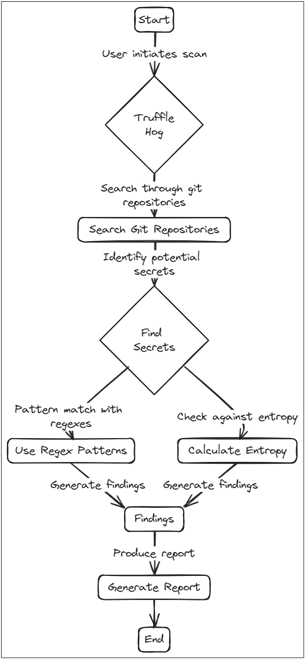
Identifying and cleaning up leaked secrets before an attacker can find them is a crucial component to security.

Installation

Installing TruffleHog is easy using APT by executing the command below.

sudo apt install trufflehog

APT not your thing? Don’t worry. The tool supports several other methods for installation:

  • Using brew on MacOS
  • Docker
  • Binary releases via https://github.com/trufflesecurity/trufflehog/releases
  • Git clone and compile from source
  • Using the install.sh script on GitHub (also supports specific version installation

Exact steps for these alternative installation methods can be found at https://github.com/trufflesecurity/trufflehog#floppy_disk-installation.

Sub-Commands

Once installed, it’s time to familiarize yourself with the nine available “sub-commands” that TruffleHog uses to root around for secrets. These can be listed by using the --help flag from the command line as shown below.

trufflehog --help
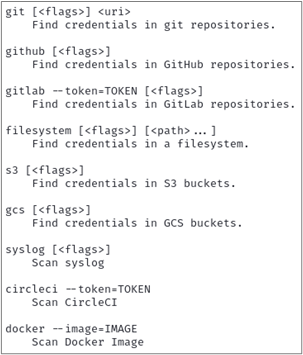
TruffleHog Sub-Commands

Each of the commands above has specific subsequent “flags” that can be set when executing TruffleHog. These additional flags help to both extend functionality and narrow the tool’s scope. These flags can be listed by including the --help flag after any of the above sub-commands as shown below.
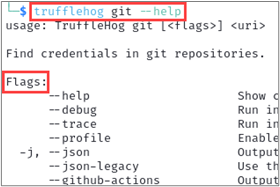
Optional Flags (Snippet)

There are some flags that are available across every sub-command. The --json flag, for example, outputs the tool’s results in JSON format.
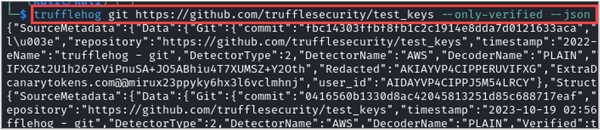
Sample JSON Output

This could then be consumed and parsed by a custom script to convert any findings into even more actionable intelligence. Given the sample TruffleHog JSON output above, let’s say you want to extract information about each detected issue, specifically the commit, file, email, repository, and the detected AWS keys. You can use jq to accomplish this!

The jq command-line tool is a powerful and lightweight way to process and manipulate JSON data. It provides a convenient and efficient way to extract, transform, and filter JSON content, making it a valuable tool for working with JSON-based APIs, configuration files, and data processing.

Some of jq‘s useful features are:

  • Querying and Selecting Data
  • Filtering and Transformation
  • Prettifying Output
  • Conditional Processing
  • Combining with Other Unix Tools (i.e., cat, grep, sed)
  • Scripting Support

The command below takes our TruffleHog JSON output and extracts commit, file, email, repository, and the detected AWS keys to display in a shortened JSON format.

cat trufflehog_output.json | jq -c '.SourceMetadata.Data.Git as $git | {commit: $git.commit, file: $git.file, email: $git.email, repository: $git.repository, awsKey: .Raw}'
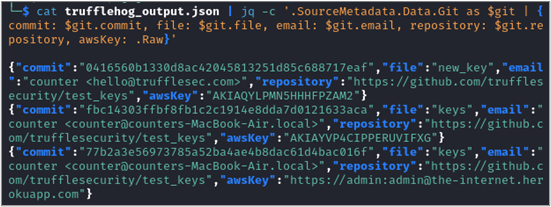
jq Parsing

Another shared sub-command flag is --only-verified, which directs TruffleHog to check every potential credential that is detected against the API that it thinks it belongs to. This additional step can help eliminate false positives. For example, the AWS credential detector performs a GetCallerIdentity API call against the AWS API to verify if an AWS credential is active.
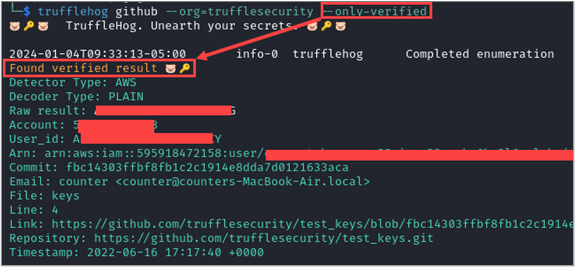
Sample Verified Key

Other flags are sub-command specific like --since-commit and --max-depth, which are available in the git command and control how far back and to what depth into commits the scan focuses on. These are useful to narrow the scope of the scan and incorporate it into your CI process to identify problems before they reach a distributed repository.

Now that we know what TruffleHog is, why it’s important, and understand the basics of how it works, let’s look at some real examples.

Web Application… err… Application

TruffleHog has been so successful in reviewing repositories, filesystems, cloud assets, and CI implementations that it has also been adapted (by third parties) into browser extensions (Chrome2 and Firefox3) to scan web application code returned by a server for secrets too!

For example, the image below shows a React application that graciously returned numerous secrets for a company’s CI/CD pipeline within the main.js file. Including GitHub, Bamboo, Polaris, AWS, and SonarQube secrets.
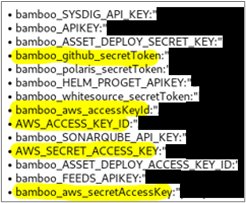
API keys for CI/CD pipeline

This issue is made worse by the file not requiring authentication to get — meaning anyone online could retrieve these keys. With a little extra legwork, and the help of GitHub’s API, an attacker would discover the GitHub token allowed for full read-write to the organization’s private GitHub. This could also permit user information for who issued the token, the organization’s larger list of users, and repository enumeration.

GitHub Token Authorization Sample

 The leaked AWS keys were also valid and could be abused using AWS’s own cli tool4.

My Code Has Secrets. What Now?

BHIS recommends taking the following steps when you encounter secrets in your (or your customer’s) code:

  • Remove all secrets.
  • Remove the previous commit(s) in the repository’s history that contained the secret.
  • Periodically run open-source token scanning software such as TruffleHog.
  • Review the CI/CD configurations.

What Next?

If you’re interested in learning more advanced usage of TruffleHog, you can start by checking out their guide on GitHub (https://github.com/trufflesecurity/trufflehog#advanced-usage).

References

  1. https://github.com/trufflesecurity/trufflehog ↩︎
  2. https://chromewebstore.google.com/detail/trufflehog/bafhdnhjnlcdbjcdcnafhdcphhnfnhjc ↩︎
  3. https://addons.mozilla.org/en-US/firefox/addon/trufflehog/ ↩︎
  4. https://aws.amazon.com/cli/ ↩︎


Enjoyed this blog? Want to learn more?

Chris will be presenting live, online training during The Most Offensive Con That Ever Offensived!

Find more details here:
Advanced Offensive Tooling