



Kent Ickler //
Because, you know—that should be a thing.
Don’t run the Unifi Controller on a laptop in the closet.
BACKGROUND
Ubiquiti’s Unifi controller is a network device, or software service, that controls Ubiquiti’s Unifi line of devices. Unifi is a brand of devices that, well, unify together to make a better user experience for network users and system admins in the SMB arena. We’ll leave that up to your own opinion, but we’ve used the devices and they work alright.
DISCLAIMER
I’m not here to comment on the controller’s software design from a security perspective. Ubiquiti pays security experts to do that. That’s not me or BHIS. And that’s OK.
What I will tell you is this:
A compromised Unifi Controller host is a compromised Unifi network.
HACKERS GONNA HACK
Unifi cloud-enabled devices got popped awhile back. Thought I should mention it.
https://krebsonsecurity.com/2021/03/whistleblower-ubiquiti-breach-catastrophic/
Enough of that.
LOCAL CONTROLLER
The local Unifi Cloud Controller can be installed on a Linux or Windows system if you didn’t want to buy their “Cloud Key” hardware controller (https://store.ui.com/products/unifi-cloudkey). It’s awesome that they provide a downloadable controller to Unifi equipment owners. This allows for a centralized install and administration of local Unifi devices without having to purchase an additional piece of software or hardware.
Download link: https://www.ui.com/download/unifi/
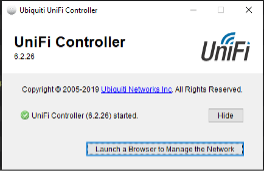
In fact, it’s so awesome and versatile, it’s like they want us to install it on an old random laptop that we don’t actively use and will completely forget is running.
CONTROLLER DESIGN
The back-end database for the controller is running a MongoDB database. While the database server only listens to the loopback address of the host it is installed on, it doesn’t require authentication.
Again, I’m not commenting on that.
LOOPBACK PORT FORWARDING
Those in infosec know that loopback addresses are only as secure as the system that operates them. In the grand scheme of things, if the host running the controller is compromised, it would be trivial to get remote access to the Unifi Controller using the loopback address without having remote desktop or console access. For demonstration purposes, I’m jumping straight to the host via RDP to snag some easy screenshots.
NO SQL
I’d normally use DBeaver (https://dbeaver.io/) for this type of thing. A while back, DBeaver removed their No-SQL and MongoDB drivers from the Community Version. Bummer.
NOSQLBooster (https://nosqlbooster.com/) is a stand-in replacement that works great.
After starting NOSQLBooster, you’ll need to connect to the local database.
DRAKE MONGODB PORT HOTLINE
No MongoDB here.
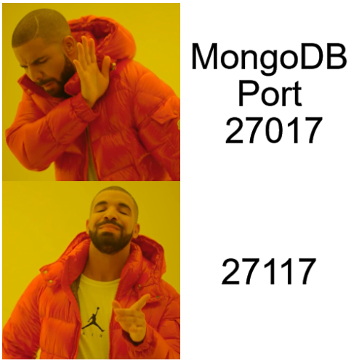
Even without Drake, this loopback obfuscated port wouldn’t have been hard to find with some cmd-fu.
But… Ubiquiti was kind enough to fully document it too: https://help.ui.com/hc/en-us/articles/218506997-UniFi-Ports-Used
GET CONNECTED
In NOSQLBooster, click on “Connect” followed by “Create.” Enter the details:
Type: Single Server
Server: localhost
Port: 27117
Name: Unifi
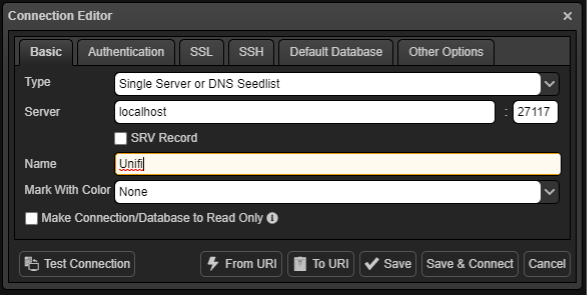
Next, press “Save and Connect.”
The database structure will open on the left side of the application.
THE GOOD HACKERY STUFF
Let’s drill down to Unifi > ace > admin.
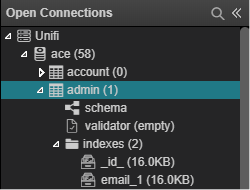
Double click “admin” to open the associated records.
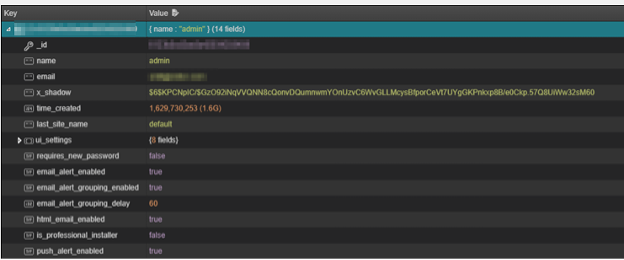
Notice the x_shadow key? It looks awfully like a hashed password.
Spoiler: It is.
Let’s snag that key and do some magic.
STOP, HASHER TIME
Dance to this and you’re gonna get thinner.
$6$KPCNpIC/$GzO92iNqVVQNN8cQonvDQumnwmYOnUzvC6WvGLLMcysBfporCeVt7UYgGKPnkxp8B/e0Ckp.57Q8UiWw32sM60
Let’s dissect that hash. By analyzing the hash with the modular-crypt-format (https://passlib.readthedocs.io/en/stable/modular_crypt_format.html), we can identify its individual parts. That syntax for this type of hash: $id$salt$encrypted
KPCNpIC/). There are some amusing bits about that salt we’ll discuss later. GzO92iNqVVQNN8cQonvDQumnwmYOnUzvC6WvGLLMcysBfporCeVt7UYgGKPnkxp8B/e0Ckp.57Q8UiWw32sM60). I SMELL PENGUIN
Notably, this is a common hash type in Linux shadow files. Cleverly, we found the hash in a key named x_shadow.
Those of you that know Linux already identified the hash as a salted sha512crypt hash.
Hashcat nerds (like me) already know that this is mode 1800.
CRACK HASH, GET POT
Get on with it.
First, we throw that hash into a file named “hash” and then start up Hashcat. Hashcat will attempt to find a hash collision and, if it does, will output the collision in a file named “pot.” We use the -m flag with Hashcat to specify the hash type and the -a flag to specify our attack mode—in this case, a direct dictionary attack.
# echo $6$KPCNpIC/$GzO92iNqVVQNN8cQonvDQumnwmYOnUzvC6WvGLLMcysBfporCeVt7UYgGKPnkxp8B/e0Ckp.57Q8UiWw32sM60 > hash
# hashcat -m 1800 -a 3 hash wordlist -o pot
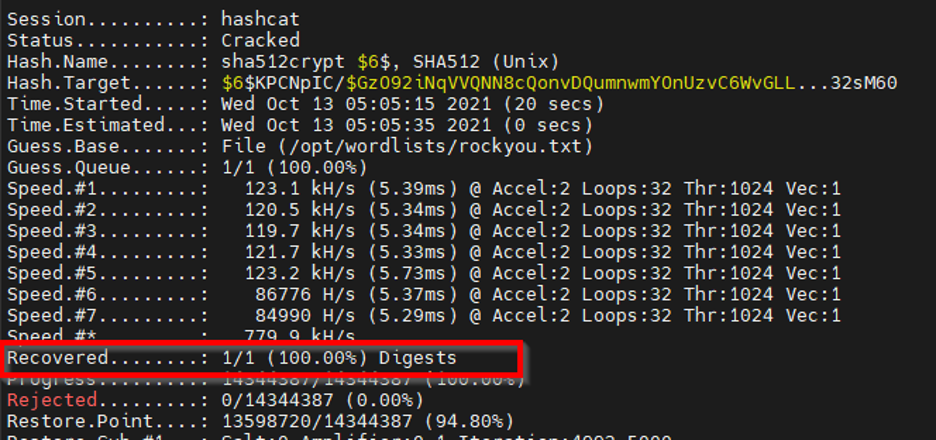
That’s a hit. You sunk my controller-ship. Let’s grab the collision from the potentials file.
# cat pot
$6$KPCNpIC/$GzO92iNqVVQNN8cQonvDQumnwmYOnUzvC6WvGLLMcysBfporCeVt7UYgGKPnkxp8B/e0Ckp.57Q8UiWw32sM60:Fall2021!
The password is Fall2021!
ADMIN LOGIN TIME
You can now login to the Unifi Controller at https://localhost:8443/ with the username specified in the ace admin key “name” with the cracked password. In our case, Fall2021! It’s haxed.
Mi Hash, Su Hash
Let’s talk about salts and hash.
To have a little fun with this (and to prove a point about non-filtered salts), let’s create our own hash.
We will use openssl to generate a SHA512-crypt hash. However, we will use our own custom salt—a salt that Unifi should know it never used to store an actual user account credential.
# openssl passwd -6 -salt BHISWASHERE Fall2021!
$6$BHISWASHERE$M.ngiEju5sTwrsxbs3gRK/Ok.mp948HNn5x1PrB6UK3q/3acozGjEQtVSRZ4KUBmU02iI.TdJGhqNBj4ttbzI1
To “reset” that Unifi Controller admin password, we need only overwrite the x_shadow key in the ace>admin table with our new hash:
$6$BHISWASHERE$M.ngiEju5sTwrsxbs3gRK/Ok.mp948HNn5x1PrB6UK3q/3acozGjEQtVSRZ4KUBmU02iI.TdJGhqNBj4ttbzI1
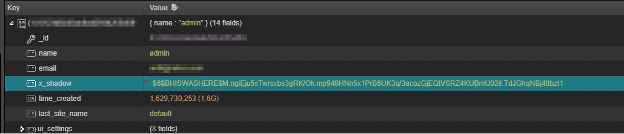
The login password will then be a very secure, Fall2021!
The salt isn’t filtered, and it will work to login to the controller.
SALTY PADME
So, the salt doesn’t matter. It’s not filtered. Big deal.
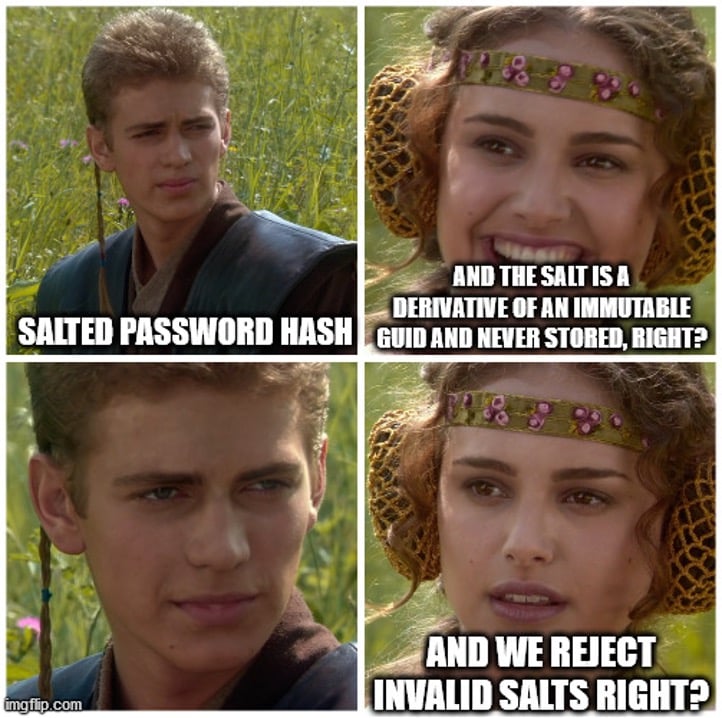
Sorry, Padme.
Imagine a runtime computed salt that is a derivative of an account attribute (like creation timestamp) plus device GUID that never gets stored, but rather, only re-computed at authentication.
At authentication time, the user submits a password which is then added to the runtime-computed salt—that is, a derivative of the user’s account creation time plus the device GUID. Since the salt would never be stored, a hacker would “never” be able to correctly produce and inject an external hash into the authentication database.
But I’m an idealist.
WHAT ELSE?
Well, aside from interesting things like the “payment” table where you find payment details for the Hot Spot Unifi service, there are other tidbits that might wet your whistle too.
The “devices” table has all you wanted to know about how the controller talks to the devices, including authentication.
The “alert” table will have network metadata alerts. You could watch as users walk around a building.
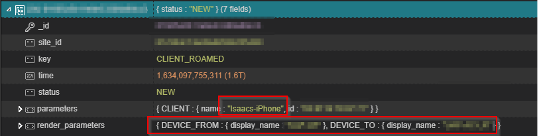
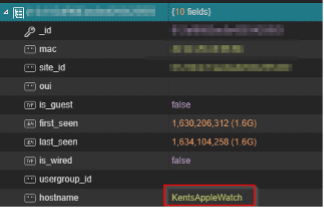
In the “users” table, you will find meta-data for every network device that the controller tracks data for (basically anything any controlled Unifi device sees in its network broadcast).
In the “settings” table, you’ll find other juicy tidbits, including the authentication and API information to Unifi’s Cloud Controller service.
Bottom line: Every setting in the controller can be enumerated.
SMTP configurations, SYSLOG, SNMP, etc. If it’s a stored credential in the controller, you now own it.
Cough… IPSEC & VPNs… cough.
I CAME HERE FOR “FREE” WIRELESS
If logging into the dashboard wasn’t your thing, you can always just pull the wireless pre-shared keys directly out of the database without logging into the controller interface.
If you look in the “wlanconf” table, you’ll find treats like “name” and “x_passphrase” that are the plaintext SSID and pre-shared key respectively. Remember, this is accessible even if the controller device itself cannot “see” the wireless network.
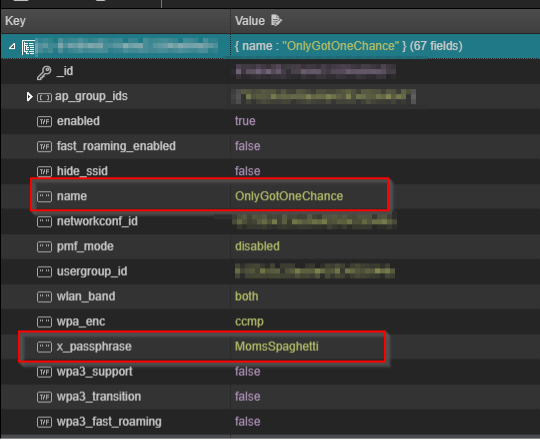
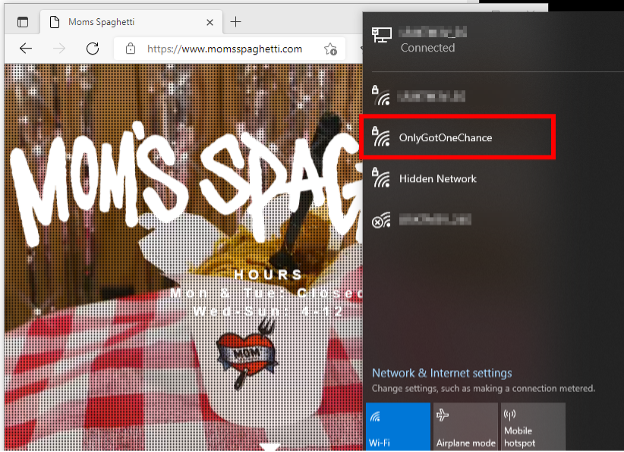
Let’s be honest: if you’ve gotten this far, spaghetti and plaintext pre-shared keys are the least of your concerns.
Frankly, this all started because I forgot my admin password on my local controller at home.
Whoops.
Red Teamers: Check for a Unifi Controller on your target endpoints. It may make an easy win.
Is the Software Unifi Controller insecure?
No. I mean, yes. Maybe.
If the host that runs the Unifi Controller becomes compromised, the network is compromised. Any external service that was configured in the controller, and potentially a linked Unifi Cloud account, should be considered compromised, and keys changed.
But then again, the host that runs this software should probably be better known as the “Unifi Controller” and protected as though it’s the “Unifi Controller.” Don’t use a random laptop thrown in the back of a closet because you didn’t want to buy the Cloud Key hardware controller.
By the way, “compromise” doesn’t mean SYSTEM context here. Remember, MongoDB is running without authentication. You only need local loopback privilege (even remotely) to modify the database.
Could it be more secure?
Yes, definitely.
But remember how the pendulum swings both ways; another extreme:
All the sensitive bits could be protected with PKI infrastructure controlled by Ubiquiti. That would be better, right?
#GetOffMYLawnAlexa
Isn’t SHA512cyrpt broken anyway?
Ehh, sure, here’s some math: https://pthree.org/2018/05/23/do-not-use-sha256crypt-sha512crypt-theyre-dangerous/
Did I contact Ubiquity?
No. This is by their design. I’m not even mad.
As a systems administrator, I acknowledge this behavior would be consistent with other manufacturer network controllers not installed on Windows. For example: a console cable can give you root privileges on a switch with nothing more than physical access—but you have that switch locked in a secure facility.
This only appears bad because of the perception that it’s OK to install the software on any Windows host, including a personal-use laptop. The network controller here leverages the security of the host itself.
When you install this software, the device becomes a network controller, and you need to secure it like one.
Don’t install network controller software on vulnerable devices.
The only thing I’d say more is that the ease of install may have trivialized the security considerations of operating the controller—or at least the considerations used in the decision to install on a specific device.
These products really do “just work” and consequently, it becomes easy to forget the security implications of how they “just work.”
Can you automate Unifi stuff?
Yes, but this guy did it first: https://github.com/MichaelMcCool/Unifi
BETTER SECURITY FOR SOFTWARE UNIFI CONTROLLER:
Did you know that after your Unifi devices are configured, they never need to talk to the controller? Just turn off the service after your devices are configured. The configuration on the devices will survive reboots and your mesh “shouldn’t” be impacted.
If a few years later you turn on the controller and find you’ve forgotten the password, you’ll find this blog post and can just change it hacker-style.
THE MORAL OF THE STORY
Real friends don’t let kids play Roblox on network controllers.
RESOURCES:
Want to learn more mad skills from the person who wrote this blog?
Check out these classes from Jordan and Kent:
此内容由惯性聚合(RSS阅读器)自动聚合整理,仅供阅读参考。 原文来自 — 版权归原作者所有。