





Mike Felch //
With the default disablement of VBA macros originating from the internet, Microsoft may be pitching a curveball to threat actors and red teams that will inevitably make initial access a bit more difficult to achieve. Over the last year, I have invested some research time in pursuing the use of the Remote Desktop Protocol as an alternative initial access vector, which this post will cover.
In efforts to regain traction, I want to introduce a new technique I dubbed as Rogue RDP. It’s the ability to leverage a malicious RDP server, an RDP relay, and a weaponized .RDP connection file which forces unsuspecting victims into connecting and forwarding control over some parts of their machine. With the right ruse, an established connection will provide an attacker the necessary means to access files, plant binaries for execution, and under the right conditions – execute remote code.
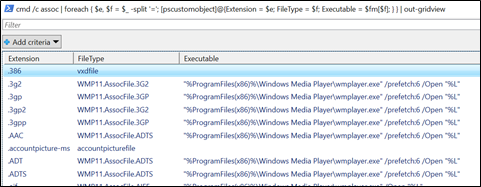
So, to begin my journey, I wanted to quickly identify the default extensions registered within Windows and their corresponding programs that would launch when executed. To do this, I generated a grid of extensions, file types, and their executable using PowerShell with the ftype and assoc built-in commands. Additionally, I also generated a file with each of the extensions so I could rapidly test default execution behavior by clicking on the files.
C:\> $fm = @{}; cmd /c ftype | foreach { $ft, $ex = $_ -split '='; $fm.add($ft,$ex); }

C:\> cmd /c assoc | foreach { $e, $f = $_ -split '='; [pscustomobject]@{Extension = $e; FileType = $f; Executable = $fm[$f]; } } | out-gridview
C:\> cmd /c assoc | foreach { $e, $f = $_ -split '='; "hax" > "hax$e"; }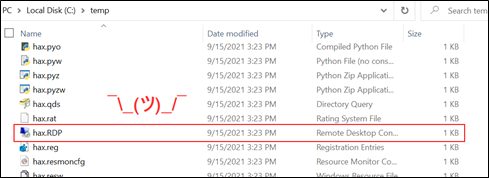
As seen in the above screenshot, after randomly clicking files and investigating the launched program, one extension continually jumped out at me… RDP! The beauty (or danger) with .RDP files is security providers, email gateways, and email clients all permit .RDP files to be sent and received by default. Whether they are downloaded from a web browser, shared via network file shares, or simply sent through email — they will arrive at their target unscathed.
At the time of this post, all the default blocked attachment lists for Microsoft Outlook, Office365, and Proofpoint allow .RDP files.
Microsoft Outlook: https://support.microsoft.com/en-us/office/blocked-attachments-in-outlook-434752e1-02d3-4e90-9124-8b81e49a8519
Microsoft Online Services: https://techcommunity.microsoft.com/t5/exchange-team-blog/changes-to-file-types-blocked-in-outlook-on-the-web/ba-p/874451
Next, I needed to determine what I could leverage within an .RDP file for initial access. Since the standard executable is Microsoft Terminal Services Client (MSTSC), this was a suitable place to start! An .RDP file contains the configuration settings for Remote Desktop connections, and since most corporate environments utilize RDP for shared computer resources among employees, Microsoft added numerous features to enable file and printer sharing, accessing clipboard contents, audio and video capture devices, smart cards, and even plug-and-play devices.
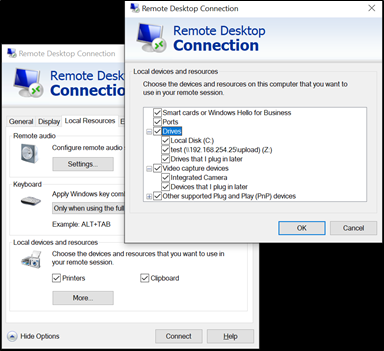
Having used RDP heavily over the past 18 years, my initial thought was to focus on the ability to force unsuspecting victims to map their local file system and clipboard to a rogue RDP server that I controlled. In this way, I could execute malicious programs (on my server) which would interact with the victim (their MSTSC client) file system. This proved to be successful because Microsoft provides a nifty way for code running within a Terminal Server environment to interact with Terminal Server Clients using Device Redirection. This capability is how accessing resources such as local drives and printers through Remote Desktop occurs. Servers can enumerate the mapped file system of a connected client by using folder paths such as \\tsclient\c\ for the C drive or even mounted Network File Shares using \\tsclient\<drive of mapped share>\.
So, let’s say a client’s computer has the following mounted paths:
They could be accessed by:
To interact with a client, we are going to need some internet-facing infrastructure. It does not have to be sophisticated but the .RDP file will need to connect to a server that we control, so that we can interact with the client. Most Windows Servers that have RDP enabled on the internet will not last long before being inundated by threat actors trying to brute force access. To curb this behavior, I suggest modifying the RDP port to something higher and random. Additionally, temporarily disable access to RDP by firewalling your own IP address for testing. We will tighten down more exposure later in the post but for now, you just need:
With PowerShell, you can modify the RDP listening port using:
Set-ItemProperty -Path 'HKLM:\SYSTEM\CurrentControlSet\Control\Terminal Server\WinStations\RDP-Tcp' -name "PortNumber" -Value 21390

New-NetFirewallRule -DisplayName 'RDPPORTLatest' -Profile 'Public' -Direction Inbound -Action Allow -Protocol TCP -LocalPort 21390

If we stop here, there are several issues that become obvious to our unsuspecting targets. First, with initial access we always want to reduce the number of interactions we require our victims to make. That is difficult because for their client to automatically connect to our server, we have to pre-load credentials in the .RDP file we send them, which is not possible nowadays because of Data Protection API (DPAPI). We could use a blank account password but that also requires weird interactions, not to mention it exposes our server to anyone who can guess the username. Because our RDP server identity is currently unverified and unknown, the publisher looks super sketchy with the big yellow warning banner. Finally, what happens if the network of the target has blocked the outbound port 3389? While we have numerous hurdles to overcome, we will attempt to solve all these problems!
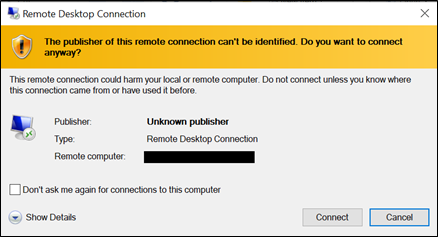
When thinking through ways to resolve some of these difficulties, I began considering the idea of writing some sort of RDP proxy. After digging into the RDP protocols and quickly realizing that the complexity of the numerous layers would end up being too much effort for the time being, I started looking for open-source projects that might have already implemented some of the communications and authentication channels. My hope was to set up some sort of listener that could forward the traffic to my server then have the victim clients connect to my proxy. This would eliminate having credentials floating around and give me the ability to auto-authenticate victims that connect. Additionally, it adds an extra layer of firewall protection so that only the proxy would be able to connect to the real RDP server.
It turns out, there is an amazing open-source project called pyrdp that implemented most of the protocols already! It acts as a MiTM (man-in-the-middle) proxy and not only will allow you to auto-authenticate but can also set up the listener on any port and even record live RDP connections. It has a bunch of built-in features, like automatically exfiltrating files that match signatures, running commands or PowerShell scripts on the real server (not the client machine), monitoring the clipboard, and even cloning certificates.
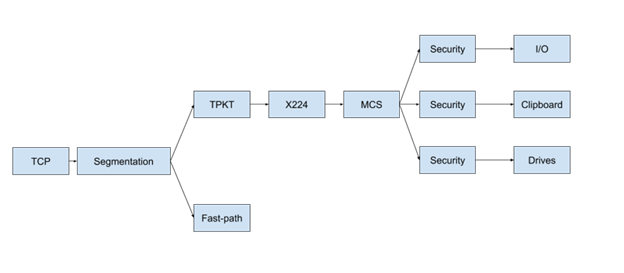
I will spare you the implementation details, but if you look at the above image, you will notice numerous protocols, authentication layers, and device redirections that had to be implemented. The protocols include 128-bit encryption via RC4 algorithm, crazy bitmap bindings for the GUI, virtual channels for interacting with the Operating System (disk/printer/clipboard/etc.), plus a range of other specifications for authentication, encoding, and communication.
What this does for us is provide the ability to pre-load our .RDP file configuration with any username, our proxy hostname, our proxy listening port (to avoid potential firewalls), and enable forwarding all drives, printers, and devices. Once we have the .RDP file generated, we can use LetsEncrypt to generate an SSL certificate for whatever domain we want to use on our proxy server then use OpenSSL to convert the certificate into a PFX file. On a Windows machine, you can import the PFX into the certificate store and sign the .RDP file using a built-in Windows utility called rdpsign.exe. There is likely an easier way to do all of this. By signing the .RDP file with your LetsEncrypt certificate, we now have a safer-looking connection dialogue!
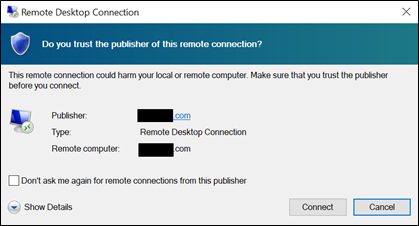
With our pyrdp proxy running and pointed at our real Windows server, all we need is some code that we execute once the sign-on session is established. The client will be connecting to our proxy via MSTSC, our proxy will automatically authenticate to our server, and bi-directional communication will occur between our victim’s client and our server. This means the clients’ drives will be accessible by both our proxy and our server.
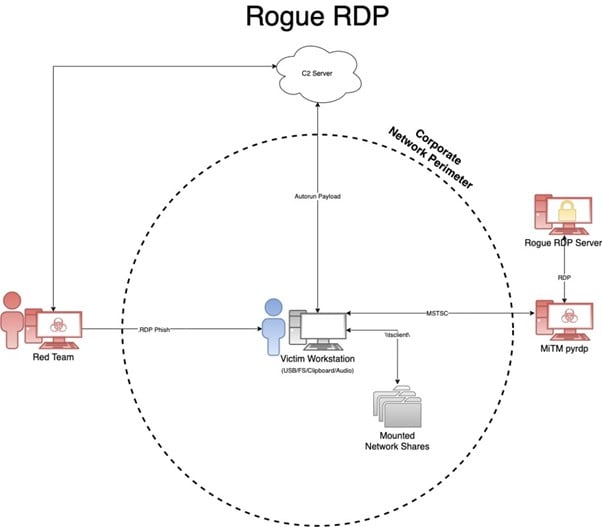
My favorite .RDP attack is enumerating mapped drives then identifying writable start-up locations so I can plant malicious payloads. Because the code is being ran on my server, EDR is mostly useless at preventing and responding, unless it detects the file-write activity or a later execution. Here are a few things to consider:
You can also search for sensitive data/files. Depending on who I target, I like to look for things like AWS/Azure credentials and PowerShell history files.
If the client has Hyper-V enabled and a writable file share, there is a chance you can immediately execute code, although I have not found this to be a real-world red team experience. A researcher named Abdelhamid Naceri introduced a method of writing a payload to C:\Program Files\Hyper-V\wfs.exe using an NTFS symbolic link, then triggering the Microsoft Windows Fax and Scan execution using printer redirection via the client printer name due to control code dispatching.
One cool technique is the ability to monitor and/or plant clipboard contents. When I was working through some testing, I was executing the .RDP file from within a Windows virtual machine but capturing the clipboard contents of the host computer. This was because I had my host clipboard mapped to my virtual machine, and when the virtual machine connected to my rogue RDP server, it was setting up a clipboard redirector. Additionally, because I had sharing enabled within my virtual machine, one of my host folders was accessible from the RDP server as well.
While I have automated most of the heavy lifting for deploying pyrdp and generating/signing RDP files, I am going to hold off on releasing the tool, RogueRDP , for the time being. There only seem to be a handful of remediations currently worth mentioning. For those interested in implementing some of the server-side code, I would encourage you to check out the Cassia C# library.
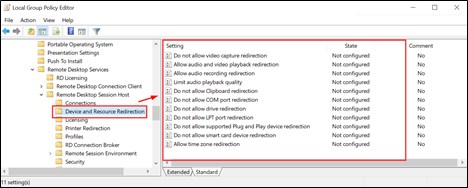
Computer Configuration\
Administrative Templates\
Windows Components\
Remote Desktop Services\
Remote Desktop Session Host
Also, consider the methods in which an .RDP file can be delivered. I commonly use email, but common chat programs and even calendar injections work well too. In some cases, social networks also permit .RDP files. Given the circumstances, this is an excellent attack vector that, unless remediated by Microsoft, will prove to be fruitful for years to come.
I intentionally left some of the implementation details a little vague in this post until we get some traction from vendors to reduce the attack surface, as well as corporations’ opportunity to restrict their Terminal Service configurations. Additionally, it leaves opportunity for those interested readers to decide how they want to implement their Windows Server, server-side code, and RDP relay without handing threat actors the keys. An example of this is, I tend to set up my relay to listen on a common port in case my target’s network blocks the outbound port 3389 and then exfil interesting files using pyrdp instead of running enumeration code from my malicious Windows Server.
For more information on the Rogue RDP technique, keep an eye out for my Wild West Hacking Fest presentation called “Socially Acceptable Ways to Walk in the Front Door” that Steve Borosh (@rvrsh3ll) and I gave last year at Deadwood 2021. I look forward to other researchers investigating ways to execute remote code and even other ways of establishing RDP sessions (*cough* I am looking at you RDP COM objects *cough*).
Ready to learn more?
Level up your skills with affordable classes from Antisyphon!
Available live/virtual and on-demand

此内容由惯性聚合(RSS阅读器)自动聚合整理,仅供阅读参考。 原文来自 — 版权归原作者所有。