








Blue Team, General InfoSec Tips & Tricks, Informational, InfoSec 101, Red Team Carrie Roberts, PowerShell
PowerShell’s Constrained Language (CLM) mode limits the functionality available to users to reduce the attack surface. It is meant to be used in conjunction with application control solutions like Device Guard User Mode Code Integrity. If CLM is enabled without proper application control settings, it is not an effective security solution.
One method for enabling CLM the wrong way is using the __PSLockDownPolicy environment variable. This is what Microsoft has to say about that:
As part of the implementation of Constrained Language, PowerShell included an environment variable for debugging and unit testing called __PSLockdownPolicy. While we have never documented this, some have discovered it and described this as an enforcement mechanism. This is unwise because an attacker can easily change the environment variable to remove this enforcement. In addition, there are also file naming conventions that enable FullLanguage mode on a script, effectively bypassing Constrained Language.
reference
A malicious user with admin privileges could simply remove the environment variable, but what about a user without admins privs? At the end of the quote above, there is a very intriguing statement.
In addition, there are also file naming conventions that enable FullLanguage mode on a script, effectively bypassing Constrained Language.
There are file naming conventions to enable Full Language mode? Do tell — inquiring minds want to know!
I’m preparing a 16-hour course on “PowerShell For InfoSec” where I will be covering this topic, and I didn’t feel comfortable making such a statement without actually knowing how to do it. So I put Google Search through the paces trying to find the magic file naming convention with no luck. Ultimately, I bit the bullet and actually looked at the PowerShell source code and now I share the magic with you. reference
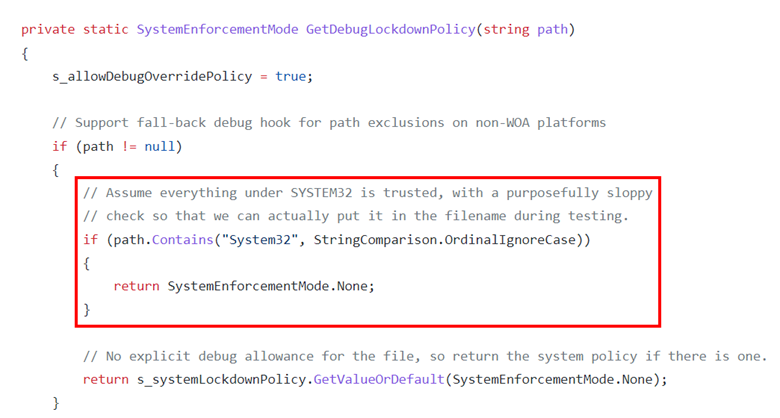
And there we have it. We just need to have “System32” somewhere in the path of the PowerShell script that we want to run in Full Language mode and it will do it. Let’s test it out. First, from an administrative PowerShell prompt, enable CLM using the environment variable (aka “the wrong way).
- [Environment]::SetEnvironmentVariable(‘__PSLockdownPolicy‘, ‘4’, ‘Machine‘)

Now, we will use this super simple script just to print out the current language mode.

Let’s run the script first from a path that does not contain “System32” and then again from a path that does.
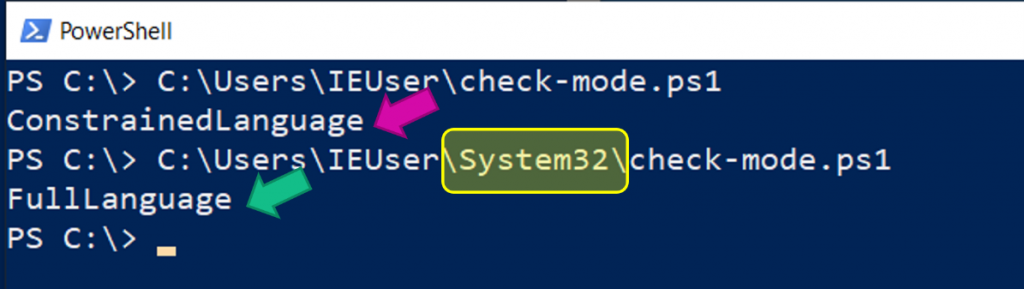
And there you have it; we can easily run any script in full language mode in this case, even without administrative access.
Keep this trick in mind the next time you run into CLM on a pentest to help ensure the organization has implemented it correctly.
If you are interested in learning more about PowerShell topics such as ‘Just Enough Admin’, PowerShell remoting, language modes, and more, check out my 16-hour course called “PowerShell For InfoSec” here.