


惯性聚合 高效追踪和阅读你感兴趣的博客、新闻、科技资讯
阅读原文 在惯性聚合中打开

推荐订阅源

H
Heimdal Security Blog
小众软件
小众软件
钛媒体:引领未来商业与生活新知
钛媒体:引领未来商业与生活新知
罗磊的独立博客
Google DeepMind News
大猫的无限游戏
大猫的无限游戏
奇客Solidot–传递最新科技情报
奇客Solidot–传递最新科技情报
Hugging Face - Blog
Hugging Face - Blog
阮一峰的网络日志
阮一峰的网络日志
A
About on SuperTechFans
宝玉的分享
宝玉的分享
博客园 - 聂微东
月光博客
月光博客
Cyberwarzone
Cyberwarzone
Microsoft Security Blog
V
Visual Studio Blog
Project Zero
Project Zero
T
Tor Project blog
freeCodeCamp Programming Tutorials: Python, JavaScript, Git & More
L
LINUX DO - 最新话题
博客园 - 叶小钗
Recent Commits to openclaw:main
Attack and Defense Labs
Spread Privacy
Spread Privacy
Forbes - Security
Forbes - Security
Simon Willison's Weblog
N
Netflix TechBlog - Medium
P
Proofpoint News Feed
Engineering at Meta
Engineering at Meta
Hacker News: Ask HN
Hacker News: Ask HN
I
InfoQ
M
MIT News - Artificial intelligence
AI
AI
博客园 - 三生石上(FineUI控件)
W
WeLiveSecurity
C
Check Point Blog
The Hacker News
The Hacker News
C
Cyber Attacks, Cyber Crime and Cyber Security
Application and Cybersecurity Blog
T
Tenable Blog
让小产品的独立变现更简单 - ezindie.com
Threat Intelligence Blog | Flashpoint
The Cloudflare Blog
Blog — PlanetScale
Blog — PlanetScale
美团技术团队
D
Darknet – Hacking Tools, Hacker News & Cyber Security
GbyAI
GbyAI
Hacker News - Newest:
Hacker News - Newest: "LLM"
腾讯CDC
K
Kaspersky official blog

Black Hills Information Security, Inc.

Bad Habits: An ANTISOC Operation Same Problem, Different Angles: When Red Team and Blue Team Actually Talk to Each Other How to Identify and Exploit New Vulnerabilities Swapper – A Pure Regex Match/Replace Burp Extension A Practical Guide to BloodHound Data Collection Network Engineering Basics Signed, Trusted, and Abused: Proxy Execution via WebView2 Getting Started In Pentesting – Advice From The BHIS Pentest Lead Cloud Security: Tips and Resources for Securing the Cloud Lessons From A Chatbot Incident How to Lead Effective Tabletops Understanding GRC: How to Navigate Risks and Compliance Standards The “P” in PAM is for Persistence: Linux Persistence Technique Malware Analysis: How to Analyze and Understand Malware OSINT: How to Find, Use, and Control Open-Source Intelligence What to Do with Your First Home Lab When the SOC Goes to Deadwood: A Night to Remember Social Engineering and Microsoft SSPR: The Road to Pwnage is Paved with Good Intentions Common Cyber Threats Finding the Right Penetration Testing Company Deceptive-Auditing: An Active Directory Honeypots Tool The Curious Case of the Comburglar How to Set Smart Goals (That Actually Work For You) Inside the BHIS SOC: A Conversation with Hayden Covington Abusing Delegation with Impacket (Part 3): Resource-Based Constrained Delegation Why You Got Hacked – 2025 Super Edition Abusing Delegation with Impacket (Part 2): Constrained Delegation Abusing Delegation with Impacket (Part 1): Unconstrained Delegation GoSpoof – Turning Attacks into Intel Model Context Protocol (MCP) Bypassing WAFs Using Oversized Requests Getting Started with AI Hacking Part 2: Prompt Injection Wrangling Windows Event Logs with Hayabusa & SOF-ELK (Part 2) DomCat: A Domain Categorization Tool Wrangling Windows Event Logs with Hayabusa & SOF-ELK (Part 1) Microsoft Store and WinGet: Security Risks for Corporate Environments Default Web Content MailFail Commonly Abused Administrative Utilities: A Hidden Risk to Enterprise Security Stop Spoofing Yourself! Disabling M365 Direct Send Bypassing CSP with JSONP: Introducing JSONPeek and CSP B Gone Offensive Tooling Cheatsheets: An Infosec Survival Guide Resource DNS Triage Cheatsheet GraphRunner Cheatsheet Burp Suite Cheatsheet Impacket Cheatsheet Wireshark Cheatsheet Hashcat Cheatsheet EyeWitness Cheatsheet Nmap Cheatsheet Netcat (nc) Cheatsheet Hunt for Weak Spots in Your Wireless Network with Airodump-ng from the Aircrack-ng Suite Detecting ADCS Privilege Escalation Vulnerability Scanning with Nmap Getting Started with NetExec: Streamlining Network Discovery and Access How to Use Dirsearch Augmenting Penetration Testing Methodology with Artificial Intelligence – Part 3: Arcanum Cyber Security Bot How to Design and Execute Effective Social Engineering Attacks by Phone Abusing S4U2Self for Active Directory Pivoting Why Use a Macro Pad? Espanso: Text Replacement, the Easy Way Caging Copilot: Lessons Learned in LLM Security Augmenting Penetration Testing Methodology with Artificial Intelligence – Part 2: Copilot Augmenting Penetration Testing Methodology with Artificial Intelligence – Part 1: Burpference Intercepting Traffic for Mobile Applications that Bypass the System Proxy How to Root Android Phones Communicating Security to the C-Suite: A Strategic Approach Offline Memory Forensics With Volatility Getting Started with AI Hacking: Part 1 Go-Spoof: A Tool for Cyber Deception How to Test Adversary-in-the-Middle Without Hacking Tools Canary in the Code: Alert()-ing on XSS Exploits How to Hack Wi-Fi with No Wi-Fi Why Your Org Needs a Penetration Test Program Burp Suite Extension: Copy For Light at the End of the Dark Web Wi-Fi Forge: Practice Wi-Fi Security Without Hardware Avoiding Dirty RAGs: Retrieval-Augmented Generation with Ollama and LangChain Gone Phishing: Installing GoPhish and Creating a Campaign 5 Things We Are Going to Continue to Ignore in 2025 John Strand’s 5 Phase Plan For Starting in Computer Security Questions From a Beginner Threat Hunter GRC for Security Managers: From Checklists to Influence AI Large Language Models and Supervised Fine Tuning Attack Tactics 9: Shadow Creds for PrivEsc w/ Kent & Jordan One Active Directory Account Can Be Your Best Early Warning Introduction to Zeek Log Analysis Indecent Exposure: Your Secrets are Showing Creating Burp Extensions: A Beginner’s Guide Pitting AI Against AI: Using PyRIT to Assess Large Language Models (LLMs) The Top Ten List of Why You Got Hacked This Year (2023/2024) ICS Hard Knocks: Mitigations to Scenarios Found in ICS/OT Backdoors & Breaches Intro to Data Analytics Using SQL Finding Access Control Vulnerabilities with Autorize The Detection Engineering Process Cyber Risk Lessons We Can Learn From Hurricane Preparedness Intro to Desktop Application Testing Methodology What Is Penetration Testing? Adversary in the Middle (AitM): Post-Exploitation Pentesting, Threat Hunting, and SOC: An Overview
How to Install Mitre CALDERA and Configure Your SSL Certificate
BHIS · 2020-10-22 · via Black Hills Information Security, Inc.

Carrie & Darin Roberts //


If you would like to install the Mitre CALDERA server on your own, the CALDERA GitHub page has installation instructions on their ReadMe here. Detailed steps are provided below for installing CALDERA on Ubuntu and configuring it to use your SSL certification.

Clone the Repository

git clone https://github.com/mitre/caldera.git --recursive --branch 2.8.1

Change directories into the “CALDERA” directory

cd caldera

Install PIP and the PIP requirements:

sudo apt install -y python3-pip
pip3 install -r requirements.txt

Install Go

Installing Go is technically optional but it makes it so that agent executables are dynamically compiled and they avoid AV detection much better.

Download Go from https://golang.org/doc/install

Extract the downloaded file (your filename may vary)

sudo tar -C /usr/local -xzf go1.15.2.linux-amd64.tar.gz

Update your PATH

Add the following line to your $HOME/.bashrc file:

export PATH=$PATH:/usr/local/go/bin

Close the terminal and reopen to have the PATH changes take effect, or use the “source ~/.bashrc” command.

Confirm that GO is properly installed by checking its version.

go --version

Start the server

Create a copy of the CALDERA config file called local.yml and then edit it to set your own users and secure passwords.

cp ~/caldera/conf/default.yml ~/caldera/conf/local.yml

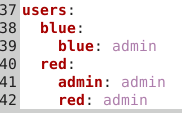
Edit the local.yml file to change the usernames and passwords shown below to something more secure.
Start the CALDERA server.

python3 server.py

Setup SSL Communications for the CALDERA Web Interface

If your CALDERA web interface is reachable over an untrusted network, you should enable encrypted communications as instructed below.

The encrypted communications are handled by the HAProxy tool. Install HAProxy as follows.

sudo apt update
sudo apt install haproxy

After logging in to the CALDERA web interface on localhost:8888, go to the Advanced–>Configuration menu.

From the configuration menu enable the SSL plugin. You can now reach the CALDERA web interface at https://<your ip>:8443.

You also need to update your app.contact.http setting from the CALDERA web interface (advanced–>configuration) to include https as shown below. (update with the IP or domain name of your server)

Note: Make sure you do not include a trailing slash (/) on the URL.

Don’t forget to click the green “update” button and restart the server after making the configuration changes.

Now that we have configured the app.contact.http setting, we will see updated commands for deploying an agent using the http contact method (54ndc47 for example)

By default, a self signed certificate is used for the SSL encryption. Replace the self-signed certificate at ~/caldera/plugins/ssl/conf/insecure_certificate.pem with your own if desired.

Need to create your own signed/trusted certificate? Try using Let’s Encrypt. You will need to own a domain name and configure a DNS authoritative record to point to your CALDERA server’s IP address.

To use your own trusted cert create a combined pem file using the commands to below.

cd /etc/letsencrypt/live/<your domain>
cat cert.pem privkey.pem > ~/caldera/plugins/ssl/conf/insecure_certificate.pem

Restart the CALDERA server after making these changes.

If you use the self-signed cert, any PowerShell commands you run to get a remote agent are going to complain about not being able to establish a trust relationship. You will need to bypass the trust check by running the PowerShell commands below before you execute the agent command. (this only applies if you are using the default self-signed cert)

class TrustAllCertsPolicy : System.Net.ICertificatePolicy {
        [bool] CheckValidationResult([System.Net.ServicePoint] $a,
            [System.Security.Cryptography.X509Certificates.X509Certificate] $b,
            [System.Net.WebRequest] $c,
            [int] $d) {
            return $true
        }
    }
    [System.Net.ServicePointManager]::CertificatePolicy = [TrustAllCertsPolicy]::new()

Now your CALDERA SERVER is fully set up and ready to be put to use. Check out the “Attack Emulation: Atomic Red Team, CALDERA, and More” class to learn more about using Mitre CALDERA, including over 25 hands-on labs. https://wildwesthackinfest.com/online-training/attack-emulation-atomic-red-team-caldera-and-more/


Ready to learn more?

Level up your skills with affordable classes from Antisyphon!

Pay-What-You-Can Training

Available live/virtual and on-demand
