




惯性聚合 高效追踪和阅读你感兴趣的博客、新闻、科技资讯
阅读原文 在惯性聚合中打开

推荐订阅源

B
Blog
Hugging Face - Blog
Hugging Face - Blog
月光博客
月光博客
钛媒体:引领未来商业与生活新知
钛媒体:引领未来商业与生活新知
人人都是产品经理
人人都是产品经理
博客园 - Franky
让小产品的独立变现更简单 - ezindie.com
P
Proofpoint News Feed
F
Fortinet All Blogs
H
Help Net Security
OSCHINA 社区最新新闻
OSCHINA 社区最新新闻
V
Visual Studio Blog
Jina AI
Jina AI
J
Java Code Geeks
Blog — PlanetScale
Blog — PlanetScale
S
SegmentFault 最新的问题
D
DataBreaches.Net
T
The Blog of Author Tim Ferriss
美团技术团队
博客园 - 司徒正美
宝玉的分享
宝玉的分享
Cyber Security Advisories - MS-ISAC
freeCodeCamp Programming Tutorials: Python, JavaScript, Git & More
Apple Machine Learning Research

Black Hills Information Security, Inc.

Bad Habits: An ANTISOC Operation Same Problem, Different Angles: When Red Team and Blue Team Actually Talk to Each Other How to Identify and Exploit New Vulnerabilities Swapper – A Pure Regex Match/Replace Burp Extension A Practical Guide to BloodHound Data Collection Network Engineering Basics Signed, Trusted, and Abused: Proxy Execution via WebView2 Getting Started In Pentesting – Advice From The BHIS Pentest Lead Cloud Security: Tips and Resources for Securing the Cloud Lessons From A Chatbot Incident How to Lead Effective Tabletops Understanding GRC: How to Navigate Risks and Compliance Standards The “P” in PAM is for Persistence: Linux Persistence Technique Malware Analysis: How to Analyze and Understand Malware OSINT: How to Find, Use, and Control Open-Source Intelligence What to Do with Your First Home Lab When the SOC Goes to Deadwood: A Night to Remember Social Engineering and Microsoft SSPR: The Road to Pwnage is Paved with Good Intentions Common Cyber Threats Finding the Right Penetration Testing Company Deceptive-Auditing: An Active Directory Honeypots Tool The Curious Case of the Comburglar How to Set Smart Goals (That Actually Work For You) Inside the BHIS SOC: A Conversation with Hayden Covington Abusing Delegation with Impacket (Part 3): Resource-Based Constrained Delegation Why You Got Hacked – 2025 Super Edition Abusing Delegation with Impacket (Part 2): Constrained Delegation Abusing Delegation with Impacket (Part 1): Unconstrained Delegation GoSpoof – Turning Attacks into Intel Model Context Protocol (MCP)
Opt for TOTP to Deal With MFA App Sprawl
Kassie Kimball · 2023-10-27 · via Black Hills Information Security, Inc.

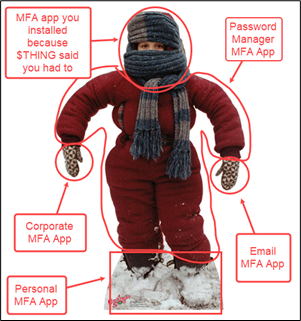
Do you have a bunch of MFA apps on your phone that leave you feeling like you can’t put your arms down?
Or maybe all those MFA apps on your phone feel like a litter of English bulldog puppies. They follow you around, demand your attention, and give you security snuggles.
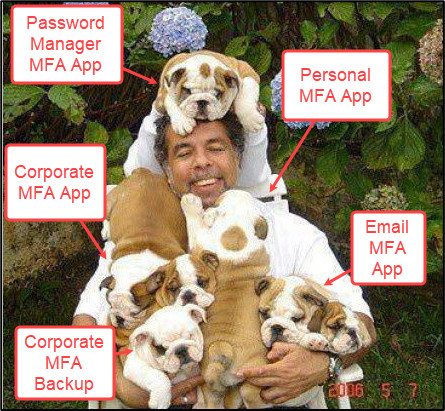
Either way, that’s a lot of figurative winter gear to take care of, a lot of mouths to feed. With all those apps to keep track of, consider the following:

  • What will you lose access to if you break or lose your phone?
  • Do all your MFA apps let you do backup / export?
  • For the apps that you know do backups, did you do a backup within the past month or so?
  • What’s the process look like for restoring those MFA apps on a new phone?
    • Have you tested this process to make sure there aren’t any surprises?
  • How about migrating to a different MFA app?
    • Assuming you can export your data, how hard is it going to be to convert that data into a format that your next MFA app can parse?

I’ll be the first to admit that I’ve been socially engineered by service providers to install their MFA apps on more than one occasion. Think about one of those times where you registered MFA with a new service provider. The procedure usually starts with the service provider saying something like, “Your organization is requiring you to do MFA. Start by installing our MFA app.”

What if I already have three MFA apps on my phone? Are none of them good enough? If you’re lucky, the service provider will at least suggest a couple alternative MFA apps that could work. Even after registration though, there’s a pretty good chance that you’ll be gently nudged to install the service provider’s app every time you log in, with phrases like, “Can’t access our MFA app right now?” Talk about presumptuous.

While each MFA app has its own “special way of doing MFA that’s way more secure than every other vendor,” there is a standards-based approach to MFA you’re probably familiar with that just about every MFA app supports. It’s the MFA flavor where you have 30 seconds to enter a 6-digit code and it goes by a couple of names:

  • Google Authenticator
  • Time-based One Time Password (TOTP)

I used to think that you MUST install the Google Authenticator app when I saw “Google Authenticator” listed as a supported MFA app. However, I’ve now come to interpret “Google Authenticator” as “an app that supports TOTP.” From the Google Authenticator Github Wiki:

The nice thing about service providers that support TOTP, is that there are a LOT of apps that support TOTP because it is standardized1 and pretty simple. Here’s an overview of how TOTP authentication usually2 works:

  • The user and the service provider have a shared secret.
  • The user’s TOTP app counts the number of time steps since the Unix epoch. The number of time steps is combined with the shared secret to calculate a 6-digit code with HMAC-SHA-1.
  • The user presents the 6-digit code to the service provider during authentication. Upon receipt of the 6-digit code, the service provider does the same calculation using its copy of the shared secret.
  • If the codes match, the authentication is successful.

Easy peasy, hey? As a matter of fact, TOTP is so simple that you could implement it in 20 lines of python or almost entirely in bash if you’re not into the whole graphical user interface thing.

So, this means that you have more flexibility with what MFA apps to use and how many to install when you opt for TOTP. For example:
  • You could choose to use a commercially supported, closed-source app or an open-source app that you can audit.
  • You could do offline local backups of MFA keys or use a solution that offers an online backup feature that you trust.
  • You can find a TOTP app that lets you register multiple devices.
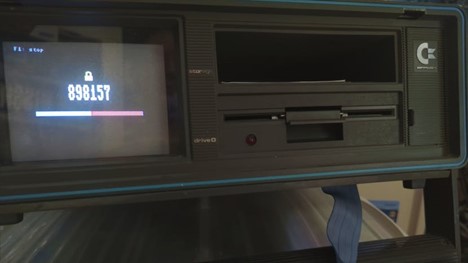
  • If you’re into retro computing, you could turn that old Commodore 64 into a stand-alone TOTP generator.

How to Tell if a Service Provider Supports TOTP

When it comes to identifying if a service provider supports TOTP, you probably will not get a clear declaration. Here are a few hints that you’re more likely to see during MFA registration:

  • The service provider will state something along the lines of “Enter a code from your MFA app.” This is an acknowledgement that you may already have an MFA app. Since TOTP is the most common flavor of MFA, there’s a good chance that TOTP is supported.
  • Look for an option that says “Google Authenticator.” Oftentimes, a Google Authenticator logo will be next to it.
  • If neither of those other hints are showing up, then TOTP might be buried as a fallback option. That is, you might need to reject the initial offerings from the service provider. This is sometimes indicated by “Try another method.”

How to Shop for TOTP Apps

Obviously, the primary consideration is whether the app supports TOTP. As with MFA registration, app descriptions in the App Store or Google Play generally don’t come out and say, “This app supports TOTP.” Most MFA apps do support TOTP, but to verify, search for something like “does XYZ MFA app support TOTP.” This should yield a technical support page, blog, or (best of all) source code.

Here’s a few more questions to consider which might take a little legwork to figure out as you start to narrow down your choices:

  • MFA Code Backups
    • Is cloud backup OK or do you need local backups?
  • Number of Device Registrations
    • Can you get away with having only one device registered with a service provider? If you want to have a backup device at the ready, keep an eye out for features that let you transfer or export MFA codes to a second device.
  • Do you have a “de-Googled” Android phone and want to keep it that way?
    • Google services are typically necessary to install or launch an MFA app when the app supports push notifications, even if a service provider doesn’t use push notifications for MFA…
  • Independent Security Audits

Will there be cases where your chosen MFA app doesn’t work for a specific scenario?

But, hopefully you’ve seen how opting for TOTP provides you some flexibility in how you do MFA. At the very least, you won’t have as many MFA apps to keep track of if you opt for TOTP authentication.


Footnotes

[1] https://datatracker.ietf.org/doc/html/rfc6238

[2] SHA-1 is the suggested default and by far the most common implementation. The RFC mentions SHA-256 or SHA-512 variants though. TOTP time steps don’t have to be 30 seconds either. You could go crazy and generate TOTPs every 5 seconds if you wanted to.


Ready to learn more?

Level up your skills with affordable classes from Antisyphon!

Pay-What-You-Can Training

Available live/virtual and on-demand
