更新
- 2017-02-27: 增加两种Alignment布局类型;增加点击前的回调判断;增加选中Tag上限
- 2016-12-25: 不再依赖UICollectionView,减少了位置刷新次数,提高性能;增加了alignment属性,可以靠左中右排列
- 2016-10-29: 增加Tag的阴影和ContentInset的设置,更新了Demo
- 2016-10-17: 增加了水平滑动;Autolayout适配;UITableViewCell例子等
- 2016-02-18: 修复了超长标签导致排版错误的Bug
前言
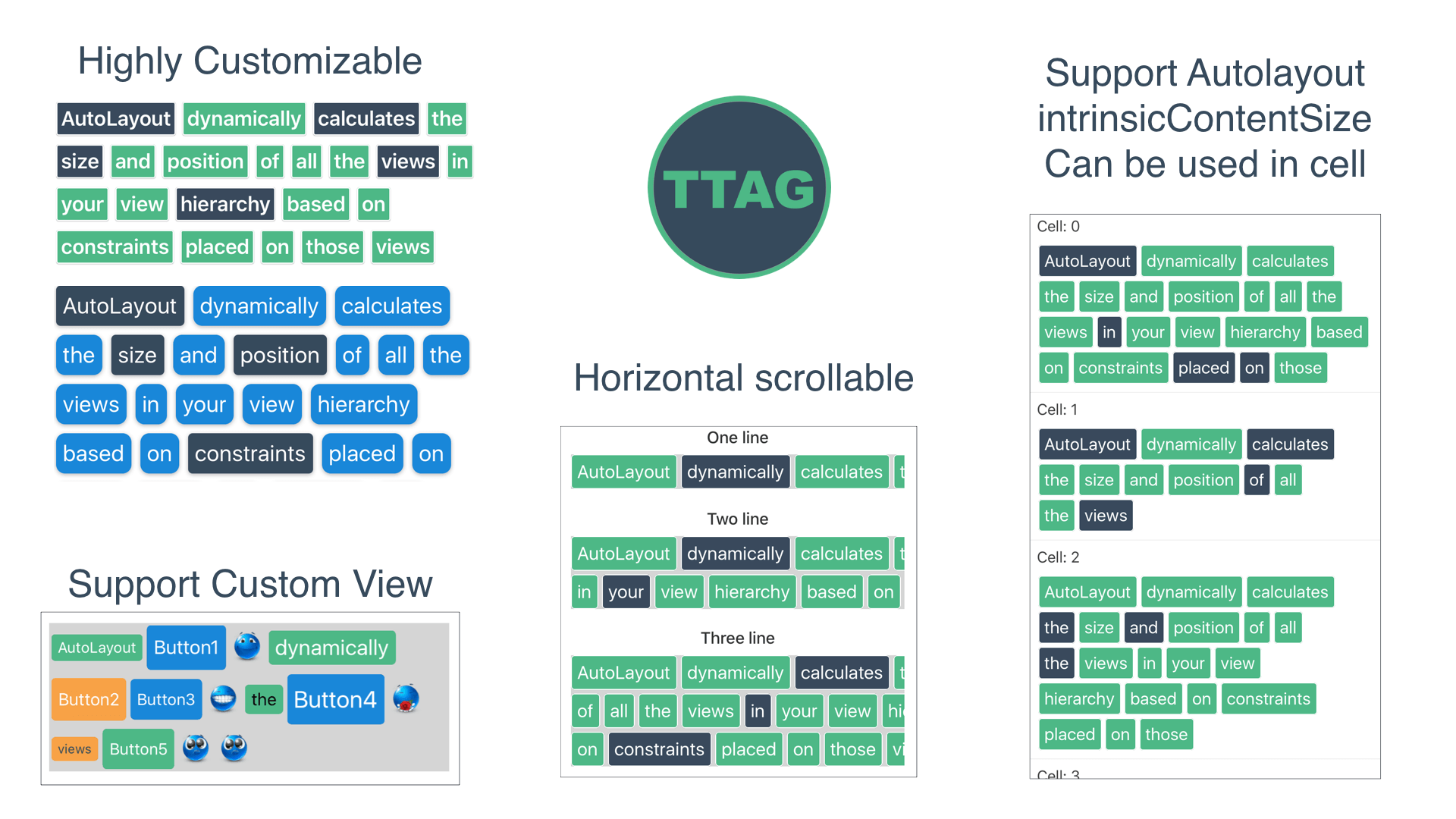
这段时间做项目的时候,总是需要显示一些“标签”样式的内容,但是又找不到用的顺手的库,所以琢磨了几天,自己实现了出来,就有了这个库:TTGTagCollectionView。如果只需要显示文字标签的话,直接使用TTGTextTagCollectionView,需要自己定义标签的话,就用TTGTagCollectionView,效果如下:
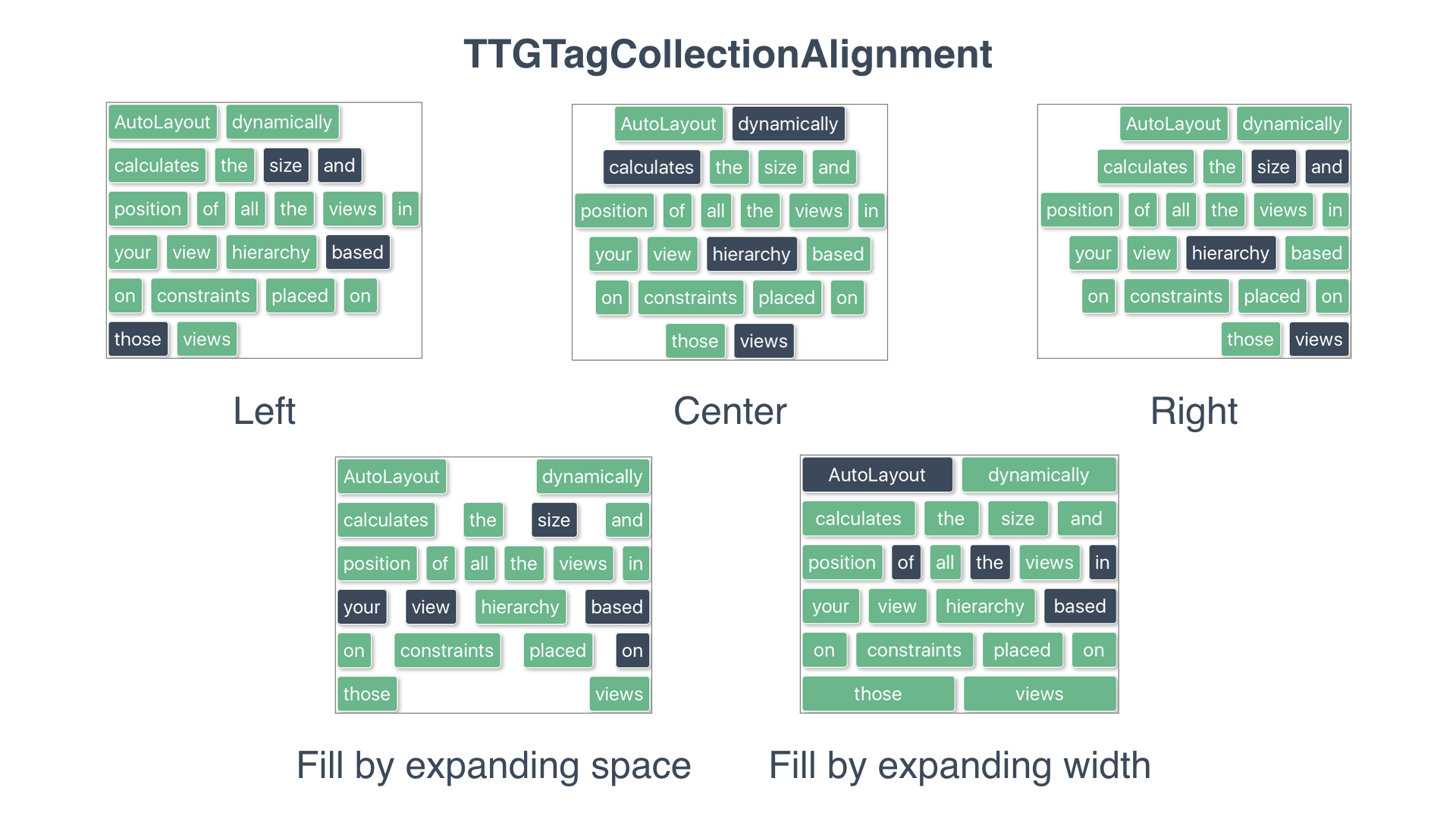
支持五种布局排版:
CocoaPods: pod "TTGTagCollectionView"
Carthage: github "zekunyan/TTGTagCollectionView"
Github地址: https://github.com/zekunyan/TTGTagCollectionView
只显示文字标签 - TTGTextTagCollectionView
基本使用
只显示文字标签的话,直接用TTGTextTagCollectionView类就可以了:
1
2
3
| TTGTextTagCollectionView *tagCollectionView = [[TTGTextTagCollectionView alloc] initWithFrame:CGRectMake(20, 20, 200, 200)];
[self.view addSubview:tagCollectionView];
[tagCollectionView addTags:@[@"TTG", @"Tag", @"collection", @"view"]];
|
接收点击事件 - 实现Delegate
如果想在标签被点击时得到通知,实现对应的Protocol即可,定义如下:
1
2
3
4
5
6
7
8
9
10
11
| @protocol TTGTextTagCollectionViewDelegate <NSObject>
@optional
- (BOOL)textTagCollectionView:(TTGTextTagCollectionView *)textTagCollectionView canTapTag:(NSString *)tagText atIndex:(NSUInteger)index currentSelected:(BOOL)currentSelected;
- (void)textTagCollectionView:(TTGTextTagCollectionView *)textTagCollectionView didTapTag:(NSString *)tagText atIndex:(NSUInteger)index selected:(BOOL)selected;
- (void)textTagCollectionView:(TTGTextTagCollectionView *)textTagCollectionView updateContentSize:(CGSize)contentSize;
@end
|
自定义文字标签样式
如果想对标签的样式做定制,可以设置以下属性:
1
2
3
4
5
6
7
8
9
10
11
12
13
14
15
16
17
18
19
20
21
22
23
24
25
26
27
28
29
30
31
32
33
34
35
36
37
38
39
40
41
42
43
44
45
46
47
48
49
50
51
52
53
54
55
56
57
58
59
|
@property (assign, nonatomic) BOOL enableTagSelection;


@property (strong, nonatomic) UIFont *tagTextFont;


@property (strong, nonatomic) UIColor *tagTextColor;
@property (strong, nonatomic) UIColor *tagSelectedTextColor;


@property (strong, nonatomic) UIColor *tagBackgroundColor;
@property (strong, nonatomic) UIColor *tagSelectedBackgroundColor;


@property (assign, nonatomic) CGFloat tagCornerRadius;
@property (assign, nonatomic) CGFloat tagSelectedCornerRadius;


@property (assign, nonatomic) CGFloat tagBorderWidth;
@property (assign, nonatomic) CGFloat tagSelectedBorderWidth;
@property (strong, nonatomic) UIColor *tagBorderColor;
@property (strong, nonatomic) UIColor *tagSelectedBorderColor;


@property (nonatomic, copy) UIColor *tagShadowColor;
@property (nonatomic, assign) CGSize tagShadowOffset;
@property (nonatomic, assign) CGFloat tagShadowRadius;
@property (nonatomic, assign) CGFloat tagShadowOpacity;


@property (nonatomic, assign) TTGTagCollectionScrollDirection scrollDirection;


@property (nonatomic, assign) TTGTagCollectionAlignment alignment;


@property (nonatomic, assign) NSUInteger numberOfLines;


@property (nonatomic, assign) NSUInteger selectionLimit;


@property (assign, nonatomic) CGSize extraSpace;


@property (assign, nonatomic) CGFloat horizontalSpacing;

@property (assign, nonatomic) CGFloat verticalSpacing;


@property (nonatomic, assign) UIEdgeInsets contentInset;


@property (nonatomic, assign, readonly) CGSize contentSize;


@property (nonatomic, assign) BOOL showsHorizontalScrollIndicator;
@property (nonatomic, assign) BOOL showsVerticalScrollIndicator;
|
增加、删除标签
1
2
3
4
5
6
7
8
9
10
11
|
- (void)addTag:(NSString *)tag;

- (void)addTags:(NSArray <NSString *> *)tags;


- (void)removeTag:(NSString *)tag;

- (void)removeTagAtIndex:(NSUInteger)index;

- (void)removeAllTags;
|
在代码里控制标签的选中状态
1
| - (void)setTagAtIndex:(NSUInteger)index selected:(BOOL)selected;
|
获取所有、选中、未选中标签
1
2
3
4
5
| - (NSArray <NSString *> *)allTags
- (NSArray <NSString *> *)allSelectedTags
- (NSArray <NSString *> *)allNotSelectedTags
|
重新加载 - Reload
用- (void)reload方法重新加载所有标签。
显示自定义的标签控件View - TTGTagCollectionView
如果想自己定义标签View,如同时显示图像、文字、按钮,可以用TTGTagCollectionView类实现。
基本要求 - 实现DataSource和Delegate
DataSource的定义如下:
1
2
3
4
5
6
7
8
| @protocol TTGTagCollectionViewDataSource <NSObject>
@required
- (NSUInteger)numberOfTagsInTagCollectionView:(TTGTagCollectionView *)tagCollectionView;
- (UIView *)tagCollectionView:(TTGTagCollectionView *)tagCollectionView tagViewForIndex:(NSUInteger)index;
@end
|
Delegate的定义如下:
1
2
3
4
5
6
7
8
9
10
11
12
13
14
15
| @protocol TTGTagCollectionViewDelegate <NSObject>
@required
- (CGSize)tagCollectionView:(TTGTagCollectionView *)tagCollectionView sizeForTagAtIndex:(NSUInteger)index;
@optional
- (BOOL)tagCollectionView:(TTGTagCollectionView *)tagCollectionView shouldSelectTag:(UIView *)tagView atIndex:(NSUInteger)index;
- (void)tagCollectionView:(TTGTagCollectionView *)tagCollectionView didSelectTag:(UIView *)tagView atIndex:(NSUInteger)index;
- (void)tagCollectionView:(TTGTagCollectionView *)tagCollectionView updateContentSize:(CGSize)contentSize;
@end
|
跟UITableView的思路一致~
设置标签的行距、间隔
1
2
3
4
5
6
7
8
9
10
11
12
13
14
15
16
17
18
19
20
21
22
23
|
@property (nonatomic, assign) TTGTagCollectionScrollDirection scrollDirection;


@property (nonatomic, assign) TTGTagCollectionAlignment alignment;


@property (nonatomic, assign) NSUInteger numberOfLines;


@property (assign, nonatomic) CGFloat horizontalSpacing;

@property (assign, nonatomic) CGFloat verticalSpacing;


@property (nonatomic, assign) UIEdgeInsets contentInset;


@property (nonatomic, assign, readonly) CGSize contentSize;


@property (nonatomic, assign) BOOL showsHorizontalScrollIndicator;
@property (nonatomic, assign) BOOL showsVerticalScrollIndicator;
|
重新加载 - Reload
用- (void)reload方法重新加载所有标签。
End
2015最后一天~
新年快乐~
上一篇:对组件化与模块化的思考与总结
下一篇:有趣的Autolayout示例3-Masonry实现







