





Bun is a JavaScript runtime, designed as a drop-in replacement for Node.js. It is an all-in-one solution: it comes with a bundler, a test runner, and a Node.js compatible package manager. It offers significant speed improvements over runtimes such as Node.js and Deno because of the built-in APIs and its use of the JavaScriptCore engine.
In this article, we will discuss Bun features, including its compatibility with ECMAScript modules, CommonJS, and Node.js, and its use as a package manager and bundler. We will take a look at Bun's unique built-in APIs that differentiate it from its counterparts such as Node.js and Deno. We'll also demonstrate how to run a sample Bun application on a Vultr Cloud Compute server using the Bun marketplace application.
Bun uses JavaScriptCore (JSC), an open-source JavaScript engine developed for Safari, whereas both Node.js and Deno use the V8 JavaScript engine that is found in Chrome. Both engines have their strengths. JSC prioritizes faster start times and uses three optimizing compilers, making it more complex but faster, and it consumes less memory. On the other hand, V8 focuses on fast execution and has two optimizing compilers, making it less complex and easy to use; however, it requires more memory due to more runtime optimization. These differences between the engines contribute to Bun being three to four times faster than Node.js.
One of the most convenient features of Bun is that it simplifies the module system by supporting both ES modules and CommonJS in the same file, a feature not possible with Node.js.
const fs = require("fs");
const path = require("path");

import { add, subtract } from "./math";

console.log(fs.readFileSync(path.join(__dirname, "file.txt"), "utf8"));
console.log(add(5, 3));
console.log(subtract(10, 7));
Without any extra configurations, both import and const can be used in the same file.
Support for built-in modules: As a drop-in replacement for Node.js, Bun supports essential Node.js built-in modules such as fs (file system), path (path manipulation), and net (networking), thereby preserving the expected behavior.
Recognition of global variables: Bun also supports global variables commonly used in Node.js, such as __dirname (represents the directory name of the current module) and process (provides information about the current Node.js process). This ensures that Node.js code relying on these variables will work as intended in the Bun environment.
Adherence to Node.js Module Resolution Algorithm: Bun follows the Node.js module resolution algorithm, which is the set of rules Node.js uses to locate and load modules in a program. This includes adhering to the familiar structure of the node_modules directory, where external dependencies are typically stored.
In addition to its runtime, Bun comes with a package manager that is relatively faster than the alternatives. This can be attributed to the fact that after a module is installed, Bun downloads it into a global module cache. If the module is needed again later, Bun checks the cache first to avoid redundant installations.
Below are some commonly used Bun commands:
To install all the dependencies:
To add a new package to the project:
To add a new development-only package:
To remove a package from the project:
To update a specific package to its latest version:
To execute a specified script:
Bun is not only a runtime but also a bundler designed to bundle JavaScript and TypeScript. It includes a minifier that can target code for the browser, Node.js, and other platforms. This sets Bun apart from other runtimes, which rely on third-party tools such as WebPack, Rollup, and Parcel for bundling.
To bundle the index.tx file, use the following command:
bun build ./index.tsx --outdir ./build
This command writes the bundle to the ./build directory on the disk.
In the commonly used runtime, Node.js, nodemon is the tool that is used for hard restarts. This tool is responsible for monitoring changes in the file and restarting the entire Node.js process whenever a change is detected. This approach can sometimes lead to disruptions such as disconnecting HTTP and WebSocket connections.
To address this, Bun enhances hot reloading with the --hot flag. This flag reloads the code in place without requiring a full restart. With this method, existing HTTP connections are not disturbed, making the hot reload almost instantaneous. This ultimately leads to a faster and more efficient development.
Here's how to use the Bun hot reload command:
Bun offers several built-in, optimized native APIs, primarily for server-side tasks like starting an HTTP server using the Bun global object. Some of these are described below.
Bun.serve(): You can set up HTTP using Bun's APIs, which are faster and capable of handling a vast number of requests. An HTTP server in Bun is started using Bun.serve, as shown below:
Bun.serve({
  fetch(req) {
    return new Response("Bun!");
  },
});
Bun.file(): This API lazily loads the files and accesses their contents, which is relatively faster than other counterparts.
const file = Bun.file("package.json");
await file.text();
Bun.write(): This API is used to write data to the disk.
await Bun.write("index.html", "<html></html>");
Sign up and log in to the Vultr Customer Portal.
Navigate to the Products page.
From the side menu, select Compute.
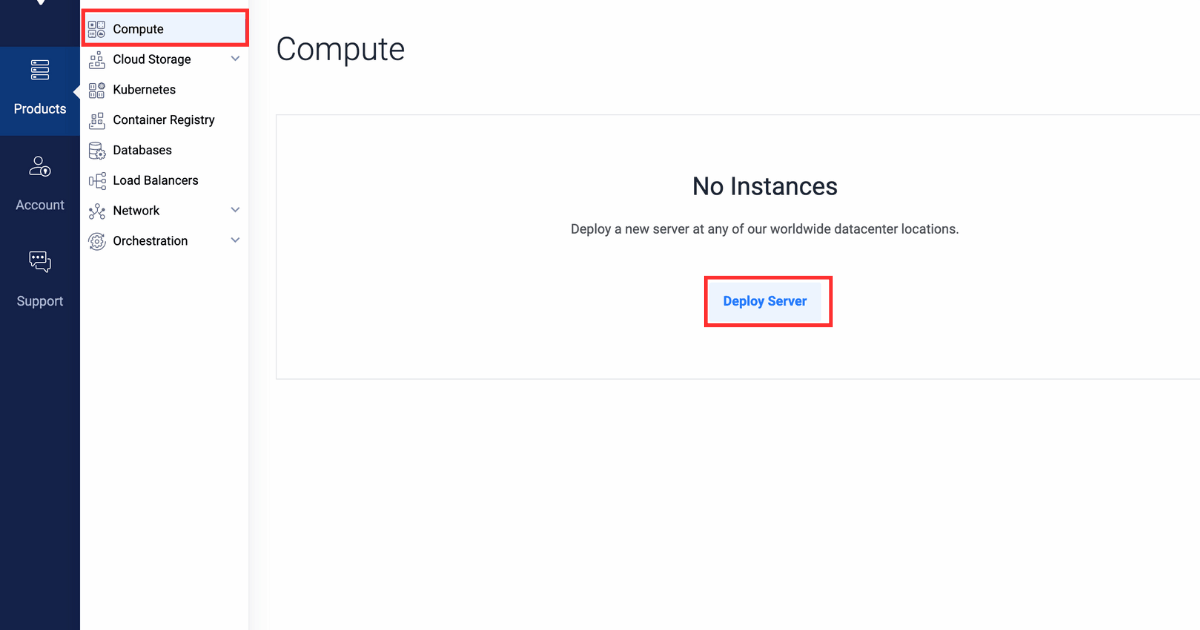
Click the Deploy Server button in the center.
Select Cloud Compute as the server type.
In the Server Location section, select the region of your choice.
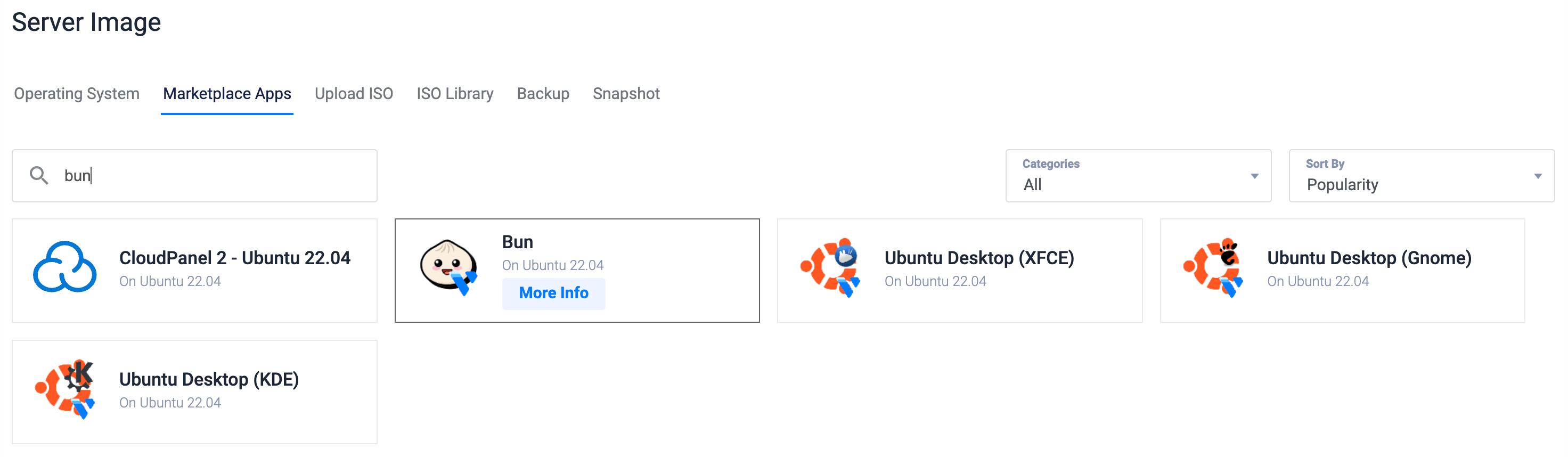
In the Marketplace Apps section, select Bun.
In the Server Size section, select the server size of your choice.
Select any more features as required in the Additional Features section.
Click the Deploy Now button on the bottom right corner.
After setting up a Vultr server as described earlier, this section will guide you through creating a sample Bun HTTP application using Vultr's Bun marketplace application.
Verify the Bun installation using the following command:
Create a JavaScript file. We're using the Nano text editor here.
Copy and paste the following code into the file:
const port = 8080;
console.log(`Server started on port ${port}`);

Bun.serve({
  port: port,
  fetch(request) {
    return new Response("Hello world");
  },
});
Save the file (Ctrl + O, Enter) and exit the editor (Ctrl + X).
Allow incoming connections to port 8080.
Start a Bun server using the following command:
The output will look like this:
Server started on port 8080
You can visit the Bun application at the following link:
http://SERVER_IP:8080
In this article, we took an in-depth look at the Bun runtime, understanding its functionalities and how it differs from alternative runtimes. We explored how Bun can be used as a drop-in replacement for Node.js. Additionally, we saw how to set up a Bun HTTP server using Vultr's Bun marketplace application and Bun's built-in API feature, making the process much faster, more efficient, and more reliable.
This is a sponsored article by Vultr. Vultr is the world's largest privately-held cloud computing platform. A favorite with developers, Vultr has served over 1.5 million customers across 185 countries with flexible, scalable, global Cloud Compute, Cloud GPU, Bare Metal, and Cloud Storage solutions. Learn more about Vultr.
此内容由惯性聚合(RSS阅读器)自动聚合整理,仅供阅读参考。 原文来自 — 版权归原作者所有。