






There are two key components of the Edgecution attack: a Microsoft Edge browser extension and a Python script. The latter serves as a bridge between traditional browser sandboxes that are designed to limit access to the local system. However, Chrome-based browsers support native messaging to enable third-party applications to perform activities outside of the sandbox and access the filesystem and operating system. In this section, we discuss how this attack deploys the malicious Microsoft Edge browser extension as well as how each component works.
These attacks typically start via social engineering through Microsoft Teams messages that impersonate a company’s IT staff. The unsuspecting victim is informed they they need a spam filter update and shown a fake Microsoft website as shown below:
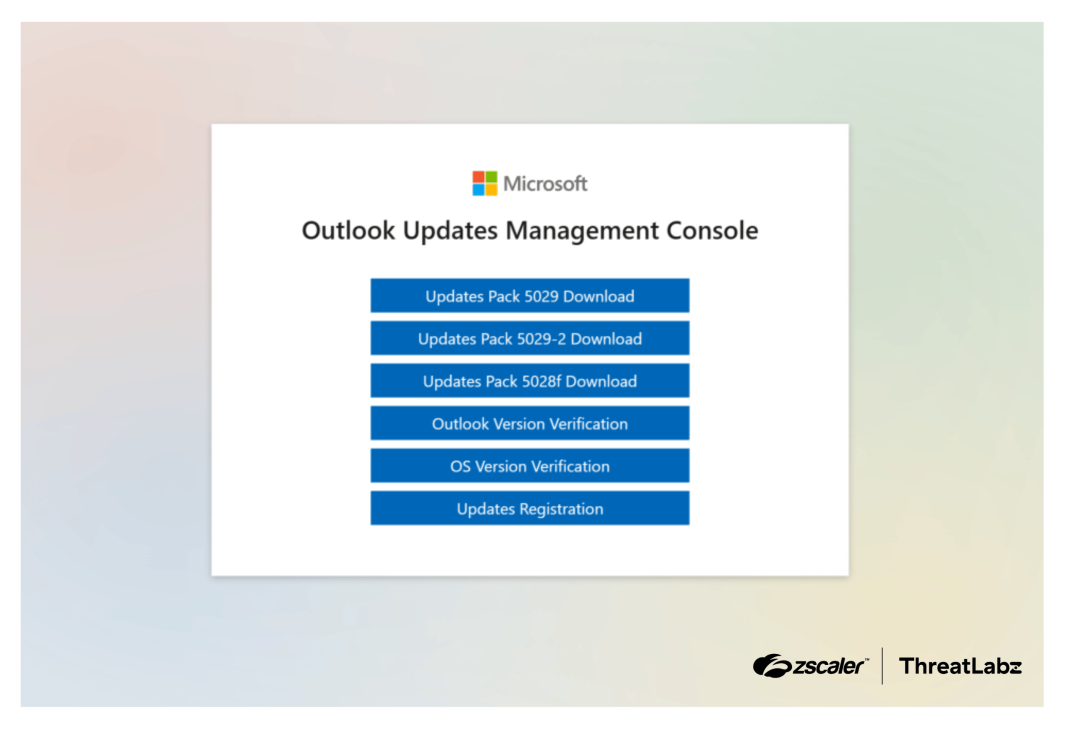
Figure 1: Fake Microsoft website disguised as an “Outlook Updates Management Console”.
These buttons shown above perform the following actions:
Button Name | Description |
|---|---|
Updates Pack 5029 Download | Downloads an obfuscated AutoHotKey script that can be used to set up and deploy the Edgecution malware. |
Updates Pack 5029-2 Download | Downloads a legitimate AutoHotKey executable. Required to execute the AutoHotKey script above. |
Updates Pack 5028f Download | Downloads an encrypted ZIP file (with the PK magic bytes removed). This is likely designed to evade network signatures. |
Outlook Version Verification | Copies a Windows batch script to the clipboard that is used to set up and deploy the Edgecution malware. |
OS Version Verification | Copies a PowerShell script to the clipboard that is used to set up and deploy the Edgecution malware. |
Updates Registration | Displays a form that requests the victim’s Microsoft365 / Outlook password. |
Table 1: Fake Microsoft Outlook Updates website used to deploy Edgecution.
Note that these buttons offer the threat actor three different options (via an AutoHotKey script, Windows batch script, and PowerShell script) to deploy the Edgecution malware.
When the AutoHotKey script or clipboard content is executed, the commands will configure the environment, fix the encrypted ZIP file headers, extract relevant files, and create a scheduled task that executes Microsoft Edge.
The commands will create a directory for the malicious browser extension under: %LOCALAPPDATA%\Microsoft\Edge\User Data\test1
The encrypted ZIP archive (disguised as a fake patch) contains an embedded Python version 3.13.3 distribution and two directories named extension and native. As these directory names suggest, the extension directory contains a web browser extension and the native directory contains a single obfuscated Python script. Interestingly, the set up scripts set a value named AppKey in the Windows registry under HKCU\SOFTWARE\Microsoft\Edge with a hex string that is used to decrypt the strings in the Python backdoor. This not only obfuscates the Python backdoor’s strings, but also prevents it from running properly without the correct key.
In order for the browser extension to launch the Python backdoor, the set up scripts create a batch script named native_host.bat in the script’s native directory that is invoked by the web browser extension. This batch script launches the backdoor with Python’s -u flag, which ensures that standard output and standard error are unbuffered. In addition, the set up scripts create a Chrome native messaging manifest file with content similar to the following:
{
	"name": "com.[rand_chars].api",
	"description": "Edge Monitoring Agent Native Host",
	"path": "%APPDATA%\\Microsoft\\Edge\\User Data\\test1\\native\\native_host.bat",
	"type": "stdio",
	"allowed_origins":  [
  		"chrome-extension://[extension_id]/"
	]
}
This allows the browser extension to invoke the native application and communicate over standard input and output. The set up scripts also create a file with hardcoded random characters (that changes per campaign) in the native directory that stores the location of the C2 server.
Finally, the set up scripts schedule a task to launch Microsoft Edge with the parameters: --user-data-dir="%LOCALAPPDATA%\Microsoft\Edge\User Data\Recovery" --load-extension="%EXTENSION_DIR%" --no-first-run --disable-sync --headless=new
This will cause Microsoft Edge to load the extension in a hidden browser window without any user prompts or warnings.
The Edgecution browser extension disguises itself as an Edge Monitoring Agent as shown in the figure below:
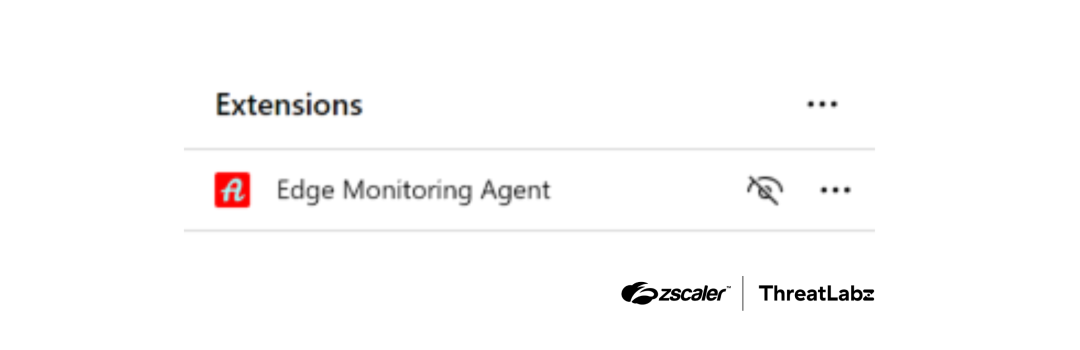
Figure 2: Edgecution browser extension disguised as an Edge Monitoring Agent.
Note that this extension will not be visible to a user when they open their web browser normally because it is not installed and the Edgection runs in a headless browser.
The Edgecution browser extension communicates with the C2 server over websockets. All of the C2 servers observed by ThreatLabz have leveraged subdomains of cloudfront.net and hosted on Amazon Web Services (AWS).
The Edgecution browser extension supports a variety of message types and commands. Some of the commands require permissions that are not allowed by normal extensions. In order to circumvent this restriction, the Edgecution browser extension uses the Chrome native messaging protocol to invoke a Python backdoor that can directly access the victim’s filesystem, execute arbitrary commands, create processes, etc. The bridge between the extension and native Python backdoor is established using chrome.runtime.sendNativeMessage to the name of the specified API endpoint (e.g., com.[rand_chars].api).
The list of message types supported by the Edgecution browser extension’s C2 protocol are the following:
Message Type | Direction | Description |
|---|---|---|
1 | Extension → C2 | Hello message. First message sent when communication is initiated. |
2 | C2 → Extension | Store VAPID public key for push subscription service. |
3 | Extension → C2 | Ping message. Heartbeat every 20 seconds. |
4 | C2 → Extension | Pong message. Heartbeat reply. |
10 | C2 → Extension | Command message. |
11 | Extension → C2 | Command result. |
20 | Extension → C2 | Event that informs when a keyword is hit during browsing. |
30 | Extension → C2 | Push subscription. The browser registers with its vendor push service and returns the subscription. |
Table 2: Edgecution browser extension C2 message types.
Message type 10 is primarily responsible for the malicious activity. There are two types of Edgecution commands:
The Edgecution command ID mappings are shown in the table below:
Extension Command ID | Python Command ID | Command Handler | Description |
|---|---|---|---|
100 | N/A | Browser Extension | Add URL keywords. |
101 | N/A | Browser Extension | Remove URL keywords. |
102 | N/A | Browser Extension | Stats about keywords matches. |
103 | N/A | Browser Extension | Reports the number of open tabs. |
104 | N/A | Browser Extension | Reports the browser’s active tab URL and title. |
105 | N/A | Browser Extension | Not used. |
106 | 1 | Python Backdoor | Collect and send system information. |
107 | 3 | Python Backdoor | Shell execute. |
108 | 4 | Python Backdoor | Write data to a specific filename / path. |
109 | 5 | Python Backdoor | Run Python code. |
110 | 6 | Python Backdoor | Retrieve a list of running processes. |
111 | 7 | Python Backdoor | Execute PowerShell commands / code. |
112 | N/A | Python Backdoor | Set a new C2 URL in the browser’s local storage. |
Table 3: Mapping between the Edgecution browser extension and Python backdoor command IDs.
Note that the keyword monitoring functionality is likely a decoy, because the Edgecution browser extension is running in headless mode. Therefore, user activity in the browser will not be monitored.
The Edgecution Python backdoor also supports four additional commands as shown below:
Command ID | Extension Command ID | Description |
|---|---|---|
2 | Unused | Ping command (replies with a pong message). |
8 | Invoked by the browser extension on successful C2 connection | Update C2 server URL. The browser extension stores the C2 address in local storage via |
9 | Invoked by the browser extension on successful C2 connection | Deletes the C2 URL configuration file after the C2 has been saved in the browser’s local storage. |
10 | Unused | Write debug information to a log file ( |
Table 4: Additional commands supported by the Edgecution Python backdoor.
Note that command ID 2 and 10 are not currently used. The command IDs 8 and 9 are invoked from the browser extension after successful communication with the Edgecution C2 has been established. These commands clean up the configuration file used to store the C2 server URL, which is stored in the browser’s local storage.
The Edgecution Python backdoor reads from standard input. The first four bytes of each message is the length of the message, followed by the message content in JSON format. Each C2 message passed to the Python backdoor contains the JSON keys command, args, and request_id. After processing a command, the Python backdoor will send a JSON response back containing the JSON keys status, result, and the corresponding request_id.
Note that Edgecution spawns a new Python process each time the C2 provides a supported command, and exits once the response is sent back.
此内容由惯性聚合(RSS阅读器)自动聚合整理,仅供阅读参考。 原文来自 — 版权归原作者所有。