







SmartRAT is a Brazil-focused banking RAT implemented entirely in PowerShell and identified by the embedded string SMART_V25. Its primary objective is remote access and financial data theft through capabilities such as fake bank-branded password forms, keylogging, and QR code interception.
SmartRAT decrypts two C2 server configurations. The first is decrypted using XOR with the key 2, resolving to c[.]windowsupdate-cdn[.]com. The fallback C2 is an IP address that is decrypted using XOR with the key 233, resolving to 162[.]141[.]111[.]227. The malware uses the port number 51888 for communication. SmartRAT also hides the running PowerShell window using user32.dll’s ShowWindow function.
Debug logs are written to C:\ProgramData or %APPDATA%\Microsoft\Diagnosis\ETW\client_debug.log, with a fallback to %TEMP%\client_debug.log. A per-process log is also created at C:\ProgramData\Microsoft\Diagnosis\ETW\process_<PID>.log to silently record all RAT activity.
SmartRAT generates a unique identity token by hashing (SHA-256) the machine GUID, MAC address, UTC ticks, a newly generated GUID, and the computer name. It stores this token in etw.dat and install.token.
SmartRAT then computes an HMAC-SHA256 of this token value using a hardcoded master key (iuhbdaubdvauygd5562$3@##$r). The hardcoded master key is used for two distinct purposes: the HMAC operation uses the raw UTF-8 bytes of the master key plaintext as its secret, while the 32-byte AES encryption key is derived from the SHA-256 hash of the same string. The encryption and decryption of C2 command traffic is handled by the following two functions, respectively:
Initialize-xVxIaX (encrypt): Uses AES-CBC to encrypt plaintext. It generates a fresh IV on each call via $aes.GenerateIV(), ensuring identical plaintext produces different ciphertext. The IV and ciphertext are each hex-encoded separately and returned as a colon-delimited string (<ivHex>:<ciphertextHex>) for transmission.Start-LXqXSB (decrypt): Splits the colon-delimited input into IV and ciphertext, hex-decodes both, and decrypts the payload using the same AES key to recover the plaintext command.SmartRAT checks its privilege level by comparing the current Windows identity's SID against S-1-5-18 (the well-known LocalSystem SID), or by checking whether it was launched with the -ServiceMode flag. If either condition is true, SmartRAT connects to the C2 immediately. Otherwise, the code performs the following steps:
%APPDATA%\Microsoft\Diagnosis\ETW\msedgeupdate.txt.MicrosoftEdgeUpdateCore. If task creation fails, it falls back to registry-based persistence by writing a MicrosoftEdgeUpdateCore value under HKCU\Software\Microsoft\Windows\CurrentVersion\Run that launches a PowerShell command to re-execute SmartRAT (msedgeupdate.txt) at each user logon.MicrosoftEdgeUpdateCore under %ProgramData%\Microsoft\Diagnosis\ETW\. This service is configured to run with System privileges. After the SmartRAT PowerShell process is created, the code creates a watchdog that checks every 5 seconds to ensure it continues to run. Otherwise, the watchdog relaunches SmartRAT.SmartRAT also compiles another C# component that uses DuplicateTokenEx and CreateProcessAsUser to spawn a new PowerShell process using the current user’s session, even when the RAT is running as SYSTEM.
SmartRAT supports multiple command-line parameters that control service installation, removal, persistence cleanup, and how the malware runs. The table below lists the parameters that are supported.
Parameter | Action |
|---|---|
-InstallService | Installs/starts the MicrosoftEdgeUpdateCore Windows service. |
-UninstallService | Stops/deletes the Windows service and its executable. |
-Uninstall | Removes persistence (scheduled tasks, registry keys, and files). |
-Reinstall | Uninstalls then reinstalls SmartRAT. |
-ServiceMode | Runs SmartRAT as a service; verifies internet connectivity (by resolving google.com) before executing. |
-ServiceStatus | Displays the current status of the service and scheduled tasks. |
-ScriptPath <path> | Defines the source file location for installation. |
-Force | Kills all other PowerShell instances (except itself) and deletes lock (PID) files. |
Table 1: Command-line parameters supported by SmartRAT.
SmartRAT outputs the string SMART_V25 along with the current timestamp as a simple confirmation that the RAT executed successfully.
Before connecting to the C2, the following C# classes (which are embedded in SmartRAT’s PowerShell code) are compiled and loaded into memory:
To map a victim’s screen coordinates and resolution, SmartRAT enumerates all screens and collects each display's full boundaries (X, Y, width, height). It calls SetProcessDpiAwareness (shcore.dll) to bypass DPI scaling and obtain true physical pixel values, then stores the results in a global array so the operator can select a monitor index and accurately align overlays and screen captures.
SmartRAT also tracks banking activity using a window title watchlist, shown in the table below:
Keyword | Target type |
|---|---|
santander | Bank |
bradesco | Bank |
itau | Bank |
caixa | Bank |
bb.com.br | Bank |
bancodobrasil | Bank |
nubank | Bank |
inter | Bank |
c6bank | Bank |
safra | Bank |
btg | Bank |
sicoob | Credit union |
sicredi | Credit union |
mercadopago | Payment platform |
picpay | Payment platform |
pagseguro | Payment platform |
paypal | Payment platform |
binance | Cryptocurrency exchange |
mercadobitcoin | Cryptocurrency exchange |
bank | Generic keyword |
banco | Generic keyword |
Table 2: Window-title keywords SmartRAT monitors to detect banking, payment, and cryptocurrency-related activity.
If the window title matches a list of predefined targets, SmartRAT logs the title, matched keyword, process name, and timestamp, and sends this information to the SmartRAT C2 server as a BrowserAlert (message type 0x80). This serves as a tipoff to the operator that the victim is interacting with a financial application.
Acting on this alert, the operator can then issue a dataEntry: command containing bank-specific branding parameters (name, color palette, prompt text, input length). This SmartRAT feature can be used to launch a full-screen overlay such as a bank verification prompt as shown in the figure below.
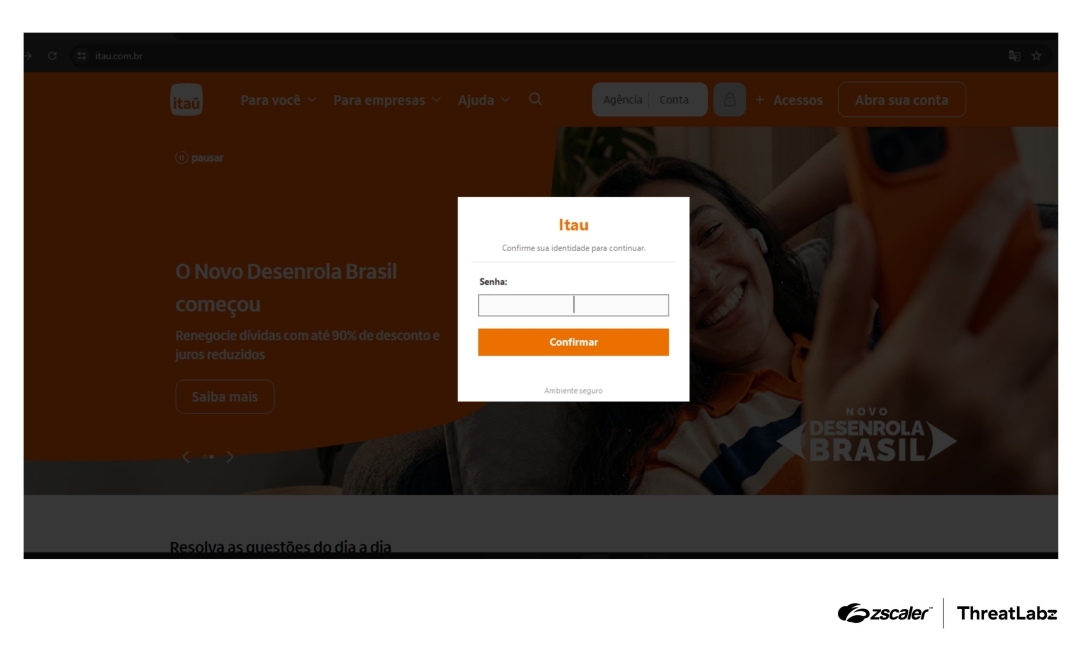
Figure 4: Example of fake overlay which can be shown to its victims.
The information captured in the overlay form is then exfiltrated to the SmartRAT C2.
SmartRAT attempts to connect to its C2 server indefinitely. If domain resolution fails, it falls back to a hardcoded IP address. Once a connection is established, SmartRAT communicates over a raw TCP socket on port 51888. Each message uses the binary framing represented in the figure below:
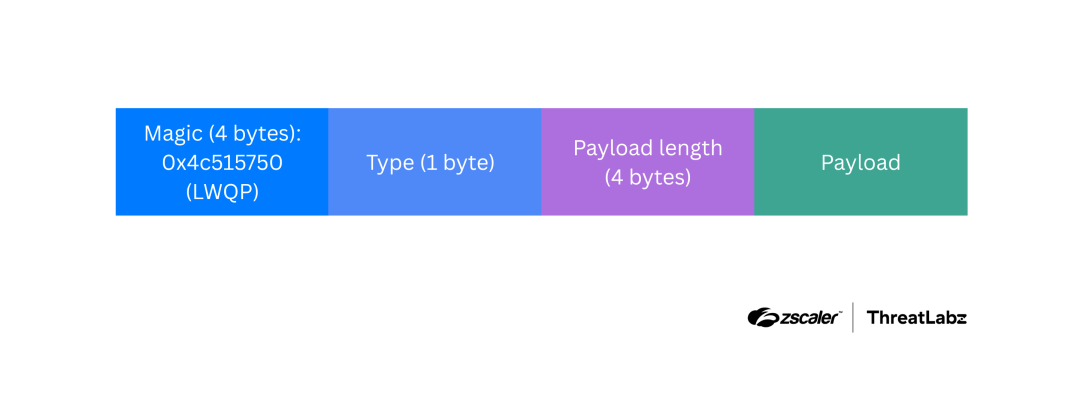
Figure 5: SmartRAT C2 message format.
During connection attempts and initial setup, SmartRAT sends the message types shown in the table below.
Type | Description |
|---|---|
ClientHello (type 0x01) | Sends version string 7.3 to the server. |
GuestInfo (type 0xE6) | Sends victim profile JSON (OS, username, host, privilege, session ID, install token, HMAC). |
Session Negotiation (0x06,0xE0,0xE1) | Waits for a SessionInfo packet (type 0x06) from the server. If Accepted: true, the connection is confirmed. Replies with a ping message type (0xE0) and waits for a Pong message type (0xE1). |
Monitor List (type 0x14) | Sends monitor layout so the operator can select a screen. |
Table 3: SmartRAT C2 message types.
After connecting, SmartRAT enters a continuous loop and performs the following high-level tasks:
The table below shows the C2 messages handled by SmartRAT:
Packet (hex) | Action |
|---|---|
0xE0 Ping | Reply with Pong. |
0x20 MouseMove | Move cursor to operator-specified coordinates. |
0x21 MouseButton | Click/release the mouse button. |
0x22 MouseWheel | Scrolls |
0x23 Keyboard | Inject keystrokes. |
0xA0 Command | Run arbitrary PowerShell via Invoke-Expression (can be AES-encrypted). |
0xA2 SystemCommand | Executes the built-in RAT commands below:
|
0x40 Clipboard | Copy content to the victim's clipboard (can be AES-encrypted). |
0x50 FileList | Browse the victim's filesystem. |
0x54 FileDownload | Exfiltrate a file (up to 50MB). |
0x11 ScreenRequest | Capture and send a screenshot immediately. |
0x13 QualityChange | Adjust JPEG compression of screen stream. |
0x15 MonitorSelect | Switch to a different monitor. |
0x61 ChatPopup | Show a fake "Windows Security" notification dialog. |
0x64 AutoQRToggle | Enable/disable automatic QR code scanning. |
0x66 ShowQROverlay | Show a full-screen bank-branded QR fake overlay. |
0x67 HideQROverlay | Close the QR overlay. |
0x70 InputTrackStart | Start keylogger thread. |
0x71 InputTrackStop | Stop the keylogger. |
0xB2 ProcessList | Return list of running processes. |
0xB3 ServiceList | Return list of Windows services. |
Table 4: Smart SmartRAT C2 commands.
SmartRAT also supports the following features:
SmartRAT is managed from a web-based C2 panel as shown in the figure below.
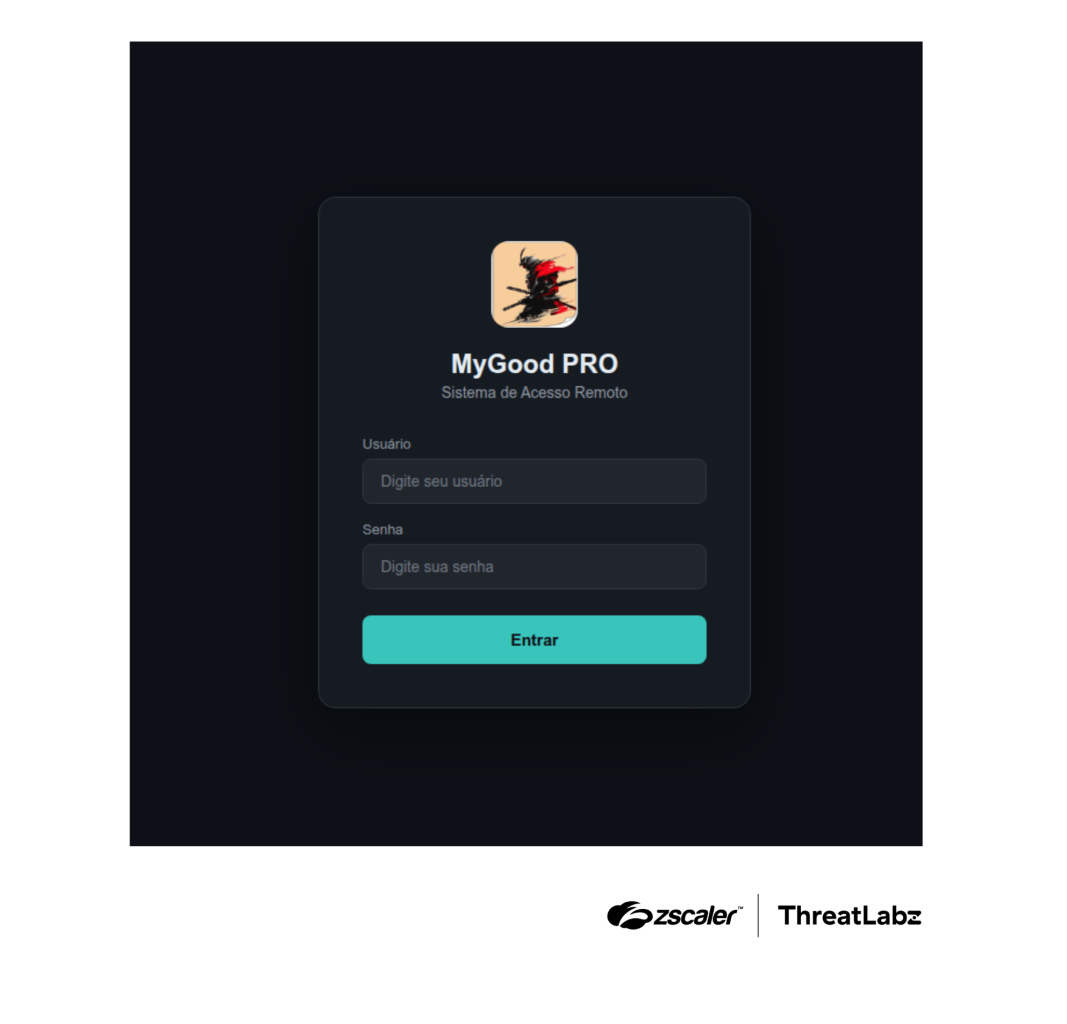
Figure 6: SmartRAT C2 panel.
Based on verbose explanatory comments and frequent emoticons, the panel’s page source suggests the use of AI tools during development. More importantly, the panel contained critical authentication weaknesses that exposed its C2 functionality, consistent with code deployed without adequate security review. Further inspection revealed that the panel’s “authentication” logic relied only on the presence of two localStorage values (authToken and currentUser) to hide the login overlay. There was no server-side validation of these values before granting access to the panel UI.
<body>
 <!-- Script inline para evitar flash da tela de login -->
 <script>
   if (localStorage.getItem('authToken') && localStorage.getItem('currentUser'))
{
           document.write('<style>#loginOverlay{display:none!important}</style>');
       }
 </script>
 <!-- 🔐 TELA DE LOGIN -->
 <div class="login-overlay" id="loginOverlay">
   <div class="login-container">
     <div class="login-logo">
       <img src="images/logo-samurai.jpg" alt="Logo">
       <h1>MyGood PRO</h1>
       <p>Sistema de Acesso Remoto</p>
Because the check is performed entirely client-side, a user could bypass the login screen by setting arbitrary values for authToken and currentUser in the browser’s localStorage. The figure below shows the panel, including the sidebar populated with threat actor-controlled values.
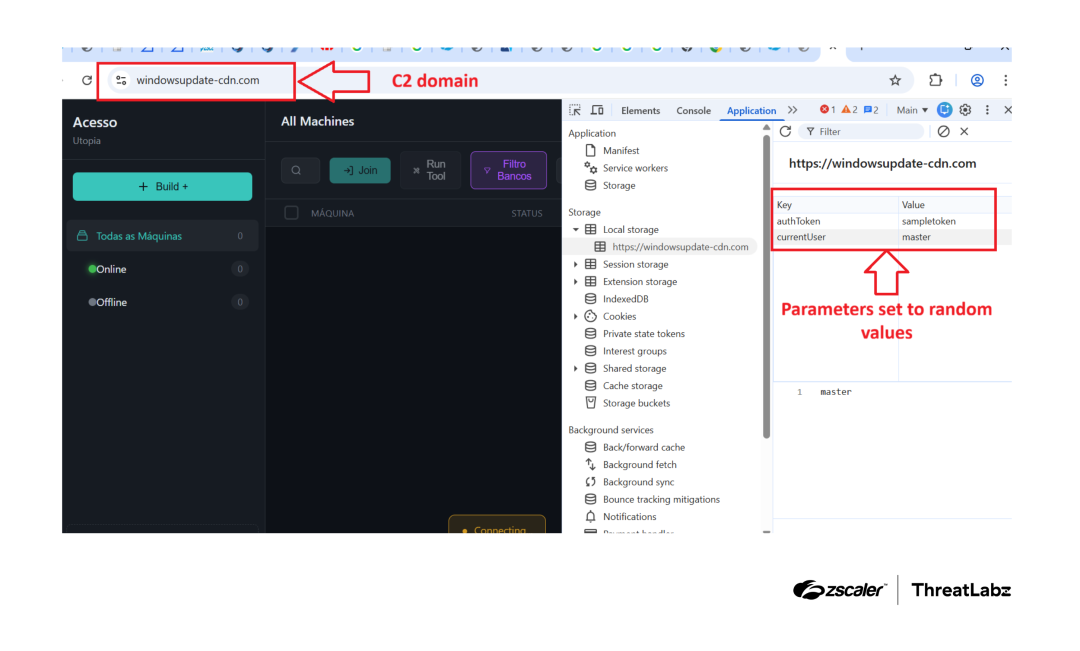
Figure 7: SmartRAT C2 panel administration page.
此内容由惯性聚合(RSS阅读器)自动聚合整理,仅供阅读参考。 原文来自 — 版权归原作者所有。