






tl;dr The Hugging Face Hub has a number of tools and integrations that are often overlooked that can make it easier to build many types of AI solutions
The Hugging Face Hub boasts over 850K public models, with ~50k new ones added every month, and that just seems to be climbing higher and higher. We also offer an Enterprise Hub subscription that unlocks compliance, security, and governance features, along with additional compute capacities on inference endpoints for production-level inference and more hardware options for doing demos on Spaces.
The Hugging Face Hub allows broad usage since you have diverse hardware, and you can run almost anything you want in Docker Spaces. I’ve noticed we have a number of features that are unsung (listed below). In the process of creating a semantic search application on the Hugging Face hub I took advantage of all of these features to implement various parts of the solution. While I think the final application (detailed in this org reddit-tools-HF), is compelling, I'd like to use this example to show how you can apply them to your own projects.
An automatically updated, visually enabled, semantic search for a dynamic data source, for free
It’s easy to imagine multiple scenarios where this is useful:
I'll be demonstrating this by using a subreddit as my data source and using the Hub to facilitate the rest. There are a number of ways to implement this. I could put everything in 1 space, but that would be quite messy. On the other hand, having too many components in a solution has its own challenges. Ultimately, I chose a design that allows me to highlight some of the unsung heroes on the Hub and demonstrate how you can use them effectively. The architecture is shown in Figure 1 and is fully hosted on Hugging Face in the form of spaces, datasets and webhooks. Every feature I'm using is free for maximum accessibility. As you need to scale your service, you might consider upgrading to the Enterprise Hub.
You can see that I'm using r/bestofredditorupdates as my Data Source, it has 10-15 new posts a day. I pull from it daily using their API via a Reddit Application with PRAW, and store the results in the Raw Dataset (reddit-tools-HF/dataset-creator-reddit-bestofredditorupdates). Storing new data triggers a webhook, which in turn triggers the Data Processing Space to take action. The Data Processing Space will take the Raw Dataset and add columns to it, namely feature embeddings generated by the Embedding Model Space and retrieved using a Gradio client. The Data Processing Space will then take the processed data and store it in the Processed Dataset. It will also build the Data Explorer tool. Do note that the data is considered not-for-all-audiences due to the data source. More on this in Ethical Considerations
*I used nomic-ai/nomic-embed-text-v1.5 to generate the embeddings for a few reasons:
One of the challenges with modern models is they typically require GPUs or other heavy hardware to run. These can be bulky with year long commitments and very expensive. Spaces makes it easy to use the hardware you desire at a low cost, but it’s not automatically spun up and down (though you could programmatically do it!). ZeroGPU is a new kind of hardware for Spaces. There is a quota for free users and a bigger one for PRO users.
It has two goals :
 |
|---|
| Figure 2: ZeroGPU behind the scenes |
This is achieved by making Spaces efficiently hold and release GPUs as needed (as opposed to a classical GPU Space with a GPU attached at all times). ZeroGPU uses Nvidia A100 GPUs under the hood (40GB of vRAM are available for each workload).
I used ZeroGPU to host the amazing nomic embedding model in my Embedding Model Space. It's super convenient because I don’t really need a dedicated GPU as I only need to do inference occasionally and incrementally.
It's extremely simple to use. The only change is that you need to have a function with all your GPU code inside, and
decorate that with @spaces.GPU.
import spaces

model = SentenceTransformer("nomic-ai/nomic-embed-text-v1.5", trust_remote_code=True, device='cuda')

@spaces.GPU
def embed(document: str):
    return model.encode(document)
 |
|---|
| Figure 3: Data Processing Space |
One of the most common requests we see from enterprises is that I want feature X, or tool Y integrated. One of the best parts of the Hugging Face Hub is that we have an unreasonably robust API that can integrate with basically anything. The second way of solving this problem is usually in spaces. Here I'll use a blank docker space that can run an arbitrary docker container with the Hardware of your choice (a free CPU in my case).
My main pain point is that I want to be able to run 2 very different things in a single space. Most spaces have a single identity, like showing off a diffusers model, or generating music. Consider the Dataset Creator Space, I need to:
main.pyapp.pyNote that both of these should run in separate processes. I’ve come across many use-cases where visualizing the logs is actually really useful and important. It’s a great debugging tool and it's also much more aesthetically pleasing in scenarios where there isn’t a natural UI.
I leverage a Multi-process Docker solution by leveraging the supervisord library, which is touted as a process control system. It's a clean way of controlling multiple separate processes. Supervisord lets me do multiple things in a single container, which is useful in a Docker Space. Note that Spaces only allows you to expose a single port, so that might influence what solutions you consider.
Installing Supervisor is quite easy as it's a python package.
pip install supervisor
You need to write a supervisord.conf file to specify your configuration. You can see my whole example
here: supervisord.conf.
It's pretty self explanatory. Note I don’t want the logs from program:app because app.py is just there to visualize
logs, not create them, so I route them to /dev/null.
[supervisord]
nodaemon=true

[program:main]
command=python main.py
stdout_logfile=/dev/stdout
stdout_logfile_maxbytes=0
stderr_logfile=/dev/stderr
stderr_logfile_maxbytes=0
autostart=true

[program:app]
command=python app.py
stdout_logfile=/dev/null
stdout_logfile_maxbytes=0
stderr_logfile=/dev/stderr
stderr_logfile_maxbytes=0
autostart=true
autorestart=true
Lastly we need to start our supervisord.conf to actually run our 2 processes. In my Dockerfile I simply run:
CMD ["supervisord", "-c", "supervisord.conf"]
In the Data Processing Space I need embeddings for the posts, this presents a challenge if I abstract the embedding model in another space. How do I call it?
When you build a Gradio app, by default you can treat any interaction as an API call. This means all those cool spaces on the Hub have an API associated with them (Spaces allows you to use an API call to Streamlit or Docker spaces too if the author enables it)! Even cooler, is that we have an easy to use client for this API.
I used the client in my Data Processing Space to get embeddings from the nomic model deployed in the Embedding Model Space. It was used in this utilities.py file, I’ve extrapolated the relevant parts below:
from gradio_client import Client

# Define the Client
client = Client("reddit-tools-HF/nomic-embeddings")

# Create an easy to use function (originally applied to a dataframe)
def update_embeddings(content, client):
    # Note that the embedding model requires you to add the relevant prefix
    embedding = client.predict('search_document: ' + content, api_name="/embed")
    return np.array(embedding)

# Consume
final_embedding = update_embeddings(content=row['content'], client=client)
There is even a really cool API recorder now which lets you use the GUI but records each step as an API interaction.
 |
|---|
| Figure 4: Project Webhooks |
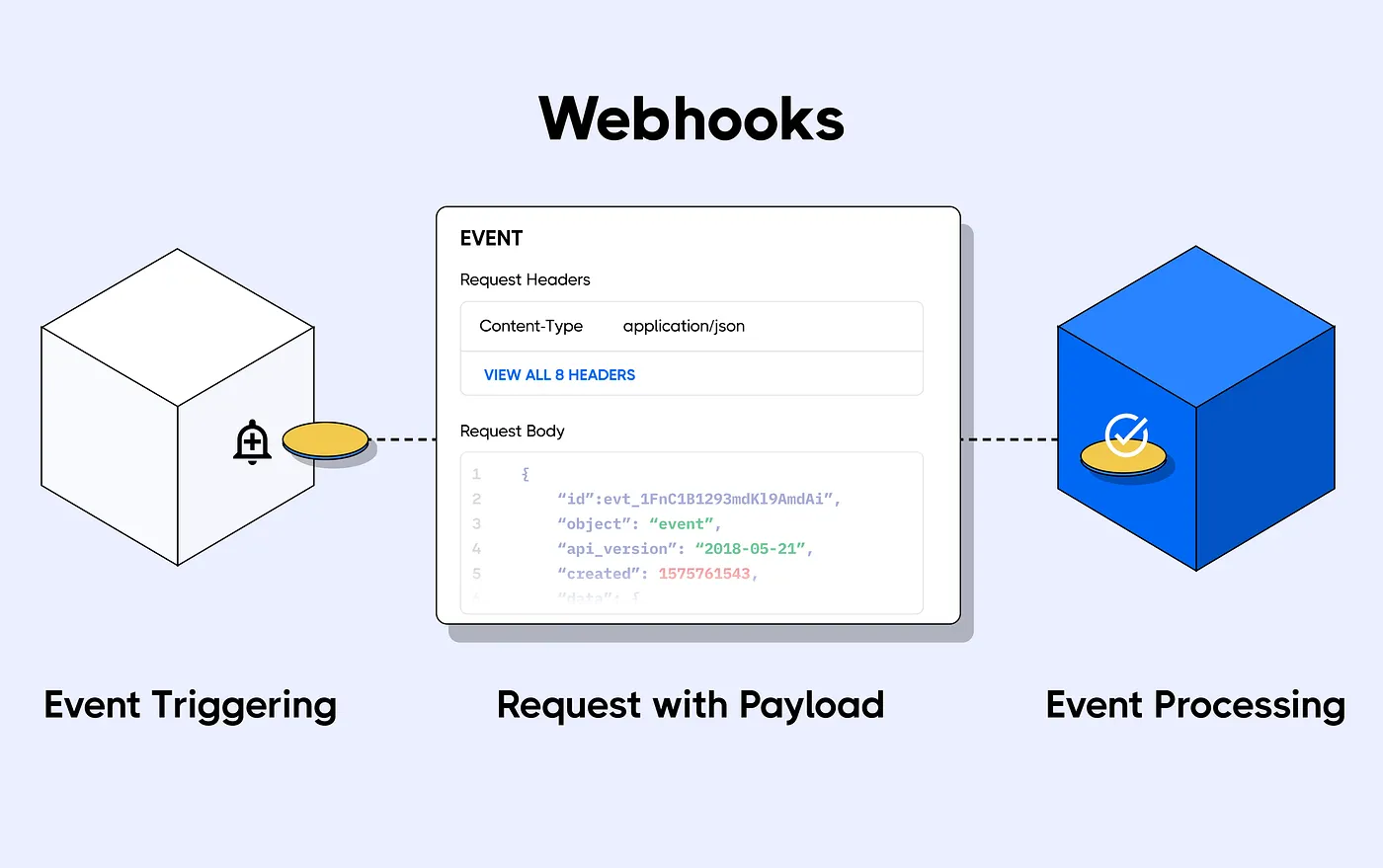
Webhooks are a foundation for MLOps-related features. They allow you to listen for new changes on specific repos or to all repos belonging to a particular set of users/organizations (not just your repos, but any repo).
You can use them to auto-convert models, build community bots, build CI/CD for your models, datasets, and Spaces, and much more!
In my use-case I wanted to rebuild the Processed Dataset whenever I update the Raw Dataset. You can see
the full code here.
To do this I need to add a webhook that triggers on the Raw Dataset updates and to send it’s payload to the Data
Processing Space. There are multiple types of updates that can happen, some might be on other branches, or in the discussions tab. My criteria is to trigger when both the README.md file and another file are updated
on the main branch of the repo, because that's what changes when a new commit is pushed to the dataset (here's an example).
# Commit cleaned up for readability
T 1807	M	README.md
T 52836295	M	data/train-00000-of-00001.parquet
You will need to carefully decide what your criteria is as you adapt this to your use-case
First you will need to create your webhook in your settings. It's best to
follow this guide on how to create a webhook, make
sure to use consistent endpoint names (/dataset_repo in my case).
Also note the webhook url is the Direct URL with /webhooks appended. The Direct URL can be found by clicking the 3 dots above the space and selecting Embed this Space. I also set a webhook secret in the Data Processing Space so it’s secure.
Here is what my webhook creation input looks like. Just don’t tell anyone my secret 😉.
Target Repositories: datasets/reddit-tools-HF/dataset-creator-reddit-bestofredditorupdates
Webhook URL: https://reddit-tools-hf-processing-bestofredditorupdates.hf.space/webhooks/dataset_repo
Secret (optional): Float-like-a-butterfly
Next you will need to consume your webhook in your space. To do this I'll discuss:
repo change refs/heads/main README.md changingFirst we need to consume the payload. We have a convenient way
to consume a webhook payload
built into the huggingface_hub library. You can see that I
use @app.add_webhook to define an endpoint that matches what I did upon webhook creation. Then I define my function.
Note you need to respond to the payload request within 30s or you will get a 500 error. This is why I have an async
function to respond and then kick off my actual process instead of doing the processing in
the handle_repository_changes function. You can check
out background task documentation for more information.
from huggingface_hub import WebhookPayload, WebhooksServer

app = WebhooksServer(ui=ui.queue(), webhook_secret=WEBHOOK_SECRET)

# Use /dataset_repo upon webhook creation
@app.add_webhook("/dataset_repo")
async def handle_repository_changes(payload: WebhookPayload, task_queue: BackgroundTasks):

    ###################################
    # Add selective trigger code here #
    ###################################

    logger.info(f"Webhook received from {payload.repo.name} indicating a repo {payload.event.action}")
    task_queue.add_task(_process_webhook, payload=payload)
    return Response("Task scheduled.", status_code=status.HTTP_202_ACCEPTED)


def _process_webhook(payload: WebhookPayload):
    #do processing here
    pass
Since I am interested in any change at the repo level, I can use payload.event.scope.startswith("repo") to determine
if I care about this incoming payload.
# FILTER 1: Don't trigger on non-repo changes
if not payload.event.scope.startswith("repo"):
    return Response("No task scheduled", status_code=status.HTTP_200_OK)
I can access the branch information via payload.updatedRefs[0]
# FILTER 2: Dont trigger if change is not on the main branch
try:
    if payload.updatedRefs[0].ref != 'refs/heads/main':
        response_content = "No task scheduled: Change not on main branch"
        logger.info(response_content)
        return Response(response_content, status_code=status.HTTP_200_OK)
except:
    response_content = "No task scheduled"
    logger.info(response_content)
    return Response(response_content, status_code=status.HTTP_200_OK)
To check which files were changed is a bit more complicated. We can see some git information in commit_files_url but
then we need to parse it. It's kind of like a .tsv.
Steps:
changed_filesfrom huggingface_hub.utils import build_hf_headers, get_session
# FILTER 3: Dont trigger if there are only README updates
try:
commit_files_url = f"""{payload.repo.url.api}/compare/{payload.updatedRefs[0].oldSha}..{payload.updatedRefs[0].newSha}?raw=true"""
response_text = get_session.get(commit_files_url, headers=build_hf_headers()).text
logger.info(f"Git Compare URl: {commit_files_url}")
# Splitting the output into lines
file_lines = response_text.split('\n')
# Filtering the lines to find file changes
changed_files = [line.split('\t')[-1] for line in file_lines if line.strip()]
logger.info(f"Changed files: {changed_files}")
# Checking if only README.md has been changed
if all('README.md' in file for file in changed_files):
response_content = "No task scheduled: its a README only update."
logger.info(response_content)
return Response(response_content, status_code=status.HTTP_200_OK)
except Exception as e:
logger.error(f"{str(e)}")
response_content = "Unexpected issue :'("
logger.info(response_content)
return Response(response_content, status_code=status.HTTP_501_NOT_IMPLEMENTED)
One of the common pain points we see with customers/partners is that data understanding and collaboration are challenging. Data understanding is often the first step to solving any AI use-case. My favorite way to do that is through visualization, and often I don’t feel I have great tools for that when it comes to semantic data. I was absolutely delighted to discover Nomic Atlas. It allows me to have a number of key features for data exploration:
I built the nomic Atlas in the Data Processing Space. In the flow I have already built the Processed Dataset and the only thing left is to visualize it. You can see how I build with nomic in build_nomic.py. As before, I'll extrapolate the relevant parts for this blog:
from nomic import atlas
from nomic.dataset import AtlasClass
from nomic.data_inference import NomicTopicOptions

# Login to nomic with a Space Secret
NOMIC_KEY = os.getenv('NOMIC_KEY')
nomic.login(NOMIC_KEY)

# Set because I do want the super cool topic modeling
topic_options = NomicTopicOptions(build_topic_model=True, community_description_target_field='subreddit')

identifier = 'BORU Subreddit Neural Search'
project = atlas.map_data(embeddings=np.stack(df['embedding'].values),
                         data=df,
                         id_field='id',
                         identifier=identifier,
                         topic_model=topic_options)
print(f"Succeeded in creating new version of nomic Atlas: {project.slug}")
Given how nomic works, it will create a new Atlas Dataset under your account each time you run atlas.map_data. I want
to keep the same dataset updated. Currently the best way to do this is to delete your old dataset.
ac = AtlasClass()
atlas_id = ac._get_dataset_by_slug_identifier("derek2/boru-subreddit-neural-search")['id']
ac._delete_project_by_id(atlas_id)
logger.info(f"Succeeded in deleting old version of nomic Atlas.")

#Naively wait until it's deleted on the server
sleep_time = 300
logger.info(f"Sleeping for {sleep_time}s to wait for old version deletion on the server-side")
time.sleep(sleep_time)
 |
|---|
| Figure 5: Nomic Screenshot |
Using Nomic Atlas should be pretty self-explanatory and you can find some further documentation here. But I'll give a quick intro so I can then highlight some of the lesser known features.
The main area with the dots shows each embedded document. The closer each document is, the more related it is. This will vary based on a few things (how well the embedder works on your data, compression from high dimensionality to 2D representation, etc) so take it with a grain of salt. We have the ability to search and view documents on the left.
In the red box in Figure 5 we can see 5 boxes that allow us to search in different ways. Each one is applied iteratively, which makes it a great way to “chip away at the elephant”. We could search by date or other field, and then use a text search for instance. The coolest feature is the one on the far left, it's a neural search that you can use in 3 ways:
I typically use Query search when I'm exploring my uploaded documents.
In the blue box in Figure 5 we can see each row of the dataset I uploaded visualized nicely. One feature I really liked is that it visualizes HTML. So you have control on how it looks. Since reddit posts are in markdown it's easy to convert this to HTML to visualize it.
The data source for all of this contains content that is labeled Not Suited For Work (NSFW), which is similar to our label of Not For All Audiences (NFAA). We don’t prohibit this content on the Hub, but we do want to handle it accordingly. Additionally, recent work has shown that content that is obtained indiscriminately from the internet has a risk of containing Child Sexual Abuse Material (CSAM), especially content that has a high prevalence of uncurated sexual material.
To assess those risks in the context of this dataset curation effort, we can start by looking at the process through which the source data is collated. The original stories (before being aggregated) go through a moderator, then the update is often in a subreddit where there is a moderator. On occasion the update gets uploaded to the original poster’s profile. The final version gets uploaded to r/bestofredditorupdates which has strict moderation. They are strict since they have more risks of brigading. All that to say there are at least 2 moderation steps, usually 3 with one being well known as strict.
At the time of writing this there were 69 stories labeled NSFW. Of those, none of them have CSAM material as I manually checked them. I have also gated the datasets containing NFAA material. To make the nomic visualization more accessible I’m making a filtered dataset upon atlas creation by removing posts containing content with “NSFW” in the dataframe.
By shining a light on these lesser-known tools and features within the Hugging Face Hub, I hope to inspire you to think outside the box when building your AI solutions. Whether you replicate the use-case I’ve outlined or come up with something entirely your own, these tools can help you build more efficient, powerful, and innovative applications. Get started today and unlock the full potential of the Hugging Face Hub!
此内容由惯性聚合(RSS阅读器)自动聚合整理,仅供阅读参考。 原文来自 — 版权归原作者所有。