












This article is also available in Chinese 简体中文.
Llama 2 is a family of state-of-the-art open-access large language models released by Meta today, and we’re excited to fully support the launch with comprehensive integration in Hugging Face. Llama 2 is being released with a very permissive community license and is available for commercial use. The code, pretrained models, and fine-tuned models are all being released today 🔥
We’ve collaborated with Meta to ensure smooth integration into the Hugging Face ecosystem. You can find the 12 open-access models (3 base models & 3 fine-tuned ones with the original Meta checkpoints, plus their corresponding transformers models) on the Hub. Among the features and integrations being released, we have:
The Llama 2 release introduces a family of pretrained and fine-tuned LLMs, ranging in scale from 7B to 70B parameters (7B, 13B, 70B). The pretrained models come with significant improvements over the Llama 1 models, including being trained on 40% more tokens, having a much longer context length (4k tokens 🤯), and using grouped-query attention for fast inference of the 70B model🔥!
However, the most exciting part of this release is the fine-tuned models (Llama 2-Chat), which have been optimized for dialogue applications using Reinforcement Learning from Human Feedback (RLHF). Across a wide range of helpfulness and safety benchmarks, the Llama 2-Chat models perform better than most open models and achieve comparable performance to ChatGPT according to human evaluations. You can read the paper here.
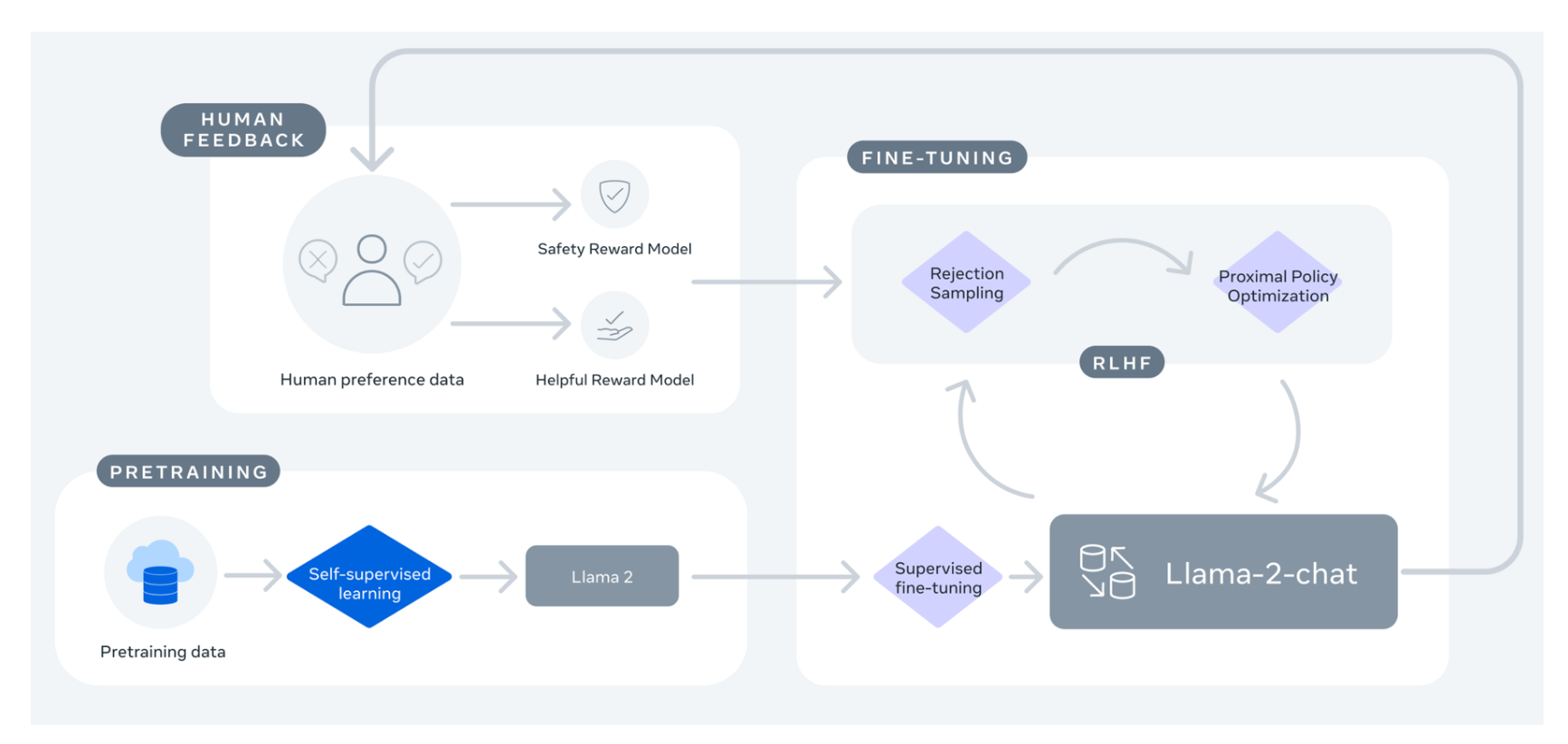
image from Llama 2: Open Foundation and Fine-Tuned Chat Models
If you’ve been waiting for an open alternative to closed-source chatbots, Llama 2-Chat is likely your best choice today!
| Model | License | Commercial use? | Pretraining length [tokens] | Leaderboard score |
|---|---|---|---|---|
| Falcon-7B | Apache 2.0 | ✅ | 1,500B | 44.17 |
| MPT-7B | Apache 2.0 | ✅ | 1,000B | 47.24 |
| Llama-7B | Llama license | ❌ | 1,000B | 45.65 |
| Llama-2-7B | Llama 2 license | ✅ | 2,000B | 50.97 |
| Llama-33B | Llama license | ❌ | 1,500B | - |
| Llama-2-13B | Llama 2 license | ✅ | 2,000B | 55.69 |
| mpt-30B | Apache 2.0 | ✅ | 1,000B | 52.77 |
| Falcon-40B | Apache 2.0 | ✅ | 1,000B | 58.07 |
| Llama-65B | Llama license | ❌ | 1,500B | 61.19 |
| Llama-2-70B | Llama 2 license | ✅ | 2,000B | 67.87 |
| Llama-2-70B-chat | Llama 2 license | ✅ | 2,000B | 62.4 |
Note: the performance scores shown in the table below have been updated to account for the new methodology introduced in November 2023, which added new benchmarks. More details in this post.
You can easily try the 13B Llama 2 Model in this Space or in the playground embedded below:
To learn more about how this demo works, read on below about how to run inference on Llama 2 models.
In this section, we’ll go through different approaches to running inference of the Llama 2 models. Before using these models, make sure you have requested access to one of the models in the official Meta Llama 2 repositories.
Note: Make sure to also fill the official Meta form. Users are provided access to the repository once both forms are filled after few hours.
With transformers release 4.31, one can already use Llama 2 and leverage all the tools within the HF ecosystem, such as:
safetensors)Make sure to be using the latest transformers release and be logged into your Hugging Face account.
pip install transformers
huggingface-cli login
In the following code snippet, we show how to run inference with transformers. It runs on the free tier of Colab, as long as you select a GPU runtime.
from transformers import AutoTokenizer
import transformers
import torch

model = "meta-llama/Llama-2-7b-chat-hf"

tokenizer = AutoTokenizer.from_pretrained(model)
pipeline = transformers.pipeline(
    "text-generation",
    model=model,
    torch_dtype=torch.float16,
    device_map="auto",
)

sequences = pipeline(
    'I liked "Breaking Bad" and "Band of Brothers". Do you have any recommendations of other shows I might like?\n',
    do_sample=True,
    top_k=10,
    num_return_sequences=1,
    eos_token_id=tokenizer.eos_token_id,
    max_length=200,
)
for seq in sequences:
    print(f"Result: {seq['generated_text']}")
Result: I liked "Breaking Bad" and "Band of Brothers". Do you have any recommendations of other shows I might like?
Answer:
Of course! If you enjoyed "Breaking Bad" and "Band of Brothers," here are some other TV shows you might enjoy:
1. "The Sopranos" - This HBO series is a crime drama that explores the life of a New Jersey mob boss, Tony Soprano, as he navigates the criminal underworld and deals with personal and family issues.
2. "The Wire" - This HBO series is a gritty and realistic portrayal of the drug trade in Baltimore, exploring the impact of drugs on individuals, communities, and the criminal justice system.
3. "Mad Men" - Set in the 1960s, this AMC series follows the lives of advertising executives on Madison Avenue, expl
And although the model has only 4k tokens of context, you can use techniques supported in transformers such as rotary position embedding scaling (tweet) to push it further!
Text Generation Inference is a production-ready inference container developed by Hugging Face to enable easy deployment of large language models. It has features such as continuous batching, token streaming, tensor parallelism for fast inference on multiple GPUs, and production-ready logging and tracing.
You can try out Text Generation Inference on your own infrastructure, or you can use Hugging Face's Inference Endpoints. To deploy a Llama 2 model, go to the model page and click on the Deploy -> Inference Endpoints widget.
bitsandbytes quantization enabled or "GPU [4xlarge] - 4x Nvidia A100"Note: You might need to request a quota upgrade via email to api-enterprise@huggingface.co to access A100s
You can learn more on how to Deploy LLMs with Hugging Face Inference Endpoints in our blog. The blog includes information about supported hyperparameters and how to stream your response using Python and Javascript.
Training LLMs can be technically and computationally challenging. In this section, we look at the tools available in the Hugging Face ecosystem to efficiently train Llama 2 on simple hardware and show how to fine-tune the 7B version of Llama 2 on a single NVIDIA T4 (16GB - Google Colab). You can learn more about it in the Making LLMs even more accessible blog.
We created a script to instruction-tune Llama 2 using QLoRA and the SFTTrainer from trl.
An example command for fine-tuning Llama 2 7B on the timdettmers/openassistant-guanaco can be found below. The script can merge the LoRA weights into the model weights and save them as safetensor weights by providing the merge_and_push argument. This allows us to deploy our fine-tuned model after training using text-generation-inference and inference endpoints.
First pip install trl and clone the script:
pip install trl
git clone https://github.com/lvwerra/trl
Then you can run the script:
python trl/examples/scripts/sft_trainer.py \
    --model_name meta-llama/Llama-2-7b-hf \
    --dataset_name timdettmers/openassistant-guanaco \
    --load_in_4bit \
    --use_peft \
    --batch_size 4 \
    --gradient_accumulation_steps 2
One of the unsung advantages of open-access models is that you have full control over the system prompt in chat applications. This is essential to specify the behavior of your chat assistant –and even imbue it with some personality–, but it's unreachable in models served behind APIs.
We're adding this section just a few days after the initial release of Llama 2, as we've had many questions from the community about how to prompt the models and how to change the system prompt. We hope this helps!
The prompt template for the first turn looks like this:
<s>[INST] <<SYS>>
{{ system_prompt }}
<</SYS>>

{{ user_message }} [/INST]
This template follows the model's training procedure, as described in the Llama 2 paper. We can use any system_prompt we want, but it's crucial that the format matches the one used during training.
To spell it out in full clarity, this is what is actually sent to the language model when the user enters some text (There's a llama in my garden 😱 What should I do?) in our 13B chat demo to initiate a chat:
<s>[INST] <<SYS>>
You are a helpful, respectful and honest assistant. Always answer as helpfully as possible, while being safe.  Your answers should not include any harmful, unethical, racist, sexist, toxic, dangerous, or illegal content. Please ensure that your responses are socially unbiased and positive in nature.

If a question does not make any sense, or is not factually coherent, explain why instead of answering something not correct. If you don't know the answer to a question, please don't share false information.
<</SYS>>

There's a llama in my garden 😱 What should I do? [/INST]
As you can see, the instructions between the special <<SYS>> tokens provide context for the model so it knows how we expect it to respond. This works because exactly the same format was used during training with a wide variety of system prompts intended for different tasks.
As the conversation progresses, all the interactions between the human and the "bot" are appended to the previous prompt, enclosed between [INST] delimiters. The template used during multi-turn conversations follows this structure (🎩 h/t Arthur Zucker for some final clarifications):
<s>[INST] <<SYS>>
{{ system_prompt }}
<</SYS>>

{{ user_msg_1 }} [/INST] {{ model_answer_1 }} </s><s>[INST] {{ user_msg_2 }} [/INST]
The model is stateless and does not "remember" previous fragments of the conversation, we must always supply it with all the context so the conversation can continue. This is the reason why context length is a very important parameter to maximize, as it allows for longer conversations and larger amounts of information to be used.
In API-based models, people resort to tricks in an attempt to override the system prompt and change the default model behaviour. As imaginative as these solutions are, this is not necessary in open-access models: anyone can use a different prompt, as long as it follows the format described above. We believe that this will be an important tool for researchers to study the impact of prompts on both desired and unwanted characteristics. For example, when people are surprised with absurdly cautious generations, you can explore whether maybe a different prompt would work. (🎩 h/t Clémentine Fourrier for the links to this example).
In our 13B and 7B demos, you can easily explore this feature by disclosing the "Advanced Options" UI and simply writing your desired instructions. You can also duplicate those demos and use them privately for fun or research!
We're very excited about Llama 2 being out! In the incoming days, be ready to learn more about ways to run your own fine-tuning, execute the smallest models on-device, and many other exciting updates we're prepating for you!
此内容由惯性聚合(RSS阅读器)自动聚合整理,仅供阅读参考。 原文来自 — 版权归原作者所有。