





We are excited to introduce the Messages API to provide OpenAI compatibility with Text Generation Inference (TGI) and Inference Endpoints.
Starting with version 1.4.0, TGI offers an API compatible with the OpenAI Chat Completion API. The new Messages API allows customers and users to transition seamlessly from OpenAI models to open LLMs. The API can be directly used with OpenAI's client libraries or third-party tools, like LangChain or LlamaIndex.
"The new Messages API with OpenAI compatibility makes it easy for Ryght's real-time GenAI orchestration platform to switch LLM use cases from OpenAI to open models. Our migration from GPT4 to Mixtral/Llama2 on Inference Endpoints is effortless, and now we have a simplified workflow with more control over our AI solutions." - Johnny Crupi, CTO at Ryght
The new Messages API is also now available in Inference Endpoints, on both dedicated and serverless flavors. To get you started quickly, we’ve included detailed examples of how to:
Limitations: The Messages API does not currently support function calling and will only work for LLMs with a chat_template defined in their tokenizer configuration, like in the case of Mixtral 8x7B Instruct.
Inference Endpoints offers a secure, production solution to easily deploy any machine learning model from the Hub on dedicated infrastructure managed by Hugging Face.
In this example, we will deploy Nous-Hermes-2-Mixtral-8x7B-DPO, a fine-tuned Mixtral model, to Inference Endpoints using Text Generation Inference.
We can deploy the model in just a few clicks from the UI, or take advantage of the huggingface_hub Python library to programmatically create and manage Inference Endpoints. We demonstrate the use of the Hub library here.
In our API call shown below, we need to specify the endpoint name and model repository, along with the task of text-generation. In this example we use a protected type so access to the deployed endpoint will require a valid Hugging Face token. We also need to configure the hardware requirements like vendor, region, accelerator, instance type, and size. You can check out the list of available resource options using this API call, and view recommended configurations for select models in our catalog here.
Note: You may need to request a quota upgrade by sending an email to api-enterprise@huggingface.co
from huggingface_hub import create_inference_endpoint

endpoint = create_inference_endpoint(
    "nous-hermes-2-mixtral-8x7b-demo",
    repository="NousResearch/Nous-Hermes-2-Mixtral-8x7B-DPO",
    framework="pytorch",
    task="text-generation",
    accelerator="gpu",
    vendor="aws",
    region="us-east-1",
    type="protected",
    instance_type="nvidia-a100",
    instance_size="x2",
    custom_image={
        "health_route": "/health",
        "env": {
            "MAX_INPUT_LENGTH": "4096",
            "MAX_BATCH_PREFILL_TOKENS": "4096",
            "MAX_TOTAL_TOKENS": "32000",
            "MAX_BATCH_TOTAL_TOKENS": "1024000",
            "MODEL_ID": "/repository",
        },
        "url": "ghcr.io/huggingface/text-generation-inference:sha-1734540", # use this build or newer
    },
)

endpoint.wait()
print(endpoint.status)
It will take a few minutes for our deployment to spin up. We can use the .wait() utility to block the running thread until the endpoint reaches a final "running" state. Once running, we can confirm its status and take it for a spin via the UI Playground:
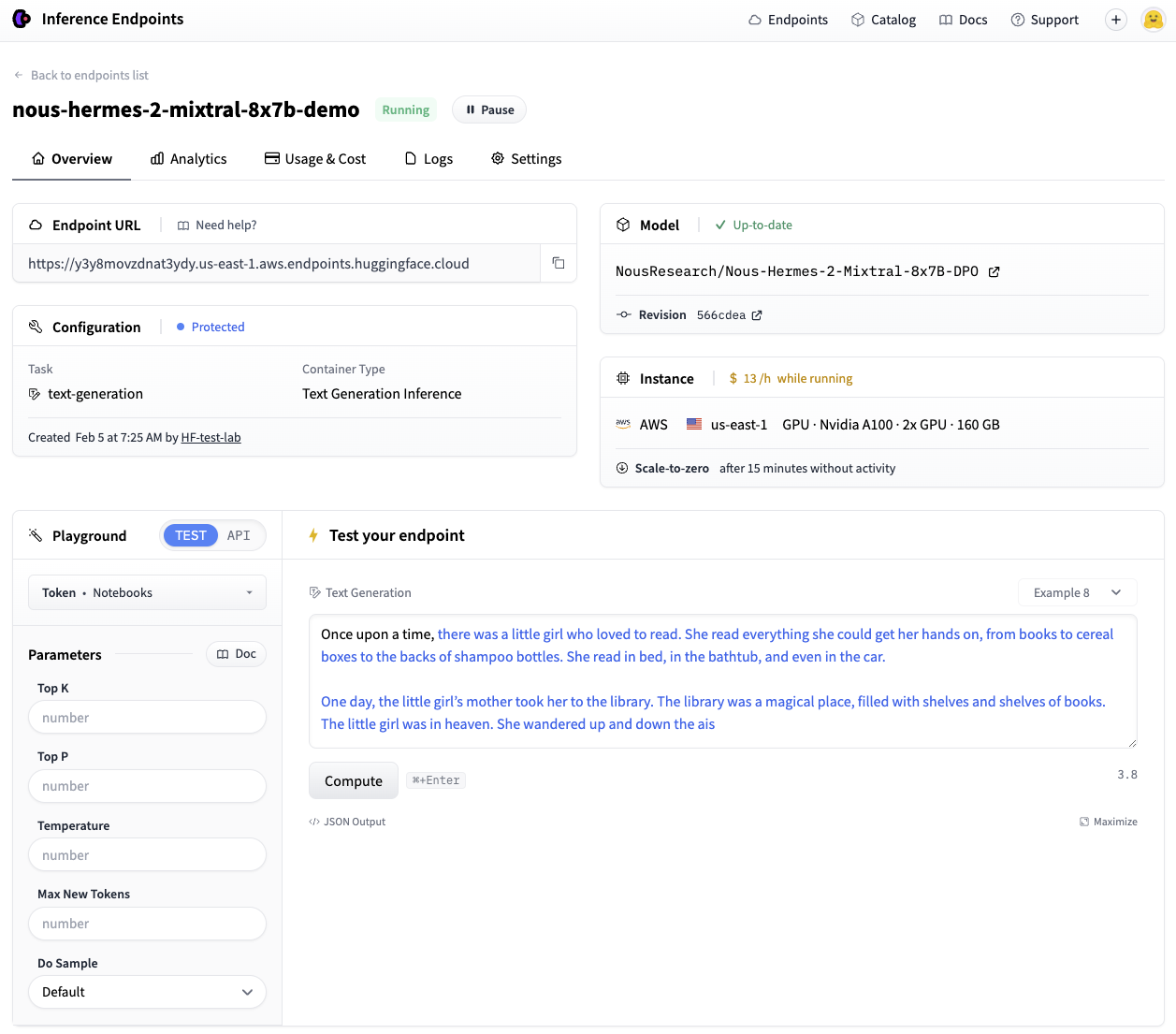
Great, we now have a working endpoint!
💡 When deploying with
huggingface_hub, your endpoint will scale-to-zero after 15 minutes of idle time by default to optimize cost during periods of inactivity. Check out the Hub Python Library documentation to see all the functionality available for managing your endpoint lifecycle.
Messages support in TGI makes Inference Endpoints directly compatible with the OpenAI Chat Completion API. This means that any existing scripts that use OpenAI models via the OpenAI client libraries can be directly swapped out to use any open LLM running on a TGI endpoint!
With this seamless transition, you can immediately take advantage of the numerous benefits offered by open models:
Lets see how.
The example below shows how to make this transition using the OpenAI Python Library. Simply replace the <ENDPOINT_URL> with your endpoint URL (be sure to include the v1/ suffix) and populate the <HF_API_TOKEN> field with a valid Hugging Face user token. The <ENDPOINT_URL> can be gathered from Inference Endpoints UI, or from the endpoint object we created above with endpoint.url.
We can then use the client as usual, passing a list of messages to stream responses from our Inference Endpoint.
from openai import OpenAI

# initialize the client but point it to TGI
client = OpenAI(
    base_url="<ENDPOINT_URL>" + "/v1/",  # replace with your endpoint url
    api_key="<HF_API_TOKEN>",  # replace with your token
)
chat_completion = client.chat.completions.create(
    model="tgi",
    messages=[
        {"role": "system", "content": "You are a helpful assistant."},
        {"role": "user", "content": "Why is open-source software important?"},
    ],
    stream=True,
    max_tokens=500
)

# iterate and print stream
for message in chat_completion:
    print(message.choices[0].delta.content, end="")
Behind the scenes, TGI’s Messages API automatically converts the list of messages into the model’s required instruction format using its chat template.
💡 Certain OpenAI features, like function calling, are not compatible with TGI. Currently, the Messages API supports the following chat completion parameters:
stream,max_tokens,frequency_penalty,logprobs,seed,temperature, andtop_p.
Here’s the same streaming example above, but using the OpenAI Javascript/Typescript Library.
import OpenAI from "openai";

const openai = new OpenAI({
  baseURL: "<ENDPOINT_URL>" + "/v1/", // replace with your endpoint url
  apiKey: "<HF_API_TOKEN>", // replace with your token
});

async function main() {
  const stream = await openai.chat.completions.create({
    model: "tgi",
    messages: [
      { role: "system", content: "You are a helpful assistant." },
      { role: "user", content: "Why is open-source software important?" },
    ],
    stream: true,
    max_tokens: 500,
  });
  for await (const chunk of stream) {
    process.stdout.write(chunk.choices[0]?.delta?.content || "");
  }
}

main();
Now, let’s see how to use this newly created endpoint with your preferred RAG framework.
To use it in LangChain, simply create an instance of ChatOpenAI and pass your <ENDPOINT_URL> and <HF_API_TOKEN> as follows:
from langchain_community.chat_models.openai import ChatOpenAI

llm = ChatOpenAI(
    model_name="tgi",
    openai_api_key="<HF_API_TOKEN>",
    openai_api_base="<ENDPOINT_URL>" + "/v1/",
)
llm.invoke("Why is open-source software important?")
We’re able to directly leverage the same ChatOpenAI class that we would have used with the OpenAI models. This allows all previous code to work with our endpoint by changing just one line of code.
Let’s now use the LLM declared this way in a simple RAG pipeline to answer a question over the contents of a HF blog post.
from langchain_core.runnables import RunnableParallel
from langchain_community.embeddings import HuggingFaceEmbeddings

# Load, chunk and index the contents of the blog
loader = WebBaseLoader(
    web_paths=("https://huggingface.co/blog/open-source-llms-as-agents",),
)
docs = loader.load()

# Declare an HF embedding model and vector store
hf_embeddings = HuggingFaceEmbeddings(model_name="BAAI/bge-large-en-v1.5")

text_splitter = RecursiveCharacterTextSplitter(chunk_size=512, chunk_overlap=200)
splits = text_splitter.split_documents(docs)
vectorstore = Chroma.from_documents(documents=splits, embedding=hf_embeddings)

# Retrieve and generate using the relevant pieces of context
retriever = vectorstore.as_retriever()
prompt = hub.pull("rlm/rag-prompt")

def format_docs(docs):
    return "\n\n".join(doc.page_content for doc in docs)

rag_chain_from_docs = (
    RunnablePassthrough.assign(context=(lambda x: format_docs(x["context"])))
    | prompt
    | llm
    | StrOutputParser()
)

rag_chain_with_source = RunnableParallel(
    {"context": retriever, "question": RunnablePassthrough()}
).assign(answer=rag_chain_from_docs)

rag_chain_with_source.invoke("According to this article which open-source model is the best for an agent behaviour?")
{
    "context": [...],
    "question": "According to this article which open-source model is the best for an agent behaviour?",
    "answer": " According to the article, Mixtral-8x7B is the best open-source model for agent behavior, as it performs well and even beats GPT-3.5. The authors recommend fine-tuning Mixtral for agents to potentially surpass the next challenger, GPT-4.",
}
Similarly, you can also use a TGI endpoint in LlamaIndex. We’ll use the OpenAILike class, and instantiate it by configuring some additional arguments (i.e. is_local, is_function_calling_model, is_chat_model, context_window). Note that the context window argument should match the value previously set for MAX_TOTAL_TOKENS of your endpoint.
from llama_index.llms import OpenAILike

# Instantiate an OpenAILike model
llm = OpenAILike(
    model="tgi",
    api_key="<HF_API_TOKEN>",
    api_base="<ENDPOINT_URL>" + "/v1/",
    is_chat_model=True,
    is_local=False,
    is_function_calling_model=False,
    context_window=32000,
)

# Then call it
llm.complete("Why is open-source software important?")
We can now use it in a similar RAG pipeline. Keep in mind that the previous choice of MAX_INPUT_LENGTH in your Inference Endpoint will directly influence the number of retrieved chunk (similarity_top_k) the model can process.
from llama_index import (
    ServiceContext,
    VectorStoreIndex,
)
from llama_index import download_loader
from llama_index.embeddings import HuggingFaceEmbedding
from llama_index.query_engine import CitationQueryEngine

SimpleWebPageReader = download_loader("SimpleWebPageReader")

documents = SimpleWebPageReader(html_to_text=True).load_data(
    ["https://huggingface.co/blog/open-source-llms-as-agents"]
)

# Load embedding model
embed_model = HuggingFaceEmbedding(model_name="BAAI/bge-large-en-v1.5")

# Pass LLM to pipeline
service_context = ServiceContext.from_defaults(embed_model=embed_model, llm=llm)
index = VectorStoreIndex.from_documents(
    documents, service_context=service_context, show_progress=True
)

# Query the index
query_engine = CitationQueryEngine.from_args(
    index,
    similarity_top_k=2,
)
response = query_engine.query(
    "According to this article which open-source model is the best for an agent behaviour?"
)
According to the article, Mixtral-8x7B is the best performing open-source model for an agent behavior [5]. It even beats GPT-3.5 in this task. However, it's worth noting that Mixtral's performance could be further improved with proper fine-tuning for function calling and task planning skills [5].
After you are done with your endpoint, you can either pause or delete it. This step can be completed via the UI, or programmatically like follows.
# pause our running endpoint
endpoint.pause()

# optionally delete
endpoint.delete()
The new Messages API in Text Generation Inference provides a smooth transition path from OpenAI models to open LLMs. We can’t wait to see what use cases you will power with open LLMs running on TGI!
See this notebook for a runnable version of the code outlined in the post.
此内容由惯性聚合(RSS阅读器)自动聚合整理,仅供阅读参考。 原文来自 — 版权归原作者所有。