






This article is also available in Chinese 简体中文.
Whisper is one of the best open source speech recognition models and definitely the one most widely used. Hugging Face Inference Endpoints make it very easy to deploy any Whisper model out of the box. However, if you’d like to introduce additional features, like a diarization pipeline to identify speakers, or assisted generation for speculative decoding, things get trickier. The reason is that you need to combine Whisper with additional models, while still exposing a single API endpoint.
We'll solve this challenge using a custom inference handler, which will implement the Automatic Speech Recognition (ASR) and Diarization pipeline on Inference Endpoints, as well as supporting speculative decoding. The implementation of the diarization pipeline is inspired by the famous Insanely Fast Whisper, and it uses a Pyannote model for diarization.
This will also be a demonstration of how flexible Inference Endpoints are and that you can host pretty much anything there. Here is the code to follow along. Note that during initialization of the endpoint, the whole repository gets mounted, so your handler.py can refer to other files in your repository if you prefer not to have all the logic in a single file. In this case, we decided to separate things into several files to keep things clean:
handler.py contains initialization and inference codediarization_utils.py has all the diarization-related pre- and post-processingconfig.py has ModelSettings and InferenceConfig. ModelSettings define which models will be utilized in the pipeline (you don't have to use all of them), and InferenceConfig defines the default inference parametersStarting with Pytorch 2.2, SDPA supports Flash Attention 2 out-of-the-box, so we'll use that version for faster inference.
This is a high-level diagram of what the endpoint looks like under the hood:
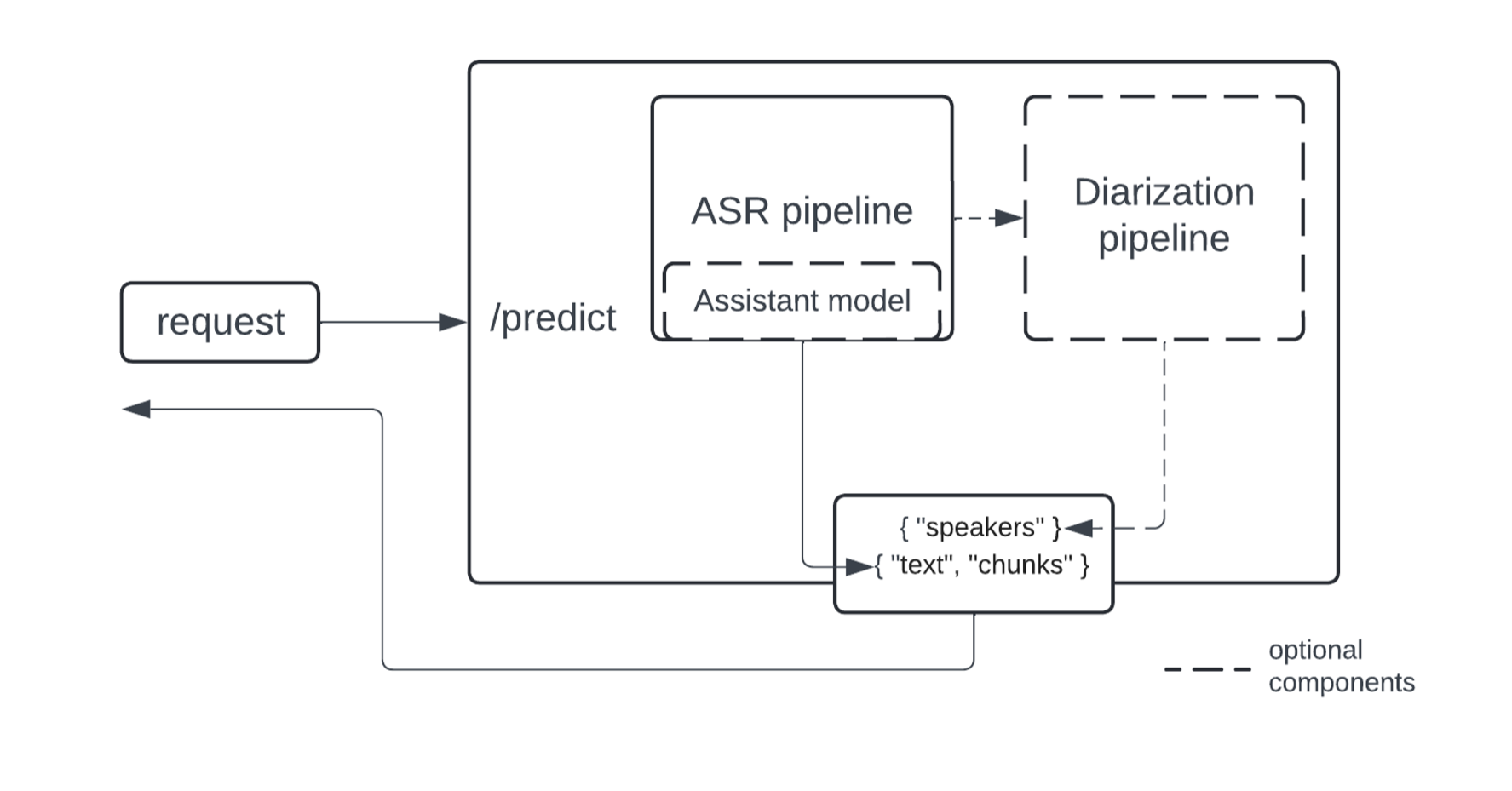
The implementation of ASR and diarization pipelines is modularized to cater to a wider range of use cases - the diarization pipeline operates on top of ASR outputs, and you can use only the ASR part if diarization is not needed. For diarization, we propose using the Pyannote model, currently a SOTA open source implementation.
We’ll also add speculative decoding as a way to speed up inference. The speedup is achieved by using a smaller and faster model to suggest generations that are validated by the larger model. Learn more about how it works with Whisper specifically in this great blog post.
Speculative decoding comes with restrictions:
Make sure to take the above into account. Depending on your production use case, supporting larger batches can be faster than speculative decoding. If you don't want to use an assistant model, just keep the assistant_model in the configuration as None.
If you do use an assistant model, a great choice for Whisper is a distilled version.
The easiest way to start is to clone the custom handler repository using the repo duplicator.
Here is the model loading piece from the handler.py:
from pyannote.audio import Pipeline
from transformers import pipeline, AutoModelForCausalLM

...

self.asr_pipeline = pipeline(
      "automatic-speech-recognition",
      model=model_settings.asr_model,
      torch_dtype=torch_dtype,
      device=device
  )

  self.assistant_model = AutoModelForCausalLM.from_pretrained(
      model_settings.assistant_model,
      torch_dtype=torch_dtype,
      low_cpu_mem_usage=True,
      use_safetensors=True
  )

  ...

  self.diarization_pipeline = Pipeline.from_pretrained(
      checkpoint_path=model_settings.diarization_model,
      use_auth_token=model_settings.hf_token,
  )

  ...
You can customize the pipeline based on your needs. ModelSettings, in the config.py file, holds the parameters used for initialization, defining the models to use during inference:
class ModelSettings(BaseSettings):
    asr_model: str
    assistant_model: Optional[str] = None
    diarization_model: Optional[str] = None
    hf_token: Optional[str] = None
The parameters can be adjusted by passing environment variables with corresponding names - this works both with a custom container and an inference handler. It’s a Pydantic feature. To pass environment variables to a container during build time you’ll have to create an endpoint via an API call (not via the interface).
You could hardcode model names instead of passing them as environment variables, but note that the diarization pipeline requires a token to be passed explicitly (hf_token). You are not allowed to hardcode your token for security reasons, which means you will have to create an endpoint via an API call in order to use a diarization model.
As a reminder, all the diarization-related pre- and postprocessing utils are in diarization_utils.py
The only required component is an ASR model. Optionally, an assistant model can be specified to be used for speculative decoding, and a diarization model can be used to partition a transcription by speakers.
If you only need the ASR part you could specify asr_model/assistant_model in the config.py and deploy with a click of a button:
To pass environment variables to containers hosted on Inference Endpoints you’ll need to create an endpoint programmatically using the provided API. Below is an example call:
body = {
    "compute": {
        "accelerator": "gpu",
        "instanceSize": "medium",
        "instanceType": "g5.2xlarge",
        "scaling": {
            "maxReplica": 1,
            "minReplica": 0
        }
    },
    "model": {
        "framework": "pytorch",
        "image": {
            # a default container
            "huggingface": {
                "env": {
            # this is where a Hub model gets mounted
                    "HF_MODEL_DIR": "/repository",
                    "DIARIZATION_MODEL": "pyannote/speaker-diarization-3.1",
                    "HF_TOKEN": "<your_token>",
                    "ASR_MODEL": "openai/whisper-large-v3",
                    "ASSISTANT_MODEL": "distil-whisper/distil-large-v3"
                }
            }
        },
        # a model repository on the Hub
        "repository": "sergeipetrov/asrdiarization-handler",
        "task": "custom"
    },
    # the endpoint name
    "name": "asr-diarization-1",
    "provider": {
        "region": "us-east-1",
        "vendor": "aws"
    },
    "type": "private"
}
To give a better idea on when using an assistant model is beneficial, here's a benchmark performed with k6:
# Setup:
# GPU: A10
ASR_MODEL=openai/whisper-large-v3
ASSISTANT_MODEL=distil-whisper/distil-large-v3

# long: 60s audio; short: 8s audio
long_assisted..................: avg=4.15s    min=3.84s    med=3.95s    max=6.88s    p(90)=4.03s    p(95)=4.89s
long_not_assisted..............: avg=3.48s    min=3.42s    med=3.46s    max=3.71s    p(90)=3.56s    p(95)=3.61s
short_assisted.................: avg=326.96ms min=313.01ms med=319.41ms max=960.75ms p(90)=325.55ms p(95)=326.07ms
short_not_assisted.............: avg=784.35ms min=736.55ms med=747.67ms max=2s       p(90)=772.9ms  p(95)=774.1ms
As you can see, assisted generation gives dramatic performance gains when an audio is short (batch size is 1). If an audio is long, inference will automatically chunk it into batches, and speculative decoding may hurt inference time because of the limitations we discussed before.
All the inference parameters are in config.py:
class InferenceConfig(BaseModel):
    task: Literal["transcribe", "translate"] = "transcribe"
    batch_size: int = 24
    assisted: bool = False
    chunk_length_s: int = 30
    sampling_rate: int = 16000
    language: Optional[str] = None
    num_speakers: Optional[int] = None
    min_speakers: Optional[int] = None
    max_speakers: Optional[int] = None
Of course, you can add or remove parameters as needed. The parameters related to the number of speakers are passed to a diarization pipeline, while all the others are mostly for the ASR pipeline. sampling_rate indicates the sampling rate of the audio to process and is used for preprocessing; the assisted flag tells the pipeline whether to use speculative decoding. Remember that for assisted generation the batch_size must be set to 1.
Once deployed, send your audio along with the inference parameters to your inference endpoint, like this (in Python):
import base64
import requests

API_URL = "<your endpoint URL>"
filepath = "/path/to/audio"

with open(filepath, "rb") as f:
    audio_encoded = base64.b64encode(f.read()).decode("utf-8")

data = {
    "inputs": audio_encoded,
    "parameters": {
        "batch_size": 24
    }
}

resp = requests.post(API_URL, json=data, headers={"Authorization": "Bearer <your token>"})
print(resp.json())
Here the "parameters" field is a dictionary that contains all the parameters you'd like to adjust from the InferenceConfig. Note that parameters not specified in the InferenceConfig will be ignored.
Or with InferenceClient (there is also an async version):
from huggingface_hub import InferenceClient

client = InferenceClient(model = "<your endpoint URL>", token="<your token>")

with open("/path/to/audio", "rb") as f:
    audio_encoded = base64.b64encode(f.read()).decode("utf-8")
data = {
    "inputs": audio_encoded,
    "parameters": {
        "batch_size": 24
    }
}

res = client.post(json=data)
In this blog, we discussed how to set up a modularized ASR + diarization + speculative decoding pipeline with Hugging Face Inference Endpoints. We did our best to make it easy to configure and adjust the pipeline as needed, and deployment with Inference Endpoints is always a piece of cake! We are lucky to have great models and tools openly available to the community that we used in the implementation:
There is a repo that implements the same pipeline along with the server part (FastAPI+Uvicorn). It may come in handy if you'd like to customize it even further or host somewhere else.
此内容由惯性聚合(RSS阅读器)自动聚合整理,仅供阅读参考。 原文来自 — 版权归原作者所有。