



惯性聚合 高效追踪和阅读你感兴趣的博客、新闻、科技资讯
阅读原文 在惯性聚合中打开

推荐订阅源

小众软件
小众软件
IT之家
IT之家
博客园 - 聂微东
www.infosecurity-magazine.com
P
Privacy International News Feed
人人都是产品经理
人人都是产品经理
PCI Perspectives
PCI Perspectives
OSCHINA 社区最新新闻
OSCHINA 社区最新新闻
博客园 - 叶小钗
V
Vulnerabilities – Threatpost
美团技术团队
S
Secure Thoughts
N
News | PayPal Newsroom
L
LINUX DO - 最新话题
腾讯CDC
Application and Cybersecurity Blog
雷峰网
雷峰网
B
Blog
MyScale Blog
MyScale Blog
T
The Blog of Author Tim Ferriss
TaoSecurity Blog
TaoSecurity Blog
N
News and Events Feed by Topic
Blog — PlanetScale
Blog — PlanetScale
C
Check Point Blog
T
Tailwind CSS Blog
月光博客
月光博客
Simon Willison's Weblog
Hacker News: Ask HN
Hacker News: Ask HN
The Last Watchdog
The Last Watchdog
Google DeepMind News
cs.CV updates on arXiv.org
MongoDB | Blog
MongoDB | Blog
S
Security @ Cisco Blogs
Jina AI
Jina AI
Engineering at Meta
Engineering at Meta
S
Security Affairs
Forbes - Security
Forbes - Security
P
Palo Alto Networks Blog
cs.CL updates on arXiv.org
博客园 - 司徒正美
博客园 - 三生石上(FineUI控件)
T
Tor Project blog
O
OpenAI News
L
Lohrmann on Cybersecurity
Security Archives - TechRepublic
P
Proofpoint News Feed
Cyber Security Advisories - MS-ISAC
L
LangChain Blog
B
Blog RSS Feed
H
Hackread – Cybersecurity News, Data Breaches, AI and More

Hugging Face - Blog

Waypoint-1.5: Higher-Fidelity Interactive Worlds for Everyday GPUs ALTK‑Evolve: On‑the‑Job Learning for AI Agents Safetensors is Joining the PyTorch Foundation Holo3: Breaking the Computer Use Frontier Any Custom Frontend with Gradio's Backend A New Framework for Evaluating Voice Agents (EVA) Bringing Robotics AI to Embedded Platforms: Dataset Recording, VLA Fine‑Tuning, and On‑Device Optimizations One-Shot Any Web App with Gradio's gr.HTML CUGA on Hugging Face: Democratizing Configurable AI Agents New in llama.cpp: Model Management Building Deep Research: How we Achieved State of the Art OVHcloud on Hugging Face Inference Providers 🔥 20x Faster TRL Fine-tuning with RapidFire AI Building for an Open Future - our new partnership with Google Cloud Aligning to What? Rethinking Agent Generalization in MiniMax M2 Building a Healthcare Robot from Simulation to Deployment with NVIDIA Isaac Sentence Transformers is joining Hugging Face! Unlock the power of images with AI Sheets Supercharge your OCR Pipelines with Open Models Google Cloud C4 Brings a 70% TCO improvement on GPT OSS with Intel and Hugging Face Get your VLM running in 3 simple steps on Intel CPUs Nemotron-Personas-India: Synthesized Data for Sovereign AI Introducing RTEB: A New Standard for Retrieval Evaluation Accelerating Qwen3-8B Agent on Intel® Core™ Ultra with Depth-Pruned Draft Models VibeGame: Exploring Vibe Coding Games Nemotron-Personas-Japan: ソブリン AI のための合成データセット Swift Transformers Reaches 1.0 – and Looks to the Future Smol2Operator: Post-Training GUI Agents for Computer Use SyGra: The One-Stop Framework for Building Data for LLMs and SLMs Gaia2 and ARE: Empowering the community to study agents Scaleway on Hugging Face Inference Providers 🔥 Democratizing AI Safety with RiskRubric.ai Public AI on Hugging Face Inference Providers 🔥 `LeRobotDataset:v3.0`: Bringing large-scale datasets to `lerobot` Visible Watermarking with Gradio Introducing the Palmyra-mini family: Powerful, lightweight, and ready to reason! Tricks from OpenAI gpt-oss YOU 🫵 can use with transformers Fine-tune Any LLM from the Hugging Face Hub with Together AI Jupyter Agents: training LLMs to reason with notebooks mmBERT: ModernBERT goes Multilingual Welcome EmbeddingGemma, Google's new efficient embedding model SAIR: Accelerating Pharma R&D with AI-Powered Structural Intelligence Make your ZeroGPU Spaces go brrr with ahead-of-time compilation NVIDIA Releases 6 Million Multi-Lingual Reasoning Dataset Generate Images with Claude and Hugging Face From Zero to GPU: A Guide to Building and Scaling Production-Ready CUDA Kernels MCP for Research: How to Connect AI to Research Tools Kimina-Prover-RL Arm & ExecuTorch 0.7: Bringing Generative AI to the masses Neural Super Sampling is here! TextQuests: How Good are LLMs at Text-Based Video Games? 🇵🇭 FilBench - Can LLMs Understand and Generate Filipino? Introducing AI Sheets: a tool to work with datasets using open AI models! Accelerate ND-Parallel: A guide to Efficient Multi-GPU Training Vision Language Model Alignment in TRL ⚡️ Welcome GPT OSS, the new open-source model family from OpenAI! Measuring Open-Source Llama Nemotron Models on DeepResearch Bench 📚 3LM: A Benchmark for Arabic LLMs in STEM and Code Implementing MCP Servers in Python: An AI Shopping Assistant with Gradio Introducing Trackio: A Lightweight Experiment Tracking Library from Hugging Face Say hello to `hf`: a faster, friendlier Hugging Face CLI ✨ Parquet Content-Defined Chunking TimeScope: How Long Can Your Video Large Multimodal Model Go? Fast LoRA inference for Flux with Diffusers and PEFT Accelerate a World of LLMs on Hugging Face with NVIDIA NIM Arc Virtual Cell Challenge: A Primer Consilium: When Multiple LLMs Collaborate Back to The Future: Evaluating AI Agents on Predicting Future Events Five Big Improvements to Gradio MCP Servers Ettin Suite: SoTA Paired Encoders and Decoders Migrating the Hub from Git LFS to Xet Kimina-Prover: Applying Test-time RL Search on Large Formal Reasoning Models Asynchronous Robot Inference: Decoupling Action Prediction and Execution ScreenEnv: Deploy your full stack Desktop Agent Building the Hugging Face MCP Server Reachy Mini - The Open-Source Robot for Today's and Tomorrow's AI Builders Creating custom kernels for the AMD MI300 Upskill your LLMs With Gradio MCP Servers SmolLM3: smol, multilingual, long-context reasoner Three Mighty Alerts Supporting Hugging Face’s Production Infrastructure Efficient MultiModal Data Pipeline Announcing NeurIPS 2025 E2LM Competition: Early Training Evaluation of Language Models Training and Finetuning Sparse Embedding Models with Sentence Transformers Welcome the NVIDIA Llama Nemotron Nano VLM to Hugging Face Hub Gemma 3n fully available in the open-source ecosystem! Transformers backend integration in SGLang (LoRA) Fine-Tuning FLUX.1-dev on Consumer Hardware Groq on Hugging Face Inference Providers 🔥 How Long Prompts Block Other Requests - Optimizing LLM Performance Learn the Hugging Face Kernel Hub in 5 Minutes Convert Transformers to ONNX with Hugging Face Optimum Intel and Hugging Face Partner to Democratize Machine Learning Hardware Acceleration Director of Machine Learning Insights [Part 3: Finance Edition] The Annotated Diffusion Model Deep Q-Learning with Space Invaders Graphcore and Hugging Face Launch New Lineup of IPU-Ready Transformers Introducing Pull Requests and Discussions 🥳 Efficient Table Pre-training without Real Data: An Introduction to TAPEX An Introduction to Q-Learning Part 2/2 How Sempre Health is leveraging the Expert Acceleration Program to accelerate their ML roadmap
Making ML-powered web games with Transformers.js
Joshua · 2023-07-05 · via Hugging Face - Blog

Back to Articles

Joshua's avatar

In this blog post, I'll show you how I made Doodle Dash, a real-time ML-powered web game that runs completely in your browser (thanks to Transformers.js). The goal of this tutorial is to show you how easy it is to make your own ML-powered web game... just in time for the upcoming Open Source AI Game Jam (7-9 July 2023). Join the game jam if you haven't already!

Quick links

Overview

Before we start, let's talk about what we'll be creating. The game is inspired by Google's Quick, Draw! game, where you're given a word and a neural network has 20 seconds to guess what you're drawing (repeated 6 times). In fact, we'll be using their training data to train our own sketch detection model! Don't you just love open source? 😍

In our version, you'll have one minute to draw as many items as you can, one prompt at a time. If the model predicts the correct label, the canvas will be cleared and you'll be given a new word. Keep doing this until the timer runs out! Since the game runs locally in your browser, we don't have to worry about server latency at all. The model is able to make real-time predictions as you draw, to the tune of over 60 predictions a second... 🤯 WOW!

This tutorial is split into 3 sections:

  1. Training the neural network
  2. Running in the browser with Transformers.js
  3. Game Design

1. Training the neural network

Training data

We'll be training our model using a subset of Google's Quick, Draw! dataset, which contains over 5 million drawings across 345 categories. Here are some samples from the dataset:

Quick, Draw! dataset

Model architecture

We'll be finetuning apple/mobilevit-small, a lightweight and mobile-friendly Vision Transformer that has been pre-trained on ImageNet-1k. It has only 5.6M parameters (~20 MB file size), a perfect candidate for running in-browser! For more information, check out the MobileViT paper and the model architecture below.
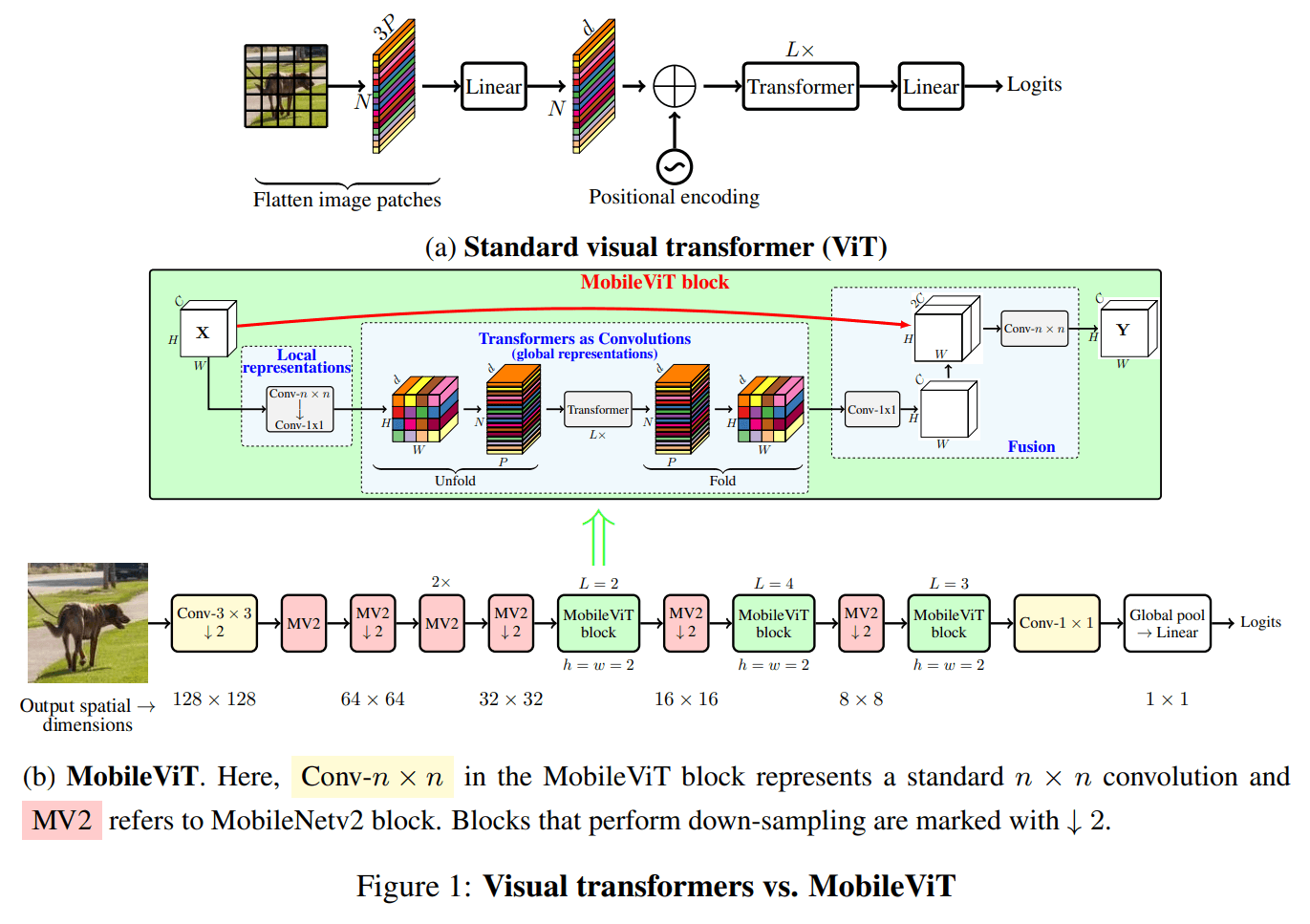
MobileViT archtecture

Finetuning

Open In Colab

To keep the blog post (relatively) short, we've prepared a Colab notebook which will show you the exact steps we took to finetune apple/mobilevit-small on our dataset. At a high level, this involves:

  1. Loading the "Quick, Draw!" dataset.

  2. Transforming the dataset using a MobileViTImageProcessor.

  3. Defining our collate function and evaluation metric.

  4. Loading the pre-trained MobileVIT model using MobileViTForImageClassification.from_pretrained.

  5. Training the model using the Trainer and TrainingArguments helper classes.

  6. Evaluating the model using 🤗 Evaluate.

NOTE: You can find our finetuned model here on the Hugging Face Hub.

2. Running in the browser with Transformers.js

What is Transformers.js?

Transformers.js is a JavaScript library that allows you to run 🤗 Transformers directly in your browser (no need for a server)! It's designed to be functionally equivalent to the Python library, meaning you can run the same pre-trained models using a very similar API.

Behind the scenes, Transformers.js uses ONNX Runtime, so we need to convert our finetuned PyTorch model to ONNX.

Converting our model to ONNX

Fortunately, the 🤗 Optimum library makes it super simple to convert your finetuned model to ONNX! The easiest (and recommended way) is to:

  1. Clone the Transformers.js repository and install the necessary dependencies:

    git clone https://github.com/xenova/transformers.js.git
    cd transformers.js
    pip install -r scripts/requirements.txt
    
  2. Run the conversion script (it uses Optimum under the hood):

    python -m scripts.convert --model_id <model_id>
    

    where <model_id> is the name of the model you want to convert (e.g. Xenova/quickdraw-mobilevit-small).

Setting up our project

Let's start by scaffolding a simple React app using Vite:

npm create vite@latest doodle-dash -- --template react

Next, enter the project directory and install the necessary dependencies:

cd doodle-dash
npm install
npm install @xenova/transformers

You can then start the development server by running:

npm run dev

Running the model in the browser

Running machine learning models is computationally intensive, so it's important to perform inference in a separate thread. This way we won't block the main thread, which is used for rendering the UI and reacting to your drawing gestures 😉. The Web Workers API makes this super simple!

Create a new file (e.g., worker.js) in the src directory and add the following code:

import { pipeline, RawImage } from "@xenova/transformers";

const classifier = await pipeline("image-classification", 'Xenova/quickdraw-mobilevit-small', { quantized: false });

const image = await RawImage.read('https://huggingface.co/datasets/huggingface/documentation-images/resolve/main/blog/ml-web-games/skateboard.png');

const output = await classifier(image.grayscale());
console.log(output);

We can now use this worker in our App.jsx file by adding the following code to the App component:

import { useState, useEffect, useRef } from 'react'
// ... rest of the imports

function App() {
    // Create a reference to the worker object.
    const worker = useRef(null);

    // We use the `useEffect` hook to set up the worker as soon as the `App` component is mounted.
    useEffect(() => {
        if (!worker.current) {
            // Create the worker if it does not yet exist.
            worker.current = new Worker(new URL('./worker.js', import.meta.url), {
                type: 'module'
            });
        }

        // Create a callback function for messages from the worker thread.
        const onMessageReceived = (e) => { /* See code */ };

        // Attach the callback function as an event listener.
        worker.current.addEventListener('message', onMessageReceived);

        // Define a cleanup function for when the component is unmounted.
        return () => worker.current.removeEventListener('message', onMessageReceived);
    });

    // ... rest of the component
}

You can test that everything is working by running the development server (with npm run dev), visiting the local website (usually http://localhost:5173/), and opening the browser console. You should see the output of the model being logged to the console.

[{ label: "skateboard", score: 0.9980043172836304 }]

Woohoo! 🥳 Although the above code is just a small part of the final product, it shows how simple the machine-learning side of it is! The rest is just making it look nice and adding some game logic.

3. Game Design

In this section, I'll briefly discuss the game design process. As a reminder, you can find the full source code for the project on GitHub, so I won't be going into detail about the code itself.

Taking advantage of real-time performance

One of the main advantages of performing in-browser inference is that we can make predictions in real time (over 60 times a second). In the original Quick, Draw! game, the model only makes a new prediction every couple of seconds. We could do the same in our game, but then we wouldn't be taking advantage of its real-time performance! So, I decided to redesign the main game loop:

  • Instead of six 20-second rounds (where each round corresponds to a new word), our version tasks the player with correctly drawing as many doodles as they can in 60 seconds (one prompt at a time).
  • If you come across a word you are unable to draw, you can skip it (but this will cost you 3 seconds of your remaining time).
  • In the original game, since the model would make a guess every few seconds, it could slowly cross labels off the list until it eventually guessed correctly. In our version, we instead decrease the model's scores for the first n incorrect labels, with n increasing over time as the user continues drawing.

Quality of life improvements

The original dataset contains 345 different classes, and since our model is relatively small (~20MB), it sometimes is unable to correctly guess some of the classes. To solve this problem, we removed some words which are either:

  • Too similar to other labels (e.g., "barn" vs. "house")
  • Too difficult to understand (e.g., "animal migration")
  • Too difficult to draw in sufficient detail (e.g., "brain")
  • Ambiguous (e.g., "bat")

After filtering, we were still left with over 300 different classes!

BONUS: Coming up with the name

In the spirit of open-source development, I decided to ask Hugging Chat for some game name ideas... and needless to say, it did not disappoint!
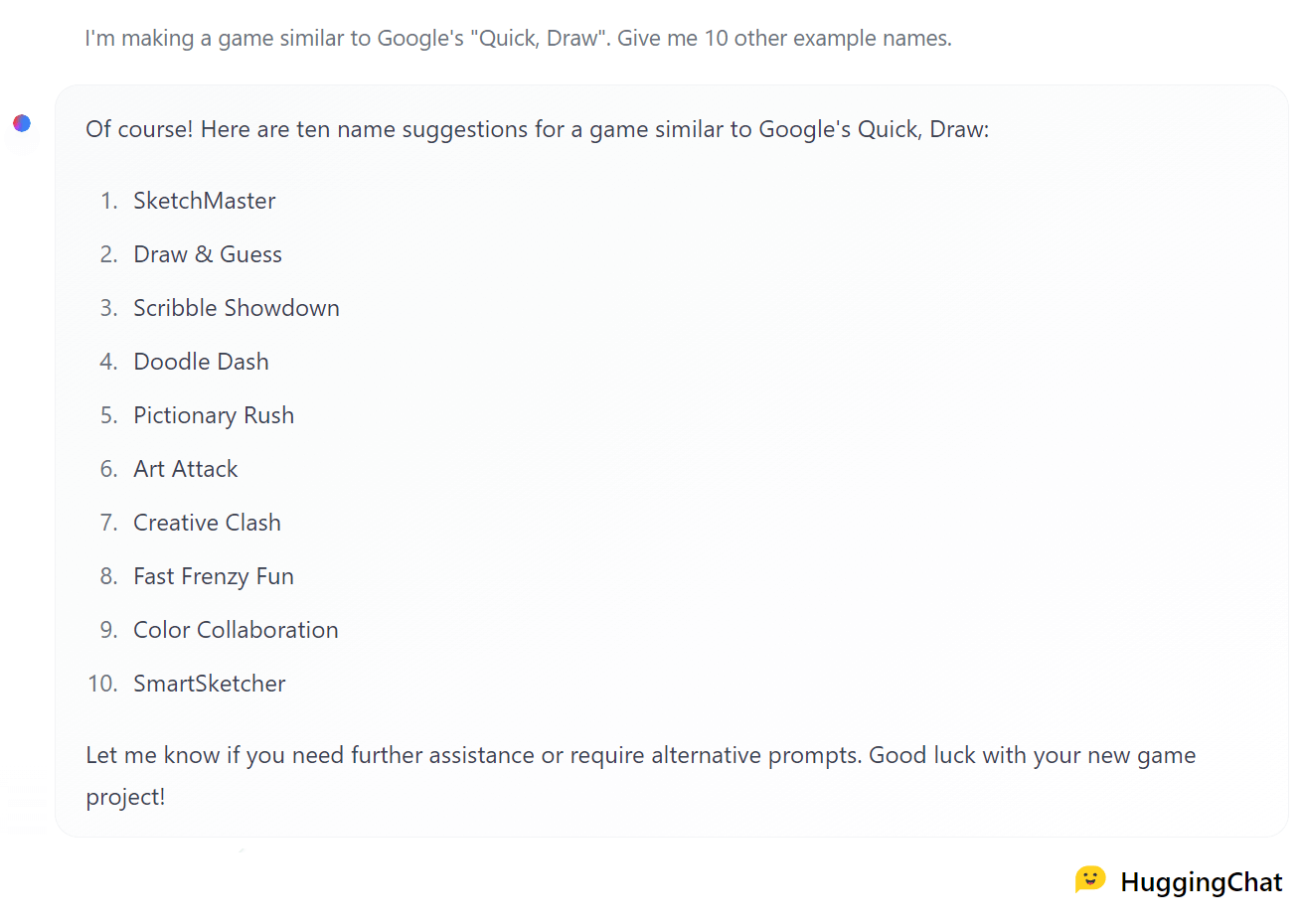
Game name suggestions by Hugging Chat

I liked the alliteration of "Doodle Dash" (suggestion #4), so I decided to go with that. Thanks Hugging Chat! 🤗


I hope you enjoyed building this game with me! If you have any questions or suggestions, you can find me on Twitter, GitHub, or the 🤗 Hub. Also, if you want to improve the game (game modes? power-ups? animations? sound effects?), feel free to fork the project and submit a pull request! I'd love to see what you come up with!

PS: Don't forget to join the Open Source AI Game Jam! Hopefully this blog post inspires you to build your own web game with Transformers.js! 😉 See you at the Game Jam! 🚀