









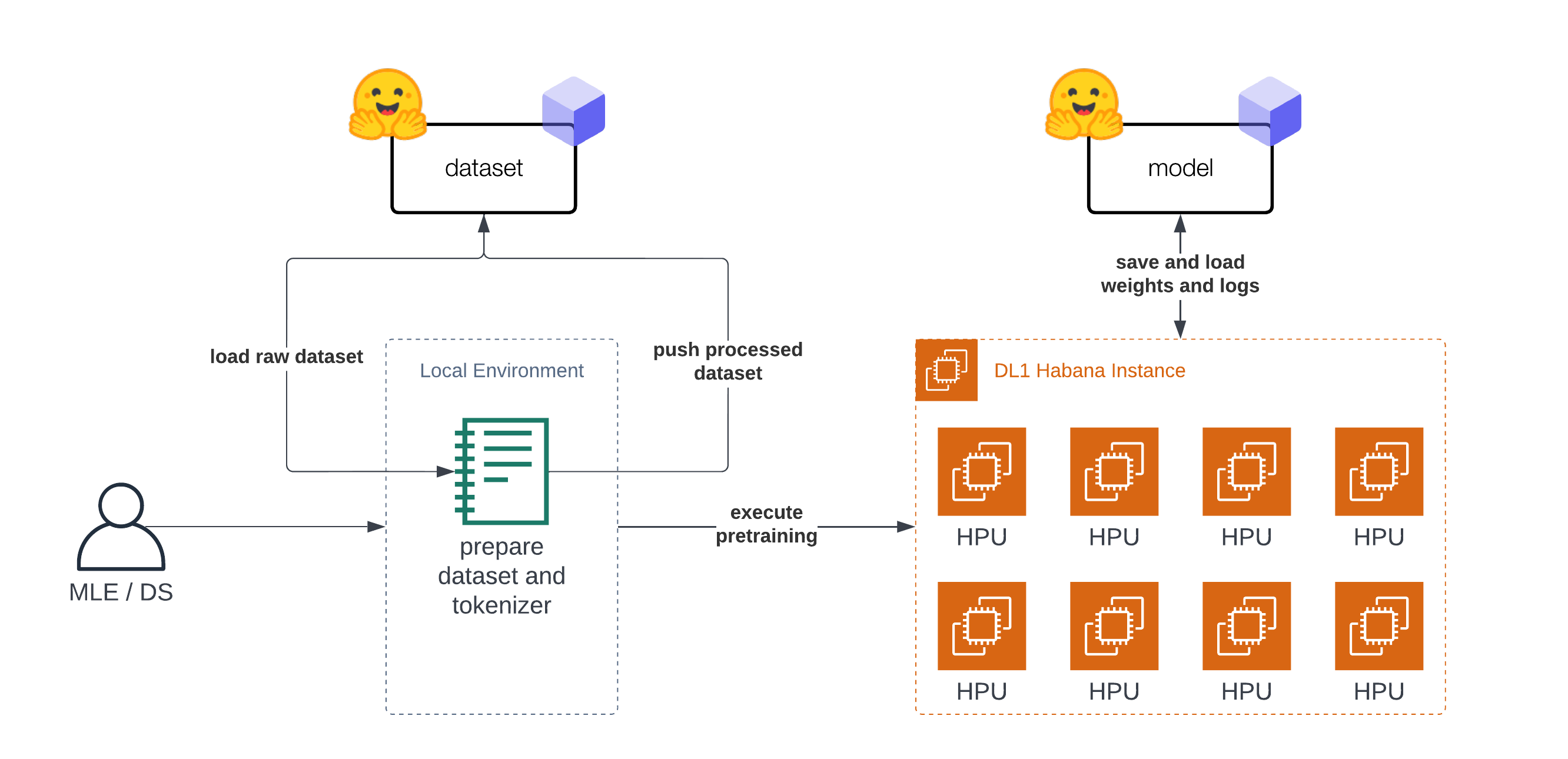
In this Tutorial, you will learn how to pre-train BERT-base from scratch using a Habana Gaudi-based DL1 instance on AWS to take advantage of the cost-performance benefits of Gaudi. We will use the Hugging Face Transformers, Optimum Habana and Datasets libraries to pre-train a BERT-base model using masked-language modeling, one of the two original BERT pre-training tasks. Before we get started, we need to set up the deep learning environment.
You will learn how to:
Note: Steps 1 to 3 can/should be run on a different instance size since those are CPU intensive tasks.
Requirements
Before we start, make sure you have met the following requirements
Helpful Resources
BERT, short for Bidirectional Encoder Representations from Transformers, is a Machine Learning (ML) model for natural language processing. It was developed in 2018 by researchers at Google AI Language and serves as a swiss army knife solution to 11+ of the most common language tasks, such as sentiment analysis and named entity recognition.
Read more about BERT in our BERT 101 🤗 State Of The Art NLP Model Explained blog.
MLM enables/enforces bidirectional learning from text by masking (hiding) a word in a sentence and forcing BERT to bidirectionally use the words on either side of the covered word to predict the masked word.
Masked Language Modeling Example:
“Dang! I’m out fishing and a huge trout just [MASK] my line!”
Read more about Masked Language Modeling here.
Let's get started. 🚀
Note: Steps 1 to 3 were run on a AWS c6i.12xlarge instance.
The Tutorial is "split" into two parts. The first part (step 1-3) is about preparing the dataset and tokenizer. The second part (step 4) is about pre-training BERT on the prepared dataset. Before we can start with the dataset preparation we need to setup our development environment. As mentioned in the introduction you don't need to prepare the dataset on the DL1 instance and could use your notebook or desktop computer.
At first we are going to install transformers, datasets and git-lfs to push our tokenizer and dataset to the Hugging Face Hub for later use.
!pip install transformers datasets
!sudo apt-get install git-lfs
To finish our setup let's log into the Hugging Face Hub to push our dataset, tokenizer, model artifacts, logs and metrics during training and afterwards to the Hub.
To be able to push our model to the Hub, you need to register on the Hugging Face Hub.
We will use the notebook_login util from the huggingface_hub package to log into our account. You can get your token in the settings at Access Tokens.
from huggingface_hub import notebook_login

notebook_login()
Since we are now logged in let's get the user_id, which will be used to push the artifacts.
from huggingface_hub import HfApi

user_id = HfApi().whoami()["name"]

print(f"user id '{user_id}' will be used during the example")
The original BERT was pretrained on Wikipedia and BookCorpus datasets. Both datasets are available on the Hugging Face Hub and can be loaded with datasets.
Note: For wikipedia we will use the 20220301, which is different from the original split.
As a first step we are loading the datasets and merging them together to create on big dataset.
from datasets import concatenate_datasets, load_dataset

bookcorpus = load_dataset("bookcorpus", split="train")
wiki = load_dataset("wikipedia", "20220301.en", split="train")
wiki = wiki.remove_columns([col for col in wiki.column_names if col != "text"])  # only keep the 'text' column

assert bookcorpus.features.type == wiki.features.type
raw_datasets = concatenate_datasets([bookcorpus, wiki])
We are not going to do some advanced dataset preparation, like de-duplication, filtering or any other pre-processing. If you are planning to apply this notebook to train your own BERT model from scratch I highly recommend including those data preparation steps into your workflow. This will help you improve your Language Model.
To be able to train our model we need to convert our text into a tokenized format. Most Transformer models are coming with a pre-trained tokenizer, but since we are pre-training our model from scratch we also need to train a Tokenizer on our data. We can train a tokenizer on our data with transformers and the BertTokenizerFast class.
More information about training a new tokenizer can be found in our Hugging Face Course.
from tqdm import tqdm
from transformers import BertTokenizerFast

# repositor id for saving the tokenizer
tokenizer_id="bert-base-uncased-2022-habana"

# create a python generator to dynamically load the data
def batch_iterator(batch_size=10000):
    for i in tqdm(range(0, len(raw_datasets), batch_size)):
        yield raw_datasets[i : i + batch_size]["text"]

# create a tokenizer from existing one to re-use special tokens
tokenizer = BertTokenizerFast.from_pretrained("bert-base-uncased")
We can start training the tokenizer with train_new_from_iterator().
bert_tokenizer = tokenizer.train_new_from_iterator(text_iterator=batch_iterator(), vocab_size=32_000)
bert_tokenizer.save_pretrained("tokenizer")
We push the tokenizer to the Hugging Face Hub for later training our model.
# you need to be logged in to push the tokenizer
bert_tokenizer.push_to_hub(tokenizer_id)
Before we can get started with training our model, the last step is to pre-process/tokenize our dataset. We will use our trained tokenizer to tokenize our dataset and then push it to the hub to load it easily later in our training. The tokenization process is also kept pretty simple, if documents are longer than 512 tokens those are truncated and not split into several documents.
from transformers import AutoTokenizer
import multiprocessing

# load tokenizer
# tokenizer = AutoTokenizer.from_pretrained(f"{user_id}/{tokenizer_id}")
tokenizer = AutoTokenizer.from_pretrained("tokenizer")
num_proc = multiprocessing.cpu_count()
print(f"The max length for the tokenizer is: {tokenizer.model_max_length}")

def group_texts(examples):
    tokenized_inputs = tokenizer(
       examples["text"], return_special_tokens_mask=True, truncation=True, max_length=tokenizer.model_max_length
    )
    return tokenized_inputs

# preprocess dataset
tokenized_datasets = raw_datasets.map(group_texts, batched=True, remove_columns=["text"], num_proc=num_proc)
tokenized_datasets.features
As data processing function we will concatenate all texts from our dataset and generate chunks of tokenizer.model_max_length (512).
from itertools import chain

# Main data processing function that will concatenate all texts from our dataset and generate chunks of
# max_seq_length.
def group_texts(examples):
    # Concatenate all texts.
    concatenated_examples = {k: list(chain(*examples[k])) for k in examples.keys()}
    total_length = len(concatenated_examples[list(examples.keys())[0]])
    # We drop the small remainder, we could add padding if the model supported it instead of this drop, you can
    # customize this part to your needs.
    if total_length >= tokenizer.model_max_length:
        total_length = (total_length // tokenizer.model_max_length) * tokenizer.model_max_length
    # Split by chunks of max_len.
    result = {
        k: [t[i : i + tokenizer.model_max_length] for i in range(0, total_length, tokenizer.model_max_length)]
        for k, t in concatenated_examples.items()
    }
    return result

tokenized_datasets = tokenized_datasets.map(group_texts, batched=True, num_proc=num_proc)
# shuffle dataset
tokenized_datasets = tokenized_datasets.shuffle(seed=34)

print(f"the dataset contains in total {len(tokenized_datasets)*tokenizer.model_max_length} tokens")
# the dataset contains in total 3417216000 tokens
The last step before we can start with our training is to push our prepared dataset to the hub.
# push dataset to hugging face
dataset_id=f"{user_id}/processed_bert_dataset"
tokenized_datasets.push_to_hub(f"{user_id}/processed_bert_dataset")
In this example, we are going to use Habana Gaudi on AWS using the DL1 instance to run the pre-training. We will use the Remote Runner toolkit to easily launch our pre-training on a remote DL1 Instance from our local setup. You can check-out Deep Learning setup made easy with EC2 Remote Runner and Habana Gaudi if you want to know more about how this works.
!pip install rm-runner
When using GPUs you would use the Trainer and TrainingArguments. Since we are going to run our training on Habana Gaudi we are leveraging the optimum-habana library, we can use the GaudiTrainer and GaudiTrainingArguments instead. The GaudiTrainer is a wrapper around the Trainer that allows you to pre-train or fine-tune a transformer model on Habana Gaudi instances.
-from transformers import Trainer, TrainingArguments
+from optimum.habana import GaudiTrainer, GaudiTrainingArguments

# define the training arguments
-training_args = TrainingArguments(
+training_args = GaudiTrainingArguments(
+  use_habana=True,
+  use_lazy_mode=True,
+  gaudi_config_name=path_to_gaudi_config,
  ...
)

# Initialize our Trainer
-trainer = Trainer(
+trainer = GaudiTrainer(
    model=model,
    args=training_args,
    train_dataset=train_dataset
    ... # other arguments
)
The DL1 instance we use has 8 available HPU-cores meaning we can leverage distributed data-parallel training for our model.
To run our training as distributed training we need to create a training script, which can be used with multiprocessing to run on all HPUs.
We have created a run_mlm.py script implementing masked-language modeling using the GaudiTrainer. To execute our distributed training we use the DistributedRunner runner from optimum-habana and pass our arguments. Alternatively, you could check-out the gaudi_spawn.py in the optimum-habana repository.
Before we can start our training we need to define the hyperparameters we want to use for our training. We are leveraging the Hugging Face Hub integration of the GaudiTrainer to automatically push our checkpoints, logs and metrics during training into a repository.
from huggingface_hub import HfFolder

# hyperparameters
hyperparameters = {
    "model_config_id": "bert-base-uncased",
    "dataset_id": "philschmid/processed_bert_dataset",
    "tokenizer_id": "philschmid/bert-base-uncased-2022-habana",
    "gaudi_config_id": "philschmid/bert-base-uncased-2022-habana",
    "repository_id": "bert-base-uncased-2022",
    "hf_hub_token": HfFolder.get_token(),  # need to be logged in with `huggingface-cli login`
    "max_steps": 100_000,
    "per_device_train_batch_size": 32,
    "learning_rate": 5e-5,
}
hyperparameters_string = " ".join(f"--{key} {value}" for key, value in hyperparameters.items())
We can start our training by creating a EC2RemoteRunner and then launch it. This will then start our AWS EC2 DL1 instance and run our run_mlm.py script on it using the huggingface/optimum-habana:latest container.
from rm_runner import EC2RemoteRunner
# create ec2 remote runner
runner = EC2RemoteRunner(
  instance_type="dl1.24xlarge",
  profile="hf-sm",  # adjust to your profile
  region="us-east-1",
  container="huggingface/optimum-habana:4.21.1-pt1.11.0-synapse1.5.0"
  )

# launch my script with gaudi_spawn for distributed training
runner.launch(
    command=f"python3 gaudi_spawn.py --use_mpi --world_size=8 run_mlm.py {hyperparameters_string}",
    source_dir="scripts",
)
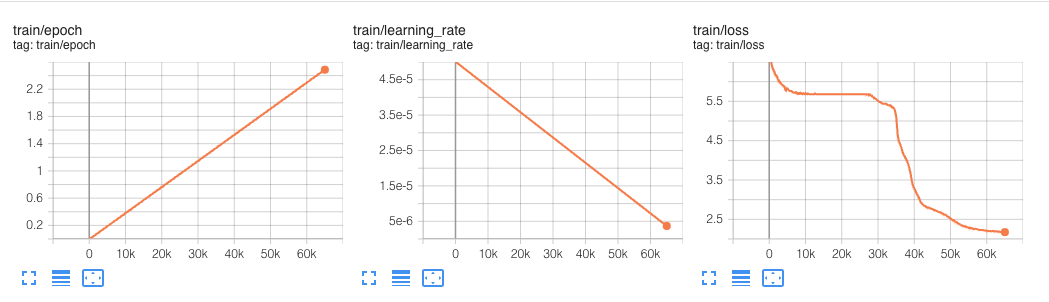
This experiment ran for 60k steps.
In our hyperparameters we defined a max_steps property, which limited the pre-training to only 100_000 steps. The 100_000 steps with a global batch size of 256 took around 12,5 hours.
BERT was originally pre-trained on 1 Million Steps with a global batch size of 256:
We train with batch size of 256 sequences (256 sequences * 512 tokens = 128,000 tokens/batch) for 1,000,000 steps, which is approximately 40 epochs over the 3.3 billion word corpus.
Meaning if we want to do a full pre-training it would take around 125h hours (12,5 hours * 10) and would cost us around ~$1,650 using Habana Gaudi on AWS, which is extremely cheap.
For comparison, the DeepSpeed Team, who holds the record for the fastest BERT-pretraining, reported that pre-training BERT on 1 DGX-2 (powered by 16 NVIDIA V100 GPUs with 32GB of memory each) takes around 33,25 hours.
To compare the cost we can use the p3dn.24xlarge as reference, which comes with 8x NVIDIA V100 32GB GPUs and costs ~31,22$/h. We would need two of these instances to have the same "setup" as the one DeepSpeed reported, for now we are ignoring any overhead created to the multi-node setup (I/O, Network etc.). This would bring the cost of the DeepSpeed GPU based training on AWS to around ~$2,075, which is 25% more than what Habana Gaudi currently delivers.
Something to note here is that using DeepSpeed in general improves the performance by a factor of ~1.5 - 2. A factor of ~1.5 - 2x, means that the same pre-training job without DeepSpeed would likely take twice as long and cost twice as much or ~$3-4k.
We are looking forward on to do the experiment again once the Gaudi DeepSpeed integration is more widely available.
That's it for this Tutorial. Now you know the basics on how to pre-train BERT from scratch using Hugging Face Transformers and Habana Gaudi. You also saw how easy it is to migrate from the Trainer to the GaudiTrainer.
We compared our implementation with the fastest BERT-pretraining results and saw that Habana Gaudi still delivers a 25% cost reduction and allows us to pre-train BERT for ~$1,650.
Those results are incredible since it will allow companies to adapt their pre-trained models to their language and domain to improve accuracy up to 10% compared to the general BERT models.
If you are interested in training your own BERT or other Transformers models from scratch to reduce cost and improve accuracy, contact our experts to learn about our Expert Acceleration Program. To learn more about Habana solutions, read about our partnership and how to contact them.
Code: pre-training-bert.ipynb
Thanks for reading! If you have any questions, feel free to contact me, through Github, or on the forum. You can also connect with me on Twitter or LinkedIn.
此内容由惯性聚合(RSS阅读器)自动聚合整理,仅供阅读参考。 原文来自 — 版权归原作者所有。