









🤗 Hugging Face Diffusers supports Flax since version 0.5.1! This allows for super fast inference on Google TPUs, such as those available in Colab, Kaggle or Google Cloud Platform.
This post shows how to run inference using JAX / Flax. If you want more details about how Stable Diffusion works or want to run it in GPU, please refer to this Colab notebook.
If you want to follow along, click the button above to open this post as a Colab notebook.
First, make sure you are using a TPU backend. If you are running this notebook in Colab, select Runtime in the menu above, then select the option "Change runtime type" and then select TPU under the Hardware accelerator setting.
Note that JAX is not exclusive to TPUs, but it shines on that hardware because each TPU server has 8 TPU accelerators working in parallel.
import jax
num_devices = jax.device_count()
device_type = jax.devices()[0].device_kind

print(f"Found {num_devices} JAX devices of type {device_type}.")
assert "TPU" in device_type, "Available device is not a TPU, please select TPU from Edit > Notebook settings > Hardware accelerator"
Output:
Found 8 JAX devices of type TPU v2.
Make sure diffusers is installed.
!pip install diffusers==0.5.1
Then we import all the dependencies.
import numpy as np
import jax
import jax.numpy as jnp

from pathlib import Path
from jax import pmap
from flax.jax_utils import replicate
from flax.training.common_utils import shard
from PIL import Image

from huggingface_hub import notebook_login
from diffusers import FlaxStableDiffusionPipeline
Before using the model, you need to accept the model license in order to download and use the weights.
The license is designed to mitigate the potential harmful effects of such a powerful machine learning system. We request users to read the license entirely and carefully. Here we offer a summary:
Flax weights are available in Hugging Face Hub as part of the Stable Diffusion repo. The Stable Diffusion model is distributed under the CreateML OpenRail-M license. It's an open license that claims no rights on the outputs you generate and prohibits you from deliberately producing illegal or harmful content. The model card provides more details, so take a moment to read them and consider carefully whether you accept the license. If you do, you need to be a registered user in the Hub and use an access token for the code to work. You have two options to provide your access token:
huggingface-cli login command-line tool in your terminal and paste your token when prompted. It will be saved in a file in your computer.notebook_login() in a notebook, which does the same thing.The following cell will present a login interface unless you've already authenticated before in this computer. You'll need to paste your access token.
if not (Path.home()/'.huggingface'/'token').exists(): notebook_login()
TPU devices support bfloat16, an efficient half-float type. We'll use it for our tests, but you can also use float32 to use full precision instead.
dtype = jnp.bfloat16
Flax is a functional framework, so models are stateless and parameters are stored outside them. Loading the pre-trained Flax pipeline will return both the pipeline itself and the model weights (or parameters). We are using a bf16 version of the weights, which leads to type warnings that you can safely ignore.
pipeline, params = FlaxStableDiffusionPipeline.from_pretrained(
    "CompVis/stable-diffusion-v1-4",
    revision="bf16",
    dtype=dtype,
)
Since TPUs usually have 8 devices working in parallel, we'll replicate our prompt as many times as devices we have. Then we'll perform inference on the 8 devices at once, each responsible for generating one image. Thus, we'll get 8 images in the same amount of time it takes for one chip to generate a single one.
After replicating the prompt, we obtain the tokenized text ids by invoking the prepare_inputs function of the pipeline. The length of the tokenized text is set to 77 tokens, as required by the configuration of the underlying CLIP Text model.
prompt = "A cinematic film still of Morgan Freeman starring as Jimi Hendrix, portrait, 40mm lens, shallow depth of field, close up, split lighting, cinematic"
prompt = [prompt] * jax.device_count()
prompt_ids = pipeline.prepare_inputs(prompt)
prompt_ids.shape
Output:
(8, 77)
Model parameters and inputs have to be replicated across the 8 parallel devices we have. The parameters dictionary is replicated using flax.jax_utils.replicate, which traverses the dictionary and changes the shape of the weights so they are repeated 8 times. Arrays are replicated using shard.
p_params = replicate(params)
prompt_ids = shard(prompt_ids)
prompt_ids.shape
Output:
(8, 1, 77)
That shape means that each one of the 8 devices will receive as an input a jnp array with shape (1, 77). 1 is therefore the batch size per device. In TPUs with sufficient memory, it could be larger than 1 if we wanted to generate multiple images (per chip) at once.
We are almost ready to generate images! We just need to create a random number generator to pass to the generation function. This is the standard procedure in Flax, which is very serious and opinionated about random numbers – all functions that deal with random numbers are expected to receive a generator. This ensures reproducibility, even when we are training across multiple distributed devices.
The helper function below uses a seed to initialize a random number generator. As long as we use the same seed, we'll get the exact same results. Feel free to use different seeds when exploring results later in the notebook.
def create_key(seed=0):
    return jax.random.PRNGKey(seed)
We obtain a rng and then "split" it 8 times so each device receives a different generator. Therefore, each device will create a different image, and the full process is reproducible.
rng = create_key(0)
rng = jax.random.split(rng, jax.device_count())
JAX code can be compiled to an efficient representation that runs very fast. However, we need to ensure that all inputs have the same shape in subsequent calls; otherwise, JAX will have to recompile the code, and we wouldn't be able to take advantage of the optimized speed.
The Flax pipeline can compile the code for us if we pass jit = True as an argument. It will also ensure that the model runs in parallel in the 8 available devices.
The first time we run the following cell it will take a long time to compile, but subsequent calls (even with different inputs) will be much faster. For example, it took more than a minute to compile in a TPU v2-8 when I tested, but then it takes about 7s for future inference runs.
images = pipeline(prompt_ids, p_params, rng, jit=True)[0]
Output:
    CPU times: user 464 ms, sys: 105 ms, total: 569 ms
    Wall time: 7.07 s
The returned array has shape (8, 1, 512, 512, 3). We reshape it to get rid of the second dimension and obtain 8 images of 512 × 512 × 3 and then convert them to PIL.
images = images.reshape((images.shape[0],) + images.shape[-3:])
images = pipeline.numpy_to_pil(images)
Let's create a helper function to display images in a grid.
def image_grid(imgs, rows, cols):
    w,h = imgs[0].size
    grid = Image.new('RGB', size=(cols*w, rows*h))
    for i, img in enumerate(imgs): grid.paste(img, box=(i%cols*w, i//cols*h))
    return grid
image_grid(images, 2, 4)
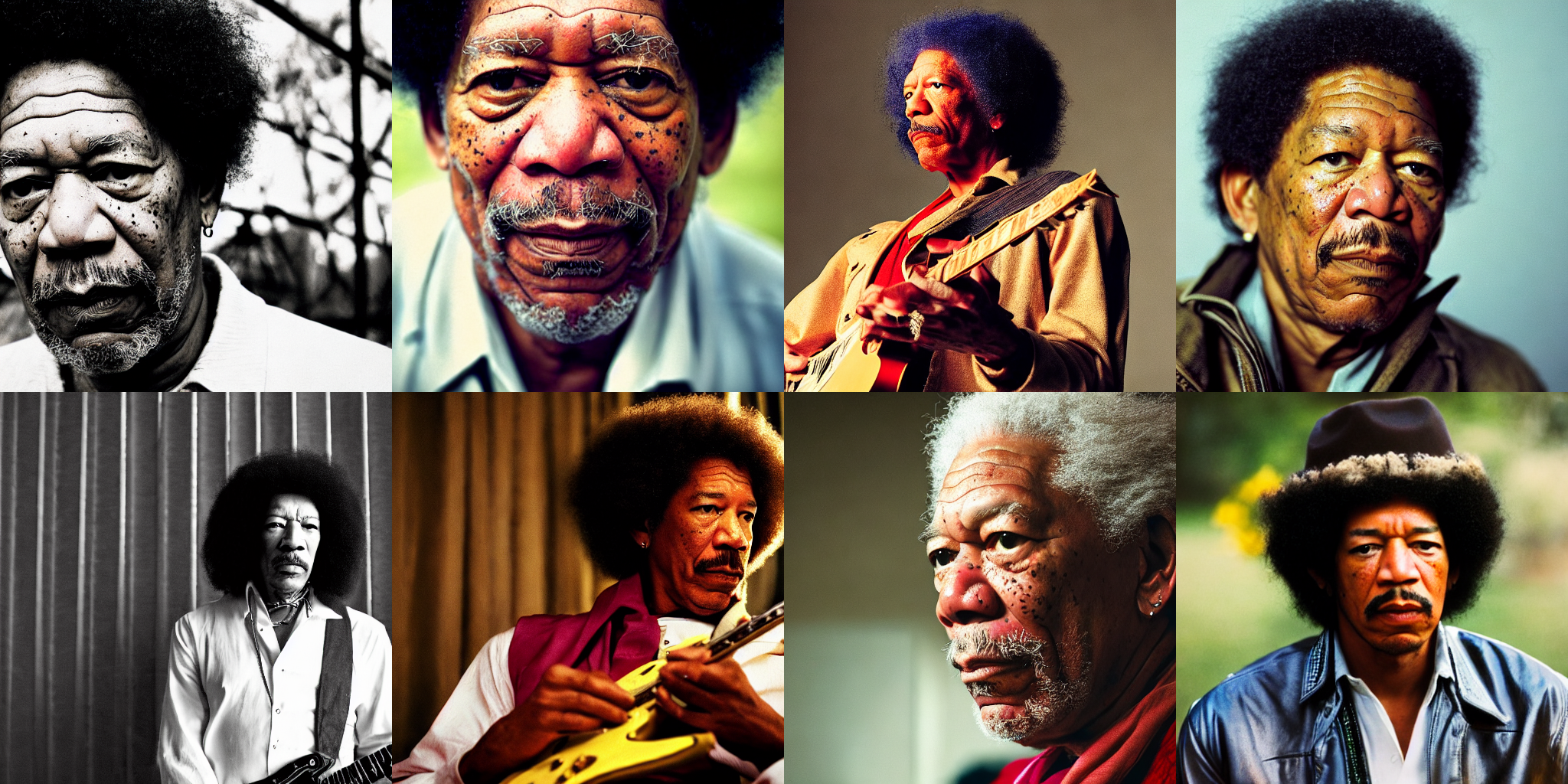
We don't have to replicate the same prompt in all the devices. We can do whatever we want: generate 2 prompts 4 times each, or even generate 8 different prompts at once. Let's do that!
First, we'll refactor the input preparation code into a handy function:
prompts = [
    "Labrador in the style of Hokusai",
    "Painting of a squirrel skating in New York",
    "HAL-9000 in the style of Van Gogh",
    "Times Square under water, with fish and a dolphin swimming around",
    "Ancient Roman fresco showing a man working on his laptop",
    "Close-up photograph of young black woman against urban background, high quality, bokeh",
    "Armchair in the shape of an avocado",
    "Clown astronaut in space, with Earth in the background",
]
prompt_ids = pipeline.prepare_inputs(prompts)
prompt_ids = shard(prompt_ids)
images = pipeline(prompt_ids, p_params, rng, jit=True).images
images = images.reshape((images.shape[0], ) + images.shape[-3:])
images = pipeline.numpy_to_pil(images)
image_grid(images, 2, 4)
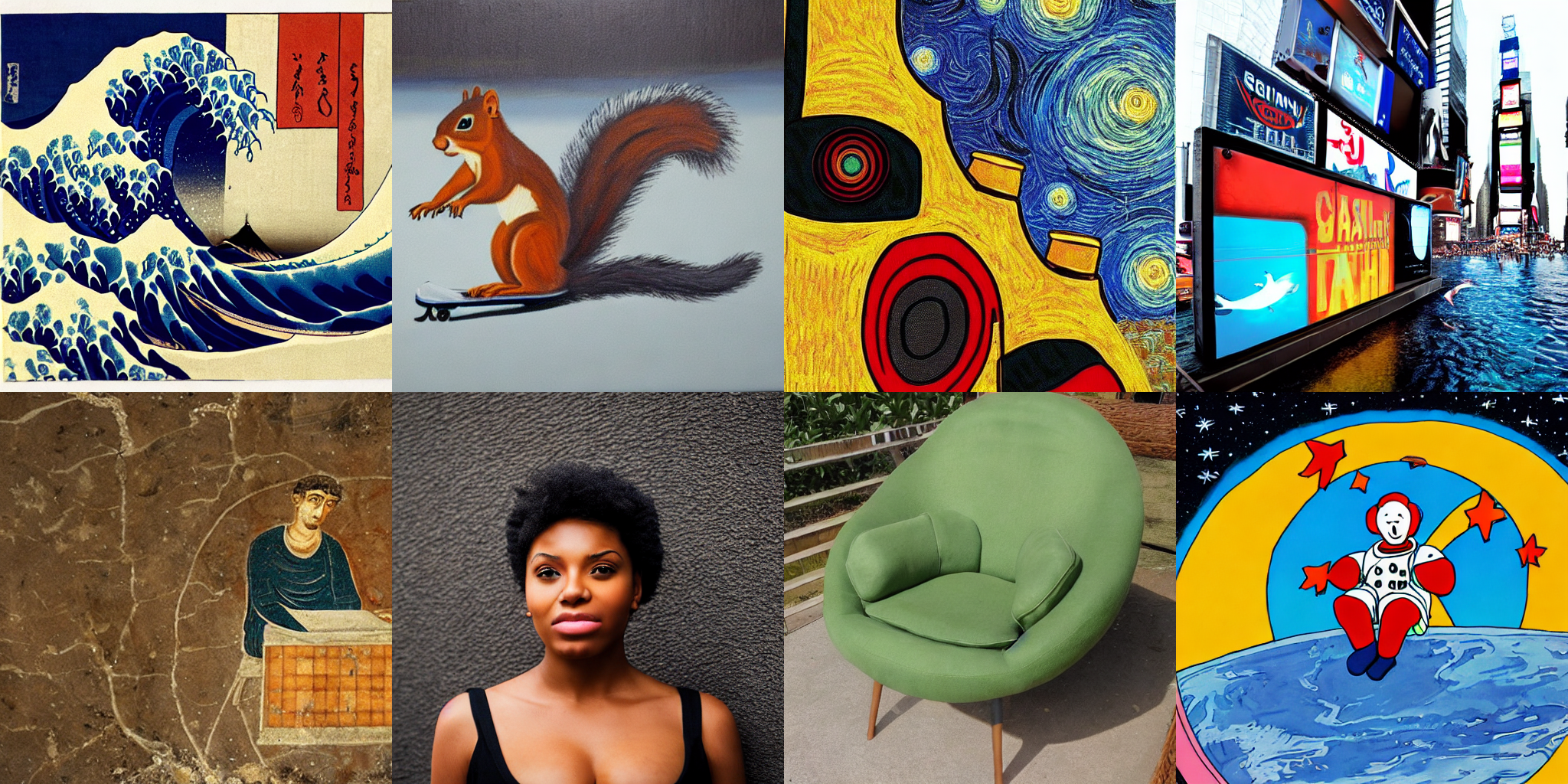
We said before that the diffusers Flax pipeline automatically compiles the model and runs it in parallel on all available devices. We'll now briefly look inside that process to show how it works.
JAX parallelization can be done in multiple ways. The easiest one revolves around using the jax.pmap function to achieve single-program, multiple-data (SPMD) parallelization. It means we'll run several copies of the same code, each on different data inputs. More sophisticated approaches are possible, we invite you to go over the JAX documentation and the pjit pages to explore this topic if you are interested!
jax.pmap does two things for us:
jits) the code, as if we had invoked jax.jit(). This does not happen when we call pmap, but the first time the pmapped function is invoked.To show how it works we pmap the _generate method of the pipeline, which is the private method that runs generates images. Please, note that this method may be renamed or removed in future releases of diffusers.
p_generate = pmap(pipeline._generate)
After we use pmap, the prepared function p_generate will conceptually do the following:
pipeline._generate in each device.prompt_ids has shape (8, 1, 77, 768). This array will be split in 8 and each copy of _generate will receive an input with shape (1, 77, 768).We can code _generate completely ignoring the fact that it will be invoked in parallel. We just care about our batch size (1 in this example) and the dimensions that make sense for our code, and don't have to change anything to make it work in parallel.
The same way as when we used the pipeline call, the first time we run the following cell it will take a while, but then it will be much faster.
images = p_generate(prompt_ids, p_params, rng)
images = images.block_until_ready()
images.shape
Output:
    CPU times: user 118 ms, sys: 83.9 ms, total: 202 ms
    Wall time: 6.82 s

    (8, 1, 512, 512, 3)
We use block_until_ready() to correctly measure inference time, because JAX uses asynchronous dispatch and returns control to the Python loop as soon as it can. You don't need to use that in your code; blocking will occur automatically when you want to use the result of a computation that has not yet been materialized.
此内容由惯性聚合(RSS阅读器)自动聚合整理,仅供阅读参考。 原文来自 — 版权归原作者所有。