




This article is also available in Chinese 简体中文.
An update to the Gemma models was released two months after this post, see the latest versions in this collection.
Gemma, a new family of state-of-the-art open LLMs, was released today by Google! It's great to see Google reinforcing its commitment to open-source AI, and we’re excited to fully support the launch with comprehensive integration in Hugging Face.
Gemma comes in two sizes: 7B parameters, for efficient deployment and development on consumer-size GPU and TPU and 2B versions for CPU and on-device applications. Both come in base and instruction-tuned variants.
We’ve collaborated with Google to ensure the best integration into the Hugging Face ecosystem. You can find the 4 open-access models (2 base models & 2 fine-tuned ones) on the Hub. Among the features and integrations being released, we have:
Gemma is a family of 4 new LLM models by Google based on Gemini. It comes in two sizes: 2B and 7B parameters, each with base (pretrained) and instruction-tuned versions. All the variants can be run on various types of consumer hardware, even without quantization, and have a context length of 8K tokens:
A month after the original release, Google released a new version of the instruct models. This version has better coding capabilities, factuality, instruction following and multi-turn quality. The model also is less prone to begin its with "Sure,".

So, how good are the Gemma models? Here’s an overview of the base models and their performance compared to other open models on the LLM Leaderboard (higher scores are better):
Gemma 7B is a really strong model, with performance comparable to the best models in the 7B weight, including Mistral 7B. Gemma 2B is an interesting model for its size, but it doesn’t score as high in the leaderboard as the best capable models with a similar size, such as Phi 2. We are looking forward to receiving feedback from the community about real-world usage!
Recall that the LLM Leaderboard is especially useful for measuring the quality of pretrained models and not so much of the chat ones. We encourage running other benchmarks such as MT Bench, EQ Bench, and the lmsys Arena for the Chat ones!
The base models have no prompt format. Like other base models, they can be used to continue an input sequence with a plausible continuation or for zero-shot/few-shot inference. They are also a great foundation for fine-tuning on your own use cases. The Instruct versions have a very simple conversation structure:
<start_of_turn>user
knock knock<end_of_turn>
<start_of_turn>model
who is there<end_of_turn>
<start_of_turn>user
LaMDA<end_of_turn>
<start_of_turn>model
LaMDA who?<end_of_turn>
This format has to be exactly reproduced for effective use. We’ll later show how easy it is to reproduce the instruct prompt with the chat template available in transformers.
The Technical report includes information about the training and evaluation processes of the base models, but there are no extensive details on the dataset’s composition and preprocessing. We know they were trained with data from various sources, mostly web documents, code, and mathematical texts. The data was filtered to remove CSAM content and PII as well as licensing checks.
Similarly, for the Gemma instruct models, no details have been shared about the fine-tuning datasets or the hyperparameters associated with SFT and RLHF.
You can chat with the Gemma Instruct model on Hugging Chat! Check out the link here: https://huggingface.co/chat/models/google/gemma-1.1-7b-it
With Transformers release 4.38, you can use Gemma and leverage all the tools within the Hugging Face ecosystem, such as:
safetensors)In addition, Gemma models are compatible with torch.compile() with CUDA graphs, giving them a ~4x speedup at inference time!
To use Gemma models with transformers, make sure to install a recent version of transformers:
pip install --upgrade transformers
The following snippet shows how to use gemma-7b-it with transformers. It requires about 18 GB of RAM, which includes consumer GPUs such as 3090 or 4090.
from transformers import pipeline
import torch

pipe = pipeline(
    "text-generation",
    model="google/gemma-7b-it",
    model_kwargs={"torch_dtype": torch.bfloat16},
    device="cuda",
)

messages = [
    {"role": "user", "content": "Who are you? Please, answer in pirate-speak."},
]
outputs = pipe(
    messages,
    max_new_tokens=256,
    do_sample=True,
    temperature=0.7,
    top_k=50,
    top_p=0.95
)
assistant_response = outputs[0]["generated_text"][-1]["content"]
print(assistant_response)
Avast me, me hearty. I am a pirate of the high seas, ready to pillage and plunder. Prepare for a tale of adventure and booty!
We used bfloat16 because that’s the reference precision and how all evaluations were run. Running in float16 may be faster on your hardware.
You can also automatically quantize the model, loading it in 8-bit or even 4-bit mode. 4-bit loading takes about 9 GB of memory to run, making it compatible with a lot of consumer cards and all the GPUs in Google Colab. This is how you’d load the generation pipeline in 4-bit:
pipeline = pipeline(
    "text-generation",
    model=model,
    model_kwargs={
        "torch_dtype": torch.float16,
        "quantization_config": {"load_in_4bit": True}
    },
)
For more details on using the models with transformers, please check the model cards.
All the Gemma model variants are available for use with PyTorch, as explained above, or JAX / Flax. To load Flax weights, you need to use the flax revision from the repo, as shown below:
import jax.numpy as jnp
from transformers import AutoTokenizer, FlaxGemmaForCausalLM

model_id = "google/gemma-2b"

tokenizer = AutoTokenizer.from_pretrained(model_id)
tokenizer.padding_side = "left"

model, params = FlaxGemmaForCausalLM.from_pretrained(
        model_id,
        dtype=jnp.bfloat16,
        revision="flax",
        _do_init=False,
)

inputs = tokenizer("Valencia and Málaga are", return_tensors="np", padding=True)
output = model.generate(**inputs, params=params, max_new_tokens=20, do_sample=False)
output_text = tokenizer.batch_decode(output.sequences, skip_special_tokens=True)
['Valencia and Málaga are two of the most popular tourist destinations in Spain. Both cities boast a rich history, vibrant culture,']
Please, check out this notebook for a comprehensive hands-on walkthrough on how to parallelize JAX inference on Colab TPUs!
You can deploy and train Gemma on Google Cloud through Vertex AI or Google Kubernetes Engine (GKE), using Text Generation Inference and Transformers.
To deploy the Gemma model from Hugging Face, go to the model page and click on Deploy -> Google Cloud. This will bring you to the Google Cloud Console, where you can 1-click deploy Gemma on Vertex AI or GKE. Text Generation Inference powers Gemma on Google Cloud and is the first integration as part of our partnership with Google Cloud.
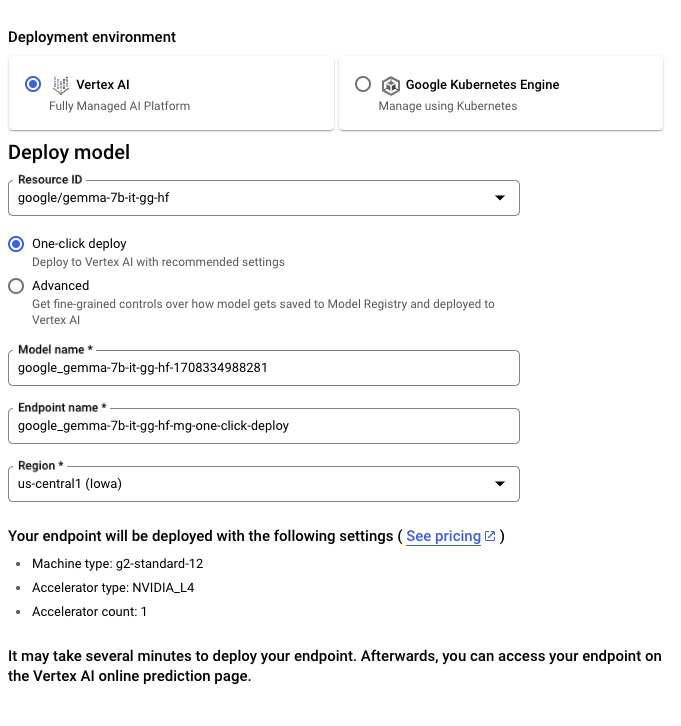
You can also access Gemma directly through the Vertex AI Model Garden.
To Tune the Gemma model from Hugging Face, go to the model page and click on Train -> Google Cloud. This will bring you to the Google Cloud Console, where you can access notebooks to tune Gemma on Vertex AI or GKE.
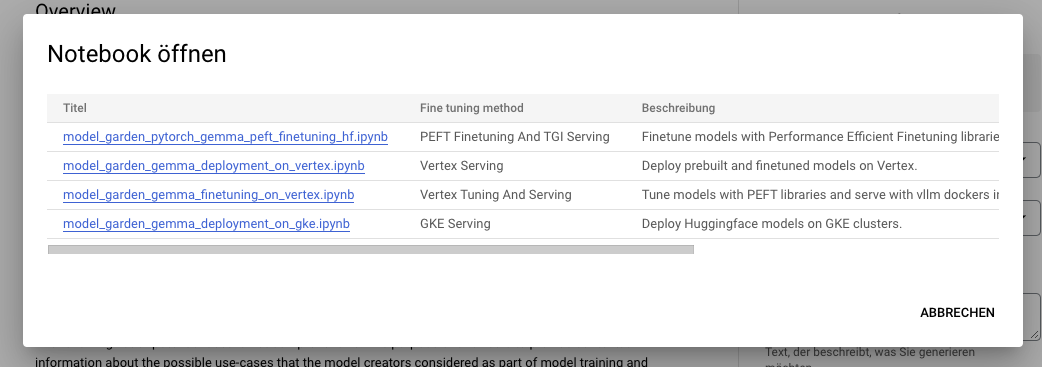
These integrations mark the first offerings we are launching together as a result of our collaborative partnership with Google. Stay tuned for more!
You can deploy Gemma on Hugging Face's Inference Endpoints, which uses Text Generation Inference as the backend. Text Generation Inference is a production-ready inference container developed by Hugging Face to enable easy deployment of large language models. It has features such as continuous batching, token streaming, tensor parallelism for fast inference on multiple GPUs, and production-ready logging and tracing.
To deploy a Gemma model, go to the model page and click on the Deploy -> Inference Endpoints widget. You can learn more about Deploying LLMs with Hugging Face Inference Endpoints in a previous blog post. Inference Endpoints supports Messages API through Text Generation Inference, which allows you to switch from another closed model to an open one by simply changing the URL.
from openai import OpenAI

# initialize the client but point it to TGI
client = OpenAI(
    base_url="<ENDPOINT_URL>" + "/v1/",  # replace with your endpoint url
    api_key="<HF_API_TOKEN>",  # replace with your token
)
chat_completion = client.chat.completions.create(
    model="tgi",
    messages=[
        {"role": "user", "content": "Why is open-source software important?"},
    ],
    stream=True,
    max_tokens=500
)

# iterate and print stream
for message in chat_completion:
    print(message.choices[0].delta.content, end="")
Training LLMs can be technically and computationally challenging. In this section, we’ll look at the tools available in the Hugging Face ecosystem to efficiently train Gemma on consumer-size GPUs
An example command to fine-tune Gemma on OpenAssistant’s chat dataset can be found below. We use 4-bit quantization and QLoRA to conserve memory to target all the attention blocks' linear layers.
First, install the nightly version of 🤗 TRL and clone the repo to access the training script:
pip install -U transformers trl peft bitsandbytes
git clone https://github.com/huggingface/trl
cd trl
Then you can run the script:
accelerate launch --config_file examples/accelerate_configs/multi_gpu.yaml --num_processes=1 \
    examples/scripts/sft.py \
    --model_name google/gemma-7b \
    --dataset_name OpenAssistant/oasst_top1_2023-08-25 \
    --per_device_train_batch_size 2 \
    --gradient_accumulation_steps 1 \
    --learning_rate 2e-4 \
    --save_steps 20_000 \
    --use_peft \
    --lora_r 16 --lora_alpha 32 \
    --lora_target_modules q_proj k_proj v_proj o_proj \
    --load_in_4bit \
    --output_dir gemma-finetuned-openassistant
This takes about 9 hours to train on a single A10G, but can be easily parallelized by tweaking --num_processes to the number of GPUs you have available.
Releasing such models with support and evaluations in the ecosystem would not be possible without the contributions of many community members, including Clémentine and Eleuther Evaluation Harness for LLM evaluations; Olivier and David for Text Generation Inference Support; Simon for developing the new access control features on Hugging Face; Arthur, Younes, and Sanchit for integrating Gemma into transformers; Morgan for integrating Gemma into optimum-nvidia (coming); Nathan, Victor, and Mishig for making Gemma available in Hugging Chat.
And Thank you to the Google Team for releasing Gemma and making it available to the open-source AI community!
此内容由惯性聚合(RSS阅读器)自动聚合整理,仅供阅读参考。 原文来自 — 版权归原作者所有。