












The PyTorch-TPU project originated as a collaborative effort between the Facebook PyTorch and Google TPU teams and officially launched at the 2019 PyTorch Developer Conference 2019. Since then, we’ve worked with the Hugging Face team to bring first-class support to training on Cloud TPUs using PyTorch / XLA. This new integration enables PyTorch users to run and scale up their models on Cloud TPUs while maintaining the exact same Hugging Face trainers interface.
This blog post provides an overview of changes made in the Hugging Face library, what the PyTorch / XLA library does, an example to get you started training your favorite transformers on Cloud TPUs, and some performance benchmarks. If you can’t wait to get started with TPUs, please skip ahead to the “Train Your Transformer on Cloud TPUs” section - we handle all the PyTorch / XLA mechanics for you within the Trainer module!
PyTorch / XLA adds a new xla device type to PyTorch. This device type works just like other PyTorch device types. For example, here's how to create and print an XLA tensor:
import torch
import torch_xla
import torch_xla.core.xla_model as xm

t = torch.randn(2, 2, device=xm.xla_device())
print(t.device)
print(t)
This code should look familiar. PyTorch / XLA uses the same interface as regular PyTorch with a few additions. Importing torch_xla initializes PyTorch / XLA, and xm.xla_device() returns the current XLA device. This may be a CPU, GPU, or TPU depending on your environment, but for this blog post we’ll focus primarily on TPU.
The Trainer module leverages a TrainingArguments dataclass in order to define the training specifics. It handles multiple arguments, from batch sizes, learning rate, gradient accumulation and others, to the devices used. Based on the above, in TrainingArguments._setup_devices() when using XLA:TPU devices, we simply return the TPU device to be used by the Trainer:
@dataclass
class TrainingArguments:
    ...
    @cached_property
    @torch_required
    def _setup_devices(self) -> Tuple["torch.device", int]:
        ...
        elif is_torch_tpu_available():
            device = xm.xla_device()
            n_gpu = 0
        ...

        return device, n_gpu
In a typical XLA:TPU training scenario we’re training on multiple TPU cores in parallel (a single Cloud TPU device includes 8 TPU cores). So we need to ensure that all the gradients are exchanged between the data parallel replicas by consolidating the gradients and taking an optimizer step. For this we provide the xm.optimizer_step(optimizer) which does the gradient consolidation and step-taking. In the Hugging Face trainer, we correspondingly update the train step to use the PyTorch / XLA APIs:
class Trainer:
…
   def train(self, *args, **kwargs):
       ...
                    if is_torch_tpu_available():
                        xm.optimizer_step(self.optimizer)
There are two main parts to running a PyTorch / XLA model: (1) tracing and executing your model’s graph lazily (refer to below “PyTorch / XLA Library” section for a more in-depth explanation) and (2) feeding your model. Without any optimization, the tracing/execution of your model and input feeding would be executed serially, leaving chunks of time during which your host CPU and your TPU accelerators would be idle, respectively. To avoid this, we provide an API, which pipelines the two and thus is able to overlap the tracing of step n+1 while step n is still executing.
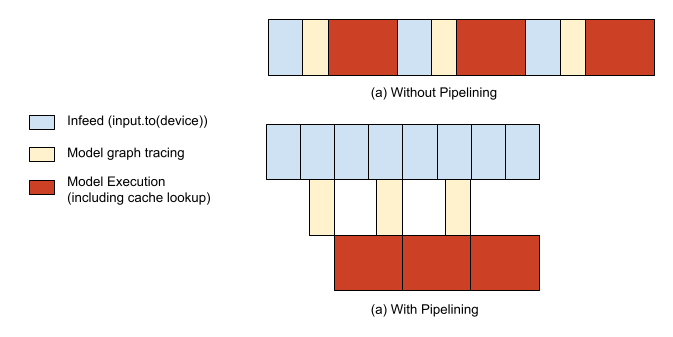
import torch_xla.distributed.parallel_loader as pl
...
  dataloader = pl.MpDeviceLoader(dataloader, device)
When a tensor is checkpointed from a XLA device and then loaded back from the checkpoint, it will be loaded back to the original device. Before checkpointing tensors in your model, you want to ensure that all of your tensors are on CPU devices instead of XLA devices. This way, when you load back the tensors, you’ll load them through CPU devices and then have the opportunity to place them on whatever XLA devices you desire. We provide the xm.save() API for this, which already takes care of only writing to storage location from only one process on each host (or one globally if using a shared file system across hosts).
class PreTrainedModel(nn.Module, ModuleUtilsMixin, GenerationMixin):
…
    def save_pretrained(self, save_directory):
        ...
        if getattr(self.config, "xla_device", False):
            import torch_xla.core.xla_model as xm

            if xm.is_master_ordinal():
                # Save configuration file
                model_to_save.config.save_pretrained(save_directory)
            # xm.save takes care of saving only from master
            xm.save(state_dict, output_model_file)
class Trainer:
…
   def train(self, *args, **kwargs):
       ...
       if is_torch_tpu_available():
           xm.rendezvous("saving_optimizer_states")
           xm.save(self.optimizer.state_dict(),
                   os.path.join(output_dir, "optimizer.pt"))
           xm.save(self.lr_scheduler.state_dict(),
                   os.path.join(output_dir, "scheduler.pt"))
PyTorch / XLA is a Python package that uses the XLA linear algebra compiler to connect the PyTorch deep learning framework with XLA devices, which includes CPU, GPU, and Cloud TPUs. Part of the following content is also available in our API_GUIDE.md.
Using XLA tensors and devices requires changing only a few lines of code. However, even though XLA tensors act a lot like CPU and CUDA tensors, their internals are different. CPU and CUDA tensors launch operations immediately or eagerly. XLA tensors, on the other hand, are lazy. They record operations in a graph until the results are needed. Deferring execution like this lets XLA optimize it. A graph of multiple separate operations might be fused into a single optimized operation.
Lazy execution is generally invisible to the caller. PyTorch / XLA automatically constructs the graphs, sends them to XLA devices, and synchronizes when copying data between an XLA device and the CPU. Inserting a barrier when taking an optimizer step explicitly synchronizes the CPU and the XLA device.
This means that when you call model(input) forward pass, calculate your loss loss.backward(), and take an optimization step xm.optimizer_step(optimizer), the graph of all operations is being built in the background. Only when you either explicitly evaluate the tensor (ex. Printing the tensor or moving it to a CPU device) or mark a step (this will be done by the MpDeviceLoader everytime you iterate through it), does the full step get executed.
From a user’s point of view, a typical training regimen for a model running on PyTorch / XLA involves running a forward pass, backward pass, and optimizer step. From the PyTorch / XLA library point of view, things look a little different.
While a user runs their forward and backward passes, an intermediate representation (IR) graph is traced on the fly. The IR graph leading to each root/output tensor can be inspected as following:
>>> import torch
>>> import torch_xla
>>> import torch_xla.core.xla_model as xm
>>> t = torch.tensor(1, device=xm.xla_device())
>>> s = t*t
>>> print(torch_xla._XLAC._get_xla_tensors_text([s]))
IR {
  %0 = s64[] prim::Constant(), value=1
  %1 = s64[] prim::Constant(), value=0
  %2 = s64[] xla::as_strided_view_update(%1, %0), size=(), stride=(), storage_offset=0
  %3 = s64[] aten::as_strided(%2), size=(), stride=(), storage_offset=0
  %4 = s64[] aten::mul(%3, %3), ROOT=0
}
This live graph is accumulated while the forward and backward passes are run on the user's program, and once xm.mark_step() is called (indirectly by pl.MpDeviceLoader), the graph of live tensors is cut. This truncation marks the completion of one step and subsequently we lower the IR graph into XLA Higher Level Operations (HLO), which is the IR language for XLA.
This HLO graph then gets compiled into a TPU binary and subsequently executed on the TPU devices. However, this compilation step can be costly, typically taking longer than a single step, so if we were to compile the user’s program every single step, overhead would be high. To avoid this, we have caches that store compiled TPU binaries keyed by their HLO graphs’ unique hash identifiers. So once this TPU binary cache has been populated on the first step, subsequent steps will typically not have to re-compile new TPU binaries; instead, they can simply look up the necessary binaries from the cache.
Since TPU compilations are typically much slower than the step execution time, this means that if the graph keeps changing in shape, we’ll have cache misses and compile too frequently. To minimize compilation costs, we recommend keeping tensor shapes static whenever possible. Hugging Face library’s shapes are already static for the most part with input tokens being padded appropriately, so throughout training the cache should be consistently hit. This can be checked using the debugging tools that PyTorch / XLA provides. In the example below, you can see that compilation only happened 5 times (CompileTime) whereas execution happened during each of 1220 steps (ExecuteTime):
>>> import torch_xla.debug.metrics as met
>>> print(met.metrics_report())
Metric: CompileTime
  TotalSamples: 5
  Accumulator: 28s920ms153.731us
  ValueRate: 092ms152.037us / second
  Rate: 0.0165028 / second
  Percentiles: 1%=428ms053.505us; 5%=428ms053.505us; 10%=428ms053.505us; 20%=03s640ms888.060us; 50%=03s650ms126.150us; 80%=11s110ms545.595us; 90%=11s110ms545.595us; 95%=11s110ms545.595us; 99%=11s110ms545.595us
Metric: DeviceLockWait
  TotalSamples: 1281
  Accumulator: 38s195ms476.007us
  ValueRate: 151ms051.277us / second
  Rate: 4.54374 / second
  Percentiles: 1%=002.895us; 5%=002.989us; 10%=003.094us; 20%=003.243us; 50%=003.654us; 80%=038ms978.659us; 90%=192ms495.718us; 95%=208ms893.403us; 99%=221ms394.520us
Metric: ExecuteTime
  TotalSamples: 1220
  Accumulator: 04m22s555ms668.071us
  ValueRate: 923ms872.877us / second
  Rate: 4.33049 / second
  Percentiles: 1%=045ms041.018us; 5%=213ms379.757us; 10%=215ms434.912us; 20%=217ms036.764us; 50%=219ms206.894us; 80%=222ms335.146us; 90%=227ms592.924us; 95%=231ms814.500us; 99%=239ms691.472us
Counter: CachedCompile
  Value: 1215
Counter: CreateCompileHandles
  Value: 5
...
To configure your VM and Cloud TPUs, please follow “Set up a Compute Engine instance” and “Launch a Cloud TPU resource” (pytorch-1.7 version as of writing) sections. Once you have your VM and Cloud TPU created, using them is as simple as SSHing to your GCE VM and running the following commands to get bert-large-uncased training kicked off (batch size is for v3-8 device, may OOM on v2-8):
conda activate torch-xla-1.7
export TPU_IP_ADDRESS="ENTER_YOUR_TPU_IP_ADDRESS"  # ex. 10.0.0.2
export XRT_TPU_CONFIG="tpu_worker;0;$TPU_IP_ADDRESS:8470"
git clone -b v4.2.2 https://github.com/huggingface/transformers.git
cd transformers && pip install .
pip install datasets==1.2.1
python examples/xla_spawn.py \
  --num_cores 8 \
  examples/language-modeling/run_mlm.py \
  --dataset_name wikitext \
  --dataset_config_name wikitext-103-raw-v1 \
  --max_seq_length 512 \
  --pad_to_max_length \
  --logging_dir ./tensorboard-metrics \
  --cache_dir ./cache_dir \
  --do_train \
  --do_eval \
  --overwrite_output_dir \
  --output_dir language-modeling \
  --overwrite_cache \
  --tpu_metrics_debug \
  --model_name_or_path bert-large-uncased \
  --num_train_epochs 3 \
  --per_device_train_batch_size 8 \
  --per_device_eval_batch_size 8 \
  --save_steps 500000
The above should complete training in roughly less than 200 minutes with an eval perplexity of ~3.25.
The following table shows the performance of training bert-large-uncased on a v3-8 Cloud TPU system (containing 4 TPU v3 chips) running PyTorch / XLA. The dataset used for all benchmarking measurements is the WikiText103 dataset, and we use the run_mlm.py script provided in Hugging Face examples. To ensure that the workloads are not host-CPU-bound, we use the n1-standard-96 CPU configuration for these tests, but you may be able to use smaller configurations as well without impacting performance.
| Name | Dataset | Hardware | Global Batch Size | Precision | Training Time (mins) |
|---|---|---|---|---|---|
| bert-large-uncased | WikiText103 | 4 TPUv3 chips (i.e. v3-8) | 64 | FP32 | 178.4 |
| bert-large-uncased | WikiText103 | 4 TPUv3 chips (i.e. v3-8) | 128 | BF16 | 106.4 |
See the “Running on TPUs” section under the Hugging Face examples to get started. For a more detailed description of our APIs, check out our API_GUIDE, and for performance best practices, take a look at our TROUBLESHOOTING guide. For generic PyTorch / XLA examples, run the following Colab Notebooks we offer with free Cloud TPU access. To run directly on GCP, please see our tutorials labeled “PyTorch” on our documentation site.
Have any other questions or issues? Please open an issue or question at https://github.com/huggingface/transformers/issues or directly at https://github.com/pytorch/xla/issues.
此内容由惯性聚合(RSS阅读器)自动聚合整理,仅供阅读参考。 原文来自 — 版权归原作者所有。