








Today, integrating AI-powered features, particularly leveraging Large Language Models (LLMs), has become increasingly prevalent across various tasks such as text generation, classification, image-to-text, image-to-image transformations, etc.
Developers are increasingly recognizing these applications' potential benefits, particularly in enhancing core tasks such as scriptwriting, web development, and, now, interfacing with data. Historically, crafting insightful SQL queries for data analysis was primarily the domain of data analysts, SQL developers, data engineers, or professionals in related fields, all navigating the nuances of SQL dialect syntax. However, with the advent of AI-powered solutions, the landscape is evolving. These advanced models offer new avenues for interacting with data, potentially streamlining processes and uncovering insights with greater efficiency and depth.
What if you could unlock fascinating insights from your dataset without diving deep into coding? To glean valuable information, one would need to craft a specialized SELECT statement, considering which columns to display, the source table, filtering conditions for selected rows, aggregation methods, and sorting preferences. This traditional approach involves a sequence of commands: SELECT, FROM, WHERE, GROUP, and ORDER.
But what if you’re not a seasoned developer and still want to harness the power of your data? In such cases, seeking assistance from SQL specialists becomes necessary, highlighting a gap in accessibility and usability.
This is where groundbreaking advancements in AI and LLM technology step in to bridge the divide. Imagine conversing with your data effortlessly, simply stating your information needs in plain language and having the model translate your request into a query.
In recent months, significant strides have been made in this arena. MotherDuck and Numbers Station unveiled their latest innovation: DuckDB-NSQL-7B, a state-of-the-art LLM designed specifically for DuckDB SQL. What is this model’s mission? To empower users with the ability to unlock insights from their data effortlessly.
Initially fine-tuned from Meta’s original Llama-2–7b model using a broad dataset covering general SQL queries, DuckDB-NSQL-7B underwent further refinement with DuckDB text-to-SQL pairs. Notably, its capabilities extend beyond crafting SELECT statements; it can generate a wide range of valid DuckDB SQL statements, including official documentation and extensions, making it a versatile tool for data exploration and analysis.
In this article, we will learn how to deal with text2sql tasks using the DuckDB-NSQL-7B model, the Hugging Face dataset viewer API for parquet files and duckdb for data retrieval.
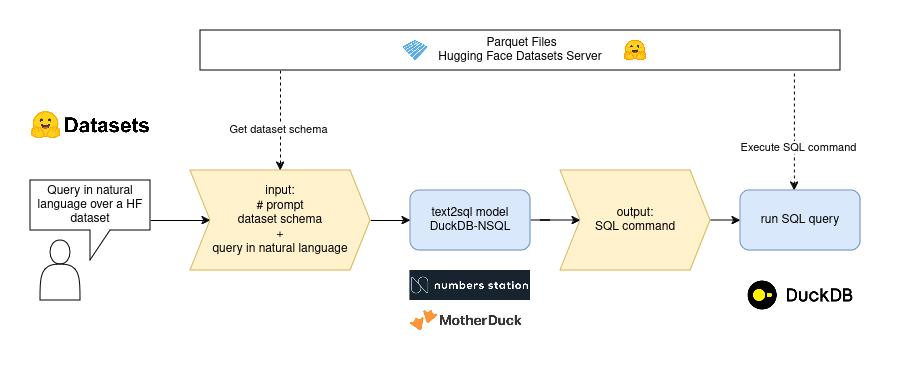
text2sql flow
transformers pipelinefrom transformers import pipeline
pipe = pipeline("text-generation", model="motherduckdb/DuckDB-NSQL-7B-v0.1")
from transformers import AutoTokenizer, AutoModelForCausalLM

tokenizer = AutoTokenizer.from_pretrained("motherduckdb/DuckDB-NSQL-7B-v0.1")
model = AutoModelForCausalLM.from_pretrained("motherduckdb/DuckDB-NSQL-7B-v0.1")
llama.cpp to load the model in GGUFfrom llama_cpp import Llama
llama = Llama(
model_path="DuckDB-NSQL-7B-v0.1-q8_0.gguf", # Path to local model
n_gpu_layers=-1,
)
The main goal of llama.cpp is to enable LLM inference with minimal setup and state-of-the-art performance on a wide variety of hardware - locally and in the cloud. We will use this approach.
Data is a crucial component in any Machine Learning endeavor. Hugging Face is a valuable resource, offering access to over 120,000 free and open datasets spanning various formats, including CSV, Parquet, JSON, audio, and image files.
Each dataset hosted by Hugging Face comes equipped with a comprehensive dataset viewer. This viewer provides users essential functionalities such as statistical insights, data size assessment, full-text search capabilities, and efficient filtering options. This feature-rich interface empowers users to easily explore and evaluate datasets, facilitating informed decision-making throughout the machine learning workflow.
For this demo, we will be using the world-cities-geo dataset.
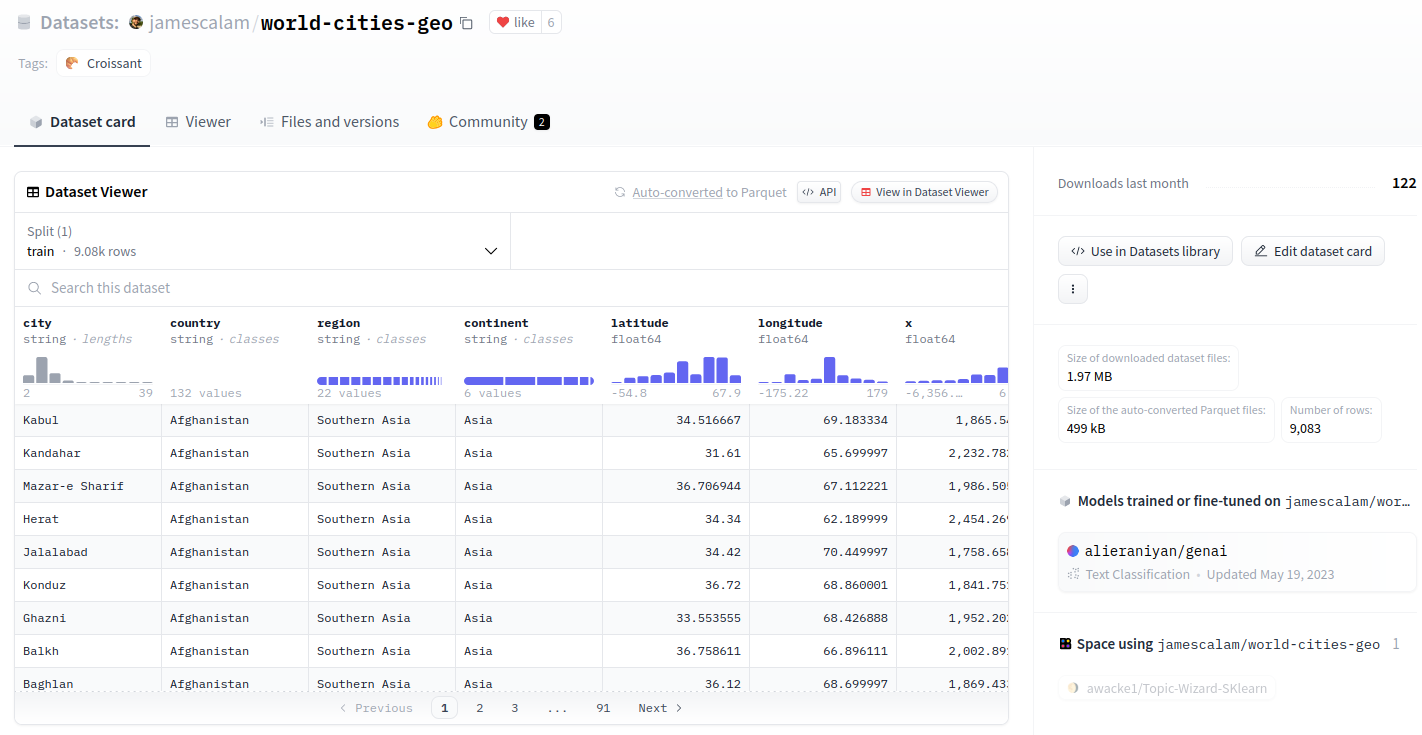
Dataset viewer of world-cities-geo dataset
Behind the scenes, each dataset in the Hub is processed by the Hugging Face dataset viewer API, which gets useful information and serves functionalities like:
In this demo, we will use the last functionality, auto-converted parquet files.
First, download the quantized models version of DuckDB-NSQL-7B-v0.1
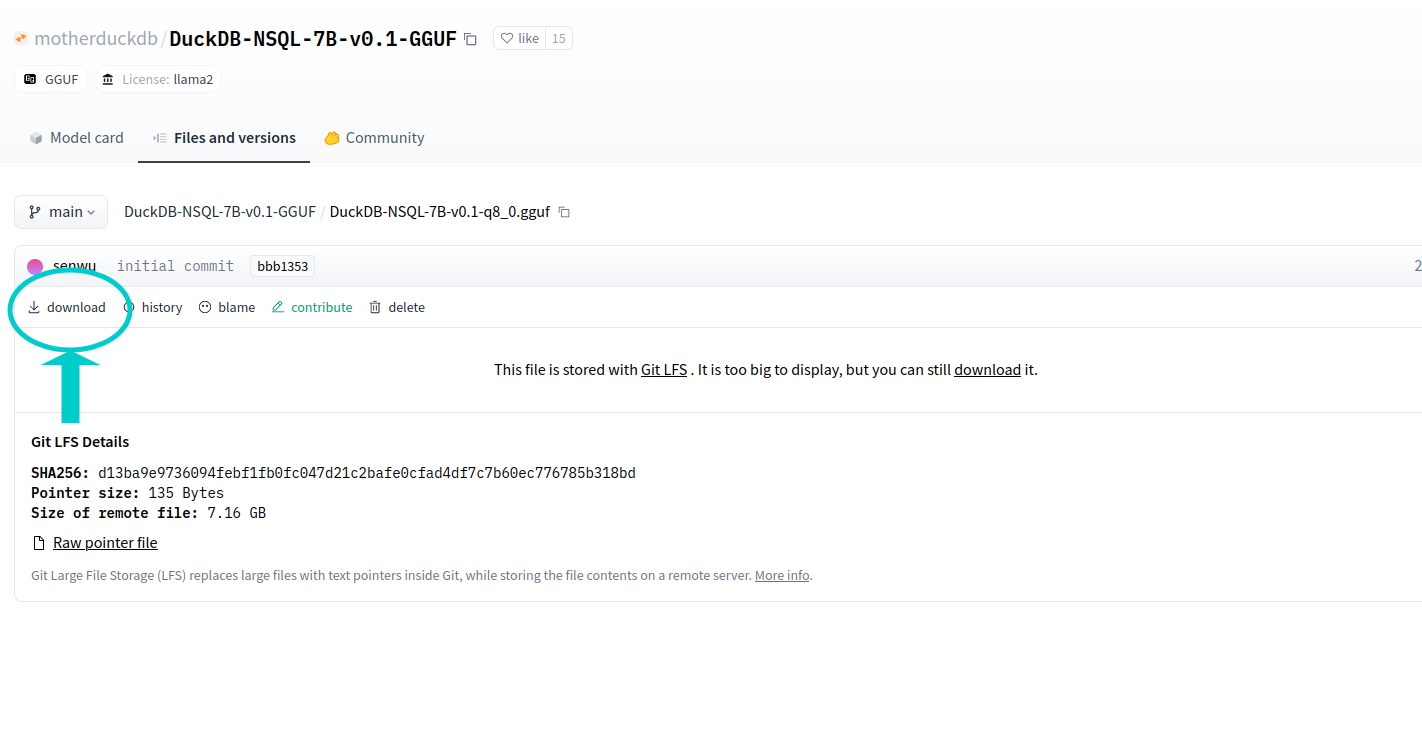
Downloading the model
Alternatively, you can execute the following code:
huggingface-cli download motherduckdb/DuckDB-NSQL-7B-v0.1-GGUF DuckDB-NSQL-7B-v0.1-q8_0.gguf --local-dir . --local-dir-use-symlinks False
Now, lets install the needed dependencies:
pip install llama-cpp-python
pip install duckdb
For the text-to-SQL model, we will use a prompt with the following structure:
   ### Instruction:
   Your task is to generate valid duckdb SQL to answer the following question.
   ### Input:
   Here is the database schema that the SQL query will run on:
   {ddl_create}

   ### Question:
   {query_input}
   ### Response (use duckdb shorthand if possible):
CREATE commandSo, we need to tell to the model about the schema of the Hugging Face dataset. For that, we are going to get the first parquet file for jamescalam/world-cities-geo dataset:
GET https://huggingface.co/api/datasets/jamescalam/world-cities-geo/parquet
{
   "default":{
      "train":[
         "https://huggingface.co/api/datasets/jamescalam/world-cities-geo/parquet/default/train/0.parquet"
      ]
   }
}
The parquet file is hosted in Hugging Face viewer under refs/convert/parquet revision:
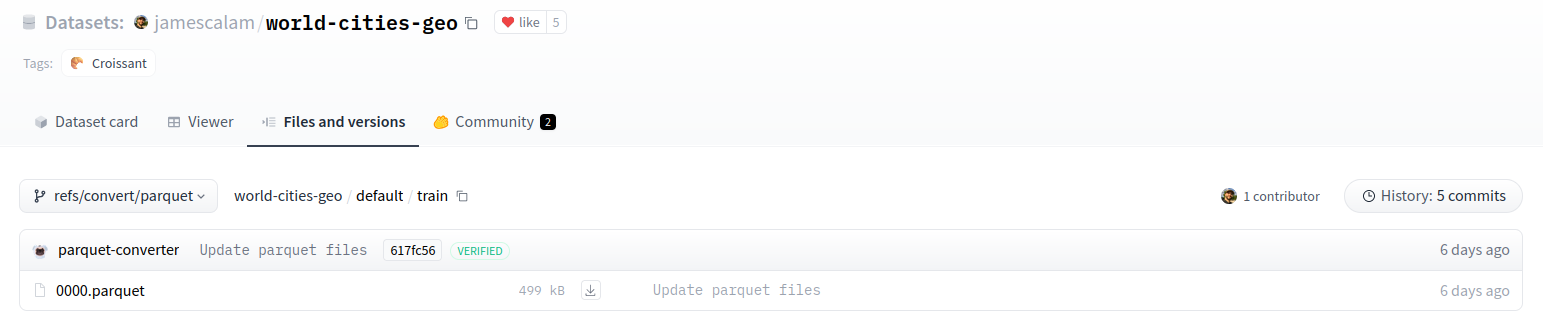
Parquet file
import duckdb
con = duckdb.connect()
con.execute(f"CREATE TABLE data as SELECT * FROM '{first_parquet_url}' LIMIT 1;")

result = con.sql("SELECT sql FROM duckdb_tables() where table_name ='data';").df()
ddl_create = result.iloc[0,0]
con.close()
The CREATE schema DDL is:
CREATE TABLE "data"(
    city VARCHAR,
    country VARCHAR,
    region VARCHAR,
    continent VARCHAR,
    latitude DOUBLE,
    longitude DOUBLE,
    x DOUBLE,
    y DOUBLE,
    z DOUBLE
);
And, as you can see, it matches the columns in the dataset viewer:

Dataset columns
prompt = """### Instruction:
   Your task is to generate valid duckdb SQL to answer the following question.
   ### Input:
   Here is the database schema that the SQL query will run on:
   {ddl_create}

   ### Question:
   {query_input}
   ### Response (use duckdb shorthand if possible):
   """
If the user wants to know the Cities from Albania country, the prompt will look like this:
query = "Cities from Albania country"
prompt = prompt.format(ddl_create=ddl_create, query_input=query)
So the expanded prompt that will be sent to the LLM looks like this:
### Instruction:
Your task is to generate valid duckdb SQL to answer the following question.

### Input:
Here is the database schema that the SQL query will run on:
CREATE TABLE "data"(city VARCHAR, country VARCHAR, region VARCHAR, continent VARCHAR, latitude DOUBLE, longitude DOUBLE, x DOUBLE, y DOUBLE, z DOUBLE);

### Question:
Cities from Albania country

### Response (use duckdb shorthand if possible):
from llama_cpp import Llama

llm = Llama(
       model_path="DuckDB-NSQL-7B-v0.1-q8_0.gguf",
       n_ctx=2048,
       n_gpu_layers=50
   )
pred = llm(prompt, temperature=0.1, max_tokens=1000)
sql_output = pred["choices"][0]["text"]
The output SQL command will point to a data table, but since we don't have a real table but just a reference to the parquet file, we will replace all data occurrences by the first_parquet_url:
sql_output = sql_output.replace("FROM data", f"FROM '{first_parquet_url}'")
And the final output will be:
SELECT city FROM 'https://huggingface.co/api/datasets/jamescalam/world-cities-geo/parquet/default/train/0.parquet' WHERE country = 'Albania'
con = duckdb.connect()
try:
   query_result = con.sql(sql_output).df()
except Exception as error:
   print(f"❌ Could not execute SQL query {error=}")
finally:
   con.close()
And here we have the results (100 rows):
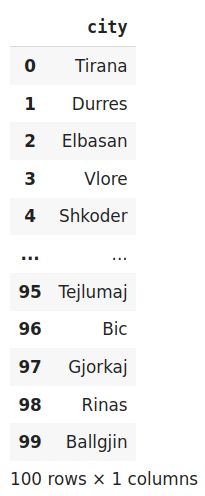
Execution result (100 rows)
Let's compare this result with the dataset viewer using the "search function" for Albania country, it should be the same:
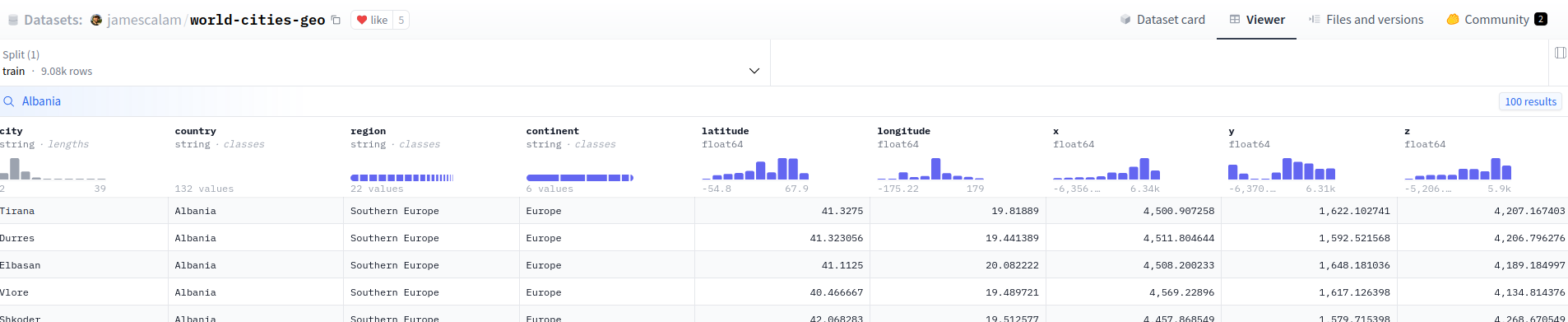
Search result for Albania country
You can also get the same result calling directly to the search or filter API:
import requests
API_URL = "https://datasets-server.huggingface.co/search?dataset=jamescalam/world-cities-geo&config=default&split=train&query=Albania"
def query():
    response = requests.get(API_URL)
    return response.json()
data = query()
import requests
API_URL = "https://datasets-server.huggingface.co/filter?dataset=jamescalam/world-cities-geo&config=default&split=train&where=country='Albania'"
def query():
    response = requests.get(API_URL)
    return response.json()
data = query()
Our final demo will be a Hugging Face space that looks like this:
You can see the notebook with the code here.
And the Hugging Face Space here
此内容由惯性聚合(RSS阅读器)自动聚合整理,仅供阅读参考。 原文来自 — 版权归原作者所有。