







We recently announced Inference for PROs, our new offering that makes larger models accessible to a broader audience. This opportunity opens up new possibilities for running end-user applications using Hugging Face as a platform.
An example of such an application is the AI Comic Factory - a Space that has proved incredibly popular. Thousands of users have tried it to create their own AI comic panels, fostering its own community of regular users. They share their creations, with some even opening pull requests.
In this tutorial, we'll show you how to fork and configure the AI Comic Factory to avoid long wait times and deploy it to your own private space using the Inference API. It does not require strong technical skills, but some knowledge of APIs, environment variables and a general understanding of LLMs & Stable Diffusion are recommended.
First, ensure that you sign up for a PRO Hugging Face account, as this will grant you access to the Llama-2 and SDXL models.
The AI Comic Factory is a bit different from other Spaces running on Hugging Face: it is a NextJS application, deployed using Docker, and is based on a client-server approach, requiring two APIs to work:
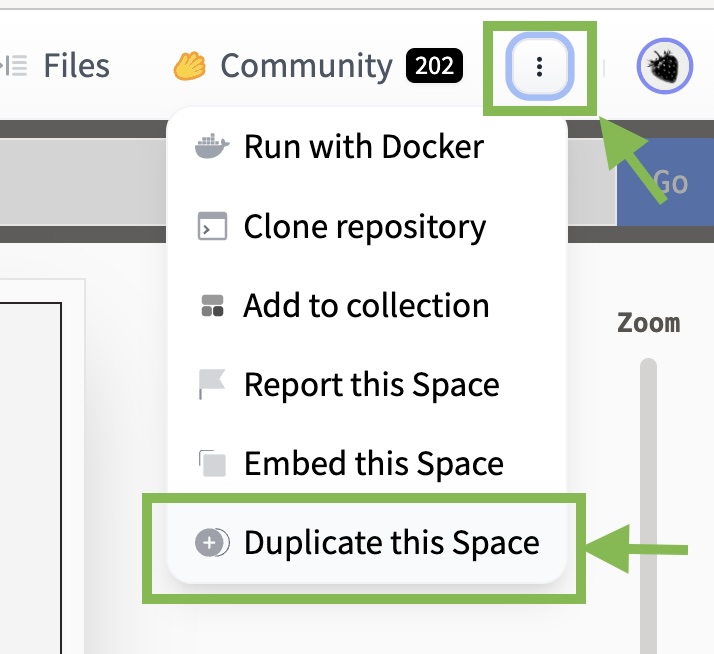
To duplicate the AI Comic Factory, go to the Space and click on "Duplicate":
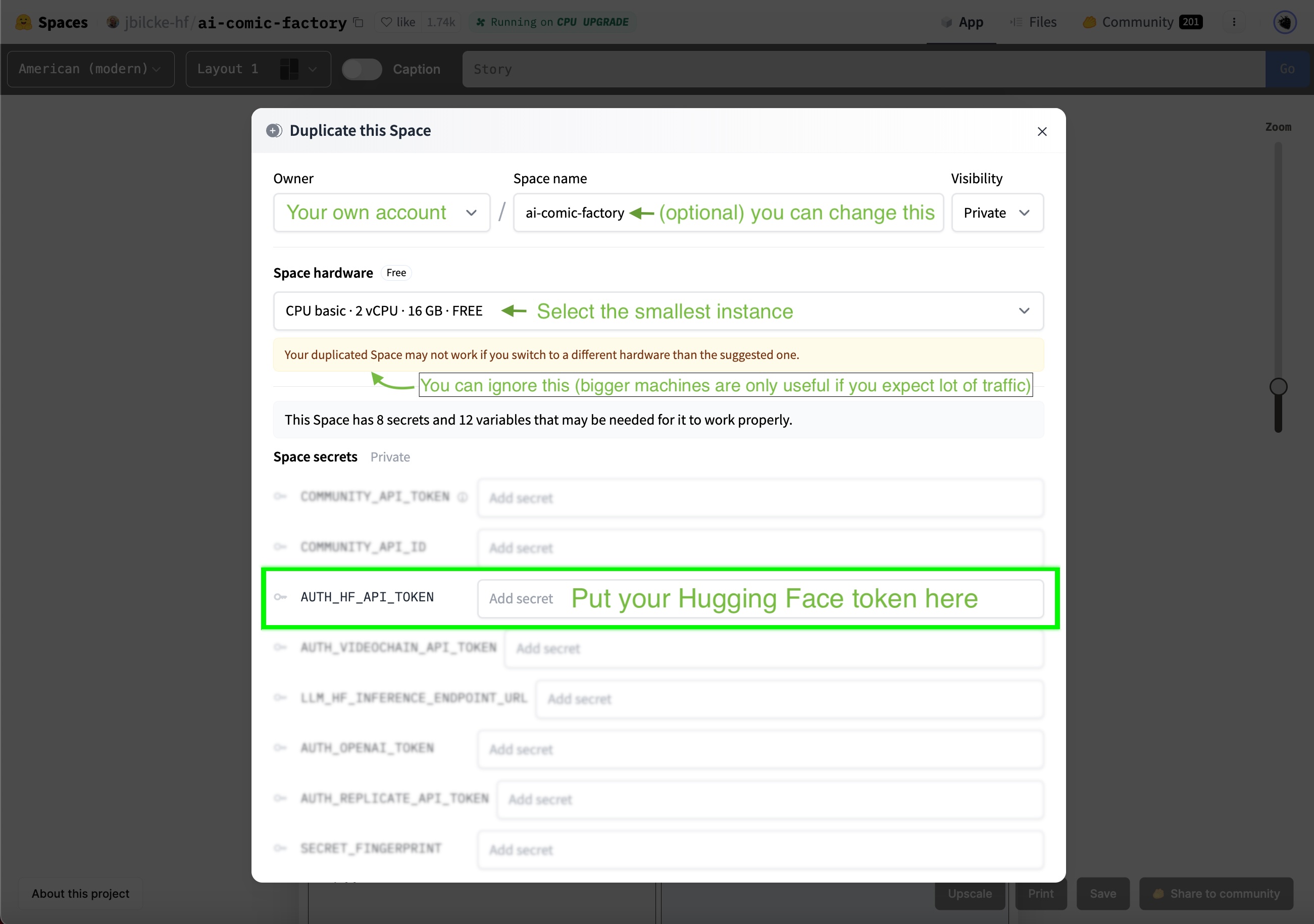
You'll observe that the Space owner, name, and visibility are already filled in for you, so you can leave those values as is.
Your copy of the Space will run inside a Docker container that doesn't require many resources, so you can use the smallest instance. The official AI Comic Factory Space utilizes a bigger CPU instance, as it caters to a large user base.
To operate the AI Comic Factory under your account, you need to configure your Hugging Face token:
The AI Comic Factory supports various backend engines, which can be configured using two environment variables:
LLM_ENGINE to configure the language model (possible values are INFERENCE_API, INFERENCE_ENDPOINT, OPENAI)RENDERING_ENGINE to configure the image generation engine (possible values are INFERENCE_API, INFERENCE_ENDPOINT, REPLICATE, VIDEOCHAIN).We'll focus on making the AI Comic Factory work on the Inference API, so they both need to be set to INFERENCE_API:

You can find more information about alternative engines and vendors in the project's README and the .env config file.
The AI Comic Factory comes with the following models pre-configured:
LLM_HF_INFERENCE_API_MODEL: default value is meta-llama/Llama-2-70b-chat-hfRENDERING_HF_RENDERING_INFERENCE_API_MODEL: default value is stabilityai/stable-diffusion-xl-base-1.0Your PRO Hugging Face account already gives you access to those models, so you don't have anything to do or change.
Support for the Inference API in the AI Comic Factory is in its early stages, and some features, such as using the refiner step for SDXL or implementing upscaling, haven't been ported over yet.
Nonetheless, we hope this information will enable you to start forking and tweaking the AI Comic Factory to suit your requirements.
Feel free to experiment and try other models from the community, and happy hacking!
此内容由惯性聚合(RSS阅读器)自动聚合整理,仅供阅读参考。 原文来自 — 版权归原作者所有。