You’ve optimized your model. Your pipeline is running smoothly. But now, your cloud bill has skyrocketed. Running 1B+ classifications or embeddings per day isn’t just a technical challenge—it’s a financial one. How do you process at this scale without blowing your budget? Whether you're running large-scale document classification or bulk embedding pipelines for Retrieval-Augmented Generation (RAG), you need cost-efficient, high-throughput inference to make it feasible, and you get that from having a well optimized configuration.
These tasks often use encoder models, which are much smaller than modern LLMs, but at the 1B+ inference request scale it's still quite a non-trivial task. Just to be clear, that's English Wikipedia 144x over. I haven’t seen much information on how to approach this with cost in mind and I want to tackle that. This blog breaks down HOW to calculate cost and latency for large scale classification and embedding. We’ll analyze different model architectures, benchmark costs across hardware choices, and give you a clear framework for optimizing your own setup. Additionally we should be able to build some intuition if you don't feel like going through the process yourself.
You might have a couple questions:
Here is the code to make it happen: https://github.com/datavistics/encoder-analysis
tl;I'm not gonna reproduce this, tell me what you found;dr
With this pricing I was able to get this cost:
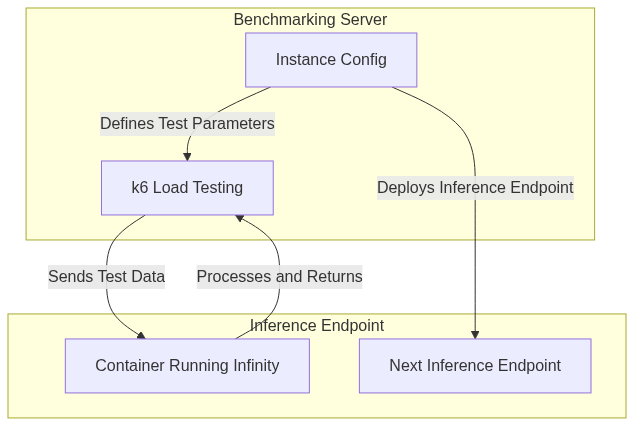
To evaluate cost and latency we need 4 key components:
I’ll be leveraging Inference Endpoints for my Hardware Options, as it allows me to choose from a wide range of hardware choices. Do note you can replace that with your GPUs of choice/consideration. For the Deployment Facilitator I'll be using the ever so useful Hugging Face Hub Library which allows me to programmatically deploy models easily.
For the Inference Server I’ll also be using Infinity which is an amazing library for serving encoder based models (and more now!). I’ve already written about TEI, which is another amazing library. You should definitely consider TEI when approaching your use-case, though this blog focuses on methodology rather than framework comparisons. Infinity has a number of key strengths, like serving multimodal embeddings, targeting different hardware (AMD, Nvidia, CPU and Inferentia) and running any new models that contain remote code that have not been integrated into huggingface’s transformer library. The most important of these to me is that most models are compatible by default.
For Load Testing I'll be using k6 from Grafana which is an open-source load testing tool written in go with a javascript interface. It’s easily configurable, has high performance, and has low overhead. It has a lot of built-in executors that are super useful. It also pre-allocates Virtual Users (VUs), which can be much more realistic than throwing some testing together yourself.
I'll go through 3 use-cases that should cover a variety of interesting points:
Optimization is a tricky issue, as there is a lot to consider. At a high level, I want to sweep across important load testing parameters and find what works best for a single GPU, as most encoder models will fit in a single GPU. Once we have a baseline of cost for a single GPU, the number of GPUs and throughput can be scaled horizontally by increasing the number of replica GPUs.
For each use-case this is the high-level flow I’ll use:
Since you have the code, feel free to adjust any part of this to your:
You won’t hurt my feelings.
VUs and Batch Size are important because these influence how well we take advantage of all the compute available in the GPU. A large enough Batch Size makes sure we are fully utilizing the Streaming Multiprocessors and VRAM. There are scenarios where we have VRAM left over but there is a bandwidth cost that prevents throughput from increasing. So experimentation can help us. VUs allow us to make sure we are fully utilizing the batch size we have available.
These are the main parameters I'll be testing:
INFINITY_BATCH_SIZE VUs Depending on your model you might want to consider:
'michaelf34/infinity:0.0.75-trt-onnx', 'michaelf34/infinity:0.0.75'] INFINITY_COMPILE whether or not you want to use torch.compile() docs INFINITY_BETTERTRANSFORMER whether or not you want torch to use Better TransformerK6 is great because it allows you to pre-allocate VUs and prevent some insidious bugs. It's quite flexible in how you are sending requests. I decided to use it in a specific way.
When I'm calling a k6 experiment, I mainly want to know what the throughput and average latency is for the requests, and have a few sanity checks for the load testing parameters I have chosen. I also want to do a sweep which means many experiments.
I use the shared-iterations executor (docs) which means K6 shares iterations between the number of VUs. The test ends once k6 executes all iterations. This allows me to have a reasonable time-out, but also put through enough requests to have a decent confidence that I can discriminate between load testing parameters choices in my sweep. In contrast to other executors, this allows me to be confident that I'm simulating the client working as hard as possible per VU which should show me what the cheapest option is.
I use 10_000 requests† and have a max experiment time of 1 min. So if 10_000 requests aren’t finished by 1 minute, then that experiment is over.
export const options = {
    scenarios: {
        shared_load_test: {
            executor: 'shared-iterations',
            vus: {{ pre_allocated_vus }},
            iterations: 10000,
            maxDuration: '1m',
        },
    },
};
† I use less max requests for the Vision Embeddings given that the throughput is much lower and images are heavy.
†† P95 means that 95% of requests complete within this time. It represents the worst-case latency for most users.
You can find the 3 notebooks that put the optimization workflow together here:
The main purpose was to get my experiments defined, launch the correct Inference Endpoint with the right parameters, and launch k6 with the right parameters to test the endpoint.
I made a couple design choices which you may want to think through to see if they work for you:
Text Classification can have a variety of use-cases at scale, like Email Filtering, Toxicity Detection in pre-training datasets, etc. The OG classic architecture was BERT, and quickly many other architectures came about. Do note that in contrast to popular decoder models, these need to be fine-tuned on your task before using them. Today I think the following architectures† are the most notable:
† Do note that for these models, you typically need to fine-tune this on your data to perform well
†† I'm using “Engineering performance” to denote anticipated latency/throughput
I chose DistilBERT to focus on as it’s a great lightweight choice for many applications. I compared 2 GPUs, nvidia-t4 and nvidia-l4 as well as 2 Infinity Docker Images.
You can see the results in an interactive format here or in the space embedded below in the Analysis section. This is the cheapest configuration across the experiments I ran:
| Category | Best Value |
|---|---|
| Cost of 1B Inputs | $253.82 |
| Hardware Type | nvidia-L4 ($0.8/hr) |
| Infinity Image | default |
batch_size |
64 |
vus |
448 |
Text Embeddings are a loose way of describing the task of taking a text input and projecting it into a semantic space where close points are similar in meaning and distant ones are dissimilar (example below). This is used heavily in RAG and is an important part of AI search (which some are fans of).
There are a large number of architectures which are compatible, and you can see the most performant ones in the MTEB Leaderboard.
ModernBERT is the most exciting encoder release since DeBERTa back in 2020. It has all the ahem modern tricks built into an old and familiar architecture. It makes for an attractive model to experiment with as it's much less explored than other architectures and has a lot more potential. There are a number of improvements in speed and performance, but the most notable for a user is likely the 8k context window. Do check out this blog for a more thorough understanding.
It's important to note that Flash Attention 2 will only work with more modern GPUs due to the compute capability requirement, so I opted to skip the T4 in favor of the L4. An H100 would also work really well here for the heavy hitters category.
You can see the results in an interactive format here. This is the cheapest configuration across the experiments I ran:
| Category | Best Value |
|---|---|
| Cost of 1B Inputs | $409.44 |
| Hardware Type | nvidia-L4 ($0.8/hr) |
| Infinity Image | default |
batch_size |
32 |
vus |
256 |
ColQwen2 is a Visual Retriever which is based on the Qwen2-VL-2B-Instruct and uses ColBERT style multi-vector representations of both text and images. We can see that it has a complex architecture compared to the encoders we explored above.

There are a number of use-cases which might benefit from this at large scale like, e-commerce search, multi-modal recommendations, enterprise multi-modal RAG, etc
ColBERT style is different than our previous embedding use-case since it breaks the input into multiple tokens and returns a vector for each instead of 1 vector for the input. You can find an excellent tutorial from Jina AI here.This can lead to superior semantic encoding and better retrieval, but is also slower, and more expensive.
I'm excited for this experiment as it explores 2 lesser known concepts, vision embeddings and ColBERT style embeddings†. There are a few things to note about ColQwen2/VLMs:
†Do check out this more detailed blog if this is new and interesting to you.
I wanted to try a small and modern GPU like the nvidia-l4 since it should be able to fit the 2B param model but also scale well since it's cheap. Like the other embedding model, I'm varying batch_size and vus.
You can see the results in an interactive format here. This is the cheapest configuration across the experiments I ran:
| Category | Best Value |
|---|---|
| Cost of 1B Inputs | $44,496.51 |
| Hardware Type | nvidia-l4 |
| Infinity Image | default |
batch_size |
4 |
vus |
4 |
Do check out the detailed analysis in this space (derek-thomas/classification-analysis) for the classification use-case (hide side-bar and scroll down for the charts):
Scaling to 1B+ classifications or embeddings per day is a non-trivial challenge, but with the right optimizations, it can be made cost-effective. From my experiments, a few key patterns emerged:
Your data, hardware, models, etc might differ, but I hope you find some use in the approach and code provided. The best way to get an estimate is to run this on your own task with your own configurations. Let's get exploring!
Special thanks to andrewrreed/auto-bench for some inspiration, Michael Feil for creating Infinity. Also thanks to Pedro Cuenca, Erik Kaunismaki, and Tom Aarsen for helping me review.
It's important to scale sanity checks as your complexity scales. Since we are using subprocess and jinja to then call k6 I felt far from the actual testing so I put a few checks in place.
The goal of task performance is that for a specific configuration we are performing similarly to what we expect. Task Performance will have different meanings across tasks. For classification I chose accuracy, and for embeddings I skipped it. We could look at average similarity and other similar metrics. It gets a bit more complex with ColBERT style since we are getting many vectors per request.
Even though 58% isn't bad for some 3 class classification tasks, it's irrelevant. The goal is to make sure that we are getting the expected task performance. If we see a significant change (increase or decrease) we should be suspicious and try to understand why.
Below is a great example from the classification use-case since we can see an extremely tight distribution and one outlier. Upon further investigation the outlier is due to a low amount of requests sent.

You can see the interactive results visualized by nbviewer here:
We should expect to see no failed requests as Inference Endpoints has a queue to handle extra requests. This is relevant for all 3 use-cases: Classification, Embedding, and Vision Embedding.
sum(df.total_requests - df.successful_requests) allows us to see if we had any failed requests.
As described above we are using a nice strategy of using exponential increases and then a binary search to find the best number of VUs. But how do we know that we tried enough VUs? What if we tried a higher amount of VUs and throughput kept increasing? If that's the case then we would see a monotonically increasing relationship between VUs and Throughput and we would need to run more tests.
You can see the interactive results visualized by nbviewer here:
When we request an embedding it makes sense that we would always get back an embedding of the same size as specified by the model type. You can see the checks here:
ColBERT Embedding Count
We are using a ColBERT style model for Vision Embedding which means we should be getting multiple vectors per image. It's interesting to see the distribution of these as it allows us to check for anything unexpected and to get to know our data. To do so I stored the min_num_vectors, avg_num_vectors, max_num_vectors, in the experiments.
We should expect to see some variance in all 3, but it’s ok that min_num_vectors and max_num_vectors have the same value across experiments.
You can see the check here:
Here is a short description, but you can get a more detailed interactive experience in the space: derek-thomas/classification-analysis
For the classification use-case we looked at 2 different Infinity Images, default and trt-onnx. Which one was better? It's best if we can compare these across the same settings (GPU, batch_size, VUs). We can simply group our results by those settings and then see which one was cheaper.

This is a key chart as for many use-cases there is a maximum latency that a user can experience. Usually if we allow the latency to increase we can increase throughput creating a trade-off scenario. That's true in all the use-cases I've looked at here. Having a pareto curve is great to help visualize where that tradeoff is.
Lastly it's important to build intuition on what is happening when we try these different settings. Do we get beautiful idealized charts? Do we see unexpected gradients? Do we need more exploration in a region? Could we have issues in our setup like not having an isolated environment? All of these are good questions and some can be tricky to answer.
The contour plot is built by interpolating intermediate points in a space defined by the 3 dimensions. There are a couple phenomena that are worth understanding:
We can see a complex contour chart with some interesting results from the classification use-case:

But here is a much cleaner one from the vision-embedding task:

For actual usage, do consider using the infinity client. When we are benchmarking it's good practice to use k6 to know what’s possible. For actual usage, use the official lib, or something close for a few benefits:
You also have OpenAI lib compatibility with the Infinity backend as another option.
As an example vision-embeddings can be accessed like this:
pip install infinity_client && python -c "from infinity_client.vision_client import InfinityVisionAPI"
VUs would save a lot of time 此内容由惯性聚合(RSS阅读器)自动聚合整理,仅供阅读参考。 原文来自 — 版权归原作者所有。